
Visual Studio 2019 Succinctly®

CHAPTER 8
Desktop Development with .NET Core 3.0
With cross-platform development, it is common to think about writing code that runs on different mobile and web systems. However, desktop development still has the same importance, especially for line-of-business and multimedia applications. With the upcoming release of .NET Core 3.0, Microsoft will bring desktop development with .NET to macOS and Linux systems. This chapter provides a quick overview of what you will be able to achieve soon with Visual Studio 2019.
.NET Core 3.0 for desktop development
The .NET Core 3.0 framework, currently available as a preview release, will include support for developing desktop applications with popular frameworks, such as Windows Presentation Foundation (WPF) and Windows Forms. This is a tremendous benefit because these applications will run not only on Windows, but also on macOS and Linux, in the pure spirit of .NET Core.
At this writing, the latest preview version of the .NET Core runtime is called v3.0.0-preview5, and the build number of the SDK is v3.0.100-preview5.011568. Don’t forget to check out the official download page for more recent updates. Support for developing desktop applications is offered through new .NET Core project templates and is based on its project system. I will now guide you through setting up the development environment before discussing how to create applications.
Enabling .NET Core 3.0 previews
The first step is downloading .NET Core 3.0 Preview from the official download page. You will have different options, but make sure you download the most recent installer from the Build apps – SDK column.
Tip: I recommend downloading the Installer file instead of the Binaries package. The Installer will automatically set up and configure .NET Core files properly, simplifying the whole process.
Once .NET Core 3.0 Preview has been installed, the next step is enabling Visual Studio 2019 to use it. This step will not be necessary once .NET Core 3.0 is fully released.
Note: Though you can use the .NET Core 3.0 Preview with the stable release of Visual Studio 2019, this is not recommended. You can instead use Visual Studio 2019 previews to test .NET Core early releases. Early builds of VS 2019 include snapshots of new features that are under development. The Visual Studio 2019 Preview has a dedicated download page, and can be installed side by side with the main release.
To accomplish this, select Tools > Options > Environment > Preview Features and select the Use previews of the .NET Core SDK check box, as shown in Figure 80.
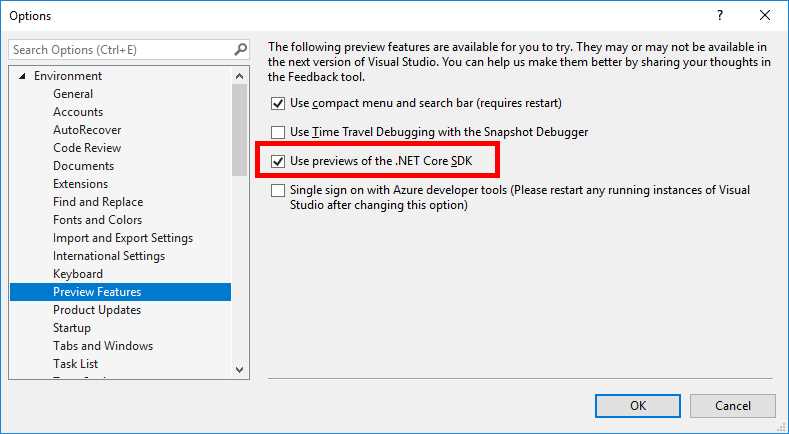
Figure 80: Enabling .NET Core SDK previews
Click OK. Now everything is set up, and you can start creating cross-platform desktop apps.
Creating WPF applications
Windows Presentation Foundation (WPF) has been Microsoft’s premiere technology for building Windows desktop applications for many years. Based on XAML for the user interface definition, and on C#/Visual Basic for the imperative code, WPF provides a robust and powerful infrastructure that covers all desktop development needs, from business applications to multimedia to document management.
The good news is that now (most of) WPF is open source and part of the .NET Core code base. With the upcoming .NET Core 3.0 and Visual Studio 2019, you will be able to build WPF applications that run on other desktop systems, such as macOS and Linux. To accomplish this, you simply create a new WPF App (.NET Core) project, as shown in Figure 81.
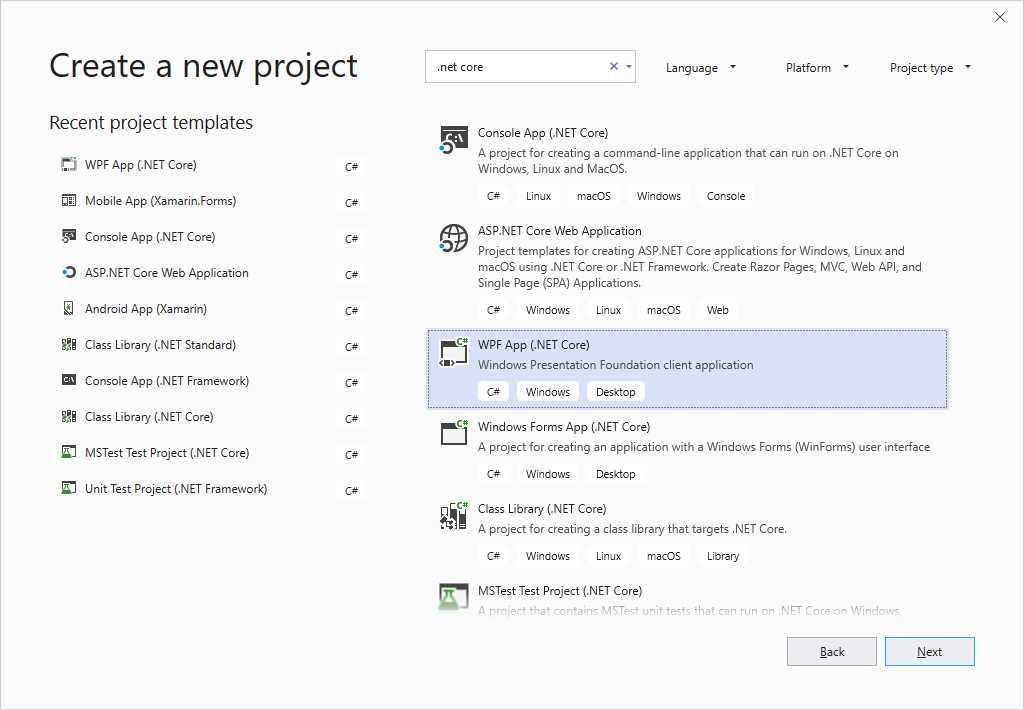
Figure 81: Creating a new WPF app on top of .NET Core
Click Next and provide a project name. When the project is created, you will see the usual WPF development environment that you would expect. This includes a fully working designer and the XAML code editor that already has the same functionalities as the classic WPF editor. Figure 82 shows an example with a few lines of code, where you can also see how IntelliSense is displaying IntelliCode suggestions.
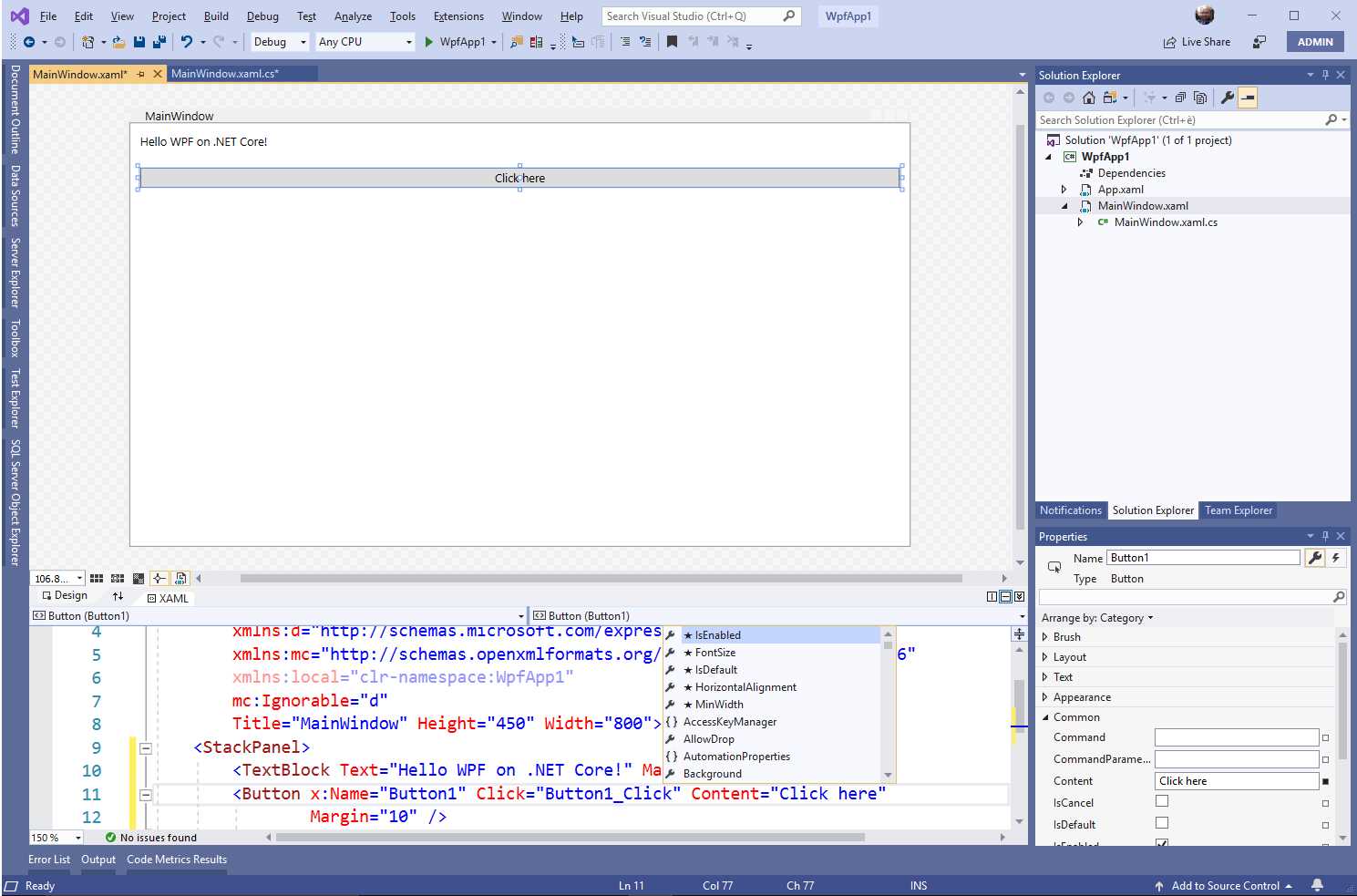
Figure 82: The WPF development environment with .NET Core
As you can see, the whole development experience is the same as for the classic WPF environment. You will get the same tools, and you will be able to write the same code in a cross-platform way. Keep in mind that, at this stage, WPF on .NET Core 3.0 is also in a preview state. This means that it can be subject to changes, improvements, and updates until it reaches the RTM milestone.
Hints about publishing .NET Core desktop apps
Unlike Windows applications built on top of the .NET Framework, desktop apps built with .NET Core need a new way to be packaged and deployed. This is mainly for two reasons:
- Classic desktop apps expect to find the .NET Framework on the target machine as a system component and will install the full .NET if it’s not found. Instead, .NET Core apps need to include libraries and runtime components in the deployment package.
- .NET Core apps will work across operating systems, so a unified installation process cannot be implemented.
To solve this problem, you can prepare a .NET Core desktop app for deployment using the dotnet publish command, which works cross-platform. Additionally, for apps targeting Windows 10, Microsoft has also created a new packaging format called MSIX, which is designed specifically for Win32, WPF, and Windows Forms apps. The official documentation includes a page about MSIX, which I recommend you read.
Note: The concepts described in the previous paragraph apply to both WPF and Windows Forms in .NET Core 3.0. Windows Forms is discussed in the next section.
Creating Windows Forms applications
Windows Forms was the very first .NET technology that developers could use to build desktop applications. Not only has it always been very popular over time, despite the power and flexibility of WPF, but there are still likely many hundreds of thousands, or possibly even millions, of Windows Forms applications in the world that need to be maintained and updated.
If you are interested in both Windows Forms and cross-platform development, there is good news: Windows Forms is now open source and runs on top of .NET Core 3.0. The project template you will use is called Windows Forms (.NET Core App), which you can see in Figure 81. At this writing, the development experience for Windows Forms in Visual Studio 2019 still has limited support. You can create a solution, but the designer is not ready, and there are other IDE limitations.
If you want to try Windows Forms and you can’t wait for the final release, my suggestion is to use Visual Studio 2019 Preview, which includes more updates, even if it cannot be used for production. Apart from this, having all the most popular desktop development frameworks running on a cross-platform technology will help you bring your software to macOS and Linux markets very much faster and more efficiently.
Chapter summary
Microsoft is working hard on the next major release of .NET Core, version 3.0. This release, which you can currently test in a preview stage, will include support for developing WPF and Windows Forms desktop applications on a cross-platform technology. At the moment, these can be used by enabling Visual Studio 2019 to use .NET Core previews.
Remember that preview releases cannot be used for production, and that they are subject to change. However, you can get an idea of how beautiful the future is going to be for you as a developer, especially if you have existing Windows desktop apps that you would like to quickly bring to other markets.


- 80+ high-performance ASP.NET Core controls, including DataGrid, Charts, and Scheduler.
- Lightweight and responsive.
- Modular and touch-friendly.
- Built-in themes.