
Uno Platform Succinctly®

CHAPTER 2
Solution Structure
Overview
Now that we have our Uno environment ready, let's focus on how the solution is structured, which this chapter is all about. Let's dive right in.
Solution structure
The Uno solution we created in the previous chapter consists of various projects targeting a different platform, except for the AppUno.Shared project, which is where most of the code resides.
The projects (besides the AppUno.Shared project) that are part of the solution are:
- AppUno.Droid: This project targets Android.
- AppUno.iOS: This project targets iOS.
- AppUno.macOS: This project targets macOS.
- AppUno.Skia.Gtk: This project targets the GTK widget toolkit for Linux using the Skia graphics engine.
- AppUno.Skia.Tizen: This project targets the Tizen mobile-based Linux operating system using the Skia graphics engine.
- AppUno.Skia.Wpf and AppUno.Skia.Wpf.Host: These projects target the Windows Presentation Foundation graphical subsystem using the Skia graphics engine.
- AppUno.UWP (Universal Windows): This project targets the Universal Windows Platform on Windows 10.
- AppUno.Wasm: This project targets the WebAssembly runtime using a browser.
Let's explore each of these projects individually.
AppUno.Droid
The AppUno.Droid project is the boilerplate that Uno uses for building the Android application. It has the following structure.
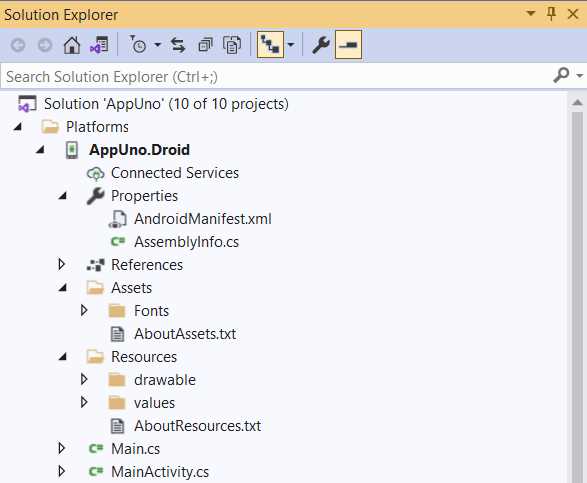
Figure 2-a: The AppUno.Droid Project Structure
First, we find the project's Properties folder containing the Android application manifest (AndroidManifest.xml) file that includes information of the package, including application components such as activities, services, receivers, and content providers.
The AssemblyInfo.cs file has information about the assembly, such as the name of the file, description, and version. If the AssemblyInfo.cs file gets removed after compilation, it will contain no information. This means that if you inspect the Details tab of the file properties, you will see no name, no description, and no version.
Then we find the project References, the libraries, and the NuGet packages that the project relies on, which are shown in the following figure. AppUno.Shared is the project's first reference.
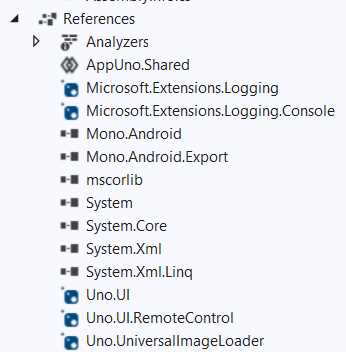
Figure 2-b: The AppUno.Droid Project References
Notice the Mono.Android and Mono.Android.Export libraries (part of the Mono framework). These are required to run .NET code on Android.
Beyond that, notice the references to the standard .NET libraries such as mscorlib, System, System.Core, System.Xml, and System.Xml.Linq.
We can see the references to the Uno.UI library—which is the core Uno module, Uno.UI.RemoteControl—used for XAML hot reload and Uno.UniversalImageLoader, which is a Xamarin.Android binding library for UniversalImageLoader.
Then we find the Assets and Resources folders. The Assets folder is used for any raw assets you want to deploy with your application.
On the other hand, the Resources folder includes images, layout descriptions, binary blobs, and string dictionaries that your application will use.
Next, we find the Main.cs and MainActivity.cs files. The Main.cs file is the AppUno.Droid main file, which is the entry point for executing the Android application, and MainActivity.cs corresponds to the Android App's main activity.
AppUno.iOS
The AppUno.iOS project is the boilerplate that Uno uses for building the iOS application. The files contained within this project are specific to creating an iOS runtime. Let's explore these files.
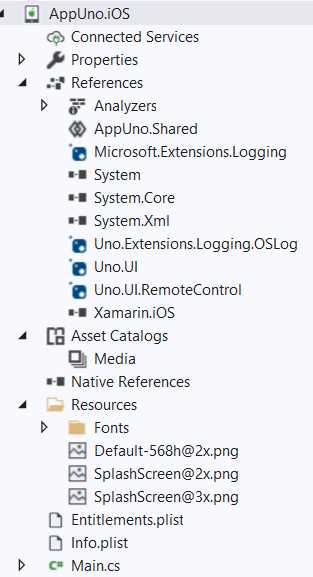
Figure 2-c: The AppUno.iOS Project Structure
As we can see, the project References are similar to those used by the AppUno.Droid project, and AppUno.Shared is also the first reference of the project.
There are also references to the Uno.UI and Uno.UI.RemoteControl libraries, as well as .NET libraries like System and System.Core. There’s nothing odd about that. However, the difference is that this project uses the Xamarin.iOS library, which is Xamarin framework implementation for iOS.
Within the project structure, we find the Asset Catalogs, including any iOS application assets.
The Resources folder includes the Fonts folder that contains the fonts and splash screens used by the application.
The Entitlements.plist ("properties list") file defines the capabilities of the iOS application, and the Info.plist file is for storing configuration data in a place where the system can easily access it.
Finally, we have the Main.cs file that is the application's main entry point.
AppUno.macOS
The AppUno.macOS project is the boilerplate that Uno uses for building the macOS application.
The files contained within this project are specific to creating a macOS runtime. Let's explore the file structure of this project.
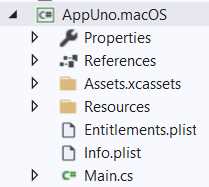
Figure 2-d: The AppUno.macOS Project Structure
Like with the AppUno.iOS project, we have a folder dedicated to application assets called Assets.xcassets.
There's also a Resource folder, which contains a Fonts folder that includes the fonts that the application will use.
Like with the AppUno.iOS project, we can find the Entitlements.plist, Info.plist, and Main.cs files—these have the same functionalities.
The libraries included in the References, though, are slightly different. Let's have a look at them.
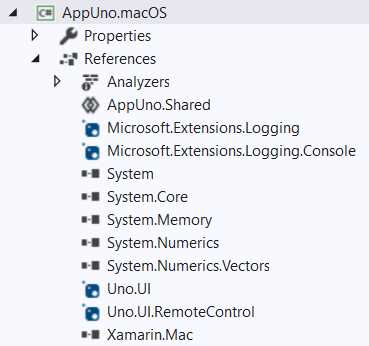
Figure 2-e: The AppUno.macOS Project References
There are references to the AppUno.Shared project and Uno.UI, Uno.UI.RemoteControl, and .NET libraries, such as System and System.Core.
The difference is that the Xamarin.Mac library is used. This is the Xamarin framework implementation for targeting macOS.
AppUno.Skia.Gtk
The AppUno.Skia.Gtk project is the boilerplate that Uno uses for building the application that targets GTK using the Skia graphics engine. The structure of this project is as follows.
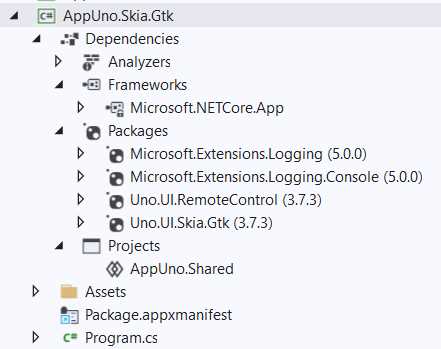
Figure 2-f: The AppUno.Skia.Gtk Project Structure
As for the Uno dependencies, we have only the Uno.UI.Skia.Gtk and Uno.UI.RemoteControl libraries.
The AppUno.Skia.Gtk project also references the AppUno.Shared project, and there is also an Assets folder.
The Package.appxmanifest file is nothing more than a glorified XML settings file containing information about the application, such as the Name, Publisher, Version, and other details.

Figure 2-g: The Package.appxmanifest File
For the AppUno.Skia.Gtk project, the application's main entry point is the Program.cs file instead of Main.cs.
AppUno.Skia.Tizen
The AppUno.Skia.Tizen project is the boilerplate Uno uses for building the application that targets Tizen using the Skia graphics engine. The structure of this project is as follows.

Figure 2-h: The AppUno.Skia.Tizen Project Structure
We can see that we have the project Dependencies, which we will look at shortly, an Assets folder, and the Package.appxmanifest and Program.cs files.
A noticeable difference is a tizen-manifest.xml file. This file contains the manifest details that Tizen will use to identify the application. The file contains the following information.

Figure 2-i: The tizen-manifest.xml File
As for the project Dependencies, we can see the SkiaSharp.Views library, which includes platform-specific views and controls for drawing on the screen.
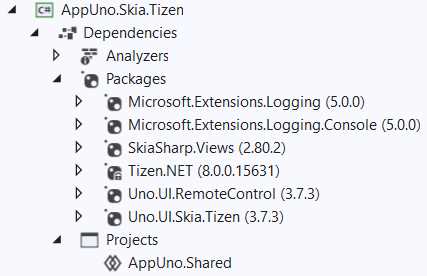
Figure 2-j: The AppUno.Skia.Tizen Project Dependencies
There is also a reference to the Tizen.NET library within the Dependencies, which allows .NET code to run on Tizen.
There are also references to the Uno.UI.Skia.Tizen and Uno.UI.RemoteControl libraries, and finally, to the AppUno.Shared project.
AppUno.Skia.Wpf and AppUno.Skia.Wpf.Host
The AppUno.Skia.Wpf and AppUno.Skia.Wpf.Host projects are related to each other, and these execute a Windows Presentation Foundation (WPF) application using Uno. We can see their structure in the following figure.
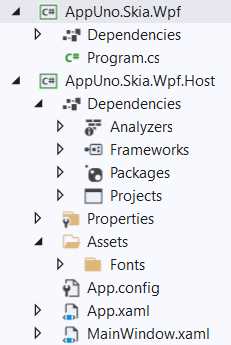
Figure 2-k: The AppUno.Skia.Wpf and AppUno.Skia.Wpf.Host Projects
The AppUno.Skia.Wpf project has a straightforward structure. As you can see, it only contains Dependencies and the Program.cs file, which is the main entry point of the WPF application.
As for the Dependencies of the project, we find the following.
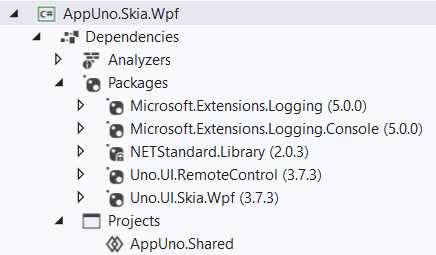
Figure 2-l: The AppUno.Skia.Wpf Project Dependencies
We can see that the AppUno.Skia.Wpf project contains references to the Uno.UI.Skia.Wpf and Uno.UI.RemoteControl libraries. Uno uses the Uno.UI.Skia.Wpf library to execute the WPF application and render it using the Skia graphics engine.
Besides that, the .NET Standard library (NETStandard.Library) is referenced, and so are the Microsoft logging extension libraries. As with the rest of the projects of the solution, the shared project—AppUno.Shared—is referenced as well.
Now, let's inspect the structure of the AppUno.Skia.Wpf.Host project.

Figure 2-m: The AppUno.Skia.Wpf.Host Project Structure
As for the project Dependencies, we find the Uno.UI.Skia.Wpf and Uno.UI.RemoteControl libraries.
The other references are not needed, given that they are part of the AppUno.Skia.Wpf project; this is because the AppUno.Skia.Wpf project is included as a reference of AppUno.Skia.Wpf.Host.
The references to the Uno.UI.Skia.Wpf and Uno.UI.RemoteControl libraries are required because the App.xaml and MainWindow.xaml files are part of the AppUno.Skia.Wpf.Host project.
The Properties and Assets folders contain resources and fonts, respectively, used by the project.
AppUno.UWP (Universal Windows Platform)
Uno uses the AppUno.UWP project to create a Universal Windows Platform application. Let's explore its structure.
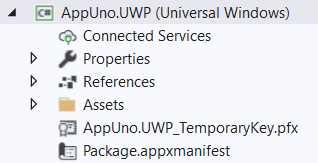
Figure 2-n: The AppUno.UWP Project
We can see that this project has Properties, References, and Assets folders, a certificate file called AppUno.UWP_TemporaryKey.pfx, and a Package.appxmanifest file. The certificate is for digitally signing the application.
Let's have a look at the AppUno.UWP project References.
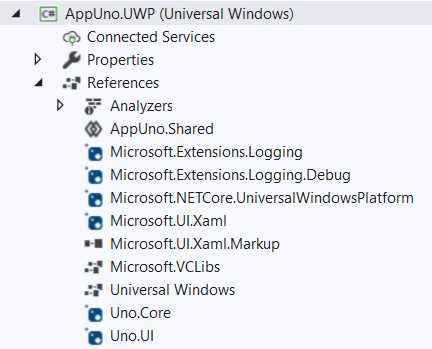
Figure 2-o: The AppUno.UWP Project References
We can see that as part of the References, the AppUno.UWP project includes some libraries that we have already seen, such as Microsoft.Extensions.Logging.
Besides those libraries, the Microsoft.UI.Xaml and Microsoft.UI.Xaml.Markup libraries are used for rendering the UI using XAML.
It is interesting to notice that this project contains a reference to the Microsoft.VCLibs library, which is the C++ Runtime packages for Desktop Bridge. An application running in a Desktop Bridge that uses an incorrect version of the C++ Runtime libraries could fail to access resources.
Besides that, this project includes the Universal Windows runtime, and the Uno.Core and Uno.UI libraries.
Just like all the other projects, this one includes a reference to the AppUno.Shared project, which is intended to include the business logic.
AppUno.Wasm
The AppUno.Wasm project is intended for Uno to execute the application on web browsers using WebAssembly. Let's look at the project structure.
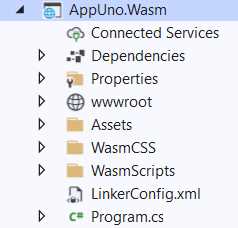
Figure 2-p: The AppUno.Wasm Project Structure
The structure of this project is similar to the organization of web projects. I say this because there is a wwwroot folder included as part of the project, and specifically for WebAssembly, we have the WasmCSS and WasmScripts folders.
The WasmCSS folder, as its name implies, is used for keeping the fonts the application will use, as well as CSS files.
The WasmScripts folder, as its name implies, is used for storing JavaScript files that the application can use.
The Assets folder is primarily used for storing images and fonts, and the wwwroot folder contains the web.config file.
Regarding the project Dependencies, we can find the following.
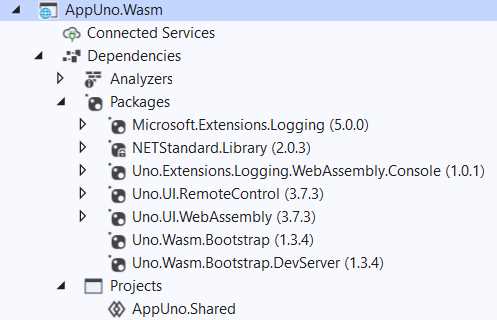
Figure 2-q: The AppUno.Wasm Project Dependencies
This project includes the Uno.Wasm.Bootstrap and Uno.Wasm.Bootstrap.DevServer libraries, which are the Uno WebAssembly runtimes to execute the application.
On the other hand, the Uno.UI.WebAssembly library contains the Uno UI implementation for WebAssembly.
Besides that, the .NET Standard library (NETStandard.Library) is referenced, and so is the Microsoft logging extension library.
Like with the rest of the projects, the AppUno.Shared project is referenced as well.
AppUno.Shared
The final project of the Uno solution is the AppUno.Shared project. Let's explore its structure.
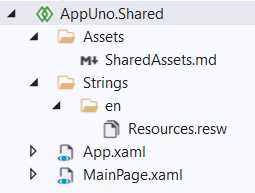
Figure 2-r: The AppUno.Shared Project Structure
The project contains an Assets and a Strings folder. The former is for storing assets shared among and used across all the other projects, as its name implies.
The latter is used for storing string translations, which can also be shared across the rest of the projects. Then we can see the App.xaml and MainPage.xaml files we explored in the previous chapter.
Something significant to mention is that we are free to add to the AppUno.Shared project as many folders, subfolders, and files as our application needs.
The AppUno.Shared project is where we as developers have the freedom to be as creative as we can be.
My recommendation would be to keep the default structure for each solution's projects, except for the AppUno.Shared project.
Summary
We've reached the end of this chapter—and covered quite a bit of ground. Although going through the structure of each of the solution's projects is not super exciting, in my opinion, this is a fundamental topic to cover, providing context on what type of applications can be built with the same solution.
The next chapter will explore some XAML fundamentals necessary to build any Uno app user interface.


- 1800+ high-performance UI components.
- Includes popular controls such as Grid, Chart, Scheduler, and more.
- 24x5 unlimited support by developers.