
Twilio with C# Succinctly®

CHAPTER 5
Code Contracts Editor Extensions
Making Code Contracts more useful
So far we have seen a lot of what Code Contracts can do. Here’s a tip on how to make the contracts you create more useful to developers using your classes and methods. Using Code Contracts Editor Extensions will allow you to see what the method you’re calling into requires with regard to the contracts defined in that method. It will do this without requiring you to drill down into the method and see what Code Contracts it implements.

Figure 57: ProductionVolumePerBin Quick Info
The method we used in Chapter 4 displays the comments you provided in the XML comments for that method in the Quick Info window when the pointer hovers over the method. This is expected behavior, but I have no idea from that Quick Info window what contracts the method implements. Code Contracts Editor Extensions changes this. To install it, go to the Tools menu in Visual Studio and click Extensions and Updates.

Figure 58: Extensions and Updates
From the Extensions and Updates window, select the Online tab and search for Code Contracts Editor Extensions. The results returned should be fairly limited. From here, click Download to download and install the extension.
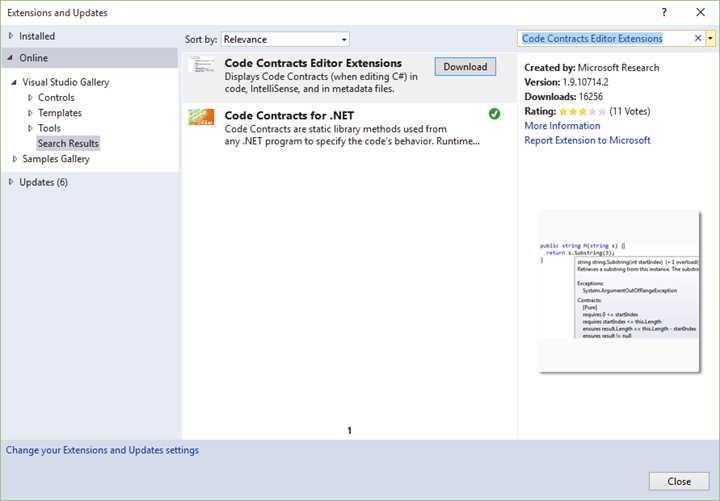
Figure 59: Install Code Contracts Editor Extensions
Once Code Contracts Editor Extensions have been installed, you will need to restart Visual Studio. The beauty of this extension is that you now get a peek inside the methods you create, which will display the contracts for that method.
Before this will work though, you need to ensure that the Contract Reference Assembly is set to Build in the Code Contracts settings.
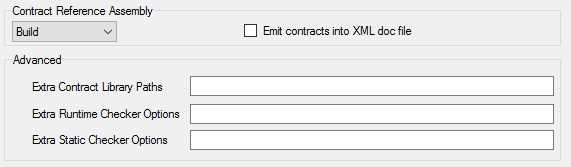
Figure 60: Contract Reference Assembly
Now if you hover over the ProductionVolumePerBin() method, you will see that the Quick Info window is rich with information regarding the contracts it implements.
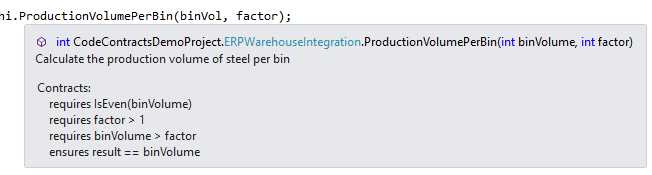
Figure 61: Method Tooltip Enhanced with Contracts
This allows me to be able to use the method without having to see inside the method, and pass it valid parameters that will validate successfully. I now have much more information regarding the method I’m calling.
Another gem when using Code Contracts Editor Extensions is the ability to see which Code Contracts a base class implements. Have another look at our CalculateNewCutFactor() method.
/// <summary> /// Calculate a new cutting factor /// r.Next(1, 7); returns a random number between 1 and 6 /// </summary> /// <param name="binVol">Upper range value of random (bin volume + 1)</param> /// <returns> /// A new cutting factor greater than 1 and equal to the bin volume /// </returns> private int CalculateNewCutFactor(int binVol) { Random r = new Random(); return r.Next(2, binVol + 1); } |
Code Listing 68: Random() Method
Hovering over the Next() method, we can peer into the contracts it requires. The Code Contracts Editor Extensions do this by mining the base classes and displaying the contracts implemented.
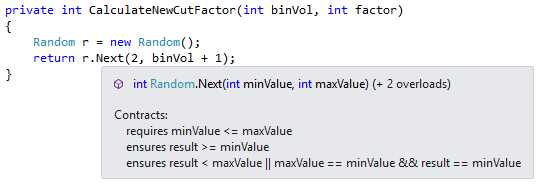
Figure 62: Random Next Method Contracts
We can see that one of the Code Contracts implemented by the Next() method is that the minValue must be less than or equal to the maxValue. For our requirements, I want to ensure that the minValue is always greater than or equal to 2. Using the information we were able to glean regarding the Code Contracts implemented by the Next() method, we can now go ahead and create our own GetRandom() method that will conform to our Code Contract requirements.
/// <summary> /// Calculate a new cutting factor /// r.Next(1, 7); returns a random number between 1 and 6 /// </summary> /// <param name="binVol">Upper range value of random (bin volume + 1)</param> /// <returns> /// A new cutting factor greater than 1 and equal to the bin volume /// </returns> private int CalculateNewCutFactor(int binVol) { return GetRandom(2, binVol + 1); } /// <summary> /// Get a random number /// </summary> /// <param name="minValue">Value not less than 2</param> /// <param name="maxValue">Upper range value of the random number to generate</param> /// <returns>A random integer</returns> static int GetRandom(int minValue, int maxValue) { Contract.Requires(minValue >= 2, "minValue cannot be less than 2"); Random r = new Random(); return r.Next(minValue, maxValue); } |
Code Listing 69: Custom GetRandom() Method
Using Code Contracts and Code Contracts Editor Extensions allows us to write more robust code and fine-tune our code to easily conform to the required business rules.
Tip: You need to keep in mind that the Random class isn’t a true random number generator. When you call Next(), for example, the Random class uses some internal state to return a number that appears to be random. It then changes its internal state so that the next time you call Next(), it returns another apparently random number. Generating true random numbers is beyond the scope of this book; if you require true randomness, you will need to do a bit more research


- 1800+ high-performance UI components.
- Includes popular controls such as Grid, Chart, Scheduler, and more.
- 24x5 unlimited support by developers.