
SQL on Azure Succinctly®

CHAPTER 1
Introduction to SQL on Azure
Over the recent years we all have witnessed how Information Technology has contributed to the growth and reach of the businesses around the globe. Companies like Amazon, Facebook, and Uber which are primarily technology companies have built their businesses solely on the basis of Information Technology and have grown unimaginably. In today’s world we cannot imagine a business without a website, app or web presence, but ironically does having a website, app or web presence guarantee a business will be successful?. So until a business is successful, companies aren’t sure whether their investment in Information Technology and IT infrastructure would be fruitful or not.
Setting up and maintaining a website, app in mobile store, databases, data warehouses incurs a lot of capital and operational expenses (CAPEX and OPEX) to the companies whose core business may not be IT. As a result, small and medium business around the world are looking towards cloud solution providers to offer IT as a Service and pay only as they use with elastic scale up-down flexibility. Even large enterprises who can afford their own datacenters and infrastructure are looking towards cloud providers since data is growing at a rapid pace and investing in new hardware and infrastructure for new projects, development, testing may not make sense until the project becomes critical and revenue generating.
Cloud Services allows big enterprises to innovate and research at an optimized cost without investing upfront on the infrastructure in their datacenters. Further, when products are designed to run as a service, the product release cycle can be agile and fast. All of these make cloud services an attractive offering and optimal alternatives for businesses today.
In this book, I will introduce you to Microsoft SQL Server (RDBMS) Offerings on Azure and talk about the use-cases, considerations, configurations and design optimizations for running SQL Server on Azure to give you a predictable performance at optimized cost. To better understand and follow along with the book you must obtain an Azure Platform subscription. You can purchase an Azure subscription or sign up for Azure free trial subscription. A prior knowledge of Powershell will make it easier to understand the scripts used in the book. You can use Windows PowerShell to perform a variety of tasks in Azure, either interactively at a command prompt or automatically through scripts. Azure PowerShell is a module that provides cmdlets to manage Azure through Windows PowerShell. You can download and install the Azure PowerShell modules by running the Microsoft Web Platform Installer. The scripts used in the book can be downloaded from the following location.
This book is primarily focused on ramping up individuals with prior knowledge of SQL Server on how to manage, optimize and design applications running SQL Server on Azure. Covering the basics of SQL Server Management and Administration is outside the scope of this book.
Microsoft Azure Offerings
Azure is Microsoft’s cloud computing platform which provides a collection of integrated services offerings, namely analytics, computing, database, mobile, networking, storage and web. Microsoft is making huge investments in Azure to ensure its cloud offerings provide a similar set of functionality or even better compared to its on premise or box product offerings. Microsoft’s Azure Offerings are primarily categorized into three categories namely Infrastructure as a Service (IaaS), Platform as a Service (PaaS) and Software as a Service (SaaS). The following figure best describes the difference between IaaS, PaaS & SaaS
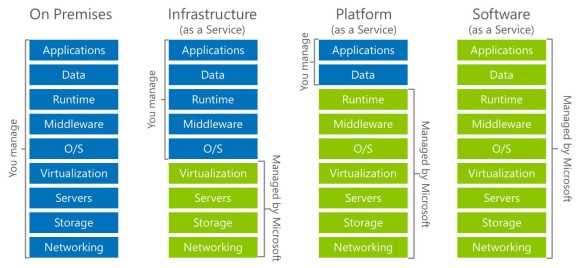
Figure 1: Microsoft’s Azure Offerings
SQL Server on Azure is available in two offerings namely SQL on Azure VMs (IaaS) and Azure SQL Database (PaaS). Let us understand each of them & how it is ifferent from its on-premise counterpart.
SQL Server on Azure VMs (IaaS)
SQL Server on Azure Virtual Machine (VMs) is no different from SQL Server running on box except for the fact that SQL Server will be running in a VM in a Microsoft Datacenter. Azure VMs support running all supported on-premise versions of SQL Server. This also means the application code, scripts, monitoring running on on-premise version of SQL Server is also compatible with and can be easily migrated to Azure VM and vice-versa with minimal hassles and modifications. We will discuss more on considerations for running SQL Server in Azure VM and contrast it with its on-premise counterpart in following sections and in more detail infollowing chapters.
Azure SQL Database (PaaS)
Azure SQL Database, which is Database-as-a-Service offering of SQL Server, is a newly designed cloud service in Azure suitable for new cloud designed applications. In this offering, the database is provisioned and hosted on Microsoft Datacenters, and you do not need to worry about setup, configuration, resource tuning, high availability, backups, etc. for SQL Server. The Azure portal provides the connection string to connect to the SQL Database which is used by the application/DBAs to create the schema, insert/manipulate/query/administer the data. When this service was first introduced, it was still catching up with its on-premise counterpart in terms of functionality and features, but the latest version v12 release of the service exceeds SQL 2014 features with support for columnstore indexes, row security and query store, etc. Azure SQL Database is more suited for Software as a service kind off application using scale-out patterns. We will discuss more on use-case scenarios for Azure SQL Database and its design consideration in more detail in following chapters.
The following table compares the SQL Server on Azure VMs (IaaS) versus Azure SQL Database(PaaS) in terms of use-case scenarios, features and cost.
Table 1: Comparing Azure SQL Database (PaaS) versus SQL Server in Azure VM (IaaS)
Azure SQL Database (PaaS) | SQL Server in Azure VM (IaaS) | |
Best for | New cloud-designed applications that have time constraints in development and marketing. Suited for Software-as-a-Service applications. | Existing Dev Cert & test environments applications that require fast migration to the cloud with minimal changes & you do not want to buy on-premises nonproduction SQL Server hardware. SQL Server applications that require accessing on-premises resources (such as, Active Directory) from Azure via a secure tunnel. Rapid development and test scenarios when Disaster recovery for on-premises SQL Server applications using backup on Azure Storage or AlwaysOn replicas in Azure VMs. |
SQL Support | Near SQL Like Functionality in preview. Application should be supported on Azure SQL Database. Existing environments cannot be migrated to Azure Database unless application is rewritten. | All SQL versions (SQL 2005 – SQL 2014) are supported similar to on-premise functionality. Existing applications can be migrated with minimal coding effort |
Size Constraints | Databases of up to 500 GB in size. | Database Any Size |
Total cost of ownership | Eliminates hardware costs. Reduces administrative costs. | Eliminates hardware costs. |
Business continuity | In addition to built-in fault tolerance infrastructure capabilities, Azure SQL Database provides features, such as Point in Time Restore, Geo-Restore, and Geo-Replication to increase business continuity. For more information, see Azure SQL Database Business Continuity. | SQL Server in Azure VM lets you to set up a high availability and disaster recovery solution for your database’s specific needs. Therefore, you can have a system that is highly optimized for your application. You can test and run failovers by yourself when needed. For more information, see High Availability and Disaster Recovery for SQL Server in Azure Virtual Machines. |
Hybrid cloud | Your on-premises application can access data in Azure SQL Database. But from SQL Database we can’t access resources on-premise | With SQL Server in Azure VMs, you can have applications that run partly in the cloud and partly on-premises. For example, you can extend the on-premises network and Active Domain Directory to the cloud via Azure Network Services. In addition, you can store on-premises data files in Azure Storage using the SQL Server Data Files in Azure feature. For more information, see Introduction to SQL Server 2016 Hybrid Cloud. |
Motivation for Running SQL Server on Azure
With the addition of SQL on Azure Offerings, Enterprises today have four options for running SQL Server in their hybrid cloud environments.
- SQL Server on physical machines
- SQL Server on VMWare or Hyper-V VMs
- SQL Server on Azure (IaaS)
- Azure SQL Database (PaaS)
Hence it is important to understand what the merits and demerits are for running SQL Server on Azure for organizations to be able to decide which scenarios are suitable for running SQL Server on Azure versus SQL on-prem.
The following figure compares the above options for running SQL Server in an environment in terms of infrastructure and administration cost.
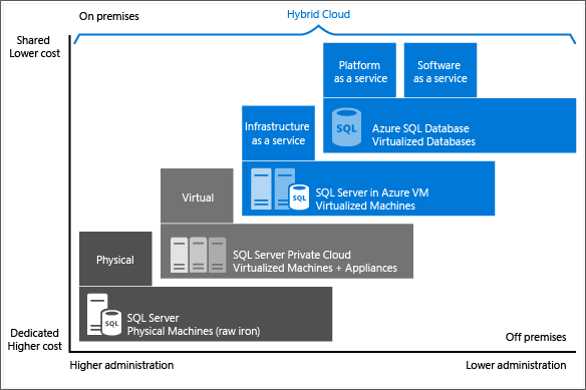
Figure 2: Motivation for running SQL Server on Azure
As we move from physical to virtual to azure the infrastructure and administration cost of SQL Server reduces. Further running in VMs also gives us a flexibility for elastic scale up/down depending on the user workload, which gives us additional benefit in terms of cost since you pay only for the resources which you consume and can scale down or shut down when not in use.
Elastic Scale up/down can be particularly useful in applications which have skewed workloads, for instance, retail stores which see higher sales during Thanksgiving or holiday seasons have higher demand for computing power and hence servers need to be scaled up during that time period as opposed to rest of time in a year. Another good example would be test or cert servers which need to be of equivalent capacity of production servers to give you accurate behavior of applications in production but only needs to be active during the testing phase of the application and needs to be scaled down or turned OFF when not in use.
Another benefit for running SQL Server on Azure is lower turnaround time for setting up and configuring SQL Server or databases. The turnaround time is quickest for Azure SQL Database where you do not need to worry about the Server, OS, Setup or Configuration, and within a few minutes a database is provisioned and available to accept new connections. For SQL Server on Azure VMs there are images available in Azure gallery which automates the entire installation and configuration of SQL Server; hence, it involves minimal steps and reduces time for spinning a SQL Server instance.
Overall the biggest motivation for moving SQL Server workloads to Azure are:
- Low hardware and data center costs
- Low administration costs
- Elastic scale
- Low turnaround time for setup &and configuration
Consideration for Running SQL Server on Azure
In spite of the cost savings and efficiency of running SQL Server on Azure, there are scenarios where it might not be appropriate to run SQL Server on Azure, which we will discuss in this section.
Data Security
In an organization, some of the databases are used for storing highly confidential data or customer PII which the organization may not be comfortable to store in Azure in Microsoft Datacenters; those companies might prefer the data to reside in on-premise servers.
Application Affinity
For most applications, you prefer the database to reside in the same LAN or network vicinity as the application to avoid any network latency-related performance problems. So if the application is designed to run on-premise, you might prefer to run SQL Server on-premise to avoid network delays. Large enterprises can set up ExpressRoute connections to Microsoft Azure Datacenters, but it still incurs some network latency which might be significant enough for applications where response time is critical.
Critical Production Workloads
Microsoft Azure is a shared multi-tenant environment where the cost benefit is achieved by sharing and reusing the resources. Since it is a shared environment, there are times where you may not see predictable performance if the host servers are over-subscribed or if the storage channels are saturated. Hence if you are critical about the performance of the SQL Server and looking for predictable performance, it would be ideal to run the SQL Server on-premise on a dedicated environment which might involve higher cost but ensures predictable performance.
Where to host my SQL Database? (Decision Matrix)
After understanding the motivation and considerations for running SQL Server on Azure, the following decision matrix should help individuals and organizations to decide where to host their SQL Server environment.
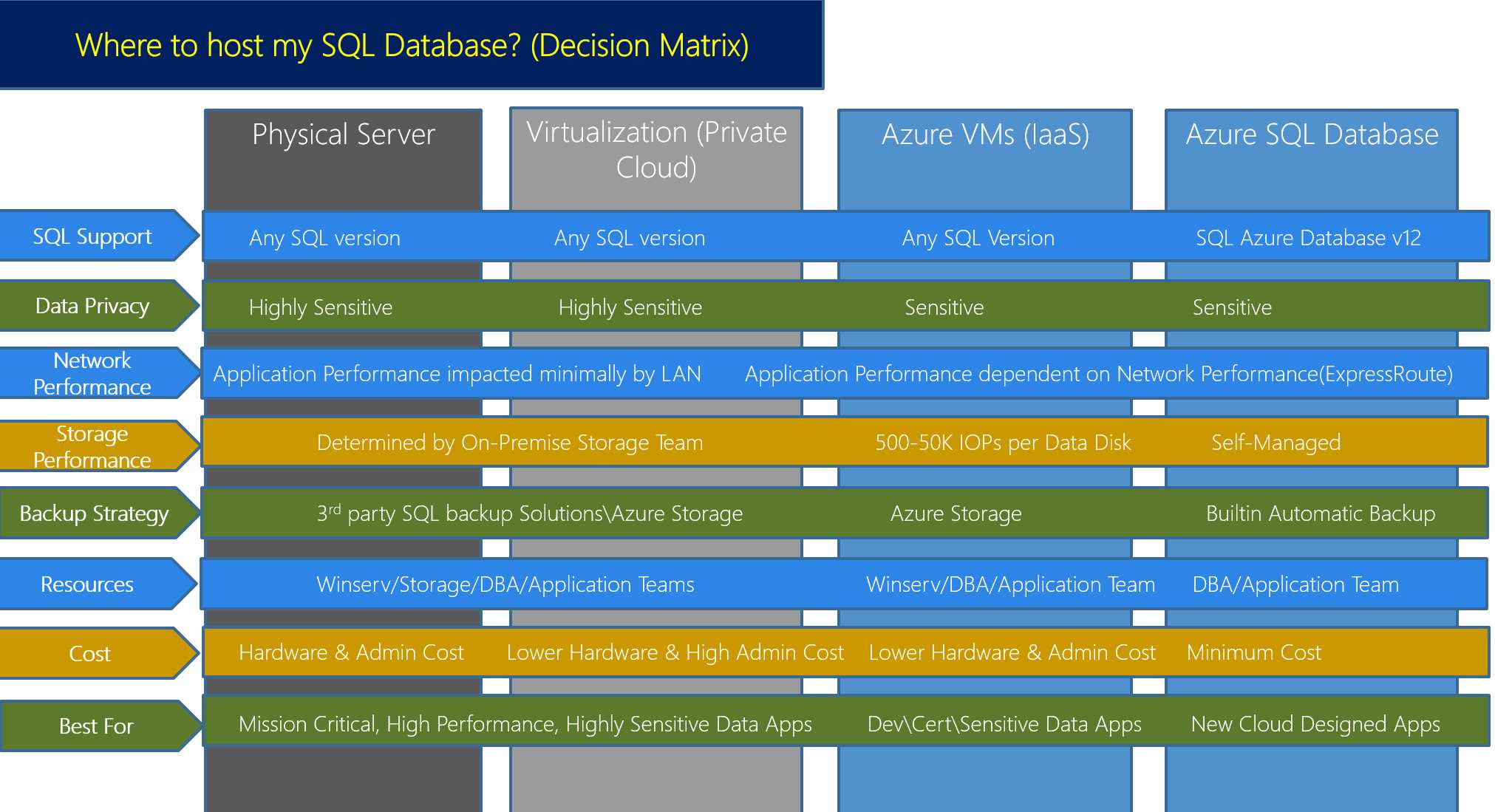
Figure 3: Decision Matrix
This chapter introduced you to the SQL Server offerings in Azure and discussed the motivation and considerations for moving your SQL workload in Azure. In the following chapters we will get into the detail of each of these offerings and understand how to design applications and configure SQL Server in Azure to gain maximum benefit at optimized cost.


- 1800+ high-performance UI components.
- Includes popular controls such as Grid, Chart, Scheduler, and more.
- 24x5 unlimited support by developers.