
SQL Server Metadata Succinctly®

CHAPTER 2
Information Schema
In most relational databases, the information schema (INFORMATION_SCHEMA) is an ANSI-standard set of read-only views that provide information about the tables, views, etc., in the database. SQL Server implements these views, although some of the terminology is slightly different, as shown in Table 1.
Table 1: Naming differences
SQL Server | Information schema |
|---|---|
Database | Catalog |
User-defined data type | Domain |
The information schema views will use the catalog and domain terminology to meet the ANSI standard. However, to the Microsoft SQL developer, the database and the user-defined data type are the more common terms. You can find these views under the System Views list in SQL Server Management Studio (SSMS).
Note: Although the information schema views are available in each database, the table catalog (which is always the current database) is returned in the various views. This will come in handy if you need to write a procedure to iterate all databases on a server.
Tables
The Tables view holds four columns.
Table 2: Tables columns
Column name | Description |
|---|---|
TABLE_CATALOG | Catalog (or database name) |
TABLE_SCHEMA | Schema (or owner) of the table |
TABLE_NAME | Actual name of the table |
TABLE_TYPE | BASE TABLE: Physical table VIEW: View |
The first three columns are generally used as identifiers (with different field names) for almost all information schema views. Use this view to identify the schema that the tables are owned by and whether it is a physical table or view.
Tip: SQL Server allows you not to specify the table owner schema when referencing a table. This can cause some subtle bugs when a table occurs in multiple schemas. The following query can identify table names that occur in more than one schema.
SELECT Table_Name,count(*) as Owners
FROM [INFORMATION_SCHEMA].[tables]
GROUP BY Table_Name HAVING count(*)>1
Table constraints
Constraints are rules applied to columns in a database table. They generally limit the type of data that can be added to a column. The TABLE_CONSTRAINTS view lists the tables and constraints on those tables. The columns are shown in Table 3.
Table 3: TABLE_CONSTRAINTS columns
Column name | Description |
|---|---|
CONSTRAINT_CATALOG | Catalog (or database name) for the constraint. |
CONSTRAINT_SCHEMA | Schema (or owner) of the table. |
CONSTRAINT_NAME | Name of the constraint itself. |
TABLE_CATALOG | Catalog (or database name) for the table the constraint applies to. |
TABLE_SCHEMA | Schema (or owner) of the table. |
TABLE_NAME | Actual name of the table. |
CONSTRAINT_TYPE | One of four values: CHECK: Expressions to limit column content. FOREIGN KEY: Reference to another table's primary key. PRIMARY KEY: Primary key for table. UNIQUE: Values in this column must be unique. |
IS_DEFERRABLE | In SQL Server, always returns NO. |
INITIALLY_DEFERRED | In SQL Server, always returns NO. |
The CHECK constraint definitions are found in the CHECK_CONSTRAINTS view, which includes the CHECK_CLAUSE column to show the definition of the constraint.
The remaining constraint types (FOREIGN KEY, PRIMARY KEY, and UNIQUE) reference tables and columns and can be found in the CONSTRAINT_COLUMN_USAGE view. You can combine these tables to create a query that returns the constraint type and name, and an expression column showing the expression or key columns. Code Listing 2 shows the query.
Code Listing 2: Constraint definition query
--------------------------------------------- -- Script: Constraint_Definitions.sql -- Show various table constraints --------------------------------------------- SELECT constraint_type AS TYPE,TC.constraint_name AS NAME CASE WHEN tc.constraint_type = 'CHECK' THEN cc.check_clause ELSE cu.table_name+'.'+cu.column_Name COLLATE DATABASE_DEFAULT END AS EXPRESSION FROM INFORMATION_SCHEMA.table_constraints tc LEFT JOIN INFORMATION_SCHEMA.check_constraints cc ON cc.CONSTRAINT_NAME=tc.CONSTRAINT_NAME AND tc.CONSTRAINT_TYPE='CHECK' LEFT JOIN INFORMATION_SCHEMA.constraint_column_usage cu ON cu.constraint_name=tc.CONSTRAINT_NAME ORDER BY constraint_type,tc.constraint_name |
This will return a table with the following sample data.
Table 4
Type | Name | Expression |
|---|---|---|
CHECK | CK_Base_Location_Latitude | ([Latitude]>=(-90) AND [Latitude]<=(90)) |
UNIQUE | UK_User_Id | Users.User_ID |
PRIMARY KEY | PK_Client_ID | Clients.ID |
Note: In this query, we are only joining on the constraint name for simplicity. If you have multiple schemas in your database, you should include schema names as part of your join condition.
Columns
The columns view begins with the table information (catalog, schema, and table name) followed by all the columns in the table and information about those columns. Some of the key column fields are shown in Table 5.
Table 5: Column fields
Column name | Description |
|---|---|
COLUMN_NAME | Column name in the table. |
ORDINAL_POSITION | Column position. |
COLUMN_DEFAULT | The default value for the column or NULL. |
IS_NULLABLE | Can the column value be NULL (YES or NO)? |
DATA_TYPE | String description of the column data type. |
CHARACTER_MAXIMUM_LENGTH | Length of the column, if a character column. |
NUMERIC_PRECISION | Length for numeric columns. |
Note: Certain column data types (such as bit and uniqueidentifer) don’t have size information in the table. If a character column is defined as MAX, the character length column will contain a -1.
Domains
Domains (or “user-defined data types” in SQL Server parlance) are useful concepts that make it easier to maintain columns by creating your own column type. For example, you might want to create a domain to set the properties you want all phone number fields to use. The domains view contains most of the same column definitions as the columns view.
Table 6: Domain fields
Column name | Description |
|---|---|
DOMAIN_NAME | Name of the domain. |
DATA_TYPE | Data type of this domain. |
DOMAIN_DEFAULT | The default value for the column or NULL. |
CHARACTER_MAXIMUM_LENGTH | Length of the column, if a character column. |
NUMERIC_PRECISION | Length for numeric columns. |
NUMERIC_SCALE | Scale of the numeric data. |
DOMAIN_DEFAULT | Text of the default constraint for this domain. |
column_domain_usage
The column_domain_usage view provides a list of all tables that reference one of the user-defined columns (domains).
Table 7: Column Domain Usage fields
Column name | Description |
|---|---|
DOMAIN_CATALOG | Name of the database the domain is in. |
DOMAIN_SCHEMA | Name of the schema of the domain. |
DOMAIN_NAME | Actual name of domain (link to Domains view). |
TABLE_CATALOG | Name of database that uses the domain. |
TABLE_SCHEMA | Name of the schema using the domain. |
TABLE_NAME | Actual table name using the domain. |
COLUMN_NAME | Column name using the domain. |
Domain queries
You can perform some basic queries to view your user-defined types and the tables that use them. Code Listing 3 simply shows the user-defined types and displays the size information in a nicely formatted way.
Code Listing 3: List user-defined types
--------------------------------------------- -- Script: List_User_Defined_Types.sql -- Show existing user-defined data types --------------------------------------------- SELECT domain_schema,domain_name, CASE WHEN data_type='DECIMAL' THEN data_type+'('+CAST(Numeric_Precision as varchar(3))+'.'+CAST(Numeric_Scale as varchar(3))+')' WHEN data_type IN ('char','varchar','nchar','nvarchar') THEN CASE WHEN character_maximum_length<0 THEN data_type+'(MAX)' ELSE data_type+'('+ CAST(Character_Maximum_Length as Varchar(3))+')' END ELSE data_type END AS RootDateType FROM INFORMATION_SCHEMA.domains ORDER BY domain_schema,domain_name |
Code Listing 4 shows a similar result but includes the count of columns that are referencing the domain.
Code Listing 4: Domain Usage Counts
--------------------------------------------- -- Script: Domains_Usage_Counts.sql -- Show existing user-defined data types --------------------------------------------- SELECT d.domain_schema,d.domain_name, CASE WHEN data_type='DECIMAL' THEN data_type+'('+ CAST(Numeric_Precision as varchar(3))+'.'+ CAST(Numeric_Scale as varchar(3))+')' WHEN data_type IN ('char','varchar','nchar','nvarchar') THEN CASE WHEN character_maximum_length<0 THEN data_type+'(MAX)' ELSE data_type+'('+ CAST(Character_Maximum_Length as Varchar(3))+')' END ELSE data_type END AS RootDateType, count(du.column_name) as ColumnsUsing FROM INFORMATION_SCHEMA.domains d LEFT JOIN INFORMATION_SCHEMA.column_domain_usage du on d.domain_name=du.domain_name GROUP BY d.domain_schema,d.domain_name,data_type, character_maximum_length,numeric_precision,numeric_scale ORDER BY d.domain_schema,d.domain_name |
You can view user-defined types in SQL Server Management Studio (SSMS) by using the Programmability menu of the object inspector, as shown in Figure 1.
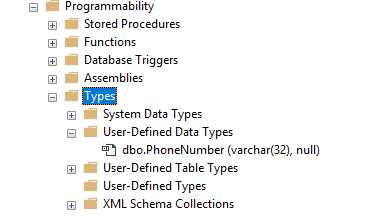
Figure 1: Object inspect user defined types
Routines
The ROUTINES view returns over 50 columns about the various stored procedures and functions in the database. It includes the source code and a flag indicating if the routine updates or simply reads the data. Some representative columns from the view are shown in Table 8.
Table 8: Routine fields
Column name | Description |
|---|---|
ROUTINE_CATALOG | Name of the database the routine is in. |
ROUTINE_SCHEMA | Name of the schema the routine is in. |
ROUTINE_NAME | Name of the view. |
ROUTINE_TYPE | FUNCTION or PROCEDURE. |
DATA_TYPE | If a FUNCTION, this indicates the return type. |
ROUTINE_DEFINITION | SQL Source code of the routine. |
SQL_DATA_ACCESS | MODIFIES (routine updates data) or READS (only reads data). |
Note: The routine definition column only contains 4,000 bytes of the routine. If you are writing code to get the complete routine body, consider using SP_HelpText instead.
Routine columns
If the routine is a table-valued function (it returns a table rather than a single value), the ROUTINE_COLUMNS view returns the column information for the returned table.
Table 9: Routine column fields
Column name | Description |
|---|---|
TABLE_CATALOG | Name of the database the function is in. |
TABLE_SCHEMA | Name of the schema the function is in. |
TABLE_NAME | Name of the function. |
COLUMN_NAME | Column name from returned table. |
ORDINAL_POSITION | Sequence of columns in returned table. |
DATA_TYPE | Data type of the returned table column. |
CHARACTER_MAXIMUM_LENGTH | Size of column (-1 max). |
IS_NULLABLE | YES or NO, can column contain NULL. |
Code Listing 5 shows the code used to identify the type of routine and whether it updates data.
Code Listing 5: Detailed routine types
--------------------------------------------- -- Script: Routine_type_details.sql -- Type and data access of routines --------------------------------------------- SELECT r.routine_name, CASE WHEN rc.table_name is null AND r.routine_type='FUNCTION' THEN 'Scalar Function' WHEN rc.table_name is not null and r.routine_type='FUNCTION' THEN 'Table Valued Function' ELSE 'Stored procedure' END AS RoutineType, r.sql_data_access FROM INFORMATION_SCHEMA.routines r LEFT JOIN (SELECT DISTINCT table_name FROM INFORMATION_SCHEMA.routine_columns) rc ON rc.table_name=r.routine_name ORDER BY RoutineType,routine_name |
Parameters
The PARAMETERS view returns many columns about the various input and output parameters to all the stored procedures and functions in the routines view. Table 10 lists some of the common columns in the view.
Table 10: Parameters fields
Column name | Description |
|---|---|
SPECIFIC_CATALOG | Name of the database the routine parameter is in. |
SPECIFIC_SCHEMA | Name of the schema the parameter is in. |
SPECIFIC_NAME | Name of the routine. |
ORDINAL_POSITION | Sequence number of the parameter. |
PARAMETER_MODE | IN or OUT. |
PARAMETER_NAME | Name of the parameter (if MODE = IN). |
DATA_TYPE | Data type of the parameter. |
CHARACTER_MAXIMUM_LENGTH | Size of the parameter (-1 = MAX). |
Routine queries
Code Listing 6 is a query that returns the routine name and type, and a column containing all the parameters used by the routine. The following table shows a sample of the output.
Table 11: Sample routine query output
Routine name | Type | Parameters |
|---|---|---|
CheckAuditTableColumns | PROC | @debug tinyint |
CheckDataPointTableTypeExists | PROC | No parameters |
CheckForCalculations | PROC | @ClientID int @VisitId int |
Code Listing 6 can provide a simple documentation overview of the database code.
Code Listing 6: Routine and parameters
--------------------------------------------- -- Script: Routine_and_parameter_details.sql -- Routine names and parameters --------------------------------------------- SELECT r.routine_schema,r.routine_name,left(routine_type, 4) AS [type], CASE left(routine_type,1) WHEN 'P' THEN IsNull(px.column_names,'No parameters') ELSE IsNull('(returns)=>' + px.column_names,'No parameters') END AS Parameters FROM INFORMATION_SCHEMA.routines r LEFT JOIN (SELECT specific_schema, specific_name, LEFT(column_names, LEN(column_names )) AS column_names FROM INFORMATION_SCHEMA.parameters AS extern CROSS APPLY ( SELECT parameter_name + ' '+ CASE WHEN DATA_TYPE like '%varchar%' AND CHARACTER_MAXIMUM_LENGTH <0 THEN DATA_TYPE+'(MAX) ' WHEN CHARACTER_MAXIMUM_LENGTH >0 THEN DATA_TYPE+'('+ CAST(CHARACTER_MAXIMUM_LENGTH as varchar)+') ' ELSE DATA_TYPE+' ' END FROM INFORMATION_SCHEMA.parameters AS intern WHERE extern.specific_name = intern.specific_name FOR XML PATH('') ) pre_trimmed(column_names) GROUP BY specific_schema,specific_name, column_names ) px on px.specific_schema=r.routine_schema AND px.specific_name=r.specific_name ORDER BY r.routine_schema, r.routine_name |
Views
The VIEWS view holds details about the views defined in the database. Notice that the column names are called TABLE, even though the content is the view itself. The view definition column contains a SQL Create View script to create the view. This column is limited to 4,000 bytes, which should be enough for all but the most complex views.
Table 12: View fields
Column name | Description |
|---|---|
TABLE_CATALOG | Name of the database the view is in. |
TABLE_SCHEMA | Name of the schema the view is in. |
TABLE_NAME | Name of the view. |
VIEW_DEFINITION | The source code for the view. |
IS_UPDATABLE | YES or NO, can data manipulation operations be performed on the view? |
CHECK_OPTION | Will return “CASCADE” if view was created using the WITH CHECK OPTION, “NONE” if the option was not applied when the view was created. |
View table usage
The VIEW_TABLE_USAGE view provides details on which tables are referenced in which views. Table 13 lists the fields in this view.
Table 13: View table usage fields
Column name | Description |
|---|---|
VIEW_CATALOG | Name of the database the view is in. |
VIEW_SCHEMA | Name of the schema the view is in. |
VIEW_NAME | Name of the view. |
TABLE_CATALOG | Name of the database the referenced table is in. |
TABLE_SCHEMA | Name of the schema the referenced table is in. |
TABLE_NAME | Name of the table referenced by the view. |
View column usage
The VIEW_COLUMN_USAGE view provides details on which tables and column are referenced in which views. Table 14 lists the fields in this view.
Table 14: View column usage fields
Column name | Description |
|---|---|
VIEW_CATALOG | Name of the database the view is in. |
VIEW_SCHEMA | Name of the schema the view is in. |
VIEW_NAME | Name of the view. |
TABLE_CATALOG | Name of the database the referenced table is in. |
TABLE_SCHEMA | Name of the schema the referenced table is in. |
TABLE_NAME | Name of the table referenced by the view. |
COLUMN_ NAME | Name of the column in the table referenced by the view. |
View queries
Code Listing 7 contains a query that will display each view name and the tables that it references.
Code Listing 7: Views and referenced tables
--------------------------------------------- -- Script: Views_and_Table_Usage.sql -- Views and the tables referenced --------------------------------------------- SELECT v.table_schema,v.table_name AS 'ViewName', IsNull(xx.RefObjects,'') AS 'References' FROM INFORMATION_SCHEMA.views v LEFT JOIN(Select distinct ST2.view_schema + '.' + ST2.view_name as ViewRollup, ltrim(substring(( Select ', ' + ST1.table_name AS[text()] FROM INFORMATION_SCHEMA.view_table_usage ST1 WHERE ST1.view_schema + '.' + ST1.view_name = ST2.view_schema + '.' + ST2.view_name ORDER BY ST1.view_schema + '.' + ST1.view_name FOR XML PATH('') ), 2, 8000))[RefObjects] FROM INFORMATION_SCHEMA.view_table_usage ST2 ) xx ON xx.ViewRollup = v.table_schema + '.' + v.table_name ORDER BY v.table_schema,v.table_name |
Tips and tricks
There are some SQL queries using information schema views that can be helpful when working with a SQL database.
Find which tables contain a column name
If you are working in an application that accesses SQL data, you can use the following query to determine all tables and views in which a column is used.
Code Listing 8: Find a column
--------------------------------------------- -- Script: Find_Column.sql -- Search for a column by name --------------------------------------------- SELECT table_schema,table_name FROM INFORMATION_SCHEMA.columns WHERE column_name='IsSupported' ORDER BY table_schema,table_name |
Same name, different types and sizes
In some databases, developers might have created a field in several tables, but the type or size information is different. This can cause some subtle, hard-to-find bugs in application code. For example, if a C# string variable reads a varchar column, the value is trimmed, but if it reads a char column, it will contain the trailing spaces, which could cause some unexpected comparison results.
This query identifies columns with the same name, but different types or sizes.
Code Listing 9: Same name, different type or size
--------------------------------------------------------- -- Script: Mismatched_Columns.sql -- Columns with same name, but different types/sizes --------------------------------------------------------- SELECT column_name, CASE WHEN min(data_type)<>max(data_type) THEN 'Type mismatch' ELSE '' END AS TypeError, CASE WHEN min(character_maximum_length) <> max(character_maximum_length) THEN 'Size differences' ELSE '' END AS SizeError,count(*) AS NumTables FROM INFORMATION_SCHEMA.columns GROUP BY column_name HAVING (min(data_type)<>max(data_type) ) OR (min(character_maximum_length) <> max(character_maximum_length)) |
Tip: You can test collation sequence, nullable, etc., by changing your HAVING conditions in the query.
Similarly named columns
Often, over time and multiple developers, column names might have slight naming variations that can create application errors. This query finds all columns that contain the text “phone”.
Code Listing 10: Similar column names
--------------------------------------------- -- Script: Similarly_named_Column.sql -- Look for columns with similar names --------------------------------------------- SELECT table_schema,table_Name,column_Name FROM INFORMATION_SCHEMA.COLUMNS WHERE column_Name LIKE '%phone%' |
In this example database, we found phone and phonenumber were both used to hold a phone number field for an organization.
Routines and parameters
You can check your stored procedures and functions and see what parameters they expect (in order) by using the following query.
Code Listing 11: Routines and parameters summary
--------------------------------------------- -- Script: Routines_summary.sql -- Routines and parameters --------------------------------------------- SELECT r.routine_type,r.specific_name,rc.parameter_name FROM INFORMATION_SCHEMA.routines r JOIN INFORMATION_SCHEMA.parameters rc ON r.specific_name=rc.specific_name WHERE rc.parameter_mode='IN' ORDER BY r.specific_name,rc.ordinal_position |
Summary
The information schema views are a handy and generic (SQL-92 standard) way to identify your database structure and look for potential problem areas.
Note: While Oracle doesn't implement the information schema, it does have views to provide the same information. For example, the ALL_TABLE view is like the TABLES view, and ALL_TAB_COLUMNS view is like the COLUMNS view.
No matter which database you use, having programmable access to the underlying structures can help you to understand the database and solve problems. If you want more information about the information schema views in SQL Server, you can visit this website. In this chapter, we only focused on some columns in the views; this site will provide complete details of all the columns in the views.


- 1800+ high-performance UI components.
- Includes popular controls such as Grid, Chart, Scheduler, and more.
- 24x5 unlimited support by developers.