
SQL Queries Succinctly®

CHAPTER 6
It’s About Time
Much of our world revolves around time, not to mention that so much of our business logic often depends on dates and times. It seems strange that we have so little support for dates and times in our database.
Turns out we actually have a bit more support than most people realize, and with a bit of effort on our part, we can build even more.
Understanding the Date and Time data types
If you look at many databases, it’s clear that most people are only aware of one data type for representing dates and times, the DateTime data type. In many situations, this is not the best data type to use.
DateTime
The DateTime data type is still the data type most commonly used to represent date and time values. It is far from the best, but often may be required for compatibility with other systems or languages. Columns of this type can represent dates in the range of January 1, 1753, through December 31, 9999, and can represent time in the range of 00:00:00 through 23:59:59.997. For most business applications, that’s probably more accurate than you need; we generally don’t care about three decimal places for the seconds. Often we don’t care about time at all, but we have to allocate space to store it anyway, and worry about stripping it out when it’s not needed.
Most importantly, this data type is not ANSI- or ISO-compliant.
DateTime2
DateTime2 is an extension to DateTime to bring it up to ANSI standards. It has a larger date range as well as a larger time range with a larger default precision, and an option for a user-defined fractional precision. Columns of this type can represent dates in the range of January 1, 0001 through December 31, 9999. They can represent time in the range of 00:00:00 through 23:59:59.9999999. This makes them precise to within 100 nanoseconds.
Tip: Any new columns added should use DateTime2 over DateTime.
This data type was not introduced in SQL Server until 2008 R2, so if you’re running an older database, you will still need to use DateTime.
Date
The Date data type was also introduced in SQL 2008 R2. It is equivalent to the Date portion of a DateTime2 column, so it has a date range of January 1, 0001 through December 31, 9999. This is useful for cases where you don’t care about the time, but only the date.
Time
The Time data type was also introduced in SQL 2008 R2. It is equivalent to the Time portion of a DateTime2 column, so it has a time range of 00:00:00.0000000 through 23:59:59.9999999. In some cases, you may only care about the time outside of the context of an associated date.
DateTimeOffset
The DateTimeOffset data type is similar to the DateTime2 data type, except it is also aware of time zones. It has all the same ranges as the DateTime2 data type.
Common functions
Getting dates
We have several functions to get the current date and time.
- SYSDATETIME(),
- SYSDATETIMEOFFSET(),
- SYSUTCDATETIME(),
- CURRENT_TIMESTAMP,
- GETDATE(),
- GETUTCDATE();
You can see the subtle differences between these various functions by running the following SQL statement:
Code Listing 6-1: Date functions to get the current date
SELECT SYSDATETIME() AS SYSDATETIME , SYSDATETIMEOFFSET() AS SYSDATETIMEOFFSET , SYSUTCDATETIME() AS SYSUTCDATETIME , CURRENT_TIMESTAMP AS [CURRENT_TIMESTAMP] , GETDATE() AS GETDATE , GETUTCDATE() AS GETUTCDATE; |
Getting parts of a date
We also have several functions that can be used to pull out part of the date:
- DATENAME (datepart, date)
- DATEPART (datepart, date)
- DAY (date)
- MONTH (date)
- YEAR (date)
Code Listing 6-2: Date functions to get parts of a date
DECLARE @TestDate DATETIME2; SELECT @TestDate = '7/4/2025'; SELECT DATENAME(WEEK, @TestDate) [Week] , DATEPART(DAYOFYEAR, @TestDate) [DayOfYear] , DAY(@TestDate) [Day] , MONTH(@TestDate) [Month] , YEAR(@TestDate) [Year]; |
The output of this query should look like this:
Week | Day of Year | Day | Month | Year |
27 | 185 | 4 | 7 | 2025 |
Result Set 6-1: The parts of a date
When you see DATEPART, it can have any of these values:
Table 6-1
Day | nanosecond |
Dayofyear | quarter |
Hour | second |
ISO_WEEK | TZoffset |
Microsecond | week |
Millisecond | weekday |
Minute | year |
Month |
Code Listing 6-3: Naming the parts of the date
DECLARE @TestDate DATETIME2; SELECT @TestDate = '7/4/2025'; SELECT DATENAME(DAY, @TestDate) [Day], DATENAME(dayofyear, @TestDate)[DOY], DATENAME(hour, @TestDate) [H], DATENAME(microsecond, @TestDate) [Micro], DATENAME(millisecond, @TestDate) [MS], DATENAME(minute, @TestDate) [Min], DATENAME(month, @TestDate) [Month], DATENAME(nanosecond, @TestDate) [Ns], DATENAME(quarter, @TestDate) [Quart], DATENAME(second, @TestDate) [Sec], DATENAME(TZoffset, @TestDate) [Offset], DATENAME(week, @TestDate) [Week], DATENAME(weekday, @TestDate) [weekday], DATENAME(year, @TestDate) [Year] |
Day | DOY | H | Micro | Ms | Min | Month | Ns | Quart | Sec | Offset | Week | Weekday | Year |
4 | 185 | 0 | 0 | 0 | 0 | July | 0 | 3 | 0 | +00:00 | 27 | Friday | 2025 |
Result Set 6-2: Naming the parts of a date
Difference between two dates
The DATEDIFF function takes a DATEPART and two dates and will return the difference between the two dates. So we can find the difference between two dates in any of the units we saw earlier for the DATEPART.
Code Listing 6-4: Differences between dates
DECLARE @EndDate DATETIME2; SELECT @EndDate = '7/4/2025'; DECLARE @StartDate DATETIME2; SELECT @StartDate = '1/1/2025'; SELECT DATEDIFF(DAY, @StartDate, @EndDate) [Day] , DATEDIFF(DAYOFYEAR, @StartDate, @EndDate) [Day of Year] , DATEDIFF(HOUR, @StartDate, @EndDate) [hour] , DATEDIFF(MINUTE, @StartDate, @EndDate) [minute] , DATEDIFF(MONTH, @StartDate, @EndDate) [month] , DATEDIFF(QUARTER, @StartDate, @EndDate) [quarter] , DATEDIFF(SECOND, @StartDate, @EndDate) [second] , DATEDIFF(WEEK, @StartDate, @EndDate) [week] , DATEDIFF(WEEKDAY, @StartDate, @EndDate) [weekday] , DATEDIFF(YEAR, @StartDate, @EndDate) [year]; |
Day | Day of Year | Hour | Minute | Month | Quarter | Second | Week |
|---|---|---|---|---|---|---|---|
184 | 184 | 4416 | 264960 | 6 | 2 | 15897600 | 26 |
Result Set 6-3: Difference between dates
Note: Depending on how big the difference is, we can easily get an overflow error for some data parts, especially for the smaller date parts. In general, we probably won’t care about the number of seconds, let alone nanoseconds between the OriginationDate and ClosingDate for a 30-year mortgage.
Changing the value of a date
We can also change the value of a date using the DATEADD function. Once again, this function uses the DATEPART logic to express which part of the date to add. We can combine the DATEDIFF logic we just looked at with DATEADD function to push the @StartDate to the @EndDate:
Code Listing 6-5: Effects of the DATEADD
DECLARE @EndDate DATETIME2; SELECT @EndDate = '7/4/2025'; DECLARE @StartDate DATETIME2; SELECT @StartDate = '1/1/2025'; SELECT DATEADD(DAY, offset.Day, @StartDate) Day , DATEADD(DAYOFYEAR, offset.[Day of Year], @StartDate) DOY , DATEADD(HOUR, offset.hour, @StartDate) H , DATEADD(MINUTE, offset.minute, @StartDate) M , DATEADD(MONTH, offset.month, @StartDate) Month , DATEADD(QUARTER, offset.quarter, @StartDate) Q , DATEADD(SECOND, offset.second, @StartDate) Sec , DATEADD(WEEK, offset.week, @StartDate) W , DATEADD(WEEKDAY, offset.weekday, @StartDate) WD , DATEADD(YEAR, offset.year, @StartDate) Y FROM ( SELECT DATEDIFF(DAY, @StartDate, @EndDate) [Day] , DATEDIFF(DAYOFYEAR, @StartDate, @EndDate) [Day of Year] , DATEDIFF(HOUR, @StartDate, @EndDate) [hour] , DATEDIFF(MINUTE, @StartDate, @EndDate) [minute] , DATEDIFF(MONTH, @StartDate, @EndDate) [month] , DATEDIFF(QUARTER, @StartDate, @EndDate) [quarter] , DATEDIFF(SECOND, @StartDate, @EndDate) [second] , DATEDIFF(WEEK, @StartDate, @EndDate) [week] , DATEDIFF(WEEKDAY, @StartDate, @EndDate) [weekday] , DATEDIFF(YEAR, @StartDate, @EndDate) [year] ) offset; |
The end result from this query displays July 4, 2025, for each column.
Date-based business logic
Business logic is often based on dates. Sometimes it might be based on specific actions taking place during promotional windows, and sometimes it might revolve around honoring business logic that was in effect when the process was initiated. You might need to honor rates from when the loan was originated, for example. You might need to honor shipping costs based on when the order was placed or processed, or you might need to evaluate the turn time between key business transactions.
Sometimes date logic is based on calendar days, and sometimes it’s based on business days. We need to clearly understand the difference. A calendar day is any day listed on a calendar. For such logic, the standard, built-in functions are all you need. An approval being good for 30 days means 30 calendar days, so you simply add 30 days to the approval date to get the expiration date. However, requiring that a specific document be generated in three business days is another matter.
A business day refers to days when business is conducted. Generally speaking, this excludes weekends and federal holidays. If you’re in a different county, the list of holidays will be different. For many holidays, the actual date may change from year to year, or at least the dates the holidays fall on will change. Also, if the holiday falls on a weekend, we sometimes celebrate it on the following Monday or the preceding Friday, and you don’t even want to think about the logic to track Easter.
Whenever we have this level of ambiguity, it’s nice to have a lookup table. We need a calendar reference table that will allow us to easily track some useful attributes for dates. Also, because the logic for determining holidays is tricky, we want to be able to easily store the holidays in our Calendar table and know that they are not business days.
Our Calendar table might look like this:
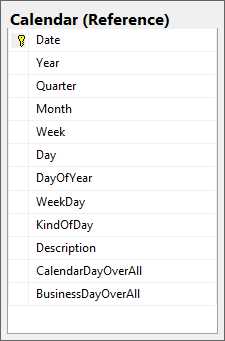
Figure 6-1: Calendar table
To populate this table, we will see some of the date functions in action, as well as some other tricks that we’ve learned along the way.
For our first trick, we will use a recursive CTE to get a list of every date between January 1, 2000, and December 31, 2050.
Code Listing 6-6: Using a recursive CTE to get a list of dates
WITH Dates ( Date ) AS ( SELECT CAST('2000' AS DATETIME) Date UNION ALL SELECT ( Date + 1 ) AS Date FROM Dates WHERE Date < CAST('2051' AS DATETIME) - 1 ) SELECT * FROM Dates OPTION ( MAXRECURSION 0 ); |
The MAXRECURSION option at the end tells our CTE not to worry about how many recursive calls this is. Normally, the database will keep up with this and complain if the recursive calls go past a set limit as a way of preventing cycles in the recursive calls. Here we know that the recursive calls will end about just under 19,000, and that’s not a problem. Setting MAXRECURSION to 0 tells the database not to worry about it.
Next we want a CTE to track the date for the Thursday for each of these dates. We do this because we will count weeks by counting the Thursdays.
Code Listing 6-7: Finding the Thursday associated with each Date
WITH Dates ( Date ) AS ( SELECT CAST('2000' AS DATETIME) Date UNION ALL SELECT ( Date + 1 ) AS Date FROM Dates WHERE Date < CAST('2051' AS DATETIME) - 1 ), DatesAndThursdayInWeek ( Date, Thursday ) -- The weeks can be found by counting the Thursdays -- in a year so we find -- the Thursday in the week for a particular date. AS ( SELECT Date , CASE DATEPART(WEEKDAY, Date) WHEN 1 THEN Date + 3 WHEN 2 THEN Date + 2 WHEN 3 THEN Date + 1 WHEN 4 THEN Date WHEN 5 THEN Date - 1 WHEN 6 THEN Date - 2 WHEN 7 THEN Date - 3 END AS Thursday FROM Dates ) SELECT * FROM DatesAndThursdayInWeek |
Next we will partition this data by Year and track how many weeks into the year each Date is:
Code Listing 6-8: Calculate the week number for each Thursday
WITH Dates ( Date ) AS ( SELECT CAST('2000' AS DATETIME) Date UNION ALL SELECT ( Date + 1 ) AS Date FROM Dates WHERE Date < CAST('2051' AS DATETIME) - 1 ), DatesAndThursdayInWeek ( Date, Thursday ) -- The weeks can be found by counting the Thursdays -- in a year so we find -- the Thursday in the week for a particular date. AS ( SELECT Date , CASE DATEPART(WEEKDAY, Date) WHEN 1 THEN Date + 3 WHEN 2 THEN Date + 2 WHEN 3 THEN Date + 1 WHEN 4 THEN Date WHEN 5 THEN Date - 1 WHEN 6 THEN Date - 2 WHEN 7 THEN Date - 3 END AS Thursday FROM Dates ), Weeks ( Week, Thursday ) AS ( SELECT ROW_NUMBER() OVER ( PARTITION BY YEAR(Date) ORDER BY Date ) Week , Thursday FROM DatesAndThursdayInWeek WHERE DATEPART(WEEKDAY, Date) = 4 ) SELECT * FROM Weeks |
Now that we have all of our CTEs defined, we are ready to use them to gather all of the data for each of these dates:
Code Listing 6-9: Building out details for each Date
WITH Dates ( Date ) AS ( SELECT CAST('1999' AS DATETIME) Date UNION ALL SELECT ( Date + 1 ) AS Date FROM Dates WHERE Date < CAST('2026' AS DATETIME) - 1 ), DatesAndThursdayInWeek ( Date, Thursday ) -- The weeks can be found by counting the -- Thursdays in a year so we find -- the Thursday in the week for a particular date. AS ( SELECT Date , CASE DATEPART(WEEKDAY, Date) WHEN 1 THEN Date + 3 WHEN 2 THEN Date + 2 WHEN 3 THEN Date + 1 WHEN 4 THEN Date WHEN 5 THEN Date - 1 WHEN 6 THEN Date - 2 WHEN 7 THEN Date - 3 END AS Thursday FROM Dates ), Weeks ( Week, Thursday ) AS ( SELECT ROW_NUMBER() OVER ( PARTITION BY YEAR(Date) ORDER BY Date ) Week , Thursday FROM DatesAndThursdayInWeek WHERE DATEPART(WEEKDAY, Date) = 4 ) SELECT d.Date , YEAR(d.Date) AS Year , DATEPART(QUARTER, d.Date) AS Quarter , MONTH(d.Date) AS Month , w.Week as Week, DAY(d.Date) AS Day , DATEPART(DAYOFYEAR, d.Date) AS DayOfYear , DATEPART(WEEKDAY, d.Date) AS Weekday , YEAR(d.Date) AS Fiscal_Year , DATEPART(QUARTER, d.Date) AS Fiscal_Quarter , MONTH(d.Date) AS Fiscal_Month , CASE WHEN DATEPART(WEEKDAY, d.Date) = 6 THEN 'Saturday' WHEN DATEPART(WEEKDAY, d.Date) = 7 THEN 'Sunday' ELSE 'BusinessDay' END KindOfDay , '' FROM DatesAndThursdayInWeek d INNER JOIN Weeks w ON d.Thursday = w.Thursday OPTION ( MAXRECURSION 0 ); |
Wrap the SELECT with an INSERT into the Calendar table and we have it all populated. Once populated, you can go through and explicitly switch the KindOfDay from BusinessDay to Holiday for any holidays that you want to track.
Date | Quarter | Month | Week | Day | DayOfYear | Weekday | KindOfDay |
|---|---|---|---|---|---|---|---|
2019-12-25 | 4 | 12 | 52 | 25 | 359 | 3 | BusinessDay |
2019-12-26 | 4 | 12 | 52 | 26 | 360 | 4 | BusinessDay |
2019-12-27 | 4 | 12 | 52 | 27 | 361 | 5 | BusinessDay |
2019-12-28 | 4 | 12 | 52 | 28 | 362 | 6 | Saturday |
2019-12-29 | 4 | 12 | 52 | 29 | 363 | 7 | Sunday |
2019-12-30 | 4 | 12 | 1 | 30 | 364 | 1 | BusinessDay |
2019-12-31 | 4 | 12 | 1 | 31 | 365 | 2 | Holiday |
2020-01-01 | 1 | 1 | 1 | 1 | 1 | 3 | Holiday |
2020-01-02 | 1 | 1 | 1 | 2 | 2 | 4 | BusinessDay |
2020-01-03 | 1 | 1 | 1 | 3 | 3 | 5 | BusinessDay |
2020-01-04 | 1 | 1 | 1 | 4 | 4 | 6 | Saturday |
2020-01-05 | 1 | 1 | 1 | 5 | 5 | 7 | Sunday |
Result Set 6-4: Dates with their details
Once we have entered the holidays that we want to track, we are ready to update the final two columns, CalendarDayOverall and BusinessDayOverall. Whenever we update a holiday, we need to update the BusinessDayOverall as well.
We can update the CalendarDayOverall with a query like this:
Code Listing 6-10: Initializing the CalendarDayOverAll
UPDATE c SET c.CalendarDayOverAll = cdo.cdo FROM dbo.Calendar c INNER JOIN ( SELECT Date , ROW_NUMBER() OVER ( ORDER BY Date ) AS cdo FROM dbo.Calendar ) cdo ON cdo.Date = c.Date; |
Updating the BusinessDayOverall is a bit more complex. For each record, we want to add up all of the business days that have come before it.
Code Listing 6-11: Initializing the BusinessDayOverAll
UPDATE c SET c.BusinessDayOverAll = bdo.BusinessDayOverAll FROM Reference.Calendar c INNER JOIN ( SELECT Date , BusinessDayOverAll = ( SELECT Sum(CASE c2.KindOfDay WHEN 'BuninessDay' THEN 1 ELSE 0 END) FROM reference.Calendar c2 WHERE c2.Date <= c1.Date) FROM reference.Calendar c1) bdo ON bdo.Date = c.Date |
Now we can use this table to evaluate BusinessDay logic.
Evaluating right of rescission
When you refinance your mortgage, you get a small window to back out of the new mortgage. This is known as the right of rescission. Your right of rescission ends three business days after closing, so we often need to determine the date three business days after the closing date. With the Calendar table, we can now do this with a simple query.
Code Listing 6-12: Finding three business days into the future
SELECT Closing.Date ClosingDate , recission.Date RecissionDate , Closing.BusinessDayOverAll , recission.BusinessDayOverAll FROM Reference.Calendar Closing INNER JOIN ( SELECT MIN(Date) Date , BusinessDayOverAll FROM Reference.Calendar GROUP BY BusinessDayOverAll ) recission ON recission.BusinessDayOverAll = Closing.BusinessDayOverAll + 3; |
ClosingDate | RecissionDate | BusinessDayOverAll | BusinessDayOverAll |
|---|---|---|---|
2019-09-29 | 2019-10-02 | 5411 | 5414 |
2019-09-30 | 2019-10-03 | 5412 | 5415 |
2019-10-01 | 2019-10-06 | 5413 | 5416 |
2019-10-02 | 2019-10-07 | 5414 | 5417 |
2019-10-03 | 2019-10-08 | 5415 | 5418 |
2019-10-04 | 2019-10-08 | 5415 | 5418 |
2019-10-05 | 2019-10-08 | 5415 | 5418 |
2019-10-06 | 2019-10-09 | 5416 | 5419 |
2019-10-07 | 2019-10-10 | 5417 | 5420 |
2019-10-08 | 2019-10-13 | 5418 | 5421 |
Result Set 6-5: Three business days into the future
Tip: This technique can be used to evaluate any cancellation window.
Determining turn time
We often need to track turn time. This is how long it takes to go from one stage in a workflow to the next. We might need to track this to verify service-level agreements, as a metric for capacity planning, or as a metric for promotions or performance reviews.
For many processes, you may need a Time table similar to the Calendar table we have been working on that would track BusinessHours in case you care about turn time in increments smaller than a business day. For our purposes here, we will assume that we only care about business days, so TurnTime will be tracking the number of business days between two dates.
Imagine that we have a table called LoanMilestone that tracks when a milestone happens on a loan.
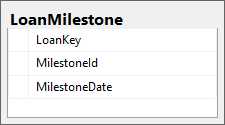
Figure 6-2: LoanMilestone table
In this system, MilestoneId 25 refers to the InitialProcessor being assigned, and MilestoneId 30 refers to the FinalUnderwriter being assigned. We have a workflow with the following steps:
- Assign initial processor
- Assign initial underwriter
- Assign final processor
- Assign final underwriter
For tracking purposes, we want to track how long it takes to go from initial processing to final underwriting. To accommodate all business scenarios, we need to accommodate that any of these steps could potentially be repeated. Events may happen to the loan during processing that require it to be reassigned to initial processor, or to repeat any step in the pipeline. To track the turn time, we care about the first time a loan was assigned to initial processing and the last time it was assigned to final underwriting.
To calculate the turn time, we need to find the number of business days between these two dates. To find the first time a loan was assigned to an initial processor, we will use the MIN function. To find the last time it was assigned to a final underwriter, we will use the MAX function. To find the number of business days between these two dates, we will join to the Calendar table twice and subtract the two BusinessDayOverall values.
Code Listing 6-13: Tracking business days between assigning processor and assigning underwriter
SELECT InitialProcessor.InitialProcessorAssigned , InitialProcessor.LoanKey , InitialUnderwriter.InitialUnderwriterAssigned , ProcessorCalendar.BusinessDayOverAll , UnderwriterCalendar.BusinessDayOverAll , UnderwriterCalendar.BusinessDayOverAll - ProcessorCalendar.BusinessDayOverAll AS TurnTime FROM ( SELECT MIN(MilestoneDate) AS InitialProcessorAssigned , LoanKey FROM dbo.LoanMilestone WHERE MilestoneId = 25 GROUP BY LoanKey ) AS InitialProcessor INNER JOIN ( SELECT MAX(MilestoneDate) AS InitialUnderwriterAssigned , LoanKey FROM dbo.LoanMilestone WHERE MilestoneId = 30 GROUP BY LoanKey ) InitialUnderwriter ON InitialUnderwriter.LoanKey = InitialProcessor.LoanKey INNER JOIN Reference.Calendar ProcessorCalendar ON InitialProcessor.InitialProcessorAssigned = ProcessorCalendar.Date INNER JOIN Reference.Calendar UnderwriterCalendar ON InitialUnderwriter.InitialUnderwriterAssigned = UnderwriterCalendar.Date ORDER BY TurnTime; |
Loan Key | Initial Underwriter Assigned | Initial Processor Assigned | Business Day Over All | Business Day Over All | Turn Time |
|---|---|---|---|---|---|
2602 | 2018-03-28 | 2018-01-31 | 4979 | 5019 | 40 |
2606 | 2018-03-26 | 2018-01-29 | 4977 | 5017 | 40 |
2798 | 2018-03-26 | 2018-01-25 | 4975 | 5017 | 42 |
2958 | 2018-03-21 | 2018-01-22 | 4972 | 5014 | 42 |
2772 | 2018-03-31 | 2018-01-30 | 4978 | 5020 | 42 |
2821 | 2018-03-31 | 2018-01-30 | 4978 | 5020 | 42 |
2498 | 2018-03-26 | 2018-01-27 | 4975 | 5017 | 42 |
2455 | 2018-03-22 | 2018-01-23 | 4973 | 5015 | 42 |
2468 | 2018-03-30 | 2018-01-29 | 4977 | 5020 | 43 |
2960 | 2018-03-27 | 2018-01-25 | 4975 | 5018 | 43 |
Result Set 6-6: Showing the turn time data
Summary
In this chapter, we explored the importance of time and date information and reviewed the various data types for tracking them. We saw the functions for getting the various date parts from a date and how to find the difference between two dates in any increment, available as a DatePart.
Finally, we explored the difference between calendar days and business days, and built out the Calendar table to track a count of these two types of days so that we could evaluate business logic based on dates, and used business dates to evaluate the recession dates and produce turn time reports.
Date and time information is very important, and helps drive much of our business logic.


- Direct integration with SQL databases for real-time data access
- Interactive dashboards for deeper data exploration
- Advanced analytics to uncover hidden patterns and trends
- Enhanced decision-making with data-driven insights