
SOLID Principles Succinctly®

CHAPTER 1
Why SOLID?
Let’s start with two questions: What are you writing as a developer? And, is it good code? As you answer, remember that simply following a few design patterns doesn’t guarantee that you are writing good code.
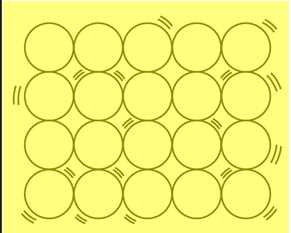
Figure 1: SOLID Image
Figure 1 shows the image that most programmers have in mind regarding their work with SOLID—unstable code loosely held together like a pile of pebbles in a bucket. Programmers typically imagine they are writing good code if they simply adopt a few design patterns, but of course, in reality, that is not enough. While our code isn’t going to be as solid as a wall of bricks or a vessel containing pebbles, with the use of SOLID, our code will be more robust and usable.
Frankly, the answer to “Why SOLID?” is simply that SOLID principles produce better code. If you’re confused, don’t worry—this will become clearer when we study a few live examples. But to sum up my rationale: I use SOLID principles to counteract my bad habits of writing code containing thousands of lines and numerous methods or functions in a class. Yes, I was one of those who intentionally and unintentionally wrote bad code, then had to put in great effort for code review.
Eventually, I made identifying dirty code a priority, and I organized a checklist to help pinpoint my issues. You can use these points to check whether or not you are writing bad, dirty code:
- Does the code implement a design pattern?
- Is the code tightly coupled?
- Is the code testable?
- Is the code human readable?
- Is the code duplicated?
- Is the code too lengthy to understand?
Perhaps you can add more checklist points that suit your own experiences, but whenever I analyze my code using the above checklist points, I am able to discern whether or not my code is dirty. However, this list doesn’t tell me that my code is SOLID.
Let’s first try to understand how the previous checklist points are helpful for analyzing our code.
Does the code implement a design pattern?
Adopting a design pattern in your code or program is not compulsory. No one can force you to do this. Use your best judgment to decide whether or not you want to implement patterns.

Figure 2: Pattern Image
As a programmer, I can imagine how patterns look, and I can easily relate these to something like a texture on a wall. Figure 2 is simply an image that correlates with the patterns in a program.
Of course, no one can prevent you from writing dirty code, such as opening on a button click and triggering the Save command to persist values in a database. Many of us did this in our student days. I still remember my C programming days, when I was struggling to write a simple console game that required me to save players’ scores into a dat file. I’d written everything within the same class using a single function. At the time, that approach was fun for me. But now, when I remember those days, I think about what a silly mistake I made.
Look again at Figure 2 and imagine a plain floor. Now, think of a plain, wet floor. What happens when you walk on a wet floor? You can fall. Now, think of a floor coated with a surface that you can grip with your shoes or feet. On this floor, there is less reason to be afraid because there are fewer chances of falling even if the floor is wet.
Next, imagine you’re working on a maintenance project in which the code is unmanaged or dirty (i.e. there is no pattern, are no principles, etc.). It’s somewhat like walking on a wet floor, isn’t it? On the other hand, if the same project is well managed, following patterns and principles, your life is easier while you’re fixing or enhancing the project. Patterns provide an extra, coated layer to your program so that you can write robustly with little chance of falling.
In summary, dirty code is code that needs a lot of refactoring and does not adhere to any patterns or principles.
Do not be hurried, just think twice about your coding decisions. There are more points in the checklist to help you decide about your code.
Tip: Decide which design pattern suits your requirements and implement that design pattern.
Is the code tightly coupled?
From Wikipedia:
“In software engineering, coupling is the manner and degree of interdependence between software modules; a measure of how closely connected two routines or modules are.”
In other words, coupling occurs when a module is fully attached to another module.
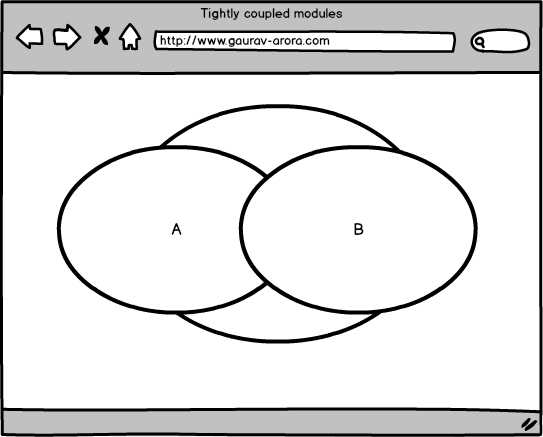
Figure 3: Tightly Coupled Modules
Imagine a scenario in which you’re writing a program of math software and you need to implement all possible math operations. You’ve introduced two modules as a part of your implementation. In this circumstance, you’ll need to make changes in both modules whenever you are required to make changes to either module. This means your application or software is tightly coupled, which means your code qualifies as dirty code.
The bottom line—you are writing dirty code if your code modules are dependent.
Is code testable?
It is good practice to always write tests and testable code for your code. Here are some of the advantages you gain by doing so:
- It reduces the reworking time needed due to any unrecovered issue.
- It provides ability-testing code within code.
- It reduces the time needed for debugging code—with the help of test-driven development (TDD) we can easily and quickly locate problems.
- It allows for easy determination of whether or not recent changes or refactoring broke the code.
TDD helps us to improve code quality and draw our focus to the main purpose of our task. It makes sure that new changes are tested and will not break any existing code functionality.
Writing tests may be unpleasant and time-consuming, and you might have a very limited timeframe in which to complete your application or code, but tests are important. Tests and code work together to achieve better code. Writing testable code is a good habit to get into as a way of avoiding future complications.
Is the code human readable?
Because your code will be read by humans, it should be meaningful code.
For example, if you are writing a function that simply returns a sum of two numbers, you should choose a meaningful name that describes this function. That way, before diving into the code, another developer can look into the function and easily understand its purpose. In this case, you might think of a function name like Sum or Add.
Tip: In order to make your method name meaningful, don’t hesitate to use a long name such as Is ValidForCharactersOnly.
While writing code, give meaningful names to your classes, methods, functions, and module names. Your program will be read by people, not by machines. Machines can understand your code, but you should write so that humans can understand it, too.
Note: Visit your code and see if you can read it. If not, that means you are writing bad code.
Is the code duplicated?
It’s possible that you are doing the same things in many places—you are creating something like a business rule to validate any input, and you are writing the same code for each and every input. Revisit and check to see if you have such code. If so, try to move that code to a common place and use it throughout your application.
Tip: Create a Common class if you can’t decide where to place your common code.
Also remember to avoid and remove any redundant code. It’s a good idea to visit your code many times, and in different ways, in order to check for redundancy. For example, you can write Console.WriteLine("SOLID Principles Succinctly!"); instead of System.Console.WriteLine("SOLID Principles Succinctly!"); if you have already added ‘namespace.’ In this case, ‘System’ is redundant and can be removed.
Let’s look at Code Listing 1 in order to better understand redundant code.
Code Listing 1
using System; public class Program { public static void Main() { //System can be removed as it is redundant code here. System.Console.WriteLine("SOLID Principles Succinctly!"); //This is fine. Console.WriteLine("SOLID Principles Succinctly!"); } } |
Is the code too lengthy to understand?
Avoid writing lengthy code. A function can be hard to understand if it contains thousands of lines. Generally, we developers write lots of code that would be better split into pieces like small functions or properties.
Lengthy code always creates confusion, especially for new developers who did not actually write that code. These kinds of programs, functions, and methods might meet stated requirements and produce expected results, but they are nevertheless hard to understand. Luckily for us, these kinds of code generally can be grouped into meaningful functions.
We can mark our code as bad code if we are writing lengthy functions or methods when we could instead break them into small and meaningful functions.
Finally, here is the complete checklist to analyze your code by category as bad or dirty code.
Table 1: Dirty Code Checklist
Dirty Code Checklist | |
|---|---|
Checkpoint | Yes/No |
Design patterns | Yes/No |
Coupling | Yes/No |
Testable code | Yes/No |
Human readable code | Yes/No |
Duplicate/redundant code | Yes/No |
Lengthy code | Yes/No |
You are writing dirty code if your checklist contains a Yes for any of the above points.
Note: Send me more points if you’d like to add to this checklist.
Next, we’ll look at how SOLID helps prevent us from writing bad or dirty code.


- 1800+ high-performance UI components.
- Includes popular controls such as Grid, Chart, Scheduler, and more.
- 24x5 unlimited support by developers.