
SOLID Principles Succinctly®

CHAPTER 4
Single Responsibility Principle
A class should have a single responsibility.
Let's dive into this ocean. We can read the above statement as: a class should not be designed to do multiple activities. But that begs the question of what kind of activities a class should or should not do.
For example, let’s say I need to design a system that provides me with employee details. This system should include activities, and I rely on Create, Read, Update, and Delete (CRUD) operations. However, according to the Single Responsibility Principle, I need to design several classes that do any one of these operations but not more than one of them.
In the past, particularly when I was learning C++, I wrote thousands of lines of code in one program containing many if…else statements.
When I was learning this principle, I questioned why a class should not be responsible for multiple activities. In those days I would design a class responsible for modifying data, retrieving data, and saving data. Later, if some kind of business requirement for which our modification or data retrieval logic changed, we would need to change our classes many times and in many places, and this would introduce more bugs and more code changes.
I came to find that keeping classes to one responsibility is really a matter of foreseeing that the responsibilities of classes will be tied to more changes in the future. Today, I don’t like a method that contains more than 4-5 lines. How the world has changed!
We will discuss SRP with a code example. Let’s consider the following:
There is a problem-solving scenario in which we need to import and sync data from different database servers after fetch, scan, and store operations. We also need to save or persist the database on our servers.
Here are the steps we can draft:
- Contact external servers
- Sync/fetch data
- Analyze/scan data
- Store in temporary storage
- Save/persist database on local server(s)
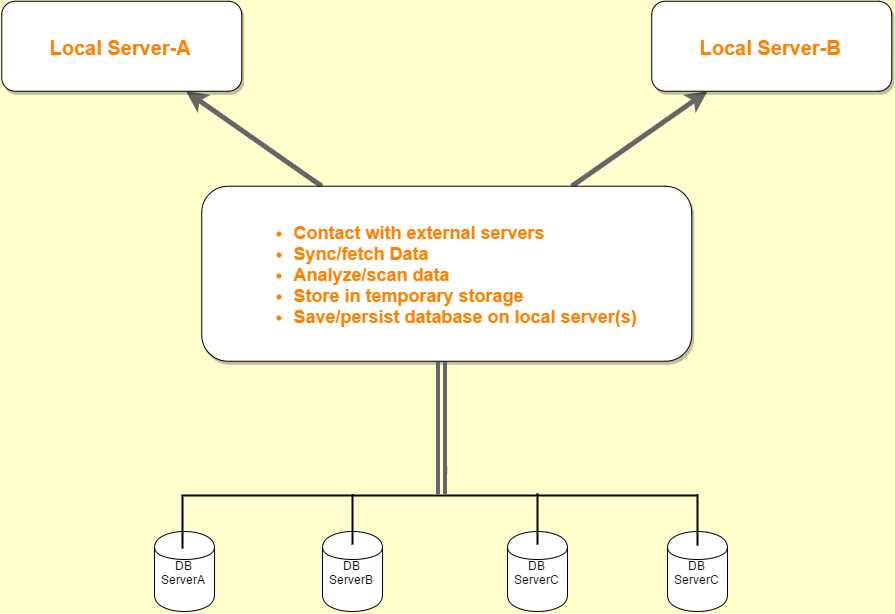
Figure 6: Overview of DataSync App
By referencing Figure 6’s overview of our Data Sync App/Utility, we can define the following operations or steps to design our class:
- Create a class (e.g., SyncOperation)
- Add a method to contact external (database) servers (e.g., Connect)
- Fetch data method (e.g., Sync)
- Call temporary storage (e.g., Store)
- Persist data (e.g., Save)
Note: You can choose whatever class names or method names you like.
After this, we are ready to start designing our class for DBSync tool.
We will analyze each step of this process—but first, let’s consider the following design for our class.
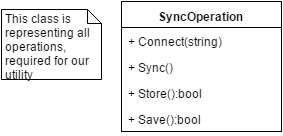
Figure 7: Class Diagram
Using the class design in Figure 7, we can write code as shown in the following code snippet.
Code Listing 2
public interface ISyncOperation { void Connect(string serverName); void Sync(); bool Store(); bool Save(); } |
With Code Listing 2, we wrote a simple interface ISyncOperation and defined a certain operational method required for our work-database utility.
Next, we will implement this interface in order to define our actual operation of these methods.
Code Listing 3
public class SyncOperation : ISyncOperation { public void Connect(string serverName) { //TODO—logic to connect external database. //Refer to http://www.connectionstrings.com/ } public bool Save() { //Permanently persist data from temporary storage. //This is the final operation. return true; } public bool Store() { //Store synced data in temporary storage. return true; } public void Sync() { //Start syncing external data. } } |
Can you find what is violating SRP in that code snippet?
Note: Code Listing 3 is not complete. Please refer to Bitbucket for the complete source code.
Next let’s see if Code Listing 4 is following SRP.
Code Listing 4
namespace SRP { class Program { static void Main(string[] args) { //Client stuff goes here. } } } public interface ISyncOperation { void Connect(string serverName); void Sync(); bool Store(); bool Save(); } |
At this stage, we have a design in our hands and actual code implementation, so let’s go back and read the definition of SRP in order to see how we can apply it. Basically, we have to make a single operational class that must also be a single responsibility class.
Unfortunately, our class has several responsibilities, so it’s violating the Single Responsibility Principle.
The best way to follow SRP in Code Listing 4 is to segregate responsibilities. Our class is meant for Sync data, which means it should bear only Sync responsibility.
At the very first stage, we have already segregated interfaces, which is a step toward Separating Coupled Responsibilities (SCR).
Note: SCR is beyond the scope of this e-book, hence we will not address the topic here.
Let’s look at the next code snippet, which does serve SRP.
Code Listing 5
/// <summary> /// This class should be responsible only for the sync operation. /// </summary> public class SyncOperation { private IList<ExternalServerData> _data; private DataStore _dataStore; private DatabaseServer _dbServer; private IExternalServerDataRepository _repository; public SyncOperation(IList<ExternalServerData> data, IExternalServerDataRepository repository, DatabaseServer dbServer) { _data = data; _repository = repository; _dbServer = dbServer; _dataStore = new DataStore(new TempStoreRepository()); } public void Sync() { //Start syncing of data as per requested server. _dataStore.Store(_repository.Sync()); } } |
In Code Listing 5, our SyncOperation class is responsible only for the Sync operation. In any case, if we need to customize or change this class, it now deals with only a single responsibility.
Here, our sync class will work on the requested DatabaseServer. First, the application connects with an external server and requests a specific database to Sync class. Sync class will simply sync the data from the external database and send it to DataStore class to preserve in temporary storage for further analysis. Afterward, it will be persisted permanently by Save class.
Code Listing 6
public class ExternalServerData { public int Id { get; set; } public DateTime InitialDate { get; set; } public DateTime EndDate { get; set; } public int OrderNumber { get; set; } public bool IsDirty { get; set; } public string IP { get; set; } public int Type { get; set; } public int RecordIdentifier { get; set; } } |
Code Listing 7
namespace SRP_Follow { public class InternalServerData { //Stuff goes here. } } |
Code Listing 7 shows that in ExternalServerData class, certain fields are required to sync data from external database servers.
Code Listing 8
public interface IExternalServerDataRepository { IEnumerable<ExternalServerData> Sync(); } |
In Code Listing 8, IExternalServerDataRepository interface is merely defined for Sync operation.
Code Listing 9
public class ExternalServerDataRepository : IExternalServerDataRepository { private readonly List<ExternalServerData> _dataList = GetServerData(); public IEnumerable<ExternalServerData> Sync() { return _dataList; } //This is sample data. private static List<ExternalServerData> GetServerData() { return new List<ExternalServerData>(new[] { new ExternalServerData { Id = 1, InitialDate= new DateTime(2014,01,01), EndDate= new DateTime(2015,01,30), OrderNumber=1, IsDirty=false, Type = 1, IP ="127.0.0.1" }, new ExternalServerData { Id = 2, InitialDate= new DateTime(2014,01,15), EndDate= new DateTime(2015,01,30), OrderNumber=2, IsDirty=true, Type=1, IP ="127.0.0.1" } }); } } |
In Code Listing 9, ExternalServerDataRepository implements the sync operation in the previous code snippet (we created fake data for demonstration purposes).
Note: For complete code, please refer to source code repository.
Conclusion
The Single Responsibility Principle, SOLID’s first principle, tells us to distribute responsibilities and create classes that stick with only a single responsibility. From the code example, we can conclude that this is a good practice for making our classes decent, neat, and clean. We can think of many related operations a class could bear, but we must think about the drawbacks and implications of classes overburdened with too many responsibilities. Therefore, a single class should be responsible for a single operation.


- 1800+ high-performance UI components.
- Includes popular controls such as Grid, Chart, Scheduler, and more.
- 24x5 unlimited support by developers.