
Skype Bots Succinctly®

CHAPTER 4
Scorables
Quick intro
If you’ve been using the Bot Framework for some time, you might be familiar with dialogs and the dialog stack—where you have a root dialog, and you can pass the control to child dialogs, which will return the control back to the parent dialog.
This can give us a lot of flexibility when designing a conversational flow—for instance, when using LUIS to determine a user’s intent and then falling back to standard dialogs if no intent can be recognized, or when a specific action (such as a greeting) needs to be executed—which is what we did in Chapter 2.
This is great, but there are times when we might want to be able to interrupt our current dialog stack in order to handle an incoming request, such as responding to specific user queries that aren’t related to the content existing on the bot’s knowledge base. This is where Scorables come into play.
You can think of Scorables as a special type of dialog that we can use within a conversational flow using the Bot Framework in order to interrupt the current dialog and handle an incoming request. Scorables act as global messaging handlers.
With these global messaging handlers, it is possible to have bots that decide how to handle a message and whether it needs to be handled at all. By using this feature, we are able to create bots that have better decision-making capabilities based on the score of an incoming message.
In this chapter, we’ll expand on the previous QnA example in order to introduce some extra flexibility and processing capabilities to our bot.
The full source code for this chapter can be found here.
The basics of Scorables
As the name implies, scorables are all about rating incoming messages and giving them a score. Basically, scorable dialogs monitor a bot’s incoming messages and decide whether to handle each message. If a message should be handled, the Scorable will set a score between 0 and 1 (100%) as to what priority it should be given.
If a Scorable matches against an incoming message (and has the highest score if there are multiple matches), it can then handle the response to the user rather than being picked up by the current dialog in the stack. This is quite powerful and allows for a lot of flexibility.
In our previous example, we scratched the surface of this concept by briefly examining the QnAMakerResponseHandler decorator, which abstracts some of the complexity of implementing Scorables when using the QnA Maker Dialog.
Based on this concept and what we’ve done so far, let’s expand our previous QnA example so that we can have the bot respond to FAQs in both English and French. This will be possible by using a Scorable.
Implementing a Scorable
The Bot Builder SDK for .NET uses AutoFac for inversion of control and dependency injection. One of the ways AutoFac is used is through Scorables.
To create a Scorable, we need to create a class that implements the IScorable interface by inheriting from the ScorableBase abstract class.
In order to have that Scorable applied to every message in the conversation, the bot needs to register the IScorable interface as a service with the conversation’s container.
When a new message arrives to the conversation, it passes that message to each implementation of IScorable in order to get a score. The one with the highest score is then processed.
To extend our QnA example to support Creative Commons French FAQs, we need to create a separate dialog that points to a different QnA Maker Service that will be specific for FAQs written in French.
By default, the Scorable will pass on the conversation to the QnA dialog that corresponds to the QnA Maker Service for English FAQs, and if the Scorable detects the word French, it will then pass the control to the QnA dialog that corresponds to the QnA Maker Service for French FAQs.
Below is a graphical explanation of what we are trying to achieve.
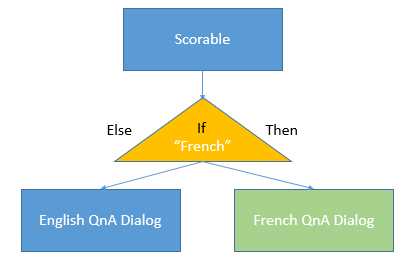
Figure 4-a: The Scorable Logic
The first thing we need to do is create a FaqSettingsDialog that we’ll add to the stack whenever the user responds with the word French in the conversation. Let’s code this as follows.
Code Listing 4-a: The FaqSettingsDialog Class
using Microsoft.Bot.Builder.Dialogs; using Microsoft.Bot.Connector; using System; using System.Threading.Tasks; public class FaqSettingsDialog : IDialog<object> { public async Task StartAsync(IDialogContext context) { await context.PostAsync( "This is the FAQ Settings. Reply to go back"); context.Wait(MessageReceived); } private async Task MessageReceived(IDialogContext context, IAwaitable<IMessageActivity> result) { var message = await result; if ((message.Text != null) && (message.Text.Trim().Length > 0)) { context.Done<object>(null); } else { context.Fail(new Exception( "Message is not a string or is empty.")); } } } |
You can add this code as a separate file under the Dialogs folder of your Visual Studio project and name it FaqSettingsDialog.cs. Think of the FaqSettingsDialog class as the decision part (triangle) in Figure 4-a.
For now, this FaqSettingsDialog class doesn’t do anything—it’s just a placeholder for the logic we’ll be implementing, which we’ll come back to in a bit.
Let’s now focus our attention on the Scorable itself. Create a FaqScorable class, which should provide an implementation of the ScorableBase abstract class in order to implement the IScorable interface.
First things first—create a new C# class file under the Dialogs folder in your Visual Studio project called FaqScorable.cs, and let’s start off by adding a PrepareAsync method—which will inspect the incoming message to check if it matches the text we are looking for (French).
If there’s a match, we’ll return the message to be used as state for scoring; otherwise, null is returned—which indicates no match. The code should look as follows.
Code Listing 4-b: The PrepareAsync Method of the FaqScorable Class
protected override async Task<string> PrepareAsync(IActivity activity, CancellationToken token) { var message = activity as IMessageActivity; if (message != null && !string.IsNullOrWhiteSpace(message.Text)) if (message.Text.ToLower().Equals("french", StringComparison.InvariantCultureIgnoreCase)) return message.Text; return null; } |
We now need to implement a HasScore method, which is invoked by the calling component in order to determine if the Scorable has a score—if there’s a match. We can implement this method as follows.
Code Listing 4-c: The HasScore Method of the FaqScorable Class
protected override bool HasScore(IActivity item, string state) { return state != null; } |
Next, we need a GetScore method. This will be invoked to get the score for the Scorable, which will be all other Scorables that have a score. We can implement it as follows.
Code Listing 4-d: The GetScore Method of the FaqScorable Class
protected override double GetScore(IActivity item, string state) { return 1.0; } |
The way this will work is that the Scorable with the highest score will process the message when the PostAsync method is invoked.
Within the PostAsync method, we’ll add FaqSettingsDialog to the stack, so it can become the active dialog. The PostAsync method looks as follows.
Code Listing 4-e: The PostAsync Method of the FaqScorable Class
protected override async Task PostAsync(IActivity item, string state, CancellationToken token) { var message = item as IMessageActivity; if (message != null) { var settingsDialog = new FaqSettingsDialog(); var interruption = settingsDialog.Void<object, IMessageActivity>(); task.Call(interruption, null); await task.PollAsync(token); } } |
The missing part is that when the scoring process is complete, we must invoke the DoneAsync method, where all the resources used in the scoring process are released. This is what we’ll implement next.
Code Listing 4-f: The DoneAsync Method of the FaqScorable Class
protected override Task DoneAsync(IActivity item, string state, CancellationToken token) { return Task.CompletedTask; } |
This concludes the FaqScorable class. The full code of this class is listed in the following Code Listing.
Code Listing 4-g: FaqScorable.cs
using Microsoft.Bot.Builder.Dialogs; using Microsoft.Bot.Builder.Dialogs.Internals; using Microsoft.Bot.Builder.Internals.Fibers; using Microsoft.Bot.Builder.Scorables.Internals; using Microsoft.Bot.Connector; using System; using System.Threading; using System.Threading.Tasks; namespace CCBot.Dialogs { public class FaqScorable : ScorableBase<IActivity, string, double> { private readonly IDialogTask task; public FaqScorable(IDialogTask task) { SetField.NotNull(out this.task, nameof(task), task); } protected override async Task<string> PrepareAsync( IActivity activity, CancellationToken token) { var message = activity as IMessageActivity; if (message != null && !string.IsNullOrWhiteSpace(message.Text)) { if (message.Text.ToLower().Equals("french", StringComparison.InvariantCultureIgnoreCase)) { return message.Text; } } return null; } protected override bool HasScore(IActivity item, string state) { return state != null; } protected override double GetScore(IActivity item, string state) { return 1.0; } protected override async Task PostAsync(IActivity item, string state, CancellationToken token) { var message = item as IMessageActivity; if (message != null) { var settingsDialog = new FaqSettingsDialog(); var interruption = settingsDialog.Void<object, IMessageActivity>(); task.Call(interruption, null); await task.PollAsync(token); } } protected override Task DoneAsync(IActivity item, string state, CancellationToken token) { return Task.CompletedTask; } } } |
We’ve now implemented our Scorable, but we need to register it—this is what we’ll do next. But before we do that, let’s implement a CancelScorable in the same way we’ve implemented FaqScorable, with the only difference being that it resets the dialog stack when the Scorable is called.
So, create a new C# class file called CancelScorable.cs, and place it under the Dialogs folder of your Visual Studio project.
Code Listing 4-h: The CancelScorable Class
using System; using System.Threading; using System.Threading.Tasks; using Microsoft.Bot.Builder.Dialogs.Internals; using Microsoft.Bot.Builder.Internals.Fibers; using Microsoft.Bot.Connector; using Microsoft.Bot.Builder.Scorables.Internals; namespace CCBot.Dialogs { public class CancelScorable : ScorableBase<IActivity, string, double> { private readonly IDialogTask task; public CancelScorable(IDialogTask task) { SetField.NotNull(out this.task, nameof(task), task); } protected override async Task<string> PrepareAsync( IActivity activity, CancellationToken token) { var message = activity as IMessageActivity; if (message != null && !string.IsNullOrWhiteSpace(message.Text)) { if (message.Text.ToLower().Equals("cancel", StringComparison.InvariantCultureIgnoreCase)) { return message.Text; } } return null; } protected override bool HasScore(IActivity item, string state) { return state != null; } protected override double GetScore(IActivity item, string state) { return 1.0; } protected override async Task PostAsync(IActivity item, string state, CancellationToken token) { task.Reset(); } protected override Task DoneAsync(IActivity item, string state, CancellationToken token) { return Task.CompletedTask; } } } |
Registering a Scorable
To register the Scorable that we’ve created, we need to create a GlobalMessagesHandlerBotModule.cs file where we can define a module that registers the FaqScorable class as a component that implements the IScorable interface.
So, using Solution Explorer, under the root of your Visual Studio project, create a new C# class file and name it GlobalMessagesHandlerBotModule.cs. Let’s add the following code to this file.
Code Listing 4-i: GlobalMessagesHandlerBotModule.cs
using Autofac; using CCBot.Dialogs; using Microsoft.Bot.Builder.Dialogs.Internals; using Microsoft.Bot.Builder.Scorables; using Microsoft.Bot.Connector; namespace CCBot { public class GlobalMessageHandlersBotModule : Module { protected override void Load(ContainerBuilder builder) { base.Load(builder); builder .Register(c => new FaqScorable(c.Resolve<IDialogTask>())) .As<IScorable<IActivity, double>>() .InstancePerLifetimeScope(); builder .Register(c => new CancelScorable(c.Resolve<IDialogTask>())) .As<IScorable<IActivity, double>>() .InstancePerLifetimeScope(); } } } |
We are simply creating the FaqScorable class as a module. The next thing we need to do is to register the module with the conversation’s container—this is done in Global.asax.cs.
Open Global.asax.cs—the FaqScorable class can be registered to the conversation’s container by registering GlobalMessageHandlersBotModule as follows.
Code Listing 4-j: The Updated Global.asax.cs File
using System.Web.Http; using Autofac; using Microsoft.Bot.Builder.Dialogs; using Microsoft.Bot.Builder.Internals.Fibers; namespace CCBot { public class WebApiApplication : System.Web.HttpApplication { protected void Application_Start() { RegisterBotModules(); GlobalConfiguration.Configure(WebApiConfig.Register); } private void RegisterBotModules() { Conversation.UpdateContainer(builder => { builder.RegisterModule(new ReflectionSurrogateModule()); builder.RegisterModule<GlobalMessageHandlersBotModule>(); }); } } } |
Let’s compile and run this to see what happens—notice that we haven’t modified MessagesController.cs, which still points to the RootDialog class that interfaces with the QnA Maker Service—so that hasn’t changed.
In principle, we should be able to query the Creative Commons English knowledge base (as we haven’t added the French one yet), and the Scorable should kick in whenever we type in the word French; otherwise, we should get the standard results from the QnA service. Let’s run it and see.
In order to test it, I’ll type in the word copyright. I would expect the QnA service to come back with the corresponding FAQ.
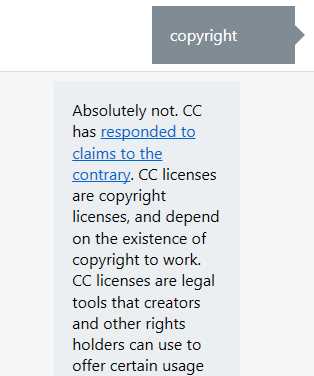
Figure 4-b: The QnA Service Response
Okay, so that worked fine. Let’s try now to type in French to see if the Scorable kicks in.
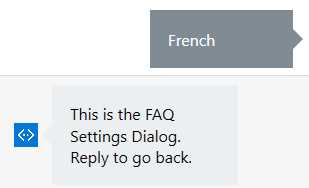
Figure 4-c: The FaqScorable in Action
Awesome—this also worked beautifully. If we now type anything else, like back, we should be back to the main dialog and have QnA services responses available again. Let’s see if this is true.
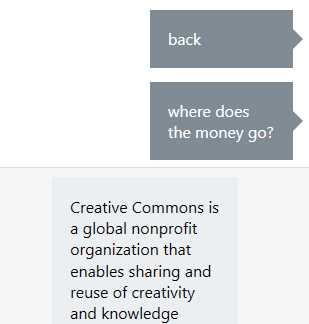
Figure 4-d: The QnA Service Back in Action
This also worked great! We’ve managed to implement a Scorable within our QnA bot, but we still need to hook up the Creative Commons French FAQs and add the corresponding logic so that our bot can trigger this service. This is what we’ll do next.
Implementing another QnA service
Now that we have successfully implemented Scorables in our bot, let’s finish the goal we have set for ourselves. We’ll need to go back to the code we wrote in the FaqSettingsDialog.cs file and make some changes.
Before we make any changes to the code, let’s create a new QnA service for the Creative Commons FAQs in French—we can do this by following the same steps we did in the previous chapter, when we created the CCBot QnA service.
The only difference is that the URL will be https://creativecommons.org/faq/fr/, and we can name our new service CCBotFrench. Once created, don’t forget to publish it—this will publicly expose the service for our code.
With this new QnA service published, let’s add another class to the RootDialog.cs file that will be the entry point to this service.
We can do this by simply cloning the RootDialog class, changing its name, and then putting the subscription key and knowledge base ID of the new QnA service. After doing this, our RootDialog.cs file should look as follows.
Code Listing 4-k: The Updated RootDialog.cs File
using System; using System.Threading.Tasks; using Microsoft.Bot.Builder.Dialogs; using QnAMakerDialog; namespace CCBot.Dialogs { [Serializable] [QnAMakerService("Eng Subscription ID", "Eng KB ID")] public class RootDialog : QnAMakerDialog<object> { public override async Task NoMatchHandler(IDialogContext context, string originalQueryText) { await context.PostAsync( $"No answer for '{originalQueryText}'."); context.Wait(MessageReceived); } [QnAMakerResponseHandler(50)] public async Task LowScoreHandler(IDialogContext context, string originalQueryText, QnAMakerResult result) { await context.PostAsync( $"Found an answer that could help...{result.Answer}."); context.Wait(MessageReceived); } } [Serializable] [QnAMakerService("Fr Subscription ID", "Fr KB ID")] public class FrenchDialog : QnAMakerDialog<object> { public override async Task NoMatchHandler(IDialogContext context, string originalQueryText) { await context.PostAsync( $"No answer for '{originalQueryText}'."); context.Wait(MessageReceived); } [QnAMakerResponseHandler(50)] public async Task LowScoreHandler(IDialogContext context, string originalQueryText, QnAMakerResult result) { await context.PostAsync( $"Found an answer that could help...{result.Answer}."); context.Wait(MessageReceived); } } } |
Don’t forget to replace the respective subscription and knowledge base identifiers for each service.
As you can see, we literally just copied the RootDialog class as is, then renamed it to FrenchDialog—which points to the QnA service we just created for the Creative Commons FAQs in French.
It’s very important to keep in mind that these classes can only be linked to the correct QnA service if the correct subscription and knowledge base identifiers are used—the QnAMakerService attribute decoration is what binds the class to the correct QnA service.
With this done, the only thing remaining is to adapt the FaqSettingsDialog class so that the correct QnA service can be triggered.
Code Listing 4-l: The Updated FaqSettingsDialog.cs File
using Microsoft.Bot.Builder.Dialogs; using Microsoft.Bot.Connector; using System; using System.Threading.Tasks; using CCBot.Dialogs; using System.Threading; public class FaqSettingsDialog : IDialog<object> { public async Task StartAsync(IDialogContext context) { await context.PostAsync( "French FAQ. Type 'english' to go back."); context.Wait(MessageReceived); } private async Task MessageReceived(IDialogContext context, IAwaitable<IMessageActivity> result) { var message = await result; if ((message.Text != null) && (message.Text.Trim().Length > 0)) { if (message.Text.ToLower().Contains("english")) context.Done<object>(null); else { var fDialog = new FrenchDialog(); await context.Forward( fDialog, null, message, CancellationToken.None); } } else { context.Fail(new Exception( "Message was not a string or was an empty string.")); } } } |
So, to recap with the modifications we’ve just made, once the Scorable intercepts the word French, it triggers the execution of FaqSettingsDialog—which will forward the conversation to FrenchDialog if any keyword is provided other than the word English—which returns the execution back to RootDialog.
Running with two QnA services
We’ve reached an important milestone—we’ve managed to implement a bot with a Scorable and two QnA services, so now is the moment of truth. Let’s compile and run it, and see what happens.
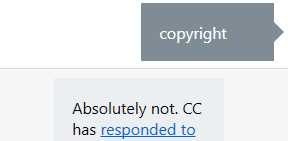
Figure 4-e: The English QnA Service Is Triggered
Here we can see that when we type copyright, the correct English FAQ response is returned. Let’s see what happens when we type French.
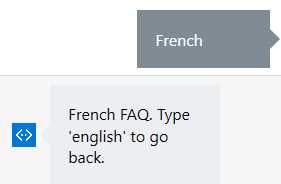
Figure 4-f: The Scorable Is Triggered
We can see that the Scorable has been triggered. Before we test out the QnA service for French FAQs, let’s type in the word English in order to see if we are able to go back to the QnA service for English FAQs.
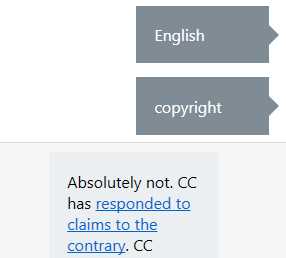
Figure 4-g: The English QnA Service Is Triggered Again
Excellent—everything is working as expected. Now, let’s type in French again to have the Scorable kick in again.
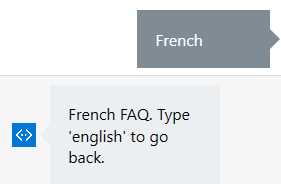
Figure 4-h: The Scorable Is Triggered Again
The Scorable was correctly triggered, as expected. Now let’s type in le logo to see if we get an FAQ result from the French QnA service.
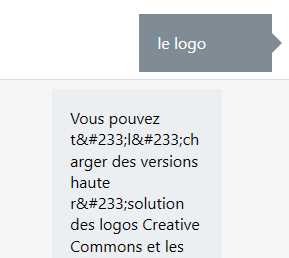
Figure 4-i: The French QnA Service Is Triggered
How wonderful is this!? Our second QnA service that points to the French FAQs was correctly triggered.
But wait, there’s one thing we missed—we can’t go back to the English QnA service unless we restart the emulator, which would be the equivalent of starting a new conversation.
I actually did this on purpose and left it out to give you a small challenge. As you can also see, there’s also a bit of markup removal that needs to be done—so there you go, a nice challenge for you to take forward.
Summary
We’ve come a long way since we started with our first QnA bot example. The goal of this chapter was to demonstrate the power and possibilities of using Scorables, as a way to intercept user requests and redirect them to other dialogs, depending on your business requirements.
Although the example outlined here is rather simple in terms of the business logic behind it, to be able to execute two QnA services instead of simply one, for now it is enough to demonstrate how Scorables can add an extra processing layer to our bot. This gives us the ability to do more things than we could do by sticking with the normal stack execution of dialogs.
In the next chapter, we’ll wrap up by publishing our latest example to Skype and interacting with it there instead of using the emulator.
The full source code for this chapter can be found here.


- 1800+ high-performance UI components.
- Includes popular controls such as Grid, Chart, Scheduler, and more.
- 24x5 unlimited support by developers.