
SharePoint 2013 App Model Succinctly®

CHAPTER 3
The New App Model Architecture Overview
Introduction
In SharePoint, an app is technically a zip file that uses the same format as the Office documents package, except it has the file type extension “.App”.
This package contains a very important file named AppManifest.xml. This file describes our app to SharePoint with a series of metadata including title, version number, the icon, the main page, the permissions that the app should guarantee will work, the prerequisites that must be in terms of SharePoint services, the supported languages, and any external domains to which the app must have the ability to communicate, if necessary.
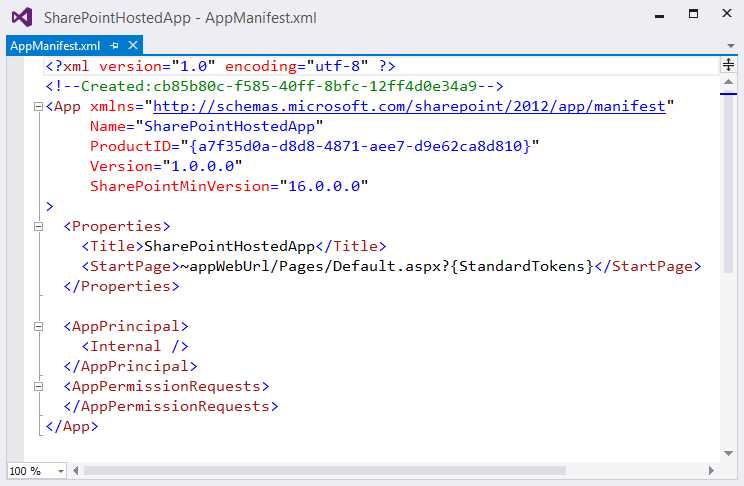
- App manifest
In the following chapters, we'll discuss the importance of the Manifest file in more detail.
In addition to this file, the package may contain other files that need to be deployed, such as list definitions, content types or pages, and resources (as in SharePoint-hosted apps). In order to do this, the app may contain WSPs to deploy these files so that SharePoint uses the same mechanism every time.
This package installation operation, in terms of internal operations to deploy to SharePoint, is completely transparent to the user who installs the app. Figure 8 shows the App Package Structure to give you a better understanding of the concepts I have just explained:

- App package structure
To decide on the type of app architecture you need, you must understand the context in which you are developing. As in any other information system, the requirements will be a core determining factor on the architecture you use; however, the knowledge you have will be fundamental for any assessment analysis.
Hosting
When developing apps for SharePoint, we have to keep in mind the new architecture that Microsoft requires us to use.
We have two different available architectures to create a SharePoint app:
- SharePoint-hosted apps
- Cloud-hosted apps
In the SharePoint-hosted architecture, our application will reside within SharePoint and all resources (including pages) will be hosted in a special, isolated subsite that will be created for each installed instance of our app. But if we can't execute server-side code in SharePoint, how can we create applications that are hosted in SharePoint? Simple: your application logic should be created completely using client-side JavaScript. With this SharePoint-hosted architecture, SharePoint offers only the hosting service and API for us to access the functionality that they offer (but the business logic must first be performed outside of SharePoint, then client-side).
In the second case, when using the cloud-hosted architecture our applications must be hosted in a hosting service external to SharePoint; this can be an IIS site or a private or public cloud, no matter which technology you want to use to create the app. This means that we can use not only .NET but also PHP, Java, Node.js, Python or any technology stack and platform that you want.
Let us remember that we are talking about web applications that you use through a web browser. Even in this case, the application can use a special, isolated subsite hosted by SharePoint in order to read or write information through the API that SharePoint offers.
Until June 30, 2014, cloud-hosted apps were composed of two subcategories: provider-hosted apps and autohosted apps. However, the latter model is considered deprecated and has been removed as a model of development, so we will not cover it in this book.
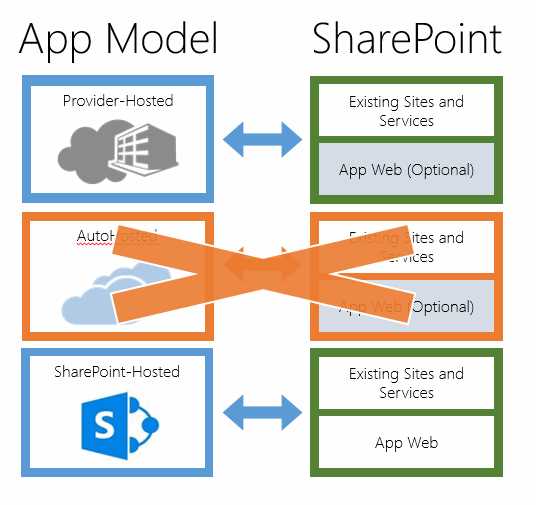
- Different app models
At this point, which model from those available should we choose?
This is the same question we ask when we develop any app. The usual answer is that it depends on the situation. There is no one model that solves all problems. Below is a template that helps to resolve the problems we might have:
Table 1: SharePoint-hosted vs. Cloud-hosted
Requirement | SharePoint-hosted | Cloud-hosted |
|---|---|---|
Use and create new SharePoint artifacts | Yes | Yes |
Use client-side code | Yes | Yes |
Burden of having to manage hosting space | No | Yes |
Use already developed server-side components or do things you can’t do server-side | No | Yes |
Port apps that are already made | Depends | Yes |
Run processes that can take time and high computational resources | No | Yes |
Perform validation on user-submitted data, securely and with certainty | No | Yes |
Automatic management of multitenancy | Yes | No |
With the model of the app we can interact with the artifacts of SharePoint under Security, as we shall see in the next chapters.
The app may access only data to which we have granted permissions.
How can we create new artifacts in SharePoint? It depends. If we are deploying lists, libraries, etc., in declarative mode, these will be available in a special, isolated site called a Web App.
Otherwise, we are forced to use APIs that are provided to us, and must therefore work in imperative mode by writing code that lets us create these artifacts.
Entry Point
When an app is made, the look and feel and how the user can interact with the app itself are very important things to consider.
The SharePoint app model lets you choose different ways to present the interface:
- Immersive Full Page: The interface is implemented as a webpage. It is the default mode and each app requires the presence of at least one Immersive page.
- App Part: Let’s put the GUI of our app, or part of it, in the pages of SharePoint, just as with the web parts. An app part is simply a type of web part that is represented by the ClientWebPart class. This kind of web part is essentially a wrapper for an IFrame that would host a page of the app.
- Extension App: Technically this is nothing more than a Custom Action that lets you share virtually all menus in SharePoint as Ribbon controls, menus on items, etc. on the web host. When users click on the link, they will be redirected to the web app.
These shapes can be used individually or combined, allowing you ability to use the application in the most integrated way possible with the SharePoint site.
App Scoping
In SharePoint, we have two ways to install an app:
- A site administrator installs an app in the site where you want to make available; in this case, it says that the app has a "web scope."
- A tenant administrator installs an app in an App Catalog. In this case, the app will have a “tenant scope."
In SharePoint 2013, a tenant is a grouping of site collections that, in turn, can be categorized as follows:
- SharePoint Online: A set of site collections that belong to a single customer account
- SharePoint Farm: All site collections within a Web application, or a subset of them or a collection you site collection across multiple Web applications within the same Farm.
So how do you decide which scope to give the app?
The choice of level of scope is not made during the development of the app itself but, rather, it is chosen during installation of the app in your system.
Web Scope
When installing an app with this type of scope, SharePoint creates a new subsite called an app web, but only if your app requires it. The app is able to make available the app parts and Custom Actions that you create, in the site where it is installed (web host).
Tenant Scope
In this case, only a tenant administrator can install an app with this scope and it must do so in a previously configured special site called an App Catalog. Once this is done, the administrator may decide to deploy the app on all sites that are part of the same tenants, or on one site, or on a subset of the available sites.The tenant admin can specify on which websites the app is installed by using a list of managed paths, a list of site templates, or a list of site collections. An app that has been batch-installed can only be uninstalled by a tenant administrator. When the tenant administrator uninstalls the app, it is uninstalled from every website in the tenancy. Users cannot uninstall a batch-installed app on a website-by-website basis.
An important note regarding this operation is that when updating a batch-installed app, only a tenant administrator has permission to do it, and it is batch-updated on all websites in the tenancy where it is installed.
If an app that includes an app web is batch-installed, only one app web is created and it is shared by all the host websites on which the app is installed. The app web is located in the site collection of the organization's app catalog. When new site collections are created in the tenancy, apps that were previously batch-installed are automatically installed on the new site collection.
You also need to keep in mind something regarding the app web. In this case, you will create a single "app web" App Catalog level. This means that any data saved in this special subsite will be shared between all sites where the app was installed. You can learn more about the app web in the next section.
Web Scope vs. Tenant Scope
Table 2: Scope comparison
Scenario | Web Scope | Tenant Scope |
Share the same data, independently from the site you are working on | No | Yes |
App must be installed on a very large number of sites | No | Yes |
App must have different data for each installation | Yes | No |
Make available the app parts and Custom Actions on the site on which it is installed | Yes | No |
App Web
We understand what the app web is and where it is created according to the scope that the app has. Because it is a SharePoint site it will have a URL, but it won’t be a normal URL.
The URL’s main function is completely isolated, even at the domain level: the app.
Its composition is as follows:
http://[TENANTS]-[APPID].[DOMAIN]/[APPNAME]
Where:
- TENANTS: The tenant name configured in SharePoint
- APPID: The unique identifier that is generated for each instance of the app
- DOMAIN: The domain name of SharePoint
- APPNAME: The name of the App (the value that is contained in the App Manifest file)
An example would be the following:
https://sp2013appdevsuccinctly-8235ceb59053d4.sharepoint.com/SharePointApp1
Where:
- sp2013appdevsuccinctly is the TENANT
- 8235ceb59053d4 is the APPID
- sharepoint.com is the DOMAIN name (in this case, it comes to Office 365)
- SharePointApp1 is the APPNAME
This app was installed on the site with the address:
https://sp2013appdevsuccinctly.sharepoint.com
This illustrates the difference between the two URLs. Although, remember, this is a subsite app web (SPWeb) site where the app was installed.
As we said a moment ago, the main purpose is to completely isolate the app. So, for example, you can delete the classic XSS issues. But another purpose is to enforce the permissions so that the code that will connect to the site will be isolated from the point of view of authorizations.
Summary
In this chapter, we learned about the architectural layout of the new model. We now understand three fundamental factors in the design and implementation of a SharePoint app: the hosting model, the kind of graphical interface will have in our app, and its scope.


- 1800+ high-performance UI components.
- Includes popular controls such as Grid, Chart, Scheduler, and more.
- 24x5 unlimited support by developers.