
SharePoint 2013 App Model Succinctly®

CHAPTER 6
Security Model Overview
Claim-Based Authentication
With SharePoint 2013, the default authentication mode is the claim-based authentication mode, which has been present, but optional, since SharePoint 2010. The classic authentication mode has been deprecated.
With the introduction of claim-based authentication, you can support several authentication and authorization scenarios, such as app requirements, all thanks to the presence of a Security Token Service (STS).
In claim-based authentication, by default, the authentication provider generates a security token that contains a set of claims that describe the user’s authentication, and when a user logs on to a website, the user's token is validated and then used to access SharePoint. The user's token is a secure token issued by an identity provider.
All of this is also possible by using a protocol called OAuth.
OAuth in SharePoint
OAuth is an open protocol for authorization. OAuth enables secure authorization from desktop and web apps in a simple and standard way. OAuth enables users to approve an app to act on their behalf without sharing their user name and password.
For example, it enables users to share their private resources or data (contact list, documents, photos, videos, and so on) that are stored on one site with another site, without users having to provide their credentials (typically, user name and password).
OAuth enables users to authorize the service provider (in this case, SharePoint 2013) to provide tokens instead of credentials (for example, user name and password) to their data that is hosted by a given service provider (that is, SharePoint 2013).
Each token grants access to a specific site (for example, a SharePoint document repository) for specific resources (such as documents from a folder) and for a defined duration, say 30 minutes. This enables a user to grant a third-party site access to information that is stored with another service provider (in this case, SharePoint), without sharing their user name and password, and without sharing all the data that they have on SharePoint.
The OAuth protocol is used to authenticate and authorize apps and services. The OAuth protocol is used:
- To authorize requests by an app for SharePoint to access SharePoint resources on behalf of a user.
- To authenticate apps in the Office Store, an app catalog, or a developer tenant.
If the apps and services that you build for SharePoint 2013 do not require the previous authentication approach, you do not have to use the OAuth protocol when you create your apps and services.
If you plan to build an app for SharePoint that runs in a remote web app and communicates back to SharePoint 2013, you will need to use OAuth.
App Authentication
In SharePoint 2013, a typical app for SharePoint usage scenario is as follows:

- SharePoint authentication flow
- User connects to the SharePoint site. SharePoint authenticates the user and creates a Security Assertion Markup Language (SAML) token which contains information about the user’s identity.
- SharePoint queries its application management database using the App ID and determines whether the app is external or not. If the app is external and has a registered app principal, SharePoint calls the Access Control System (ACS) to create a context token that passes information about the app and about the current user.
- The ACS creates a context token which contains information about the app principal and about the user. The context token also contains a refresh token, which is used by the client app. Also note that certain aspects of the context token are signed by ACS using the app secret and can only be prepared by the client app, which also has a copy of the app secret.
- SharePoint returns a page to the browser which contains a launcher (e.g., a clickable tile) allowing the user to redirect from the SharePoint site to the client app.
- When the user clicks on the launcher, JavaScript behind the launcher issues an HTTP POST request to redirect the user to the client app. The body of this HTTP POST request contains the context token as a named form parameter.
- The client app reads the context token and exacts the refresh token from inside. The client app passes the refresh token to the ACS in a request to create an OAuth token. Part of the message to ACS is signed with the app secret.
- ACS uses the app secret to authenticate the client app request. If authentication succeeds, ACS creates an OAuth token and returns it back to the client app.
- The client app uses the OAuth token to make CSOM calls and REST calls into SharePoint.
- SharePoint authenticates the client app and makes sure it has the proper permissions to ensure it is authorized to do whatever it is attempting to do. If the call is authenticated and authorized, SharePoint performs whatever work is requested by the CSOM and/or REST calls, and then returns any information requested back to the client app.
- The client app returns a page back to the user which contains HTML-generated form data returned by CSOM and REST calls into SharePoint.
App Authorization
The authorization process verifies that an authenticated subject (an app or a user the app is acting on behalf of) has permission to perform certain operations or to access specific resources (for example, a list or a SharePoint document folder).
SharePoint 2013 provides three types of authorization policies. The authenticated identities on the call determine which authorization policy is used.
The authenticated identities can be:
- User identity only
- User and app identities
- App identity only
The authorization policy can be:
- User-only policy
- User+app policy
- App-only policy
For example, if the user+app policy is used, both the app and the user the app is acting on behalf of must have permissions to the resources being accessed. In the case of app-only policies, the access check only goes against the app's rights. In Figure 25, you can analyze the security flow that the SharePoint Engine uses for user authentication.

- Security flow
The permissions that the app must have in order to work are defined within the AppManifest.xml file and are defined by three values:
- Scope: Identifies the resource for which you want to set the permission.
- Permission: Indicates the permission that you want to set.
- Properties: Identifies additional properties needed to determine which resource the permission will be applied to (not always necessary).
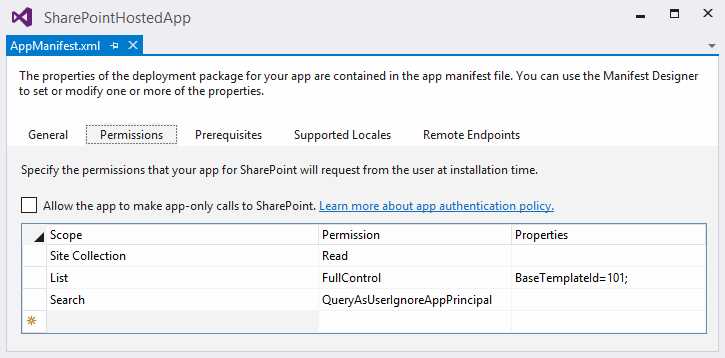
- Set permissions on AppManifest.xml using Designer
Here are the same permissions in XML format:
<AppPermissionRequests> <AppPermissionRequest Scope="http://sharepoint/content/sitecollection" Right="Read" /> <AppPermissionRequest Scope="http://sharepoint/content/sitecollection/web/list" Right="FullControl"> <Property Name="BaseTemplateId" Value="101"/> </AppPermissionRequest> <AppPermissionRequest Scope="http://sharepoint/search" Right="QueryAsUserIgnoreAppPrincipal" /> </AppPermissionRequests> |
But how do permissions work? Take a look at Figure 27.
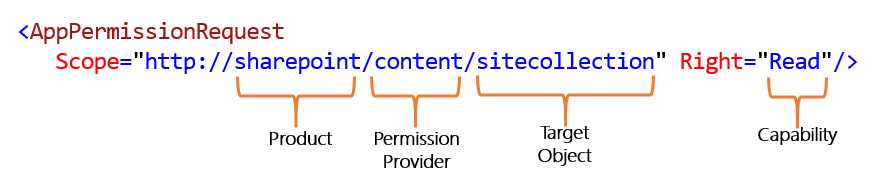
- AppPermissionRequest
An app permission request contains a scope attribute and a right attribute. The scope attribute contains a string that includes the following pieces of information:
- Product: For example, SharePoint vs. Exchange vs. Lync
- Permission Provider: This is the request for permissions to content or a specific service, such as search or user profiles.
- Target object: An object where a grant is requested, such as a tenancy, site collection, site, or list.
The right attribute defines the type of permission being requested. SharePoint standardizes four basic rights: Read, Write, Manage and FullControl.However, some permission types, such as search permissions, use specialized permissions like QueryAsUserIgnoreAppPrincipal.
The flag on the page allows you to choose which type of permits the app must have:
- User+app policy: When the user+app policy is used, the authorization checks take into account both the user identity and the app identity. In particular, when this policy is used, authorization checks succeed only if both the current user and the app have sufficient permissions to perform the action in question.
- App-only policy: When the app-only policy is used, the content database authorization checks take into account only the app identity. In particular, when this policy is used, an authorization check succeeds only if the current app has sufficient permissions to perform the action in question regardless of the permissions of the current user (if any).
Summary
In this chapter, we learned about authentication and authorization in SharePoint 2013. We have also learned about app permissions; it’s very important to be able to access the code of the app with resources that SharePoint offers through the CSOM or REST API.


- 1800+ high-performance UI components.
- Includes popular controls such as Grid, Chart, Scheduler, and more.
- 24x5 unlimited support by developers.