
SharePoint 2013 App Model Succinctly®

CHAPTER 5
Provider-hosted Apps
A provider-hosted app for SharePoint is a type of app that provides the ability to execute server-side code but not within SharePoint. It is, therefore, necessary to host the web application that is part of the app using an application server such as Internet Information Servies (IIS) or any other according to the technology used. This is because we are no longer forced to use .NET for the web part and, therefore, are free to use any language or platform we want.
The Project
At this point, Visual Studio asks us to enter information (which will be modified later) that includes the name of the app, the site on which we want to perform debugging, and the type of app we want to create. In this case, choose “provider-hosted” as shown in Figure 19:

- Choice of host type
In this screen, Visual Studio allows us to choose the type of web project we want to use for the creation of our app. We can choose ASP.NET Web Forms or ASP.NET MVC:

- Choice of web application project type
Here, we need to specify the way our app will authenticate to SharePoint using SharePoint Online. Our choice is either the Access Control Service (ACS) of Azure or we can set up a digital certificate.

- Choice of app authentication type
Once you click Finish, the solution is presented with two projects. The first is the real project for SharePoint apps, the second is the web project that contains the code of our app.
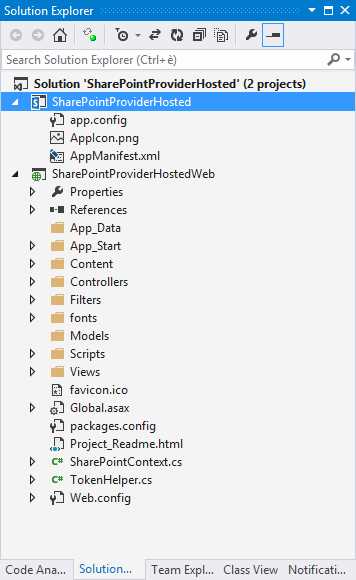
- Solution Explorer
This web project, an ASP.NET MVC type, contains some interesting files.
The first file is the SharePointContext.cs file that allows us to create a new ClientContext for use in CSOM, starting from the current http context.
The second is the TokenHelper.cs file, which is used internally by the SharePointContext class and to initiate a mechanism to obtain an Access Token valid for requests under the OAuth authentication.
Inside the HomeController controller, we can see how it uses this mechanism in order to have a valid ClientContext and make a call to SharePoint using the CSOM Managed.
var spContext = SharePointContextProvider.Current .GetSharePointContext(HttpContext); using (var clientContext = spContext.CreateUserClientContextForSPHost()) { if (clientContext != null) { // CSOM Code here } } |
The SharePointContext class has several methods already made in order to create different ClientContext based on the scope of use:
- CreateUserClientContextForSPHost
- CreateUserClientContextForSPapp web
- CreateAppOnlyClientContextForSPHost
- CreateAppOnlyClientContextForSPapp web
These would create contexts to connect to the app web or HostWeb, either using only the credentials of the App or combined with user credentials, making it very easy to use.
App Manifest
With regard to the AppManifest, there aren't any major changes compared to what has been said for SharePoint-hosted apps. As you can see, the difference is the type of hosting, which is set to provider-hosted. However, everything else is the same as described in the App Manifest section of Chapter 4.
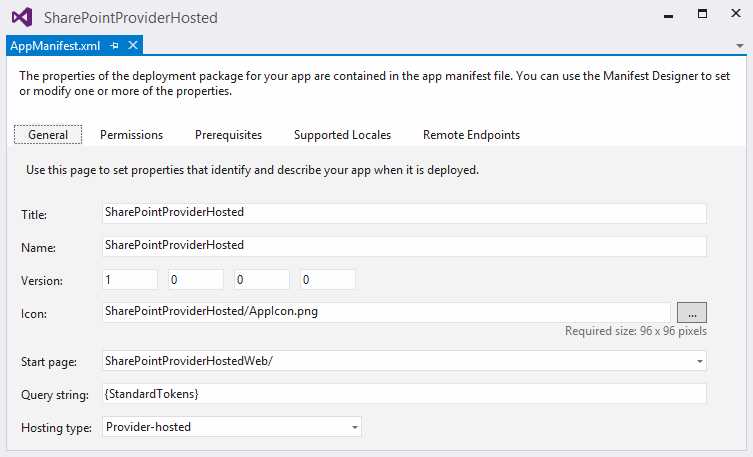
- General tab
In XML view, we can see how the Start Page is identified:
<Properties> <Title>SharePointProviderHosted</Title> <StartPage>~remoteAppUrl/?{StandardTokens}</StartPage> </Properties> |
The value of ~remoteAppUrl will be replaced with the domain name where the app will be hosted, this being the published app.
Summary
In this chapter, we learned how to create a provider-hosted app as well as how it is structured. We chose to create an ASP.NET MVC web project, but you can also create one using ASP.NET Web Forms.
Visual Studio provides these two templates for the web project but you can use any web development framework you want.


- 1800+ high-performance UI components.
- Includes popular controls such as Grid, Chart, Scheduler, and more.
- 24x5 unlimited support by developers.