
ServiceStack Succinctly®

CHAPTER 1
ServiceStack Overview
What is ServiceStack?
ServiceStack is an open-source, Microsoft .NET and Mono REST web services framework and an alternative to the WCF, ASP.NET MVC, and ASP.NET Web API frameworks. ServiceStack is particularly suitable for the development of REST web services.
Authors of ServiceStack define it as:
“Thoughtfully architected, obscenely fast, thoroughly enjoyable web services for all.”
And I agree.
In a nutshell, ServiceStack supports the following features:
- REST and SOAP endpoints.
- Autoconfiguration of data formats including XML, JSON, HTML, CSV, and JSV.
- Plain-old CLR objects (POCO) as input and output objects.
- Validation and smart fluent syntax.
- Inversion of Control (IoC) container.
- Object-Relational Mapping (ORM).
- Caching mechanism (Memcached and Redis supported).
- Logging framework.
- Self-contained—no external libraries needed.
We will take a look at most of these features in the following chapters.
Why Should You Consider Using ServiceStack?
If you are not already impressed with the list of features that ServiceStack supports, the following list contains a few points on why you should use ServiceStack in your next project:
- Extremely fast: Based on the benchmarks at http://www.servicestack.net/benchmarks, ServiceStack excels when it comes to the real-world speed of object (de)serialization.
- Simplicity: Defining endpoints, hosting, routing, and configuration are simpler compared to WCF or ASP.NET Web API.
- Coherence: It follows the same philosophy across different styles of services, REST or SOAP.
- Clean configuration: No XML configuration files and no code-generated proxies.
ServiceStack Components
ServiceStack is made up of a number of independent modules (see Figure 1) which can be used separately in projects without using the ServiceStack framework itself.
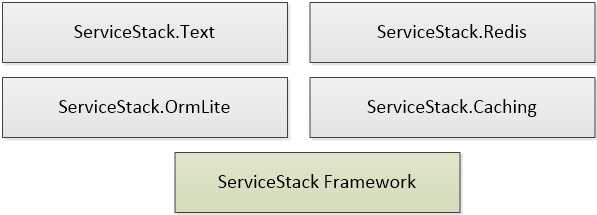
- ServiceStack components
ServiceStack.Text
ServiceStack.Text is an independent, dependency-free serialization library that is used by ServiceStack internally to do any text processing. ServiceStack.Text contains a large number of features, and some of the most important ones are:
- JSON serialization and deserialization through JsonSerializer.
- JSV format serialization and deserialization through TypeSerializer.
- CSV format serialization and deserialization through CsvSerializer.
- StringExtensions for XML, JSON, CSV, and URL encoding, BaseConvert, Rot13, Hex escape, etc.
- Supports custom builds for .NET 3.5+, Mono, MonoTouch and MonoDroid, Silverlight 4 and 5, Xbox, and Windows Phone 7.
If you were to use ServiceStack.Text in your project and needed the JSON serializer, the following code example shows how to do so.
TypeSerializer
TypeSerializer is one of the fastest and most compact text serializers available for .NET. Out of all the serializers benchmarked, it is the only one to remain competitive with protobuf-net's very fast implementation of Protocol Buffers, Google’s high-speed binary protocol. [2]
TypeSerializer uses a hybrid CSV and JavaScript-like, text-based format that is optimized for both size and speed. Authors have called this format JSV, which is a combination of JSON and CSV.
Source code for TypeSerializer can be downloaded at https://github.com/ServiceStack/ServiceStack.Text, or the package can be directly installed by using NuGet with the following command:
PM> Install-Package ServiceStack.Text |
ServiceStack.Redis
ServiceStack.Redis is an open-source client for the Redis (http://www.redis.io) in-memory database. ServiceStack.Redis simplifies interfacing with Redis significantly and, as mentioned earlier, is built on ServiceStack but can be used separately.
Note: Redis is an open source, Berkeley Software Distribution (BSD) licensed, advanced key-value store. It is often referred to as a data structure server since keys can contain strings, hashes, lists, sets, and sorted sets. In order to achieve its outstanding
Source code for Redis can be downloaded from https://github.com/ServiceStack/ServiceStack.Redis, or the package can be directly installed by using NuGet with the following command:
PM> Install-Package ServiceStack.Redis |
ServiceStack.OrmLite
ServiceStack includes its own ORM library, which is a convention-based, configuration-free, lightweight ORM that uses standard plain-old CLR object (POCO) classes and data annotation attributes to infer its table schema.
ServiceStack.OrmLite currently supports several relational databases: Microsoft SQL Server, MySQL, PostgreSQL, Oracle, Firebird, SQLite32, SQLite64, and SQLite.Mono. ServiceStack.OrmLite is compatible with both Microsoft .NET and Mono.
Source code for ServiceStack.OrmLite can be downloaded from https://github.com/ServiceStack/ServiceStack.OrmLite. Alternatively, packages can be directly installed by using NuGet with the following commands.
Microsoft SQL Server provider:
PM> Install-Package ServiceStack.OrmLite.SqlServer |
Oracle provider:
PM> Install-Package ServiceStack.OrmLite.Oracle |
ServiceStack.Caching
ServiceStack provides ICacheClient, a unified caching interface, for a number of different cache providers:
- In Memory: Uses RAM as the caching mechanism.
- Redis: An open-source, BSD-licensed, advanced key-value store.
- Memcached: An interface to Memcached, which is a high-performance, distributed memory, object-caching system intended for use in speeding up dynamic web applications by alleviating database load.
- Azure Client: Used to interface with Microsoft Azure AppFabric Caching.
- AWS Cache Client: Used to interface with Amazon's DynamoDB back-end hosted on Amazon Web Services.
- Disk: Writes on the hard disk.
ServiceStack Philosophy
ServiceStack is influenced by Martin Fowler’s Data Transfer Object pattern[3] (DTO) and promotes message based communication. This pattern simplifies manipulation of request and response data, and enables decoupling of message structures from domain layer entities.
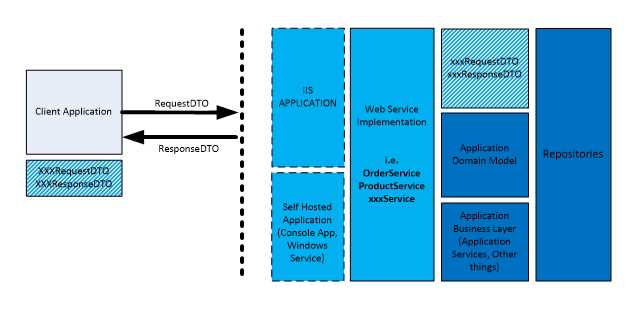
- Data transfer objects
Exposing DTOs, and not the application domain model, gives the freedom to refactor internal implementation of the service without breaking external clients and keeps a clean interface.
By definition, a ServiceStack web service will have, at minimum, the following:
- Basic web service components
Class | Description |
|---|---|
Request DTO object | The input of a service method. It represents the action to be performed. Usually the name of the class contains a verb (e.g., GetOrderRequest, DeleteItem). |
Service | Implements the internal logic and acts as a “controller”. Usually has some or all of the following HTTP verbs implemented: GET, POST, PUT, DELETE, PATCH, OPTIONS, HEAD, or Any(),which represents all of them. |
Response DTO object | Represents the result of an action. Usually the data returned should be named with a noun (e.g., MoviesResponse, Orders, ProductResponse). |
Request and Response Pipeline
ServiceStack is built on top of the ASP.NET System.Web.IHttpHandler interface. Fortunately, the new implementation has reduced complexity (compared to WCF configuration) and introduces POCO objects in almost every aspect of the framework itself.
ServiceStack implements a simple framework with which to work and enables a great deal of extensibility to the basic functionality. For instance, you can create Request and Response filters, which can be global or only applied to a service, or you can extend the formatters.
The following figure shows the Request and Response pipeline.
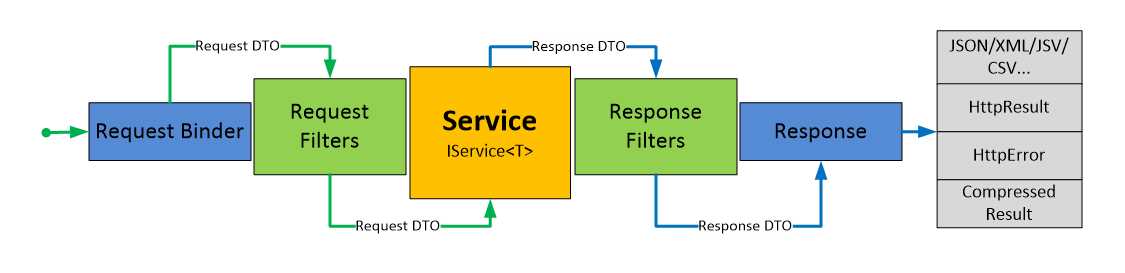
- Request and Response pipeline
Hypermedia as the Engine of Application State (HATEOAS)
REST services, to be considered complete, should implement the HATEOAS[4] constraint. The goal of HATEOAS is that the clients interact with the service entirely through hypermedia (i.e. links) that are provided dynamically (at run time) by the service itself. In a perfect world, the client should not need any prior knowledge about how to interact with the service; the only thing it should need to know is how to follow the links (or, in other words, to understand the hypermedia itself).
Consequently, this principle makes the client and the application loosely coupled, which makes it very different from SOAP-based services where the communication between the client and the server is made through some fixed interfaces.
Certainly this book cannot cover the full HATEOAS implementation, but as we are going to see, we will expose some basic information to enable the hypermedia constraint.


- Flexible data integration with REST-based APIs
- Supports various authentication methods, including basic HTTP and no authentication
- Handles diverse data formats like JSON, CSV, and XML
- Dynamic data retrieval with date parameter filtering