
ServiceStack Succinctly®

CHAPTER 9
Logging
ServiceStack provides a logging framework that exposes the ILog interface and adapters for the major Microsoft .NET logging providers (log4net, NLog, etc.).
By depending on the ILog interface, the web service and the application logic are free from any direct dependency to any external logging library, which then can be injected at run time.
The following NuGet packages are available for download:
- ServiceStack.Logging.NLog
- ServiceStack.Logging.Elmah
- ServiceStack.Logging.Log4Net
- ServiceStack.Logging.Log4Netv129
- ServiceStack.Logging.EventLog
ServiceStack, however, contains some basic logger implementation as shown in the following figure.
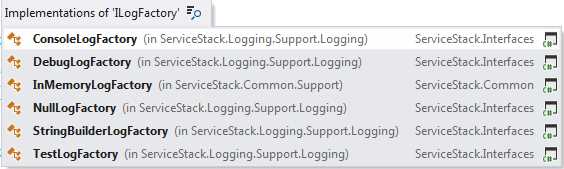
- Built-in logging factories
There are mainly three objects to look into:
- LogManager: The entry point for the logging configuration.
- ILog: Abstracts the provider by offering a generic interface.
- LogFactories: One per provider; instantiates a provider.
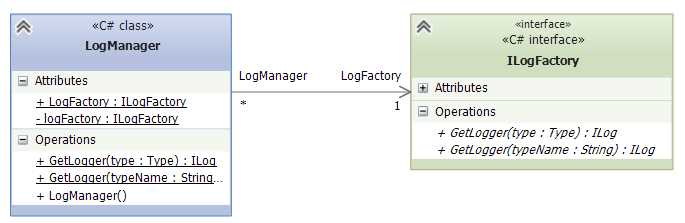
- Log classes
log4net Integration
log4net is probably the most often used logging library in the Microsoft .NET world. Many developers are familiar with its configuration and usage. In this chapter, we will see how to configure and start using the logging feature as well as how to use the log4net provider adapter.
To start using the log4net, the first thing to do is to install a package from NuGet: ServiceStack.Logging.Log4Net.
In the application host configuration, we need to register the fact that we want to use the log4net provider. This is done by creating a new instance of the Log4NetFactory and assigning the object to the LogManager.LogFactory.
public override void Configure(Container container) { LogManager.LogFactory = new Log4NetFactory(true); } |
To get an instance of the logger that we just registered in the application host configuration, we will use the LogManager.GetLogger() method.
public class ProductService : ServiceStack.ServiceInterface.Service { private ILog Logger { get; set; }
public ProductService() { Logger = LogManager.GetLogger(GetType()); }
public ProductResponse Get(GetProduct request) { Logger.Debug("Getting the product");
return new ProductResponse(); } } |
Using the ILog Interface
If you think that instantiating the logger in every service is an overhead, then you can use the dependency injection and inject the logger to the class. In this case, we would need to change the previous example to include the registration of the ILog interface.
public override void Configure(Container container) { LogManager.LogFactory = new Log4NetFactory(true); container.Register<ILog>(LogManager.GetLogger("")); } |
By changing the ILog (logger) property to become public, the IoC container will inject the instance at service creation.
public class ProductService : ServiceStack.ServiceInterface.Service { public ILog Logger { get; set; }
public ProductResponse Get(GetProduct request) { Logger.Debug("Getting the product");
return new ProductResponse(); } } |
RequestLogsFeature Plug-in
In addition to the aforementioned possibility of enabling the logging by exposing the ILog interface, ServiceStack contains a built-in plug-in that enables configurable, in-memory tracking of recent requests and error responses.
To enable the plug-in, we have to register the RequestLogsFeature by adding it to the plug-ins list in the application host.
public override void Configure(Container container) { Plugins.Add(new RequestLogsFeature() { RequiredRoles = new string[]{} }); } |
After starting the application, a new URI http://<servername>/requestlogs will be registered and immediately available for querying.
The plug-in exposes a list of configurable properties that can be changed and that affect what is logged.
Property | Description |
|---|---|
AtRestPath Default value: /requestlogs | The location at which the logging output can be queried. Being a configurable option, one can set a new location (e.g., “/lastrequests”). |
EnableSessionTracking Default value: False | Tracks the information about the current user session. The log will contain the information exposed by the implementor of the IAuthSession mentioned in Chapter 7. |
EnableRequestBodyTracking Default value: False | Enables the tracking of the raw body of the request (as in the request header). |
EnableResponseTracking Default value: False | Enables the tracking of the returned object (result of the service call). |
EnableErrorTracking Default value: True | Enables the tracking of the errors (result of the service call). |
Capacity Default value: 1000 | Defines a maximum number of (latest) requests to be tracked. Being configurable, this can be changed to a higher or lower value as defined in InMemoryRollingRequestLogger. |
RequiredRoles Default value: “Admin” | Contains a list of roles that are allowed to query the URI. Being a collection, multiple roles can be configured. If left empty, everyone will be able to access the URI. |
RequestLogger Default value: Instance of InMemoryRollingRequestLogger | Contains an instance of a system-defined logger that implements the IRequestLogger interface. It is possible to create your own implementation of the IRequestLogger. The system default’s configured logger is InMemoryRollingRequestLogger. |
ExcludeRequestDtoTypes Default value: typeof (RequestLogs) | Contains a list of DTOs for which we don’t want to track the logging. |
HideRequestBodyForRequestDtoTypes Default value: typeof (Auth), typeof (Registration) | Request body of the types specified in the list won’t be tracked. |
InMemoryRollingRequestLogger
InMemoryRollingRequestLogger is a built-in class that implements the IRequestLogger interface (IRequestLogger interface is only used in the RequestLogs plug-in). As its name suggests, the logger implements the tracking and stores the values in memory as RequestLogEntry entries.
The list of RequestLogEntry values is returned in the /requestlog URI. The RequestLogEntry class is defined as follows.
public class RequestLogEntry { public long Id { get; set; } public DateTime DateTime { get; set; } public string HttpMethod { get; set; } public string AbsoluteUri { get; set; } public string PathInfo { get; set; } public string RequestBody { get; set; } public object RequestDto { get; set; } public string UserAuthId { get; set; } public string SessionId { get; set; } public string IpAddress { get; set; } public string ForwardedFor { get; set; } public string Referer { get; set; } public Dictionary<string, string> Headers { get; set; } public Dictionary<string, string> FormData { get; set; } public Dictionary<string, object> Items { get; set; } public object Session { get; set; } public object ResponseDto { get; set; } public object ErrorResponse { get; set; } public TimeSpan RequestDuration { get; set; } } |
And, when displayed in the browser, it looks like the following figure.

- RequestLogs result screen


- Flexible data integration with REST-based APIs
- Supports various authentication methods, including basic HTTP and no authentication
- Handles diverse data formats like JSON, CSV, and XML
- Dynamic data retrieval with date parameter filtering