
ServiceStack Succinctly®

CHAPTER 12
Documenting Web Services
One of the important things to do when exposing RESTful web services is to provide good documentation. There's no real standard (or at least a de facto standard) to expose a REST contract (WADL[31] is an attempt). Many REST APIs expose a human-readable documentation, which, if manually edited, can be hard to keep perfectly synchronized with the API’s current state. An alternative way is to create the documentation from the code itself.
ServiceStack currently supports two ways of documenting web services from the code:
- Metadata page
- Swagger integration[32]
Metadata Page
We have already mentioned that there is a metadata page that is automatically generated by the framework; it includes the main information about the operations and types included in the service.
In order for the metadata page to display the information required, the main source of information is the RouteAttribute. The same applies to the Route definition in the application host as the two offer the same functionality.
RouteAttribute provides five properties that can be set. The following is the public API of the RouteAttribute definition.
public class RouteAttribute : Attribute { public object TypeId { get; set; } public string Path { get; set; } public string Verbs { get; set; } public string Notes { get; set; } public string Summary { get; set; } } |
However, there is support for the new attributes Api, ApiResponse, ApiMember, and ApiAllowableValues which are now available to further enrich the objects. The new attributes will be mainly used when integrated with Swagger but, as we will see, some of them are available in the metadata page too.
Let’s look at an example of Route and Api attributes usage.
Once we run the application in the metadata page, we can see all of the information in the previous code example. As shown in the following figure, all of the information is available.

- Metadata page
At the time of writing, ApiResponse and ApiAllowableValues are not displayed in the metadata page.
ApiResponse allows you to specify the different error response statuses that the service can return. It can be declared several times, once for each error.
The ApiAllowableValues attribute allows you to specify an allowable minimum and maximum numeric range, a list of named values, an Enum of named values, or a custom factory that returns a list of names.
Swagger Integration
The following description of Swagger is taken directly from the company webpage:
“Swagger is a specification and complete framework implementation for describing, producing, consuming, and visualizing RESTful web services.”
ServiceStack has an API that enables integration with the Swagger framework. You can integrate Swagger in a matter of minutes.
- Install the ServiceStack.Api.Swagger NuGet package. This will create a swagger-ui folder where the Swagger JavaScript and HTML page is stored. Additionally, this will create two new services: /resources and /resource/name*. These two services are the data source for the Swagger UI.
- Configure the application host by adding the SwaggerFeature.
Plugins.Add(new SwaggerFeature()); |
- Configure the index.html page in the swagger-ui folder by changing the discoveryUrl value to "../resources".
<script type="text/javascript"> $(function () { window.swaggerUi = new SwaggerUi({ discoveryUrl:"../resources", |
- Run the application. In the browser, navigate to /swagger-ui/index.html. As shown in the following figure, Swagger will give you a great deal of information about your API.
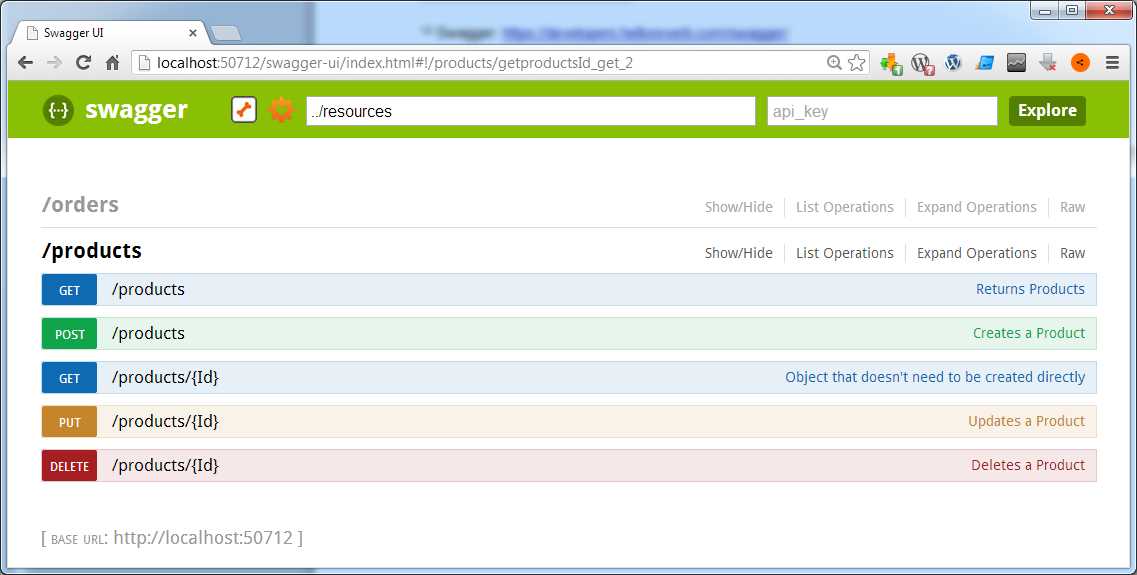
- Swagger interface
We can see that all of the information provided through the Api attributes is visible.

- Swagger getting products with parameters
[3] For more information about the DTO pattern, please read Martin Fowler’s article: http://martinfowler.com/eaaCatalog/dataTransferObject.html.


- Flexible data integration with REST-based APIs
- Supports various authentication methods, including basic HTTP and no authentication
- Handles diverse data formats like JSON, CSV, and XML
- Dynamic data retrieval with date parameter filtering