
ServiceStack Succinctly®

CHAPTER 8
Caching
In Chapter 1, we briefly mentioned that ServiceStack contains built-in support for server-side caching.
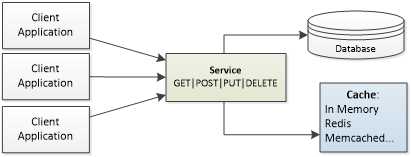
- Caching in ServiceStack
ServiceStack provides ICacheClient, a clean caching interface, for a number of different cache providers:
- In Memory: Uses RAM as the caching mechanism.
- Redis: An open-source, BSD-licensed, advanced key-value store.[28]
- Memcached: A high-performance, distributed memory, object-caching system intended for use in speeding up dynamic web applications by alleviating database load.[29]
- Azure Client: Used to interface with Microsoft Azure.
- AWS Cache Client: Used to interface with Amazon's DynamoDB back end hosted on Amazon Web Services.
- Disk: Writes to the hard disk.
Which cache provider you use depends mainly on the needs of your application.
MemCached, Azure, or AwsDynamoDb providers need to be installed separately through NuGet.

- NuGet caching providers
Configuring Caching
The ICacheClient interface is the starting point for all of the supported caching options as it defines the basic interface that every cache provider has to implement.
To start using the caching mechanism, it is as simple as registering the provider in the application host. Once registered, an instance of the ICacheClient will be injected to the service at run time, and will be available as a Cache property, which is part of the ServiceBase class.
The following example shows how to configure the various providers in the application host.
public override void Configure(Container container) { //MemoryCacheClient container.Register<ICacheClient>(new MemoryCacheClient());
//Redis container.Register<IRedisClientsManager> (c => new PooledRedisClientManager("<redis_address_here>")); container.Register (c => c.Resolve<IRedisClientsManager>().GetCacheClient()) .ReusedWithin(ReuseScope.None);
//MemCached container.Register<ICacheClient> (new MemcachedClientCache(new[] {"<memcached_host>"}));
//Azure container.Register<ICacheClient>(new AzureCacheClient("CacheName"));
//AWS DynamoDB container.Register<ICacheClient>(new DynamoDbCacheClient(...)) } |
Response Caching
To demonstrate how to use caching, we will reuse our ProductService. One important thing to note here is that the cache will contain the full response rather than the Response DTO itself.
In order to support this scenario, we have to change the output of the method to object instead of the existing ProductResponse. We should know two things about caching:
- Cache is basically a dictionary and it needs a unique key to identify a cached object. The key is a string and it can be generated by the UrnId helper class.
- RequestContext.ToOptimizedResultUsingCache is the method responsible for returning data from the cache.
The following code example contains the modified Get() method. The highlighted code will be executed in case nothing is found in the cache with the given key (this always happens the first time a particular item is requested from the cache) and, for all the subsequent calls, it will be ignored.
public object Get(GetProduct request) { var key = UrnId.Create<GetProduct>(request.Id.ToString());
var cachedProduct = RequestContext.ToOptimizedResultUsingCache(this.Cache, key, () => { var product = ProductRepository.GetById(request.Id); if (product == null) { Response.StatusCode = (int) HttpStatusCode.NotFound; return default(ProductResponse); } return ProductMapper.ToProductResponse(product); }); return cachedProduct; } |
Caching with Time Expiration
The basic caching method works fine for static objects that we know won’t change over a long period of time. But for items that can change, there is an overload of the method that supports time expiration through a TimeSpan, which defines a period after which the cached item will be automatically deleted and therefore refreshed in the next call.
RequestContext.ToOptimizedResultUsingCache(this.Cache, key, new TimeSpan(0,1,0), () => { //… } |
Cached Items Removal
However, the time expiration method still doesn’t ensure that the object returned from the cache is actually the latest version stored in the repository. The object can, theoretically, be updated (changed) during the time frame when the object is supposed to be in the cache.
The way to fix this is to manually ensure that the object is refreshed in the cache in case the object is changed. One possible way of doing this would be to change the Put() (update) method to remove the changed objects from the cache.
public ProductResponse Put(UpdateProduct request) { var key = UrnId.Create<GetProduct>(request.Id.ToString()); base.RequestContext.RemoveFromCache(base.Cache, key); } |


- Flexible data integration with REST-based APIs
- Supports various authentication methods, including basic HTTP and no authentication
- Handles diverse data formats like JSON, CSV, and XML
- Dynamic data retrieval with date parameter filtering