
ScriptDOM Succinctly®

CHAPTER 3
Tokens
The abstract syntax tree returned by the parser call contains a list of statements from the SQL code. In this chapter, we will explore the script and statement objects and the information they contain.
TSqlScript class
The tree object returned from the Parse method is a type TSqlScript. The following properties are defined for the class:
Batches property
If more than one script appears (separated by the GO command), each script will have its own TSqlBatch object. Table 1 shows the properties of the TSqlBatch class.
Table 1: TSqlBatch class
Property | Type | Description |
|---|---|---|
FirstTokenIndex | Int | First element # in the list of tokens found in the script |
FragmentLength | Int | Length of the text from the script |
LastTokenIndex | Int | The last element # in the list of tokens |
ScriptTokenStream | List | Collection of parser tokens |
StartColumn | Int | Column position in the source file |
StartLine | Int | Line in the source file |
StartOffset | Int | Offset (byte #) in the original source file |
Statements | List | List of statement types (Create procedure, select, etc.) |
The Statements list will contain a variety of different statements. This will be a nested tree of the type of SQL statements it finds. We will explore this in detail in Chapter 4.
Position properties
The StartOffset and FragmentLength integer properties provide the offset and size in the script of the specific element. The StartLine and StartColumn integer properties provide similar information for the line and column number in the script.
Token properties
The FirstTokenIndex and LastTokenIndex integer properties provide the starting and ending element numbers in the ScriptTokenStream collection. The ScriptTokenStream property is a list of TSqlParserToken objects derived from the script.
TSqlParserToken class
The ScriptTokenStream list contains a collection of all parser tokens found in the script. Each element is a TSqlParserToken object, which contains the properties listed in Table 2.
Table 2: TSqlParserToken properties
Property | Type | Description |
|---|---|---|
Column | Int | Column position in the source file |
Line | Int | Line in the source file |
Offset | Int | Offset (byte #) in the original source file |
Text | String | Text content of the token |
TokenType | TSql Token Type | Enumerated token type; for example: · Single line comment · White space, text contains space, CR, LF, etc. · Identifier (schema, procedure name, etc.) · Variable: a variable or parameter · Declare: declare variable statement · Various statements and fragments: o SELECT, FROM, WHERE, etc. |
The list of tokens is arranged as found in the script. There is no implied relationship between the list; it is simply a sequential list of the tokens from the code. You can see the complete list of token types at TSqlTokenType Enum.
Using tokens
Although you could process the token list for individual code snippets, the statements and visitor pattern (see later chapters) are better options for processing code statements. Tokens can be used for aggregate data about the code, such as the number of variables or the percentage of comments.
God procedures
A God procedure (or code) is a routine that is generally doing too much. In programming, it is usually better to write small code modules rather than a single monolithic code component. Smaller modules are easier to debug and much more likely to be reusable. We might want to see a couple of things to check for to determine if our procedure might be too big. How big is it? How many tables?
Listing 12 shows a sample stored procedure to compute payroll. We are going to use the token list to look for certain parameters that might suggest a code review is needed.
Code Listing 12: Compute payroll
-- Chap 3 Sample procedure /* Purpose: Compute payroll amount, update employee records, email data file to vendor, process result from vendor Date: 02-FEB-2021 */ CREATE PROCEDURE dbo.ComputeEntirePayroll(@PayrollDate date) AS BEGIN DECLARE @15DaysAgo Date = DATEADD(day,-15,@payrollDate ) DECLARE @PayAmount MONEY;
SELECT em.Id,em.HourlyRate*ts.HoursWorked as PayAmount,em.SSN INTO #tmpPayroll FROM employeeMaster em JOIN timesheets ts on ts.employeeId = em.id WHERE ts.workdate between @15DaysAgo and @payrollDate
-- Flag timesheet as processed UPDATE timesheets SET payDate =@payrollDate WHERE workdate between @15DaysAgo and @payrollDate
-- Update employee and send payroll data to vendor DECLARE payCursor CURSOR FOR SELECT * FROM #tmpPayroll;
OPEN payCursor -- Code to use cursor... CLOSE payCursor DEALLOCATE payCursor END |
You could visually look at the code and probably decide whether to review it or not, but with a large number of procedures, it could be helpful to have some automated ways to suggest which ones to review.
Tip: For a quick test, see if you can determine the bug that causes people to be overpaid. See Chapter 18 if you want the answer.
Analyzing the code
We are going to take our tree (returned from the Parse method) and compute some summary values about the code.
Code Listing 13: Create the token list
// Ask ScriptDOM to parse it TSqlScript tree = (TSqlScript)parser.Parse(rdr, out errors); |
Once we have the tree object, we can use LINQ (Language Integrated Query) to collect some statistics about the code. Listing 14 illustrates some queries.
Code Listing 14: LINQ to get info
// Gather information about the code var sm = tree.ScriptTokenStream; int numberComments = sm.Count((cc) => cc.TokenType == TSqlTokenType.SingleLineComment || cc.TokenType == TSqlTokenType.MultilineComment); int numberSelect = sm.Count((cc) => cc.TokenType == TSqlTokenType.Select); bool anyCursors = sm.Any((cc) => cc.TokenType == TSqlTokenType.Cursor); // Since the table is an identifier (which can be multiple items), // we simply count FROM and JOIN to get table references) int numberTables = sm.Count((cc) => cc.TokenType == TSqlTokenType.From || cc.TokenType == TSqlTokenType.Join); // Compute percent of comments over entire script length double commentsRatio = sm.Where((cc) => cc.TokenType == TSqlTokenType.SingleLineComment || cc.TokenType == TSqlTokenType.MultilineComment).Sum((cc) => cc.Text.Length) * 1.0 / tree.FragmentLength; // Number of statements that manipulate data int numberUpdateStatements = sm.Count((cc) => cc.TokenType == TSqlTokenType.Insert || cc.TokenType == TSqlTokenType.Delete || cc.TokenType == TSqlTokenType.Update); |
Note: You can download the LINQ Succinctly ebook by Jason Roberts from the Syncfusion website if you want to learn more about LINQ.
With these values, we can now make a quick decision about whether we should review the code. Figure 5 shows sample console output from the analysis of the stored procedure.
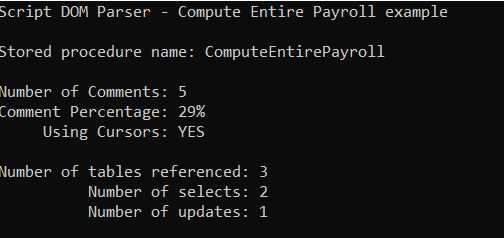
Figure 5: Stored proc analysis
You can use the various values to determine if the procedure might be too large or needs a review. In this example, issues like cursors, multiple select statements, and low comment percentage might suggest a code review.
Summary
The Parse method provides both a sequential list of tokens (Script Token Stream) and a list of statements (Statements property in the batches). Tokens in a list collection can be very useful for getting basic information about the code, such as how big it is and how many comments it has.
You can write code to explore the statements collection as part of any script analysis (see Chapter 4), and the visitor pattern (Chapter 5), which makes processing individual statements easier.


- 1800+ high-performance UI components.
- Includes popular controls such as Grid, Chart, Scheduler, and more.
- 24x5 unlimited support by developers.