
ScriptDOM Succinctly®

CHAPTER 4
Statements
The Statements property is a nested collection of the various statements within the script. Each statement type will have its own set of properties applicable to that statement. Looking at the batches collection from our example code in Chapter 3, we will find a property called statements, which is a collection of all statements. A statement is a SQL command or the content of a BEGIN…END block. In our example, our first statement is the Create Procedure statement.
Stored procedure
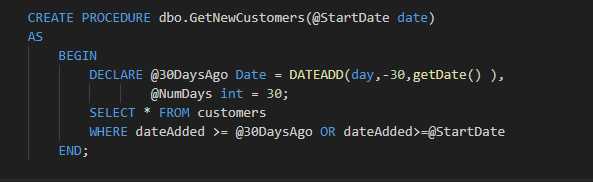
Figure 6: Simple stored proc
Create procedure statement
Some of the properties of the CreateProcedure statement are shown in Table 3.
Table 3: CreateProcedure statement class
Property | Type | Description |
|---|---|---|
Parameters | List | An array of parameter objects from the statement |
ProcedureReference | Procedure reference object | This object has details of the procedure, including a name, and the identifiers (schema and name) |
IsForReplication | Boolean | The Replication option value |
StatementList | List | A collection of child statement objects |
The CreateProcedure statement contains detailed information, but also a list of the statements within the block (i.e. between the CREATE statement and the end of the procedure). The StatementList property is a collection of all statements within the block.
The first statement in the Statements list is the BeginEndBlock statement, as shown in Figure 7.
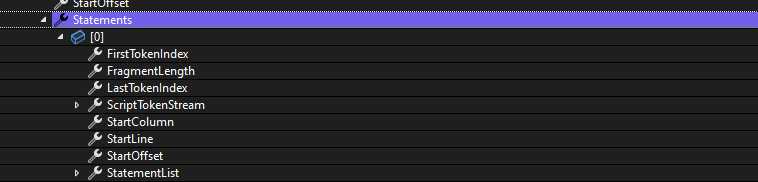
Figure 7: BeginEndBlock Statement
This block includes all statements within the BEGIN…END block in the stored proc. We can now open the StatementList property, which will show a collection of two statements—all the statements within the BEGIN…END block:
· DeclareVariableStatement
· SelectStatement
These are the lowest-level statements in the tree and they will not have any Statement List property associated with them.
Tracing this down, you will see a tree of all the statements that we found with the script. Figure 8 shows the statements.
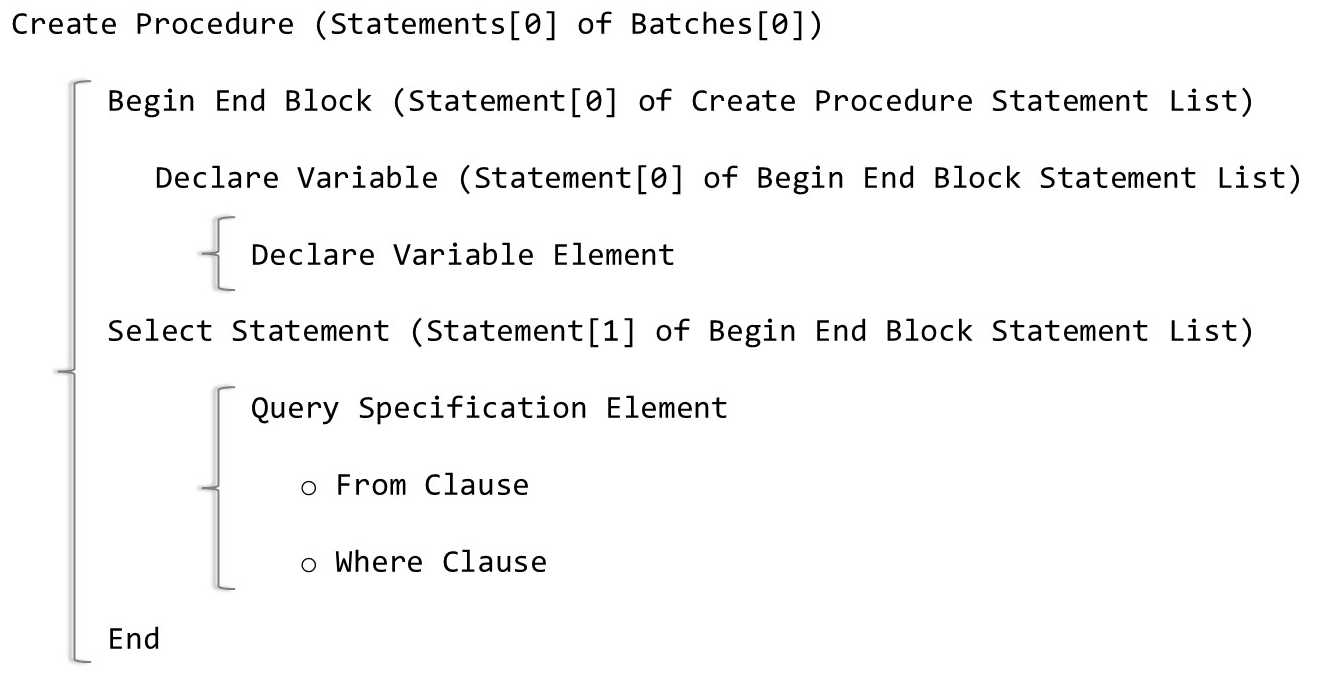
Figure 8: Nested statements
Each statement in the list has its own class definition, with appropriate properties based on the statement type. For example, the FROM clause has a property called TableReferences, a list of all tables within the query. The WHERE clause has a property called SearchCondition, which provides the expression, comparison method, and so on.
While you can work directly with these various statement classes, the ScriptDOM library relies on the visitor class pattern (described in Chapter 5), which provides a much cleaner approach than parsing your way through the statement list.
Select statement example
In our example, once we get to the SELECT statement, we can access properties appropriate to interpret a SELECT statement. Table 4 shows a partial list.
Table 4: SELECT statement properties (partial)
Property | Content | Description |
|---|---|---|
Into | Null | There is no INTO clause in the SELECT |
QueryExpression | customers | Contains a FROM clause, which has a table reference with a value |
GroupBy | Null | No GROUP BY in the SELECT |
OrderBy | Null | No ORDER BY in the SELECT |
WHERE clause | dateAdded >= @30daysAgp | SearchCondition object that contains the first expression (dateAdded), the comparison type (GreaterThanOrEqualTo), and the second expression (@30DaysAgo) |
Although it requires some familiarity with the nested objects, the Statement object provides all the parsing information necessary to interpret the statement. In subsequent chapters, we will look at the various statements in more detail.
Summary
The Statement list can be tricky to navigate, as nested statements can get pretty deep in the list of statements. However, once you’ve found the statement you want to process, the data type of that statement will provide the necessary details to interpret and analyze the statement. The next chapter provides another approach for getting statements from the parser tree.


- 1800+ high-performance UI components.
- Includes popular controls such as Grid, Chart, Scheduler, and more.
- 24x5 unlimited support by developers.