
ScriptDOM Succinctly®

CHAPTER 8
Insert Statement
The INSERT statement in SQL is used to add rows to an existing table. The INSERT visitor class parses the statement, determining the table, the columns, the values or expressions, and so on.
We will work with the INSERT visitor class to see if we can identify the error from Glen’s code to add a new company, shown in Listing 33.
Code Listing 33: Add new company
CREATE procedure [dbo].[InsertCompany] (@companyName varchar(50),@zipCode varchar(10) ) as begin DECLARE @companyID int -- Record # of new company INSERT INTO dbo.Company (CompanyName,PostalCode) VALUES (@companyName,@zipcode) SET @companyID = @@IDENTITY UPDATE dbo.Company SET city = zp.City,StateCode = zp.StateCode FROM (select * from dbo.ZipCodes WHERE zipCode=@zipCode) zp WHERE CompanyID = @companyID end |
The visitor method call to get INSERT statements is shown in Listing 34.
Code Listing 34: Visitor method for insert statements
public override void ExplicitVisit(InsertStatement node) { base.ExplicitVisit(node); } |
The node will contain all the standard properties (first token index, fragment length, start line, and so on). However, Table 16 lists properties unique to the INSERT statement, which are the properties we will likely use during our analysis method.
Table 16: Unique INSERT statement properties
Property | Type | Description |
|---|---|---|
Insert specification | Insert specification | Class with INSERT details: · Insert source (values, select, or exec) · Target table · Top row filter |
Optimizer hints | List | Any optimizer hints found in the query, with the OPTION keyword |
Insert specification
This property contains all the details to evaluate the INSERT statement. The key properties are described in the sections that follow.
Columns
This is a collection of column objects corresponding to the column list. If this collection is empty, this indicates the code does not provide a column list. In general, this is a bad practice because if a column is added or removed, or its position changed, the procedure that is dependent upon that table will now break.
Listing 35 shows how to get the InsertSpecification property and check for a missing column list.
Code Listing 35: Visitor method for INSERT statements
public override void ExplicitVisit(InsertStatement node) { if (node.InsertSpecification != null) { // Check for missing column list InsertSpecification? obj = node.InsertSpecification; if (obj.Columns.Count < 1) { Console.WriteLine("INSERT statements should always " + "include a column list"); } } base.ExplicitVisit(node); } |
If there are columns in the collection, you can iterate the collection to get details about the columns to be inserted. Each item in the collection is a column reference expression. The key properties for the Column are described next.
Collation
The Collation property is an identifier object, and the Value property provides the name of the collation for the column. If no collation exists in the column, this value will be null.
Column type
The column type is an enumeration value used for various statements. The most likely column types on the insert statement are shown in Table 17.
Table 17: Column type enumeration
Enum Name | Description |
|---|---|
Regular | A standard column |
Identity | An identity key column |
Multi-part identifier
Each column has a multi-part identifier property, which can be used to determine the name of the column being inserted. The property contains a count field and a collection of Identifier objects. The Value property in each Identifier has the name of the database field.
Insert source
The InsertSource can be a different class, depending on the data being inserted. The three possible class types are shown in Table 18.
Table 18: Insert Source classes
Class | Description |
|---|---|
ValuesInsertSource | Standard values clause, list of values to add |
SelectInsertSource | The data is being inserted from a SELECT clause |
ExecuteInsertSource | A stored procedure that is being executed to provide data |
ValuesInsertSource
This class has two key properties. The IsDefaultValues Boolean indicates if all the columns are default values. The primary property is the RowValues property, a collection of RowValue objects. This allows you to parse all rows if a multirow insert is in the code.
Within each RowValue element is a ColumnValues collection. Some of the most common class types are shown in Table 19.
Table 19: Column value types
Class | Description |
|---|---|
Variable reference | A variable, such as @companyName The Name property provides the actual variable name |
Function call | A SQL standard or UDF function, such as GetDate() The function’s Name property has details about the function, such as Parameters and the Value property, with the function name |
String literal | A string of characters This class has properties Is National (i.e. nvarchar text string), Is Large Object, and the Value property for the actual text |
Integer literal | A numeric integer value The value property contains the text (even though numeric), but the property is still a string |
SelectInsertSource
When the object is a SelectInsertSource, the key property will be a query specification (see Chapter 7 for details on the query specification class). You can use the query parsing code to grab the name of the table, the top expression, the WHERE clause, and so on.
ExecuteInsertSource
When the object is an ExecuteInsertSource, the key property will be the Execute property, which contains an ExecuteSpecification object. The key properties for the Execute class are shown in Table 20.
Table 20: ExecuteSpecification properties
Property | Type | Description |
|---|---|---|
ExecutableEntity | Execute procedure reference | Includes the procedure reference object and any parameters used |
ExecuteContent | Execute content object | The Principal property will contain the name of the user or login to execute the procedure as. The Kind can be User or Login. |
LinkedServer | Identifier | The Identifier object provides the name of the linked server the procedure is found on |
Target
The Target property is a named table reference object, which you can use to determine the table to insert the values into. Table 21 lists the properties of the schema object in the table reference.
Table 21: Schema object reference
Element | Example | Property |
|---|---|---|
Server name | [JDB01] | Server identifier |
Database name | [BookExample] | Database identifier |
Schema name | [dbo] | Schema identifier |
Base identifier | [customer] | Table or view name |
You can use the Target property to determine the table the insert statement applies to.
SetVariableStatement
In addition to the INSERT statement, we are also going to add a visitor method for the SetVariable command. For this example, we are specifically looking for references to @@identity and suggesting SCOPE_IDENTITY instead. Listing 36 shows the visitor method.
Code Listing 36: Set Variable Statement
public override void ExplicitVisit(SetVariableStatement node) { base.ExplicitVisit(node); } |
The SetVariableStatement class has several properties we can use to determine the variable being assigned and the content to be set in the variable
Table 22: Unique SetVariable statement properties
Property | Types | Description |
|---|---|---|
Expression | Global variable expression | The expression’s name property will indicate the name of the global variable |
Function call | The function name property is an identifier object, and the identifier object has a property called Value, with the name of the function being called | |
Integer, string literal | If a literal value (string, integer, and so on), the Value property will contain the value being set | |
Variable | Variable reference | Provides the name of the variable being updated |
In our code, we are going to check to see if @@identity was used, and if we detect it, suggest using SCOPE_IDENTITY() instead. Listing 37 shows the revised code.
Code Listing 37: Check for @@identity
// Check to see if @@identify is used public override void ExplicitVisit(SetVariableStatement node) { if (node.Expression is GlobalVariableExpression) { GlobalVariableExpression exp = (GlobalVariableExpression)node.Expression; if (exp.Name.ToLower()=="@@identity") { Console.WriteLine("Replace @@identify with SCOPE_IDENTITY()"); } } base.ExplicitVisit(node); } |
When the code is now analyzed, it will identify the issue with @@identity and suggest the replacement. This will fix Glen’s code that broke once another developer added a trigger to a related table.
Example
An example INSERT statement is shown in Figure 11.
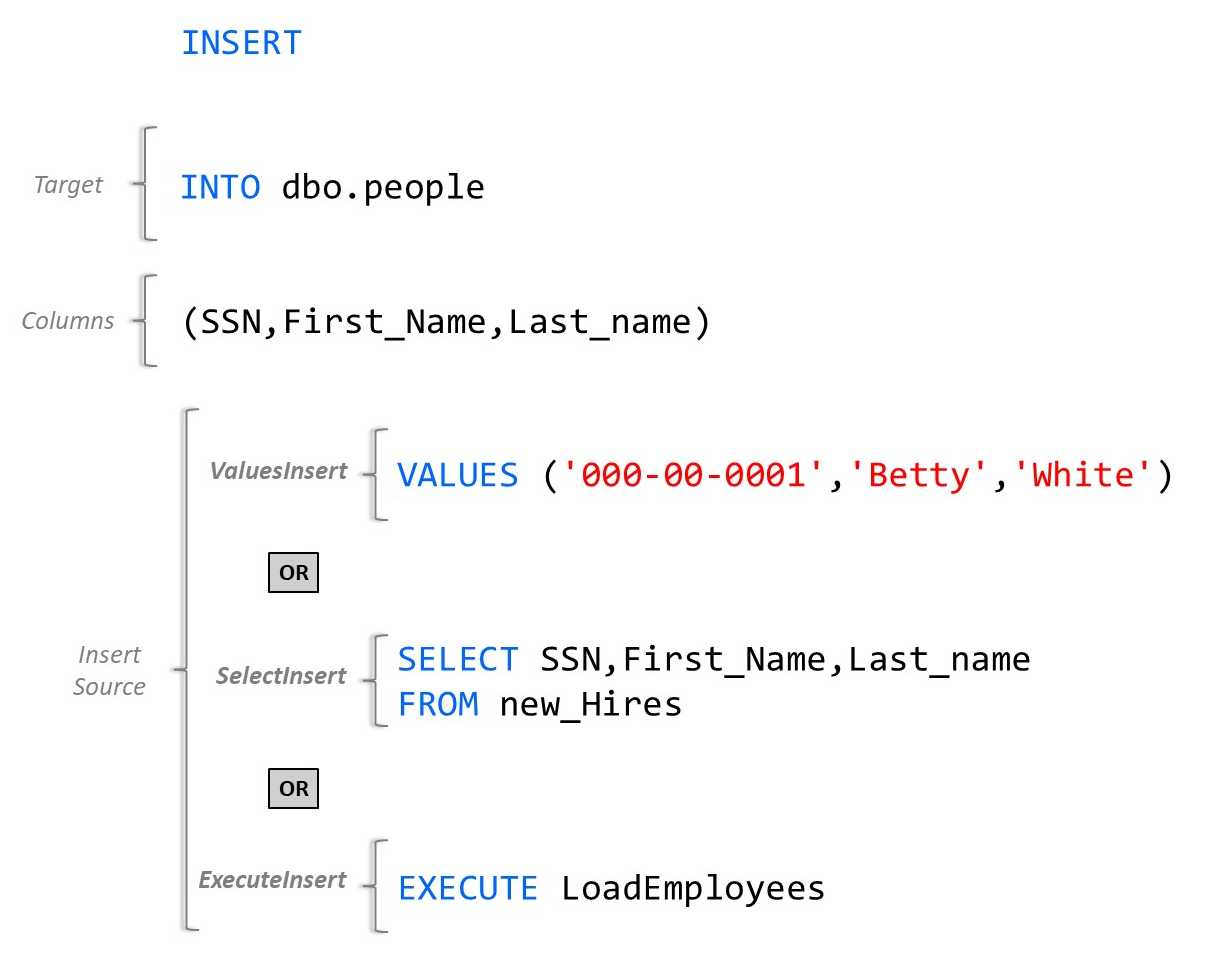
Figure 11: Example INSERT statement
Summary
The INSERT statement has several properties and sources of the content to insert. You can use this visitor method to detect a missing column list, use of @@identity, and so on. There are other issues you can detect, such as updating an identity column without an identity insert.


- 1800+ high-performance UI components.
- Includes popular controls such as Grid, Chart, Scheduler, and more.
- 24x5 unlimited support by developers.