
ScriptDOM Succinctly®

CHAPTER 15
Generate Script
Our newbie developer from Chapter 1 has written some stored procedures for us, but unfortunately, has not yet developed good code-formatting habits. His latest stored procedure code is shown in Code Listing 59.
Code Listing 59: Newbie’s get inactive customers
CREATE proc dbo.InactiveCustomers AS begin DECLARE @oneYearAgo date set @oneYearAgo = DateAdd(year,-1,getDate()); select cs.first as FirstName, cs.last as LastName, z.city,z.state,cs.zipCode FROM customer cs JOIN zipCodes z on z.zipCode=cs.zipCode WHERE cs.lastVisit > @oneYearAgo ORDER BY cs.lastVist insert logTable (tableName,updatedBy,updatedDate) values ('CUSTOMER',user_Name(), getDate() ) END |
In his defense, the code does work, but it is difficult to read and maintain. Fortunately, ScriptDOM comes to the rescue.
SqlxxScriptGenerator (where xx is version #)
There are different versions of the Script Generator, depending on your SQL version. Figure 15 shows a sample WinForms application in which we’ve loaded the ugly code from the newbie.
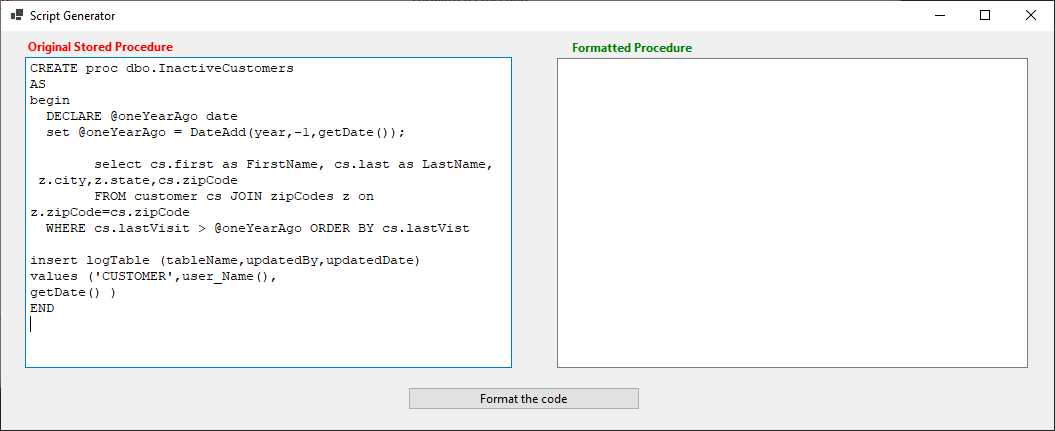
Figure 15: WinForms application
Format the code
The Format the code button performs the magic, using ScriptDOM to format the code. Code Listing 60 shows the Format the code button code. It starts with the usual code snippet to create the abstract tree, but then calls a script generator method to format the new code.
Code Listing 60: Format code
private void FormatCodeBtn_Click(object sender, EventArgs e) { var parser = new TSql160Parser(true, SqlEngineType.All); // Create list to hold any errors IList<ParseError>? errors = null; byte[] byteArray = Encoding.ASCII.GetBytes(sb.ToString()); MemoryStream stream = new(byteArray); StreamReader rdr = new(stream); // Ask ScriptDOM to parse it TSqlScript tree = (TSqlScript)parser.Parse(rdr, out errors); Sql160ScriptGenerator generator = new Sql160ScriptGenerator(); generator.GenerateScript(tree, out string srcCode); FormattedCode.Text = srcCode; } |
Once ScriptDOM formats the code, we can load it into our application to see the result. Figure 16 shows the original and formatted code.
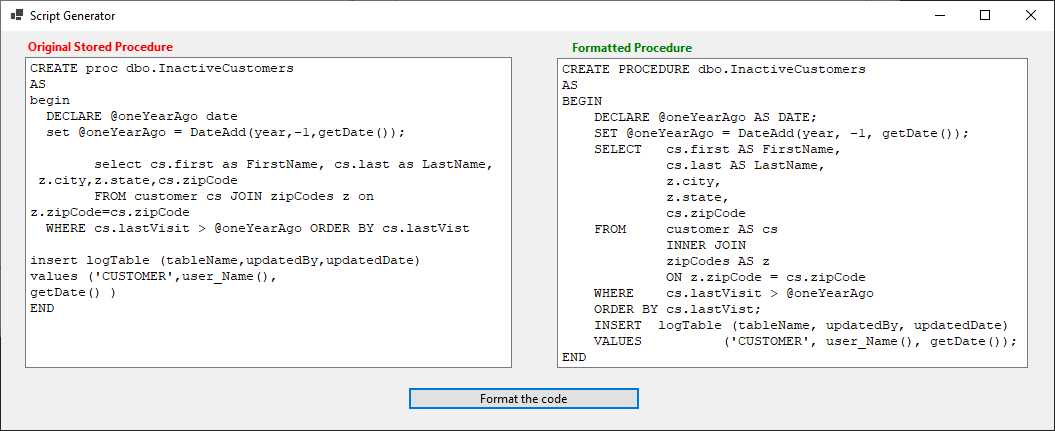
Figure 16: Original and formatted code
Formatting options
There are a number of options you can specify to control how the code is formatted. You set these on the generator object before calling the GenerateScript method. For example, to specify lowercase keywords, you would use the following code snippet:
generator.Options.KeywordCasing = KeywordCasing.Lowercase;
Table 33 lists some of the different options you can set to form the code.
Table 33: Code formatting options
Option | Type | Description |
|---|---|---|
AlignClauseBodies | Boolean | FROM, WHERE, etc. are aligned |
AlignSetClauseItem | Boolean | Align SET statements in UPDATE |
AsKeywordOnOwnLine | Boolean | Should each AS be on its own line |
IncludeSemicolons | Boolean | Include semicolons as line delimiters |
KeywordCasing | Upper Case Lower Case CamelCase | Options to show how keywords are cased CREATE, create, Create |
NewLineBeforeFromClause | Boolean | Include a new line before the FROM clause |
NewLineBeforeJoinClause | Boolean | Include a new line before a JOIN clause |
SQLVersion | Enum List | Determine SQL version for script |
The complete list of options can be found here. You can customize the options to format the code to your company preferences.
Note: Comments do not get copied to the formatted code. ☹
Summary
If your code is pretty ugly, you can use ScriptDOM to tidy it up for you. You will likely need to add the comments back in, but this should at least allow you to get more consistent and readable SQL stored procedures.


- 1800+ high-performance UI components.
- Includes popular controls such as Grid, Chart, Scheduler, and more.
- 24x5 unlimited support by developers.