
Roslyn Succinctly®

CHAPTER 1
Project Roslyn: The .NET Compiler Platform
With the recent release of Visual Studio 2015 and .NET Framework 4.6, Microsoft has also shipped version 1.0 of the .NET Compiler Platform, formerly Project Roslyn, which provides open source C# and Visual Basic compilers with rich code analysis APIs. The .NET Compiler Platform plays a crucial role in the new .NET ecosystem and empowers Visual Studio 2015 in many ways. For a better understanding of what the .NET Compiler Platform is and why it’s so important, you need some explanation about what’s new with compilers in the latest release. This chapter provides an introduction to Roslyn, giving you the foundation to understand the more complex concepts described throughout the book that are necessary before you start writing code.
Note: Except for where expressly stated, all the topics described in this book apply to both Visual Basic and C#.
Introducing Project Roslyn
Over the last few years, Microsoft has been very busy rewriting the C# and Visual Basic compilers entirely in managed, .NET code. Other than being rewritten, both compilers expose rich code analysis APIs you can leverage to build developer tools that perform code-related tasks, and are the same ones used by the Visual Studio code editor to detect issues and errors as you type. By exposing APIs, compilers are treated as a platform (also known as compiler-as-a-service); this opens an infinite number of possible development scenarios with particular regard to code analysis and code generation.
Additionally, Microsoft has released the new Visual Basic and C# compilers as an open source project, which means that you can download the source code, investigate it, and collaborate by sending your code, feedback, or suggestions. These rewritten, open source compilers exposing rich code analysis APIs use the name .NET Compiler Platform.
Note: This book uses the “.NET Compiler Platform” and “Roslyn” names interchangeably. The first name is the product’s name at release time, but the Roslyn alias has been (and is still) widely used for years to refer to the project. In fact, many developers around the world still prefer using the Roslyn alias rather than the official name.
As for all the other open source projects from Microsoft, the .NET Compiler Platform is hosted on GitHub, a very popular website that allows sharing code and offers tools for collaboration, including source control based on the Git engine, and tools for accepting contributions from the developer community. The official .NET Compiler Platform home page on GitHub contains the full source code for compilers and the APIs they expose, the documentation, the API reference, and code examples. It is worth mentioning that the project home page also contains documentation for new language features in C# 6.0 and Visual Basic 14. The implementation of some of the new language features has been possible thanks to the .NET Compiler Platform.
How Does Roslyn Change the Way I Write Code?
The Visual Basic and C# compilers have been rewritten in managed code and now expose APIs, but from a practical point of view, this does not really change the way you use programming languages and write code. However, behind the scenes, the code editor in Visual Studio 2015 strongly relies on the .NET Compiler Platform. For example, live code analysis that detects issues as you type, which you already know from the past, is now built upon the Roslyn APIs. Also, Visual Basic now supports code refactorings and C# has an improved refactoring experience; both have been rebuilt on top of the .NET Compiler Platform. I’ll describe these improvements in detail in Chapter 2, so do not be afraid if something is not clear at this point.
Roslyn in Practice
You use the Roslyn APIs to build tools for developers. More specifically, with the Roslyn APIs you can:
- Write and share custom, domain-specific code analysis rules that integrate into the Visual Studio 2015 code editor. In this way, you can extend the live code analysis engine with your own rules. This means that you can write diagnostics and code fixes (known as analyzers), and code refactorings for your APIs or for specific programming patterns, and the Visual Studio code editor will detect code issues as you type, squiggling the code that needs attention, and suggesting the proper fixes. Writing diagnostics and code fixes is discussed in Chapter 4, and writing code refactorings is discussed in Chapter 5.
- Implement code generation, emit IL code, and perform other code-related tasks inside your .NET applications with the compiler APIs.
- Build stand-alone tools that run outside Visual Studio, but can leverage MSBuild workspaces and take advantage of the Visual Basic and C# compilers to perform code-related tasks.
- Create an interactive, interpreted C# or Visual Basic programming environment using a read-evaluate-print loop (REPL).
The possibilities are not limited to this list. Wherever you might need to analyze source code or build tools that leverage the compiler’s APIs, that’s where the .NET Compiler Platform comes in.
Cloning the Roslyn Repository to Your Computer
To experiment with Roslyn, you will need to download and install the .NET Compiler Platform SDK, as is explained in the next section. But because Roslyn is an open source project on GitHub, you can also optionally view and modify Roslyn's source code, as is explained in this section.
Tip: You need a GitHub account to complete the steps described in this section. If you do not have one, you can register for free. Also, the GitHub extension for Visual Studio 2015 must be installed. If it is not installed, you can update Visual Studio’s installed components from the Windows Programs and Features tool.
GitHub and the Git source control engine allow cloning a source code repository on local machines, which is very useful for editing and testing any open source project locally, and for familiarizing yourself with the code. Of course, this is the case with the Roslyn project, too. To clone the full Roslyn source code, which includes the compilers’ source code, follow these steps:
- Open your favorite web browser, navigate to https://github.com/dotnet/roslyn, and sign in with your account (see Figure 1).
- Click Open in Visual Studio.
- When Visual Studio 2015 starts, the Team Explorer window automatically appears, supplying the necessary information to clone the project (see Figure 2). You can provide a different local folder if you want. When ready, click Clone. If you’ve never signed into GitHub from Team Explorer, Visual Studio will ask you to enter your GitHub credentials.
- When the operation completes, Team Explorer shows the full list of Visual Studio solutions in the code repository, plus a number of shortcuts that you can use to manage the project (see Figure 3).
- Double-click the Roslyn.sln file and wait for Visual Studio 2015 to open all of the Roslyn project’s code.

Figure 1: The Roslyn home page on GitHub
|
|
Figure 2: The Team Explorer window ready to connect to GitHub | Figure 3: The Roslyn project’s source code cloned locally |
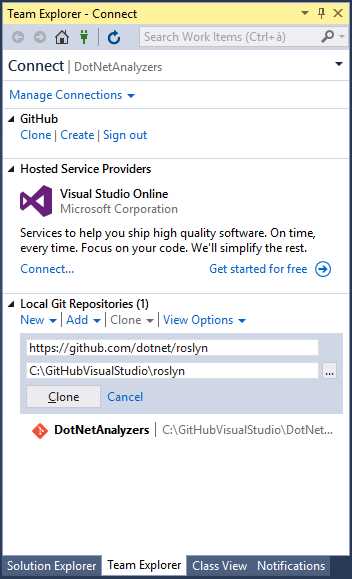
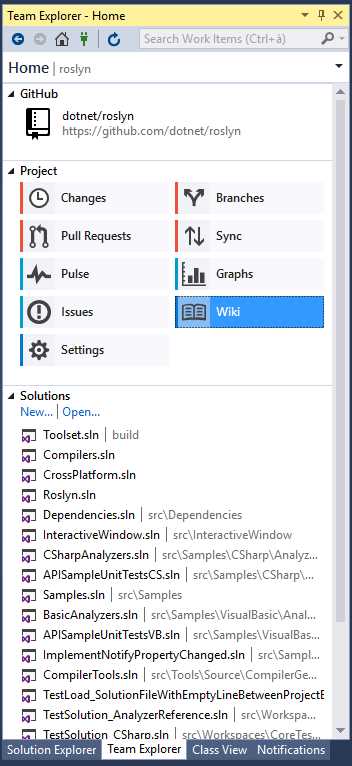
You can now explore the source code of the entire .NET Compiler Platform, including compilers, features such as Visual Studio’s tool windows, refactoring tools, and built-in code analysis rules. You can also make changes to the code (do it only if you have experience with compilers) and test your edits locally. To do this, set the OpenSourceDebug project as the startup project and then press F5. This will launch the so-called Roslyn Hive, an experimental instance of Visual Studio where you can debug the source code of the .NET Compiler Platform. You can also compile and run unit tests included in the solution. To do so, write the following line in the Visual Studio Command Prompt:
msbuild /v:m /m BuildAndTest.proj /p:PublicBuild=true /p:DeployExtension=false
This command will build and run the unit tests supported in the current public build of Visual Studio. Additional information about debugging, testing, and running the source code can be found on the Building, Testing, and Debugging page of the Roslyn project.
Collaboration: Sending Feedback, Suggestions, and Requests
Microsoft has been publishing all of its open source projects to GitHub. This website provides a full collaboration platform, which not only includes source control, but also specific tools to submit your feedback, suggestions, and requests. This allows direct engagement between the team and the developer community. For instance, you might want to submit a bug, request a feature, or even send a piece of code you added to the cloned Roslyn project that you think should be evaluated for future releases. In order to send your contribution, you must respect the Contributing Code guidelines. All of your submissions will be deeply evaluated according to the terms of the guidelines. If you want to send feedback, you can open an issue or send a pull request (do not forget to search for similar issues or requests before you submit a new one). This book is not intended to be a full guide to the GitHub tooling, so make sure you read the Help page if you want to actively collaborate on the Roslyn project.
Installing the .NET Compiler Platform SDK
In order to write code analyzers, refactorings, and stand-alone .NET applications that leverage the Roslyn APIs, you first need to install the .NET Compiler Platform SDK, which you will need to complete the next chapters. The SDK is a free extension for Visual Studio 2015 that can also be installed from within the IDE. To do this, open Visual Studio 2015 and select Tools > Extensions and Updates. In the Extensions and Updates dialog box, select Online on the left, and then in the search box, type .NET Compiler Platform SDK (see Figure 4).

Figure 4: Installing the .NET Compiler Platform SDK
On your machine, click Download. After restarting Visual Studio, you are ready to go. The .NET Compiler Platform SDK includes project and item templates required to create diagnostics, code fixes, code refactorings, and stand-alone, Roslyn-based .NET applications. It also includes a very important tool called Syntax Visualizer that is discussed later in Chapter 3, and will be used frequently throughout this book.
What’s Next
Leveraging the Roslyn APIs to build code analysis tools is not difficult once you understand the purpose of the .NET Compiler Platform (and, of course, if you have some experience with .NET and Visual Studio). In order to help you get the best understanding possible of the .NET Compiler Platform and what you can do with it, topics in this book have been organized in the following sequence:
- Explaining and showing how Visual Studio 2015 uses the .NET Compiler Platform to enable the live code analysis engine in the code editor to detect code issues as you type (see Chapter 2).
- Describing the Roslyn APIs and architecture with technical explanations and diagrams, and the concept of syntax, including explanations on how to investigate the syntactic structure of existing code with the help of the Syntax Visualizer tool (see Chapter 3).
- Guiding you to the most relevant topics of the book: writing custom, domain-specific code analyzers and refactorings (see Chapters 4 and 5).
- Helping you share your tools with other developers, either via NuGet or the Visual Studio Gallery (see Chapters 6 and 7).
- Giving you the basics to use APIs for compiling code and managing solutions and projects (see Chapter 8).
If you are like me, you might be impatient to jump to Chapter 4 and put your hands on the keyboard. However, it is strongly recommended that you read all chapters in sequence. After all, they are not very long, and I promise they will not be annoying.
Chapter Summary
The .NET Compiler Platform, formerly Project Roslyn, provides open source Visual Basic and C# compilers with rich code analysis APIs. This chapter provided an introduction to the .NET Compiler Platform, describing how the Visual Basic and C# compilers have been rewritten in managed code and how they expose APIs that developers can leverage to build developer tools, such as diagnostics, code fixes, and code refactorings that integrate into the Visual Studio 2015 code editor or stand-alone code analysis tools. You saw how the full source code for the .NET Compiler Platform is available on GitHub, how you can clone the code repository onto your computer for local tests, and what tools you need in order to work with the .NET Compiler Platform. The next chapter describes how Visual Studio 2015 uses Roslyn for an improved coding experience; this will give you a clearer idea of what you can do with Roslyn’s analysis APIs.


- 1800+ high-performance UI components.
- Includes popular controls such as Grid, Chart, Scheduler, and more.
- 24x5 unlimited support by developers.