
Regular Expressions Succinctly®

CHAPTER 8
Regex Tester Program II
In order to explore some of the features in the next few chapters, we need to improve our regex tester program by adding a few more features. While the initial program was good for testing searching patterns out, we are going to explore groups and captures, look-arounds, and optimization in the next few chapters, so we need to create a new and enhanced version of our tester application.
You can download the complete application at https://bitbucket.org/syncfusiontech/regularexpressions. Be sure to either download the application or create it yourself to help explore the remaining chapters in the book.
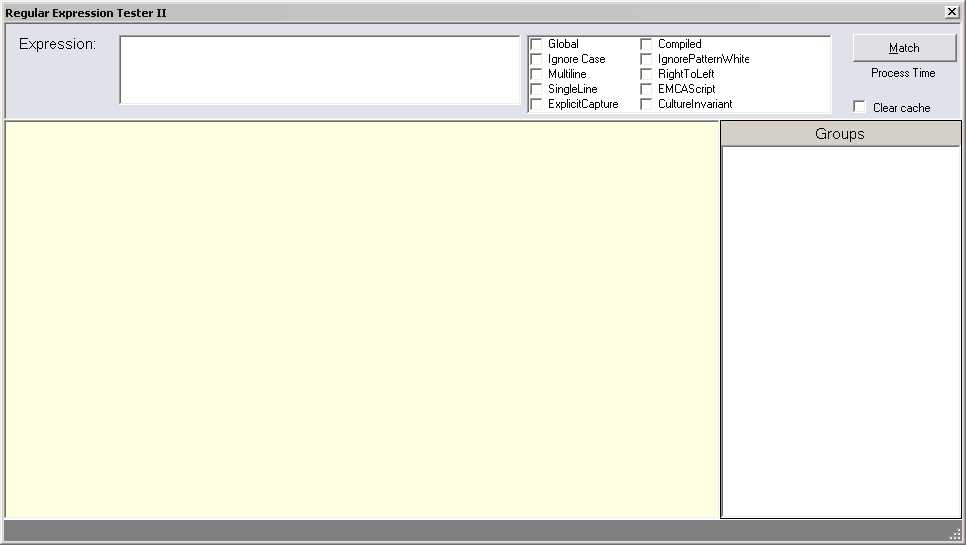
Figure 4: Regular Expressions Tester
Timing
One of the features we are adding is the ability to report how long the engine takes to process the regular expression. We will use the Stopwatch class found in the System.Diagnostics assembly. This allows us to report the number of milliseconds an expression takes to process.
private void RunBtn_Click(object sender, EventArgs e) { Stopwatch stopWatch = new Stopwatch(); // Create a high resolution time. // Start the timer. stopWatch.Start(); // Process the expression. // Record how long the processing took. stopWatch.Stop(); TimeSpan HowLong = stopWatch.Elapsed; Double TotalTicks = HowLong.TotalMilliseconds; TimeLabel.Text = TotalTicks.ToString("F3") + " ms"; } |
This will allow us to try out various optimizations to make our regular expressions run quicker. For most of the examples we’ve looked at so far, you will probably not notice a difference. However, if you are processing a large number of large text inputs, squeezing a few extra milliseconds can add up.
Clearing the Cache
We’ve also added a check box to clear the regex cache. This will allow you to test the impact of compiling the regex in advance, which is a particularly useful optimization for regex patterns that will be used repeatedly in your code. The code to clear the cache is shown below:
if (clearCache.Checked) { Regex.CacheSize=0; clearCache.Checked = false; } |
Groups
In the next chapter, we will be exploring how groups work in regular expressions. By adding a tree view component to our testing application, we can see the groups that are found when processing the expression. The code to populate the tree view with groups and captures is shown below:
rootNode.Add(TV.Nodes.Add("[ "+theMatch.Value+" ]")); TreeIndex++; foreach (string groupName in theExpr.GetGroupNames()) { Group theGroup = theMatch.Groups[groupName]; if (groupName != "0") { TreeNode ChildNode = rootNode[TreeIndex].Nodes.Add("<" + groupName + "> (" + theGroup + ")"); foreach (Capture theCapture in theGroup.Captures) { ChildNode.Nodes.Add(theCapture.Value); } } } |
All Options
Finally, we are going to provide the check box for all regular expression options, not just the subset that we introduced in earlier chapters.
private void RunBtn_Click(object sender, EventArgs e) { Boolean isGlobal = false; RegexOptions theOpts = RegexOptions.None; foreach (var item in CB.CheckedItems) { if (item.ToString().ToLower() == "global") { isGlobal = true; } if (item.ToString().ToLower() == "multiline") { theOpts = theOpts | RegexOptions.Multiline; } if (item.ToString().ToLower() == "ignore case") { theOpts = theOpts | RegexOptions.IgnoreCase; } if (item.ToString().ToLower() == "singleline") { theOpts = theOpts | RegexOptions.Singleline; } if (item.ToString().ToLower() == "compiled") { theOpts = theOpts | RegexOptions.Compiled; } if (item.ToString().ToLower() == "ignorepatternwhitespace") { theOpts = theOpts | RegexOptions.IgnorePatternWhitespace; } if (item.ToString().ToLower() == "righttoleft") { theOpts = theOpts | RegexOptions.RightToLeft;} if (item.ToString().ToLower() == "emcascript") { theOpts = theOpts | RegexOptions.ECMAScript; } if (item.ToString().ToLower() == "cultureinvariant") { theOpts = theOpts | RegexOptions.CultureInvariant; } } |
Match button
When the match button is clicked, the following code is performed after the options are set:
// Start the timer. stopWatch.Start(); List<TreeNode> rootNode = new List<TreeNode>(); int TreeIndex = -1; // If global, then iterate the Matches collection. if (isGlobal) { try { Regex theExpr = new Regex(pattern,theOpts); foreach (Match match in theExpr.Matches(source)) { int endindex = match.Length; rtb.Select(match.Index, endindex); rtb.SelectionBackColor = BGHighlight; rtb.SelectionColor = FGHighlight; rootNode.Add(TV.Nodes.Add("[ " + match.Value + " ]")); TreeIndex++; foreach (string groupName in theExpr.GetGroupNames()) { Group theGroup = match.Groups[groupName]; if (groupName != "0") { TreeNode ChildNode = rootNode[TreeIndex].Nodes.Add("<" + groupName + "> (" + theGroup + ")"); foreach (Capture theCapture in theGroup.Captures) { ChildNode.Nodes.Add(theCapture.Value); } } } } } catch (Exception ex) { SLAB.Text = ex.Message; } } else { try { Regex theExpr = new Regex(pattern, theOpts); Match theMatch = theExpr.Match(source); if (theMatch.Success) { int endindex = theMatch.Length; rtb.Select(theMatch.Index, endindex); rtb.SelectionBackColor = BGHighlight; rtb.SelectionColor = FGHighlight; rootNode.Add(TV.Nodes.Add("[ "+theMatch.Value+" ]")); TreeIndex++; foreach (string groupName in theExpr.GetGroupNames()) { Group theGroup = theMatch.Groups[groupName]; if (groupName != "0") { TreeNode ChildNode = rootNode[TreeIndex].Nodes.Add("<" + groupName + "> (" + theGroup + ")"); foreach (Capture theCapture in theGroup.Captures) { ChildNode.Nodes.Add(theCapture.Value); } } } } else { SLAB.Text = "Not found..."; } } catch (Exception ex) { SLAB.Text = ex.Message; } } TV.ExpandAll(); |
One of the changes we need to make was to create a regex object rather than rely on the static Regex class. This is because certain group functionality, i.e. GetGroupnames(), is not available as a static regex method.


- 1800+ high-performance UI components.
- Includes popular controls such as Grid, Chart, Scheduler, and more.
- 24x5 unlimited support by developers.