
Public Speaking for Geeks Succinctly®

CHAPTER 6
During the Talk: Be a Better You!
“Just be yourself” is not enough
How many times have people told you, “Just be yourself, and everything will be fine!” This is some of the most-used advice out there, something that everybody tends to say to someone before letting them enter the lion’s den. And it’s wrong!
Being yourself is not enough—being yourself lowers your energy because you’re not leaving your comfort zone. “Don’t try to be somebody else” could be better advice, but as you probably know, in those moments our brain prefers to receive a positive order instead of a negative one.
“Be the better version of you” should be the advice given to someone before a presentation. It’s excellent advice because it pushes you out of your comfort zone. It says that you can always improve, even after many years as a public speaker.
Being the better version of you means that you’re in the best state for that moment. It means people can see that fire in your eyes, and that you’re there to transfer the value to them in the best way.
You have to work to reach your best state, and it’s normal if your best state is different from one presentation to another.
Note: A personal story: During the Visual Studio 2010 launch, I was doing a tour around Italy, and my grandfather was in the hospital. Just before my session in Venice, my sister told me on the phone that he died in the early morning. I didn’t expect that. I was shocked, but I decided to deliver my session and then go home.
We were far from home, so I decided to present my session even if I wasn’t in the right mood. I decided to do that for the people that were attending the event, and a little bit for myself, too.
It wasn’t easy. It wasn’t my best performance, but I still remember those moments. I tried to give my best, even if my best wasn’t the same person that delivered many other sessions before and after that moment.
How to be a better you
If you’ve recorded your dry run, it’s easy to start. Watch it and find something in your posture, voice, dress, or body language that makes you feel uncomfortable, and work on it.
Talk with people and ask for direct feedback. Ask them what makes them uncomfortable during your sessions. Perhaps it’s a little thing, or maybe they don’t know what the exact problem is, but you should try to understand what could be improved.
Begin by being conscious of what is not good. There is no manual to be a better you; it’s trial and error.
Note: Breath is essential. I knew a young speaker who did solid performances, but, during her sessions, there was something that made people uncomfortable. Many people told me “she is a good speaker, but I didn’t completely enjoy her session.” I went to some of her sessions to try to understand what was going wrong and I discovered that her breath was very anxious at the beginning of the presentation, and that anxiety ruined the session for some of the audience. My suggestion was easy: start speaking with somebody about the session’s topic some minutes before the beginning to let the anxiety go away.
If you need some more inspiration, you can look at James Whittaker’s post “Just Suck Less”[33] for some direct tips.
You can also start by avoiding some of the sentences that you’ve heard many times during presentations:
- “Sorry, it’s my first time speaking in public.” Don’t do it. You don’t have to be sorry in advance; it lowers your confidence and the confidence that the audience has in you.
- “I’ll keep this short.” Nobody will trust you. The presentation has to give value and must stay in the allotted time. Length is not the key.
- “I have a lot of information and not enough time, so I’ll go fast, really fast!” You have to give value in the allotted time; you don’t have to enumerate all the things that you know. Create an appendix in the presentation with all the things that don’t fit in, and tell people that you can discuss those things later.
- “I’m fatigued,” “My plane was late,” or “I didn’t have time to prepare.” This is the first thing to avoid. People are there to receive value and to trust you. It’s your fault if you don’t do everything well; they won’t believe you anymore after these sentences.
Tip: You shouldn’t use profane or crude language during your presentations.
They make you sound unprofessional, and you should avoid them at all costs. If your sessions contain stories that use curse words, and you can’t avoid it, it’s better to say it at the beginning. If you are an exceptional speaker, you could be the exception that proves the rule.
Note: Many conferences and user groups have adopted a code of conduct that speakers and attendees should follow both during meetings and online. Ask the organizers for it, or look for it on their website. If you aren’t comfortable with it, tell them in advance. If they don’t have a code of conduct, just be professional and avoid doing something that could upset people, especially if the audience members are from different countries.
If you want to be a better you every time you deliver a presentation, you can do many things, but the best thing to do is to create your set of rituals.
Rituals
In the beginning, you have to find your routines and figure out what works for you. It’s a good idea to write your routines down as a checklist.
Know the environment
Your session should start directly with the value, with a lot of energy—it should captivate people.
You must avoid sentences like “Can you hear me?” You should have checked the audio before the beginning of the presentation. You should arrive at least fifteen minutes in advance and check the audio and the video connection, make sure your presentation remote works, check if the floor is creaking when you walk, and so on.
You need to master the room and figure out where you can go without losing eye contact. If you need to do a demo and you have a hand microphone, you should rehearse it; you cannot just put the mic on the table.
If you must talk at the podium because the mic is wired there, you should know that ahead of time. If you need a lectern, a whiteboard, or something like that, it’s better to check with the organizers well in advance and multiple times.
Can people see your slides and fonts from the back of the room? Check in advance. If you aren’t used to tools, like ZoomIt, don’t trust them. During the session, you’ll just forget to use them. It’s better to increase the font size.
Do you have a big timer available? Can you ask somebody to track time and alert you in the middle of the session, and then when you have 15, 10, or 5 minutes left? Don’t trust a small watch, like your phone. If you keep looking at it, you will send the wrong message to your audience, telling them that you’re in a hurry because you have something better to do.
Tip: Some people fear arriving early and setting up everything in advance because they don’t want to stay in front of the audience for some minutes without talking, with an increasing sense of anxiety. You can avoid this by using the extra minutes to chat with people in the front rows, asking questions about their expectations, trying to understand their level of knowledge of the matter, and so on.
As we’ve seen in the previous chapters, you should avoid starting with who you are—get directly to the point. Later, you could introduce yourself during the talk when it fits better, and you can also explain why you’re delivering this presentation. Sometimes it’s better to break this rule; for example, if you’re talking in a formal environment, it’s better to introduce yourself at the beginning. Perhaps you can ask the organizers to present you.
Relaxation and power posing
There are many relaxation techniques that you could study and that you could use before the session. But how do you overcome the anxiety just before the session’s start or during the performance?
One trick that you could use to elicit relaxation is the following: while you’re studying and applying your favorite relaxation technique, use a simple gesture like keeping three fingers together during the relaxation time.
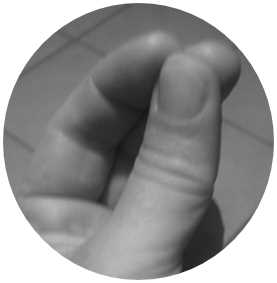
Figure 29: A simple gesture to elicit relaxation
Then, when you’re anxious, you can recall your relaxed state by using this simple gesture. Usually, a gesture like this one is easy to use and can be done without other people knowing about it.
Another way to get in your best state is with power posing. Studies have shown that adopting a power pose can put you in a better state. One of the best power poses is the so-called Wonder Woman power pose: put your hands on your hips, feet wide apart, and shoulders back.
You can look at Amy Cuddy’s TED talk about power posing,[34] and then you can read a recent Q&A[35] with her for updates on the subject.
Note: When I asked one of my colleagues to draw my avatar, she chose to represent me with the power pose that I always use before delivering a session.
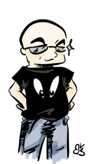
Figure 30: Author's avatar in the Wonder Woman power pose
Clean your mess
Don’t let the clutter on your desktop or your fancy wallpaper distract your audience when you switch from the presentation to the demo or vice versa.
Choose a standard wallpaper, or, even better, a background color. You can hide all your icons with a simple command, like in the following figure.
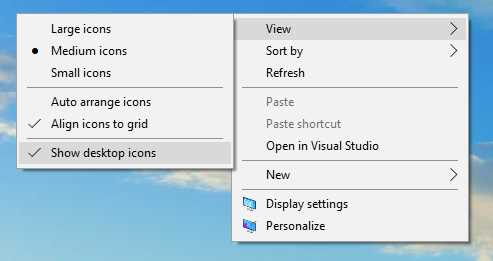
Figure 31: Showing or hiding desktop icons in Windows 10
If you need to switch from the presentation to the demo, or to multiple sets of demos, you can create many virtual desktops and switch from one to another with a simple gesture. With this trick, you can keep PowerPoint running while moving to the demo; it’s especially useful when you’re in the middle of an animated slide.
Note: MacOS has supported virtual desktops (called “Spaces” back then) since 2007, available in OS X Leopard and later. Microsoft added virtual desktops support natively in Windows 10; with previous versions, you needed a third-party tool. Virtual desktops support in Linux and other Unix-like OSes has been available since the 1990s. You can always switch between virtual desktops with a shortcut or with a trackpad gesture (if available).
Remember to turn off notifications, both on your desktop and on your mobile phone.
Eye contact is the key to audience involvement
It doesn’t matter if you’re an introvert or extrovert, if you’re sitting behind a desk or standing in front of your audience: without eye contact, you’ll lose most people within few minutes. You need to have a ritual regarding eye contact. You should ask your friends to look at you and to tell you at the end of the session if you looked like a robot, or like a sprinkler. They can let you know if you stared at your feet or at the ceiling, or, like most people do, at the slides the whole time.
You have to exercise eye contact in one-on-one conversations, small meetings, and presentations in front of big audiences.[36]
Tip: You can improve eye contact in one-on-one discussions with a simple exercise. You look your interlocutor in the eyes and tell them a list of things without losing eye contact, using filler words, or pausing. The other party chooses the first subject; then, it’s your turn to select a topic, and your partner should do the same.[37]
Tip: In big rooms, you can use a trick to show eye contact without having to look at everyone in the room. You can simply focus some rows in front of you, and look at people there. All the people in your line of sight will feel connected with you.
Powerful or powerless communication
Many people think that one always needs to adopt a powerful communication style to impress attendees and have better chances of success. Sometimes, powerless communication can give better results.[38]
Note: You can use poewrful or powerless communication with the same slides, the same demos, the same content; this is why this paragraph is in this chapter and not in Chapter 3.
Let’s see what the differences between the two styles are.
Table 1: Differences Between Communication Styles
Powerful Style | Powerless Style |
|---|---|
Useful when we have authority, when people trust us, when we have credibility or status that allows us to state facts without doubts. | Useful when attendees are skeptical of our expertise, when there’s a significant difference between us and the audience (age, role, etc.), or when there are problematic attendees that try to undermine our credibility. |
Based on precise affirmations, facts, rules, directives. Uses powerful words. | Based on questions, advice seeking, talking tentatively, and sometimes, expressing vulnerability. |
You’re there to teach them something. | You’re there to understand and to create something with the audience. |
Imagine that you need to present something to a more experienced audience, and they don’t know you.
You can try establishing trust, but it will be a long process, and sometimes it could backfire. Or you can start with a powerless style, acknowledging the differences between you and them, and setting the bar by saying that you would like to better understand their views on the topic, how to adapt it using their experience, and so on.
Nobody can guarantee that the second approach works better, but most of the time it’s the easiest one, at least when the audience is very cohesive (for example, at a workshop for a company).
If you’re doing a series of sessions for similar audiences, you can use the feedback on the first one to adapt your communication style for the following classes. Suppose you received feedback like “lacks confidence.” You can try to adopt a more powerful style. If you received feedback like “his content doesn’t fit with our context,” it’s better to adopt a powerless style, starting with questions on the attendees’ environment, and trying to give practical examples related to their context.
Tip: You can talk tentatively on a slide full of bullet points, facts, and directives. You can use a powerful style on a slide full of question marks. The most important thing is that your communication style, your body language, and your tone of voice should match.
You can switch styles many times during the talk. For example, when you need to define the problem, you can use a powerless style, and when you’re framing the solution, you can switch to a powerful one. You can also move from a powerless style to a powerful one during the time in a multi-day engagement when you feel that the audience trusts you.
How to express vulnerability without losing trust
In the section titled “How to be a better you,” we told you to avoid sentences like “Sorry, it’s my first time speaking in public.”
So, how can you express vulnerability without compromising your credibility? You can try to use some humor, and anticipate comments from the audience. For example, if you’re a forty-something presenter and you’re speaking in front of millennial startup types, you can begin with a joke about your age, asking if they know some famous film or series from the 80s, and then you can move to the 90s.
Note: As an Italian, I always joke about my body language, hand gestures, my tone of voice, and other typical stereotypes, especially when presenting abroad.
Anticipating comments about age differences, cultural differences, and technical background can be a good way to express vulnerability and find a connection with the audience without losing trust or using weak sentences.
Always remember to be authentic. You cannot use powerless communication if you don’t care about your audience, if your presentation tries to sell something in a very arrogant way, if you wear a powerful t-shirt, or if your body language doesn’t match your powerless style.[39]
How to finish a presentation when everything goes wrong
Demos fail, projectors fail, your voice could fail—a lot of things could go wrong during a presentation.
Do you have a backup copy of your slides? And another one in the cloud?
Tip: Print a copy of your presentation, with two or three slides per page. You can use it for annotations. Don’t depend on the presenter view and its notes section—you’re more credible when looking at printed slides than when you’re staring at the screen.
Can you do your session without the Internet? Can you deliver value when the technology doesn’t help? Do you have a working solution for your code or a deployed website to show if everything goes wrong?
Tip: Draw the flow of your demos on paper and keep it near the keyboard. If somebody is recording the session, check that it’s not visible in the camera.
If the presentation is crucial, you can record your demos in advance as a backup, especially if they involve external hardware, the Internet, or cloud access.
Remember, you don’t need slides to deliver value. You also don’t need props, demos, or anything else. You could transmit value with just your voice, body language, and presence. It’s difficult, but sometimes it’s worth it!
Note: A personal story: Some years ago, during a big conference in Rome, I prepared two sets of presentations on two different PCs. The first one, with few slides, was connected to the projector and ended with a “broken screen” slide. I used that slide as the excuse to turn off the projector and continue without it. The second set of slides that were on a PC in the first row and visible only by me were used to follow the flow that I prepared. The session went well and ended with two standing ovations!
Learn how to breathe in difficult situations
Do you remember Napoléon Bonaparte, who was often portrayed with one hand inside his waistcoat? That position, with the hand over the stomach, allows you to breathe with the diaphragm easily.

Figure 32: The painting “The Emperor Napoleon in His Study at the Tuileries” by Jacques-Louis David, 1812. Source: Wikipedia.
When you’re in trouble and your voice starts to tremble, breathing with the diaphragm could help a lot. It’s much better to look like an emperor from the past than being unable to finish your talk!
Help someone in need
If you’re the conference organizer, room manager, or the next speaker, and somebody is in trouble during their session, please step up and help the speaker. You can start a round of applause, as encouragement. You can give him or her a bottle of water. It’s a great way to save a speaker and a presentation from disaster.
You can also help the speaker at the end of a presentation, during Q&A, by being the first person to ask a (simple) question to break the ice.
Work hard to exceed your limits
Many things could ruin your presentation, but you can overcome most of them:
- Some people find it very complicated to give a session with a hand mic. Get over it! Most of the time you’re forced to use them, so do your homework, pick a small bottle, and do a lot of practice.
- Some people like to walk a lot during their presentations. Walking can be a good thing, but you shouldn’t go too far. If a session is recorded, it’s better to limit speaker movements. In this case, talk with the cameraperson to understand the range. If you prefer, draw an X on the floor with some masking tape, and stay behind it.
- Doing a talk in another language requires much more preparation. You need at least three or four more dry runs; you should check the grammar (you should always check it, but it’s even more critical in a foreign language). You should listen carefully to your dry runs to understand if some words or sentences are difficult to remember, and change them or create a meaningful slide to communicate the point effectively.
- If a talk format has auto-advance slides,[40] you need to rehearse many times. It’s embarrassing when slides go on, and the speaker starts imploring the organizers to roll back to the previous slide. If a concept doesn’t fit in the allotted slide time, you should duplicate the slide (losing a slot) or simplify it.
Never learn a presentation by heart
You aren’t an actor who should deliver something word-for-word. You just have to transmit value, credibly. Learning a presentation by heart is very difficult, and prone to errors, pauses, and filler words that give your audience the wrong impression.
If you memorize your presentation, there's a risk that you'll focus on recalling it exactly, rather than being natural and flexible.
Some speakers like to use teleprompters, secondary displays with notes, or something like that. You can easily spot them because their performance sounds recorded. The same thing happens when you learn everything by heart; it doesn’t feel natural.
What you should do is to learn two things by heart:
- Open your presentation in the best way, going directly to the value. One method is to craft some very powerful openings and start with one of them, word for word. Not the entire presentation—just the first sentences to skyrocket your talk!
- Close your presentation in the best way. Most of the speakers do sound performances, but they fade away at the end, without giving an explicit call to action, giving instructions on how to leave feedback, or letting attendees know that the session is finished.
Close your session with style
Never finish a presentation by immediately starting the Q&A. Doing the Q&A leaves the destiny of your performance in the hands of the audience. Some people could ask annoying questions or try to undermine your presentation. As in the previous paragraph, you should close the session by delivering your messages and taking in the applause, and only then should you start the Q&A. People have to know that the session is finished and that Q&A is something extra.
You might want to announce that you'll be happy to take additional questions immediately after the Q&A, outside the presentation room, so that attendees won't be frantic to ask their question immediately.
If the conference is collecting feedback, remember to ask people to submit their input, and show them the code or title of your session so they don’t have to do the extra work to find that information.
As a courtesy, be sure to end your presentation and clear the podium or stage with plenty of time for the next speaker to set up their talk.


- 1800+ high-performance UI components.
- Includes popular controls such as Grid, Chart, Scheduler, and more.
- 24x5 unlimited support by developers.