
Prism 4 Succinctly®

CHAPTER 7
Prism 4 And MVVM
The Model View - View Model (MVVM) design pattern is not included in the Prism 4 library, but is a particularly well suited companion to the framework. MVVM is all about separation of concerns. It’s main objective is to isolate the solution’s views from its business rules. The MVVM pattern consists of three parts, the View, the View Model and the Model.
Views contain the User Interfaces (UI) in the solution. Views are how users interact with the solution.
In Prism 4 solutions views can be user controls, data templates or almost any container control. Prism 4 Views can also be injected into regions on the shell form or into other views. This allows for dynamic construction of user interfaces at runtime. We’ll show how to inject views into regions in chapter 9.
Listing 24: A Listing Of The AddTwoView View.
<syncfusion:TabItemExt
x:Class="PRISM4.MATH_MODULE.VIEWS.AddTwoView"
xmlns="http://schemas.microsoft.com/winfx/2006/xaml/presentation" xmlns:x="http://schemas.microsoft.com/winfx/2006/xaml" xmlns:mc="http://schemas.openxmlformats.org/markup-compatibility/2006" xmlns:d="http://schemas.microsoft.com/expression/blend/2008" xmlns:ei="http://schemas.microsoft.com/expression/2010/interactions" xmlns:i="http://schemas.microsoft.com/expression/2010/interactivity"
xmlns:syncfusion="http://schemas.syncfusion.com/wpf"
x:Name="AddTwo" mc:Ignorable="d" d:DesignWidth="300" Header="{Binding Path=TabHeaderText}" Height="auto"> <i:Interaction.Triggers> <i:EventTrigger EventName="Loaded"> <i:InvokeCommandAction Command="{Binding TabLoadedCommand}"> </i:InvokeCommandAction> </i:EventTrigger> </i:Interaction.Triggers>
<Grid Name="MainGrid"> <Grid.RowDefinitions> <RowDefinition Height="auto"> </RowDefinition> <RowDefinition Height="auto"> </RowDefinition> <RowDefinition Height="20*"> </RowDefinition> <RowDefinition Height="auto"> </RowDefinition> <RowDefinition Height="80*"> </RowDefinition> </Grid.RowDefinitions> <Grid.ColumnDefinitions> <ColumnDefinition Width="40*"> </ColumnDefinition> <ColumnDefinition Width="60*"> </ColumnDefinition> </Grid.ColumnDefinitions> <!--*************************************************** ADD Interaction Behaviors here. *******************************************************--> <i:Interaction.Behaviors> <ei:DataStateBehavior x:Name="TextBox1ExceptionBehavior" Binding="{Binding TextBox1Exception}" Value="true" TrueState="TextBox1ExceptionStatusTrueState" FalseState="TextBox1ExceptionStatusFalseState"> </ei:DataStateBehavior> <ei:DataStateBehavior x:Name="TextBox2ExceptionBehavior" Binding="{Binding TextBox2Exception}" Value="true" TrueState="TextBox2ExceptionStatusTrueState" FalseState="TextBox2ExceptionStatusFalseState"> </ei:DataStateBehavior> <ei:DataStateBehavior x:Name="BothTextBoxesBlankOrClearBehavior" Binding="{Binding BothTextBoxesBlankOrClear}" Value="true" TrueState="BothTextBoxesBlankOrClearState"> </ei:DataStateBehavior> <ei:DataStateBehavior x:Name="TextBox1HasValueBehavior" Binding="{Binding TextBox1HasValue}" Value="true" TrueState="TextBox1HasValueState"> </ei:DataStateBehavior> <ei:DataStateBehavior x:Name="TextBox1AndTextbox2HasValueBehavior" Binding="{Binding TextBox1AndTextbox2HasValue}" Value="true" TrueState="TextBox1AndTextbox2HasValueState"> </ei:DataStateBehavior> </i:Interaction.Behaviors>
<!--*************************************************** Add Visual State Manager (VSM) groups here. *******************************************************--> <VisualStateManager.VisualStateGroups> <VisualStateGroup x:Name="Exception1TextBoxStates"> <VisualState x:Name="TextBox1ExceptionStatusTrueState">
<Storyboard> <BooleanAnimationUsingKeyFrames Storyboard.TargetProperty="IsEnabled" Storyboard.TargetName="CalculateButton"> <DiscreteBooleanKeyFrame KeyTime="0" Value="false"> </DiscreteBooleanKeyFrame> </BooleanAnimationUsingKeyFrames> <BooleanAnimationUsingKeyFrames Storyboard.TargetProperty="IsEnabled" Storyboard.TargetName="ClearButton"> <DiscreteBooleanKeyFrame KeyTime="0" Value="true"> </DiscreteBooleanKeyFrame> </BooleanAnimationUsingKeyFrames> <BooleanAnimationUsingKeyFrames Storyboard.TargetProperty="IsEnabled" Storyboard.TargetName="Integer1TextBox"> <DiscreteBooleanKeyFrame KeyTime="0" Value="true"> </DiscreteBooleanKeyFrame> </BooleanAnimationUsingKeyFrames> <BooleanAnimationUsingKeyFrames Storyboard.TargetProperty="IsEnabled" Storyboard.TargetName="Integer2TextBox"> <DiscreteBooleanKeyFrame KeyTime="0" Value="true"> </DiscreteBooleanKeyFrame> </BooleanAnimationUsingKeyFrames> <ColorAnimation Storyboard.TargetProperty="BorderBrush.Color" Storyboard.TargetName="ContentGroupBox" To="Red"> </ColorAnimation> <ColorAnimation Storyboard.TargetProperty="Foreground.Color" Storyboard.TargetName="Integer1TextBox" To="White"> </ColorAnimation> <ColorAnimation Storyboard.TargetProperty="Background.Color" Storyboard.TargetName="Integer1TextBox" To="Red"> </ColorAnimation> <ColorAnimation Storyboard.TargetProperty="BorderBrush.Color" Storyboard.TargetName="StatusBorder" To="Red"> </ColorAnimation> <ColorAnimation Storyboard.TargetProperty="Foreground.Color" Storyboard.TargetName="StatusLabel" To="Red"> </ColorAnimation> <ColorAnimation Storyboard.TargetProperty="BorderBrush.Color" Storyboard.TargetName="FormulaBorder" To="Red"> </ColorAnimation> <ColorAnimation Storyboard.TargetProperty="Foreground.Color" Storyboard.TargetName="FormulaText" To="Red"> </ColorAnimation> <ColorAnimation Storyboard.TargetProperty="Foreground.Color" Storyboard.TargetName="FormulaLabel" To="Red"> </ColorAnimation> <ColorAnimation Storyboard.TargetProperty="Foreground.Color" Storyboard.TargetName="StatusTextBox" To="Red"> </ColorAnimation> <ColorAnimation Storyboard.TargetProperty="Foreground.Color" Storyboard.TargetName="ContentGroupBox" To="Red"> </ColorAnimation> </Storyboard>
</VisualState> <VisualState x:Name="TextBox1ExceptionStatusFalseState"> <Storyboard> <ColorAnimation Storyboard.TargetProperty="BorderBrush.Color" Storyboard.TargetName="ContentGroupBox" To="DarkBlue"> </ColorAnimation> <ColorAnimation Storyboard.TargetProperty="Foreground.Color" Storyboard.TargetName="Integer1TextBox" To="Black"> </ColorAnimation> <ColorAnimation Storyboard.TargetProperty="Background.Color" Storyboard.TargetName="Integer1TextBox" To="White"> </ColorAnimation> <ColorAnimation Storyboard.TargetProperty="BorderBrush.Color" Storyboard.TargetName="StatusBorder" To="DarkBlue"> </ColorAnimation> <ColorAnimation Storyboard.TargetProperty="Foreground.Color" Storyboard.TargetName="StatusLabel" To="Black"> </ColorAnimation> <ColorAnimation Storyboard.TargetProperty="BorderBrush.Color" Storyboard.TargetName="FormulaBorder" To="DarkBlue"> </ColorAnimation> <ColorAnimation Storyboard.TargetProperty="Foreground.Color" Storyboard.TargetName="FormulaText" To="Blue"> </ColorAnimation> <ColorAnimation Storyboard.TargetProperty="Foreground.Color" Storyboard.TargetName="FormulaLabel" To="Black"> </ColorAnimation> <ColorAnimation Storyboard.TargetProperty="Foreground.Color" Storyboard.TargetName="StatusTextBox" To="Blue"> </ColorAnimation> <ColorAnimation Storyboard.TargetProperty="Foreground.Color" Storyboard.TargetName="ContentGroupBox" To="Black"> </ColorAnimation> </Storyboard> </VisualState>
</VisualStateGroup> <VisualStateGroup x:Name="TextBox2ExceptionStates"> <VisualState x:Name="TextBox2ExceptionStatusTrueState"> <Storyboard> <BooleanAnimationUsingKeyFrames Storyboard.TargetProperty="IsEnabled" Storyboard.TargetName="CalculateButton"> <DiscreteBooleanKeyFrame KeyTime="0" Value="false"> </DiscreteBooleanKeyFrame> </BooleanAnimationUsingKeyFrames> <BooleanAnimationUsingKeyFrames Storyboard.TargetProperty="IsEnabled" Storyboard.TargetName="ClearButton"> <DiscreteBooleanKeyFrame KeyTime="0" Value="true"> </DiscreteBooleanKeyFrame> </BooleanAnimationUsingKeyFrames> <BooleanAnimationUsingKeyFrames Storyboard.TargetProperty="IsEnabled" Storyboard.TargetName="Integer1TextBox"> <DiscreteBooleanKeyFrame KeyTime="0" Value="true"> </DiscreteBooleanKeyFrame> </BooleanAnimationUsingKeyFrames> <BooleanAnimationUsingKeyFrames Storyboard.TargetProperty="IsEnabled" Storyboard.TargetName="Integer2TextBox"> <DiscreteBooleanKeyFrame KeyTime="0" Value="true"> </DiscreteBooleanKeyFrame> </BooleanAnimationUsingKeyFrames> <ColorAnimation Storyboard.TargetProperty="BorderBrush.Color" Storyboard.TargetName="ContentGroupBox" To="Red"> </ColorAnimation> <ColorAnimation Storyboard.TargetProperty="Foreground.Color" Storyboard.TargetName="Integer2TextBox" To="White"> </ColorAnimation> <ColorAnimation Storyboard.TargetProperty="Background.Color" Storyboard.TargetName="Integer2TextBox" To="Red"> </ColorAnimation> <ColorAnimation Storyboard.TargetProperty="BorderBrush.Color" Storyboard.TargetName="StatusBorder" To="Red"> </ColorAnimation> <ColorAnimation Storyboard.TargetProperty="Foreground.Color" Storyboard.TargetName="StatusLabel" To="Red"> </ColorAnimation> <ColorAnimation Storyboard.TargetProperty="BorderBrush.Color" Storyboard.TargetName="FormulaBorder" To="Red"> </ColorAnimation> <ColorAnimation Storyboard.TargetProperty="Foreground.Color" Storyboard.TargetName="FormulaText" To="Red"> </ColorAnimation> <ColorAnimation Storyboard.TargetProperty="Foreground.Color" Storyboard.TargetName="FormulaLabel" To="Red"> </ColorAnimation> <ColorAnimation Storyboard.TargetProperty="Foreground.Color" Storyboard.TargetName="StatusTextBox" To="Red"> </ColorAnimation> <ColorAnimation Storyboard.TargetProperty="Foreground.Color" Storyboard.TargetName="ContentGroupBox" To="Red"> </ColorAnimation> </Storyboard> </VisualState> <VisualState x:Name="TextBox2ExceptionStatusFalseState"> <Storyboard> <ColorAnimation Storyboard.TargetProperty="BorderBrush.Color" Storyboard.TargetName="ContentGroupBox" To="DarkBlue"> </ColorAnimation> <ColorAnimation Storyboard.TargetProperty="Foreground.Color" Storyboard.TargetName="Integer2TextBox" To="Black"> </ColorAnimation> <ColorAnimation Storyboard.TargetProperty="Background.Color" Storyboard.TargetName="Integer2TextBox" To="White"> </ColorAnimation> <ColorAnimation Storyboard.TargetProperty="BorderBrush.Color" Storyboard.TargetName="StatusBorder" To="DarkBlue"> </ColorAnimation> <ColorAnimation Storyboard.TargetProperty="Foreground.Color" Storyboard.TargetName="StatusLabel" To="Black"> </ColorAnimation> <ColorAnimation Storyboard.TargetProperty="BorderBrush.Color" Storyboard.TargetName="FormulaBorder" To="DarkBlue"> </ColorAnimation> <ColorAnimation Storyboard.TargetProperty="Foreground.Color" Storyboard.TargetName="FormulaText" To="Blue"> </ColorAnimation> <ColorAnimation Storyboard.TargetProperty="Foreground.Color" Storyboard.TargetName="FormulaLabel" To="Black"> </ColorAnimation> <ColorAnimation Storyboard.TargetProperty="Foreground.Color" Storyboard.TargetName="StatusTextBox" To="Blue"> </ColorAnimation> <ColorAnimation Storyboard.TargetProperty="Foreground.Color" Storyboard.TargetName="ContentGroupBox" To="Black"> </ColorAnimation> </Storyboard> </VisualState> </VisualStateGroup> <VisualStateGroup x:Name="EnabledStates">
<VisualState x:Name="BothTextBoxesBlankOrClearState"> <Storyboard> <BooleanAnimationUsingKeyFrames Storyboard.TargetProperty="IsEnabled" Storyboard.TargetName="CalculateButton"> <DiscreteBooleanKeyFrame KeyTime="0" Value="false"> </DiscreteBooleanKeyFrame> </BooleanAnimationUsingKeyFrames> <BooleanAnimationUsingKeyFrames Storyboard.TargetProperty="IsEnabled" Storyboard.TargetName="ClearButton"> <DiscreteBooleanKeyFrame KeyTime="0" Value="false"> </DiscreteBooleanKeyFrame> </BooleanAnimationUsingKeyFrames> <BooleanAnimationUsingKeyFrames Storyboard.TargetProperty="IsEnabled" Storyboard.TargetName="Integer1TextBox"> <DiscreteBooleanKeyFrame KeyTime="0" Value="true"> </DiscreteBooleanKeyFrame> </BooleanAnimationUsingKeyFrames> <BooleanAnimationUsingKeyFrames Storyboard.TargetProperty="IsEnabled" Storyboard.TargetName="Integer2TextBox"> <DiscreteBooleanKeyFrame KeyTime="0" Value="false"> </DiscreteBooleanKeyFrame> </BooleanAnimationUsingKeyFrames> </Storyboard> </VisualState> <VisualState x:Name="TextBox1HasValueState"> <Storyboard> <BooleanAnimationUsingKeyFrames Storyboard.TargetProperty="IsEnabled" Storyboard.TargetName="CalculateButton"> <DiscreteBooleanKeyFrame KeyTime="0" Value="false"> </DiscreteBooleanKeyFrame> </BooleanAnimationUsingKeyFrames> <BooleanAnimationUsingKeyFrames Storyboard.TargetProperty="IsEnabled" Storyboard.TargetName="ClearButton"> <DiscreteBooleanKeyFrame KeyTime="0" Value="true"> </DiscreteBooleanKeyFrame> </BooleanAnimationUsingKeyFrames> <BooleanAnimationUsingKeyFrames Storyboard.TargetProperty="IsEnabled" Storyboard.TargetName="Integer1TextBox"> <DiscreteBooleanKeyFrame KeyTime="0" Value="true"> </DiscreteBooleanKeyFrame> </BooleanAnimationUsingKeyFrames> <BooleanAnimationUsingKeyFrames Storyboard.TargetProperty="IsEnabled" Storyboard.TargetName="Integer2TextBox"> <DiscreteBooleanKeyFrame KeyTime="0" Value="true"> </DiscreteBooleanKeyFrame> </BooleanAnimationUsingKeyFrames> </Storyboard> </VisualState> <VisualState x:Name="TextBox1AndTextbox2HasValueState"> <Storyboard> <BooleanAnimationUsingKeyFrames Storyboard.TargetProperty="IsEnabled" Storyboard.TargetName="CalculateButton"> <DiscreteBooleanKeyFrame KeyTime="0" Value="true"> </DiscreteBooleanKeyFrame> </BooleanAnimationUsingKeyFrames> <BooleanAnimationUsingKeyFrames Storyboard.TargetProperty="IsEnabled" Storyboard.TargetName="ClearButton"> <DiscreteBooleanKeyFrame KeyTime="0" Value="true"> </DiscreteBooleanKeyFrame> </BooleanAnimationUsingKeyFrames> <BooleanAnimationUsingKeyFrames Storyboard.TargetProperty="IsEnabled" Storyboard.TargetName="Integer1TextBox"> <DiscreteBooleanKeyFrame KeyTime="0" Value="true"> </DiscreteBooleanKeyFrame> </BooleanAnimationUsingKeyFrames> <BooleanAnimationUsingKeyFrames Storyboard.TargetProperty="IsEnabled" Storyboard.TargetName="Integer2TextBox"> <DiscreteBooleanKeyFrame KeyTime="0" Value="true"> </DiscreteBooleanKeyFrame> </BooleanAnimationUsingKeyFrames> </Storyboard> </VisualState> </VisualStateGroup> </VisualStateManager.VisualStateGroups>
<Border Grid.Row="0" Grid.Column="0" Grid.RowSpan="5" BorderBrush="DarkBlue" BorderThickness="3" CornerRadius="5" Margin="10"> <ScrollViewer VerticalScrollBarVisibility="Auto"> <TextBlock Name="HelpText" Text="{Binding Path=DescriptionTextboxText}" Height="auto" Width="Auto" HorizontalAlignment="Stretch" VerticalAlignment="Stretch" TextWrapping="WrapWithOverflow" FontWeight="Bold" FontSize="16" Foreground="Blue" Padding="5"> <TextBlock.Background> <LinearGradientBrush EndPoint="0.5,1" StartPoint="0.5,0"> <GradientStop Color="LightSteelBlue" Offset="0"/> <GradientStop Color="LightSteelBlue" Offset="1"/> <GradientStop Color="White" Offset="0.556"/> </LinearGradientBrush> </TextBlock.Background> </TextBlock> </ScrollViewer> </Border> <ScrollViewer Grid.Row="0" Grid.Column="1" VerticalScrollBarVisibility="Auto" Margin="0,0,5,0"> <GroupBox Name="ContentGroupBox" BorderBrush="DarkBlue" BorderThickness="3" Header="{Binding Path=GroupBoxHeaderText}" FontWeight="Bold" Padding="2"> <GroupBox.Background> <LinearGradientBrush EndPoint="0.5,1" StartPoint="0.5,0"> <GradientStop Color="LightSteelBlue" Offset="0"/> <GradientStop Color="LightSteelBlue" Offset="1"/> <GradientStop Color="White" Offset="0.541"/> </LinearGradientBrush> </GroupBox.Background> <Grid Name="CalculationGrid" HorizontalAlignment="Stretch" VerticalAlignment="Stretch" Margin="5,10"> <Grid.RowDefinitions> <RowDefinition Height="auto"> </RowDefinition> <RowDefinition Height="auto"> </RowDefinition> <RowDefinition Height="auto"> </RowDefinition> <RowDefinition Height="auto"> </RowDefinition> <RowDefinition Height="*"> </RowDefinition> </Grid.RowDefinitions> <Grid.ColumnDefinitions> <ColumnDefinition Width="Auto"> </ColumnDefinition> <ColumnDefinition Width="*"> </ColumnDefinition> <ColumnDefinition Width="auto"> </ColumnDefinition> </Grid.ColumnDefinitions> <Label Name="Integer1Label" Grid.Row="0" Grid.Column="0" FontWeight="Bold" FontSize="14" Content="Integer One: " Margin="0,0,0,3"> </Label> <TextBox Name="Integer1TextBox" Grid.Row="0" Grid.Column="1" FontWeight="Bold" FontSize="14" HorizontalAlignment="Stretch" VerticalAlignment="Stretch" VerticalContentAlignment="Center" Margin="0,0,0,3" Text="{Binding Path=TextBoxOneText}"> <i:Interaction.Triggers>
<i:EventTrigger EventName="TextChanged">
<i:InvokeCommandAction Command="{Binding TextBoxOneTextChangedCommand}" CommandParameter="{Binding ElementName=Integer1TextBox, Path=Text}"> </i:InvokeCommandAction>
</i:EventTrigger>
</i:Interaction.Triggers> </TextBox> <Label Name="Integer2Label" Grid.Row="1" Grid.Column="0" FontWeight="Bold" FontSize="14" Content="Integer Two: " Margin="0,0,0,3"> </Label> <TextBox Name="Integer2TextBox" Grid.Row="1" Grid.Column="1" FontWeight="Bold" FontSize="14" HorizontalAlignment="Stretch" VerticalAlignment="Stretch" VerticalContentAlignment="Center" Margin="0,0,0,3" Text="{Binding Path=TextBoxTwoText}"> <i:Interaction.Triggers> <i:EventTrigger EventName="TextChanged"> <i:InvokeCommandAction Command="{Binding TextBoxTwoTextChangedCommand}" CommandParameter="{Binding ElementName=Integer2TextBox, Path=Text}"> </i:InvokeCommandAction> </i:EventTrigger> </i:Interaction.Triggers> </TextBox> <Label Name="TotalLabel" Grid.Row="2" Grid.Column="0" FontWeight="Bold" FontSize="16" Foreground="DarkBlue" Content="TOTAL: " Margin="0,0,0,3"> </Label> <TextBox Name="TotalTextBox" Grid.Row="2" Grid.Column="1" FontWeight="Bold" Foreground="DarkBlue" FontSize="16" IsReadOnly="True" HorizontalAlignment="Stretch" HorizontalContentAlignment="Right" VerticalAlignment="Stretch" Width="auto" VerticalContentAlignment="Center" Margin="0,0,0,3" Text="{Binding Path=TextBoxTotalText}"> <TextBox.Background> <LinearGradientBrush EndPoint="0.5,1" StartPoint="0.5,0"> <GradientStop Color="LightSkyBlue" Offset="0"/> <GradientStop Color="LightSkyBlue" Offset="1"/> <GradientStop Color="White" Offset="0.544"/> </LinearGradientBrush> </TextBox.Background> </TextBox> <Button Name="ClearButton" Content="Clear" Grid.Row="3" Grid.Column="1" FontWeight="Bold" Foreground="DarkBlue" FontSize="16" Margin="0,5,0,0"> <i:Interaction.Triggers> <i:EventTrigger EventName="Click"> <i:InvokeCommandAction Command="{Binding ClearButtonClickCommand}"> </i:InvokeCommandAction> </i:EventTrigger> </i:Interaction.Triggers> </Button> <Button Name="CalculateButton" Content="Calculate" Grid.Row="0" Grid.Column="2" Grid.RowSpan="4" FontWeight="Bold" Foreground="DarkBlue" FontSize="16" Margin="5,0" Padding="10" IsDefault="True"> <i:Interaction.Triggers> <i:EventTrigger EventName="Click"> <i:InvokeCommandAction Command="{Binding CalculateButtonClickCommand}"> </i:InvokeCommandAction> </i:EventTrigger> </i:Interaction.Triggers> </Button> </Grid> </GroupBox> </ScrollViewer> <Label Name="FormulaLabel" Grid.Row="1" Grid.Column="1" FontWeight="Bold" FontSize="16" Foreground="Black" Content="Formula: " Margin="0,0,5,5"> </Label> <Border Name="FormulaBorder" Grid.Column="1" Grid.Row="2" Grid.ColumnSpan="2" BorderBrush="DarkBlue" BorderThickness="3" CornerRadius="5" Margin="0,0,5,5"> <ScrollViewer VerticalScrollBarVisibility="Auto"> <TextBlock Name="FormulaText" Text="{Binding Path=FormulaTextboxText}" Height="auto" Width="Auto" HorizontalAlignment="Stretch" VerticalAlignment="Stretch" TextWrapping="WrapWithOverflow" FontWeight="Bold" FontSize="16" Foreground="Blue" Padding="5"> <TextBlock.Background> <LinearGradientBrush EndPoint="0.5,1" StartPoint="0.5,0"> <GradientStop Color="LightSteelBlue" Offset="0"/> <GradientStop Color="LightSteelBlue" Offset="1"/> <GradientStop Color="White" Offset="0.556"/> </LinearGradientBrush> </TextBlock.Background> </TextBlock> </ScrollViewer> </Border> <Label Name="StatusLabel" Grid.Row="3" Grid.Column="1" FontWeight="Bold" FontSize="16" Foreground="Black" Content="Status: " Margin="0"> </Label> <Border Name="StatusBorder" Grid.Row="4" Grid.Column="1" Grid.ColumnSpan="2" BorderBrush="DarkBlue" BorderThickness="3" CornerRadius="5" Margin="0,0,5,10"> <ScrollViewer VerticalScrollBarVisibility="Auto"> <TextBox Name="StatusTextBox" FontWeight="Bold" Foreground="Black" FontSize="16" IsReadOnly="True" HorizontalAlignment="Stretch" VerticalAlignment="Stretch" Width="auto" Height="auto" Margin="0,0,0,3" Text="{Binding Path=StatusTextboxText}" TextWrapping="WrapWithOverflow"> <TextBox.Background> <LinearGradientBrush EndPoint="0.5,1" StartPoint="0.5,0"> <GradientStop Color="LightSteelBlue" Offset="0"/> <GradientStop Color="LightSteelBlue" Offset="1"/> <GradientStop Color="White" Offset="0.544"/> </LinearGradientBrush> </TextBox.Background> </TextBox> </ScrollViewer> </Border> </Grid> </syncfusion:TabItemExt>… |
The first thing that you'll notice about Listing 24 is that it's a lot of markup! This is because the power of XAML makes it possible to do more than simply render UIs. The markup in Listing 24 in addition to rendering the UI, also exposes behaviors and states that are used to update the UI as the user interacts with it during the lifetime of the solution.
If you look closely at the markup in Listing 24, you'll notice that a standard user control is not being used. The reason for this is that if we use a regular user control, we’ll add a tab to the tab control for each view that we inject, but the tab headers will be blank. There is not a property in user controls that will allow for the population of the tab’s header property. The solution to this issue is to use a Syncfusion TabItemExt control. This control has a header property and allows for the population of the property.
Prism 4 State Based Navigation.
Another interesting aspect of this view is that Prism 4 State Based Navigation is used to update the user interface. Each state is implemented with an Expression Blend behavior and an associated State.
State based navigation allows the user interface to transition between different states. State based navigation changes the view without affecting data or underlying business rules.
Note: I could have used a Microsoft mask edit control or one of Syncfusion's numeric controls such as the Integer textbox control. These controls would greatly reduce the amount of validation code needed in the solution. I used regular textbox controls to show one method of validation in this type of solution.
State Based Navigation Behaviors.
In Listing 25, a DataStateBehavior is used to trigger one of two states. Each state executes animation storyboards that change different properties in the user interface’s controls.
The binding property is associated with a Boolean property that resides in the view model. This property is used to set the behavior to one of two states. We’ll talk more about this when we look at the view model.
A true state triggers the TextBox1ExceptionStatusTrueState. This state is triggered when there is an exception. The TextBox1ExceptionStatusFalseState is triggered when there is not an exception.
The Value property is the initial setting for the behavior.
Listing 25: The TextBoxOneExceptionBehavior Markup.
<ei:DataStateBehavior x:Name="TextBox1ExceptionBehavior" Binding="{Binding TextBox1Exception}" Value="true" TrueState="TextBox1ExceptionStatusTrueState" FalseState="TextBox1ExceptionStatusFalseState"> </ei:DataStateBehavior> |
State Based Navigation States.
Listing 26 shows the TextBox1ExceptionStatusTrueState. This state is triggered when the TextBox1Exception property is set to true. This partial listing shows three storyboard key frames.
The BooleanAnimationUsingKeyFrames is used to set the IsEnabled property of the Calculate button. When an exception is thrown the IsEnabled property value is set to false.
The first ColorAnimation changes the forground color of the Integer1Textbox to white. The second ColorAnimation changes the background color of the Integer1Textbox to Red.
These changes are used to give the UI a visual indication that there is an exception. Disabling the Calculate button stops the user from passing invalid data for calculation.
Listing 26: A Partial Listing Of The TextBox1ExceptionStatusTrueState Markup.
<VisualState x:Name="TextBox1ExceptionStatusTrueState">
<Storyboard> <BooleanAnimationUsingKeyFrames Storyboard.TargetProperty="IsEnabled" Storyboard.TargetName="CalculateButton"> <DiscreteBooleanKeyFrame KeyTime="0" Value="false"> </DiscreteBooleanKeyFrame> </BooleanAnimationUsingKeyFrames> … <ColorAnimation Storyboard.TargetProperty="Foreground.Color" Storyboard.TargetName="Integer1TextBox" To="White"> </ColorAnimation> <ColorAnimation Storyboard.TargetProperty="Background.Color" Storyboard.TargetName="Integer1TextBox" To="Red"> </ColorAnimation>
… </Storyboard>
</VisualState> |
The view model serves as an intermediary between the view and the model. It exposes public properties to the view via the data context. (We looked at the data context in chapter 6). The view has knowledge of the View Model though the data context and bindings, the view model on the other hand, has no knowledge of the views that it services. This is a very important aspect of the MVVM pattern. The view model exposes entities to views with no real information about the views to which they provide the services. This allows views to be designed as autonomous entities that simply use the services that the view model provides.
Listing 27 shows a partial listing of the AddTwoViewModel.
Listing 27: The AddTwoViewModel.
public class AddTwoViewModel : INotifyPropertyChanged { #region CLASS PROPERTIES AND MEMBERS #region CLASS CONSTANTS private const string AddIntegersTabHeaderText = "Add Two Integers"; private const string AddIntegersGroupboxHeaderText = "Add Integers"; #endregion //END CLASS CONSTANTS REGION #region CLASS SINGLE MEMBERS private IEventAggregator EventAggregator; private UpdateUIModel UIModel; private IUpdateUIState CurrentUIState; private bool ClearFlag = false; private ObservableCollection<string> IntegerStrings = new ObservableCollection<string>(); private string IntegerTotal = ""; private AddTwoModel AddIntegers; private IDescription Description; private DescriptionResult DescriptionResult; #endregion //END CLASS SINGLE MEMBERS REGION #region GENERAL CLASS PROPERTIES AND MEMBERS private string TAB_HEADER_TEXT; public string TabHeaderText { get { return TAB_HEADER_TEXT; } set { if (TAB_HEADER_TEXT != value) { TAB_HEADER_TEXT = value; NotifyPropertyChanged("TabHeaderText"); } } } ... #region CLASS CONSTRUCTOR public AddTwoViewModel (IEventAggregator EventAggregator, UpdateUIModel UIModel, IUpdateUIState CurrentUIState, AddTwoModel AddIntegers, IDescription Description, DescriptionResult DescriptionResult) { if (EventAggregator != null) { this.EventAggregator = EventAggregator; } if (UIModel != null) { this.UIModel = UIModel; } if (AddIntegers != null) { this.AddIntegers = AddIntegers; } if (Description != null) { this.Description = Description; } if (DescriptionResult != null) { this.DescriptionResult = DescriptionResult; } SetDescriptionText(); SetHeaderValues(); ResetUserInterface(); TAB_LOADED_COMMAND = new DelegateCommand(TabLoad); TEXT_BOX_ONE_TEXT_CHANGED_COMMAND = new DelegateCommand<string>(TextBoxOneTextChanged); TEXT_BOX_TWO_TEXT_CHANGED_COMMAND = new DelegateCommand<string>(TextBoxTwoTextChanged); CLEAR_BUTTON_CLICK_COMMAND = new DelegateCommand(ClearButtonClick); CALCULATE_BUTTON_CLICK_COMMAND = new DelegateCommand(CalculateButtonClick); } #endregion //END CLASS CONSTRUCTOR REGION |
The INotifyPropertyChanged Interface:
The AddTwoViewModel class implements the INotifyPropertyChanged interface. As we spoke of earlier, this interface is used to reflect changes made in the view model in the view. It should be implemented in all view model classes. Let's take a closer look at the code.
Listing 28: A Property and The INotifyPropertyChanged Code.
private string TAB_HEADER_TEXT; public string TabHeaderText { get { return TAB_HEADER_TEXT; } set { if (TAB_HEADER_TEXT != value) { TAB_HEADER_TEXT = value; NotifyPropertyChanged("TabHeaderText"); } } } #region I NOTIFY PROPERTY CHANGED public event PropertyChangedEventHandler PropertyChanged; private void NotifyPropertyChanged(string PropertyName) { if (PropertyChanged != null) { PropertyChanged(this, new PropertyChangedEventArgs(PropertyName)); } } #endregion //END I NOTIFY PROPERTY CHANGED REGION |
Listing 28 shows an example of the INotifyPropertyChanged code. The property, TabHeaderText calls the NotifyPropertyChanged method. It passes its name to the method (PropertyName). A guard clause determines that the PropertyChanged event handler is not null. If the handler is not null the event is triggered. The view model is passed to the sender argument of the event and the PropertyName is passed to the PropertyChangedEventArgs of the event.
Each property in the view model that is used by the view should call the NotifyPropertyChanged method in its setter and pass it's property name to the method.
The MVVM model is where we expose services. These services can be local or global. Services can be anything ranging from Data Access Layers (DAL) to business rules. The model is designed to have no knowledge of the view or view model. It is designed to provide the services needed to execute the solution's functionally.
The only class in the MVVM pattern that should have knowledge of the model is the view model. The view model accesses services from the model and exposes their returned values as public properties to the view. This provides the necessary separation of concerns between the view and model.
Each Prism 4 module in the solution should use the MVVM pattern to keep views and models separate. There are a number of ways to keep this separation of concerns. Figure 10 shows an example of the folder structure used in the Virtual Calculator solution.
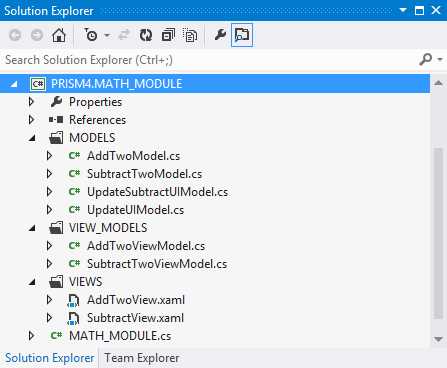
- The Math Module Project Folder Layout
There are three folders in the module.
- MODELS
- VIEW_MODELS
- VIEWS
I use folders to separate the classes to better organize my solutions. This can be handy in large projects that contain numerous classes of different types.
Let's do a quick synopsis of MVVM. MVVM is not a Prism 4 construct but is designed to work well with the framework. It's main purpose is to enforce separation of concerns between views and models. The view's data context is used to loosely couple the view model to the view. Views know about view models through the data context, but view models have little knowledge about views. View models know about models. Models have no knowledge of views or view models.
View models use the INotifyPropertyChanged interface to synchronize changes in the view model and view.
Although the MVVM design pattern is not a part of Microsoft Prism 4, it does serve as a powerful addition to solutions that use the framework
In the next chapter we'll talk about Prism 4 regions.


- 1800+ high-performance UI components.
- Includes popular controls such as Grid, Chart, Scheduler, and more.
- 24x5 unlimited support by developers.