
Power BI Succinctly®

CHAPTER 8
Power BI Gateway: Data Security
If the data source we have is on-premises, we can’t update from Power BI automatically, which instead runs in the cloud. Therefore, we need to implement a communication channel between what is in the cloud and what runs on-premises. This is possible through the gateways that are made available by Power BI. In particular, we have the personal gateway and the on-premises data gateway, both free and directly downloadable from the Power BI portal.
The personal gateway is a Windows service that can act as a data source for Windows applications. If the user is an administrator, the personal gateway will run as a Windows service by using the same credentials of the user who installed it. But if the user is not an administrator of the machine, the personal gateway will run as a Windows application. The personal gateway service runs as a 64-bit Windows application that communicates with Power BI using the Azure Service Bus, which allows a secure channel for data transfer. It is very important to specify here that we do not need to open firewall ports in the infrastructure in order to accept incoming connections because the Azure Service Bus works in “relay” mode and therefore all communicating entities are clients of the Services bus. This means we must be open to the possibility of open outgoing connections, although incoming connections are not required. It is a little bit like the chat functionality in which all the users use chat clients, but in fact the communication among them is bidirectional.
The personal gateway cannot run in combination with other gateways, therefore it must be the only gateway present on the machine on which it is installed. It is called a personal gateway because it is meant for personal use. For instance: the user who works with Excel workbooks daily and decides to load the workbooks on Power BI would need a data refresh because they are working on-premises. We can reach the same result by installing the personal gateway in a personal laptop. The personal gateway will be linked to the personal Power BI workspace of the user who installed it. At that point, we will be able to update the data exactly as it occurred when the workbook was on-premises. But if we think about an organization with more users, even 10 users, each of them should install their own personal gateway, so that they will have the ability to update the data. To solve this, the on-premises data gateway is available, which is indeed meant for enterprise environments.
The on-premises data gateway has been designed to run on-premises 24/7. The results of the queries are sent safely (SSL) through the Azure Service Bus.
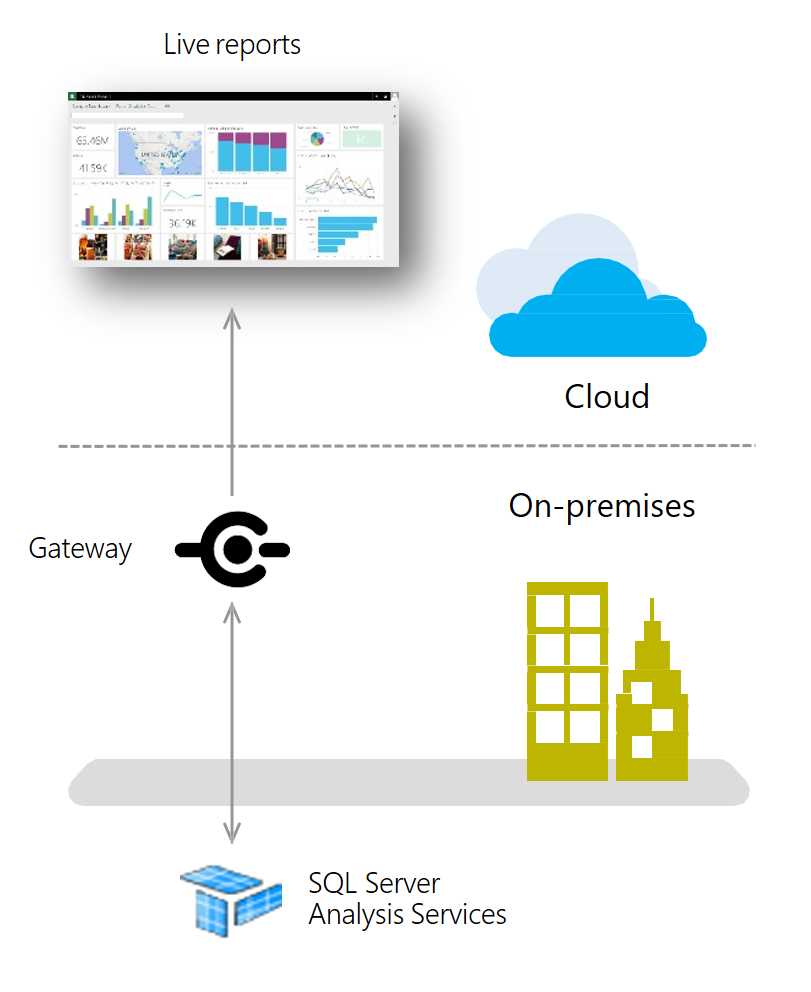
Figure 195: Power BI Gateway rule
With Power BI, the Enterprise Gateway is installed on a dedicated server. There is also a recovery procedure in case of failure. In such a case, if we know the recovery key, we can carry out the refresh even on a different server. Also remember that the personal gateway interrupts the refresh functionality when the user’s is shut down. With the Power BI Enterprise Gateway, we can have a constant refresh, seven days a week and 24 hours a day. The on-premises data gateway works by using a channel of Azure Service Bus similar to how the personal gateway works. Azure Service Bus gives us the ability to interact with data sources such as Analysis Services. The gateway allows us to accept the account from which the query comes. In the specific case of a connection to a data source of Analysis Services, we can accept the so-called Effective User Name. The gateway will receive the users as well as carry out the query on behalf of the specific user, and the result of the query will depend only on the users who updated the report on Power BI. Another essential aspect of the on-premises data gateway is that it allows us to manage data sources in a centralized way. The user who installs an on-premises data gateway is the administrator of the data sources. Furthermore, the administrator can add other administrators and set up different types of data sources, such as SQL Server, Database Oracle, and many others. Access to the data sources can be set up on the basis of the destination user. As administrators, we can decide that only one category of users will be able to access that specific data source, while the others cannot.


- 1800+ high-performance UI components.
- Includes popular controls such as Grid, Chart, Scheduler, and more.
- 24x5 unlimited support by developers.