
OWIN Succinctly®

CHAPTER 1
OWIN
Introduction
In this first chapter, you are going to learn how the world of web development has dramatically changed in the last few years, and how a group of .NET developers have defined a small set of specifications to try to make web development in the .NET world easier. You will also learn how Microsoft embraced these specifications, and why it is basing the future of ASP.NET on it.
The web is evolving fast, and web development needs to keep up with it. For this reason, all framework vendors need to offer good solutions for developers to deal with their latest needs.
One of these needs is to have an abstraction between the web application and the web server. This has several advantages, which we will discuss later in the book.
OWIN bridges this gap between web application and web server in the .NET world by offering different solutions like Katana or the open source community-driven Nowin.
What is OWIN?
OWIN is the acronym of Open Web Server Interface for .NET. It is defined on the project website as follows.
OWIN defines a standard interface between .NET web servers and web applications. The goal of the OWIN interface is to decouple server and application, encourage the development of simple modules for .NET web development, and, by being an open standard, stimulate the open source ecosystem of .NET web development tools.
As you can imagine after reading the definition, there is no code for OWIN, just specifications for the real implementation of a custom web server.
After two years (2010–2012), OWIN's specification was finally completed and the current version is 1.0. If you are curious and would like to see the history of the specification, the draft history is also available on the OWIN project website.
Why Do We Need OWIN?
Probably you have already figured out some of the reasons that make OWIN an important factor in web applications, but there are others that are not as obvious.
Firstly, OWIN aims at defining a standard interface for web servers and .NET client applications to interact, whereas Katana and Nowin are the implementations.
Moreover, like the OWIN website says, the design of OWIN is inspired by Node.js, WSGI on Python, and Rack, which is a similar lightweight server for Ruby.
Despite being an inspiration and having many similarities, there are also important differences between Node.js and OWIN: the OWIN specification mentions a web server like something that runs on the server, answers to HTTP requests, and forwards them to its middleware. On the other hand, Node.js is the web server that runs under your code, so you have total control of it.
So then, why is OWIN so cool, and why do we need it?
Well, Internet Information Services (IIS) is a super-tested web server and it will probably have a long life in .NET applications, but it has several limitations.
First of all, IIS is related to the operating system. It means that you have to wait for the new release of Windows to have new features (e.g., WebSockets are available only on the latest version of Windows). You have to completely update the web server. Often it is not easy to update a web server, and system admins don't like a request like "I need the latest version of Windows because I need to use WebSockets."
With OWIN, your code is not related to the OS (specifically to System.Web, the “huge” monolithic library that lies behind the execution of ASP.NET). This means that you can use whatever you want instead of IIS (i.e. Katana or Nowin) and update it when necessary, instead of updating the OS. Moreover, if you need it, you can build your custom host and insert whatever you want in the HTTP request processing pipeline (i.e. your custom authentication logic).
All these things are possible thanks to OWIN, which provides the specifications for writing those "extension points" that make it easy to insert into the chain. In a perfect world, where all the web servers observe OWIN, you could also change the web server, keeping your extension points without writing one line of code.
Another important point could be performance, but we will explain it later when we talk about the pipeline.
When is it Right to Use OWIN?
The short answer is: "Whenever the framework you are using allows it."
This is because OWIN, and in particular Katana, is becoming part of the web development stack from Microsoft (and with ASP.NET vNext due in 2015, this will be even more true). Some frameworks have integrated the paradigms of OWIN, while others are not yet compatible. For example, Web API and SignalR are compatible with OWIN, and can be used in the OWIN middleware pipeline, while ASP.NET MVC (prior to v5) is still incompatible. Nancy, FubuMVC, and other third-party web frameworks are also compatible with OWIN. In Chapter 3, we will look at how to use these frameworks with Katana.
The question of compatibility will not be relevant for long, because the new wave of ASP.NET web frameworks will be based on OWIN, including the new version of ASP.NET MVC (v6). Soon you will be using software built on top of OWIN specifications even without knowing it. Some of the current version of ASP.NET MVC is also based on OWIN, as you will see in Chapter 5.
OWIN Specifications
Now that we have an idea of what OWIN is and the scenarios in which a server that respects OWIN specs is useful, it is time to analyze the specifications in detail.
As anticipated at the beginning of the chapter, the OWIN specifications are pretty simple. They define a set of layers, the order in which they are stacked, and the interface, referred to as the application delegate or AppFunc, which is used by these layers to communicate with each other.
OWIN Layers
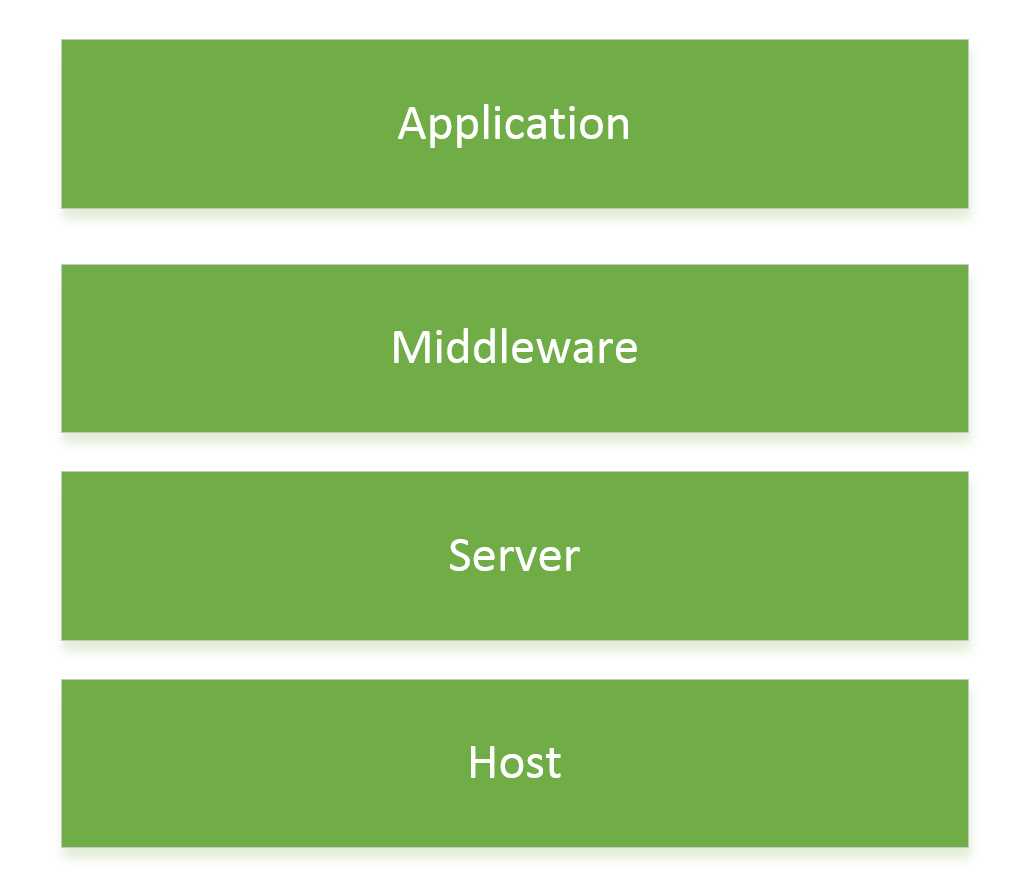
OWIN layers
The OWIN specs define four layers:
- Host: The process inside which all the other layers are executed. It is mainly responsible for the application configuration and startup of the process, including launching the server.
- Server: This is the actual HTTP server, the one binding to the network socket to listen to requests and sending them to the pipeline of OWIN middleware components.
- Middleware: These pass-through components stand between the server and the final application code, and handle the requests sent through the OWIN pipeline. These components can be as simple as a logger or as complex as full web frameworks like Web API or SignalR. As far as the server is concerned, a middleware component is anything that implements the application delegate.
- Application: This is the specific application code, possibly built on top of a web framework. Since the code of your application will only interact with the web framework, the only interaction you will have with the OWIN part of the pipeline will be configuration of the pipeline, but nothing more than this.
The Application Delegate
The other important part of the specs is the definition of the interface used by middleware components to interact with the server in the OWIN pipeline. It is not an interface in the strict sense of the term, but it is a delegate that each OWIN middleware component should provide.
using AppFunc = Func< IDictionary<string, object>, // Environment Task>; // Done |
In plain English, the previous code means that each OWIN middleware must have a method that receives as input a variable of type IDictionary<string, object> (known as the environment dictionary) with the state of the running request, and must return a Task object to allow the asynchronous execution of the component.
The Environment Dictionary
The environment dictionary contains all the information about the request, response object, and any server state. It is the responsibility of the server to create the dictionary, fill it with the streams used to write the response, and read the possible request body with all the headers.
Through the pipeline, each component and layer may add additional data, but the specs define a set of mandatory keys that always have to be present.
Mandatory Keys in Request Data
Key Name | Description |
|---|---|
owin.RequestBody | A Stream with the request body, if any. Stream.Null MAY be used as a placeholder if there is no request body. |
owin.RequestHeaders | A IDictionary<string, string[]> of request headers. |
owin.RequestMethod | A string containing the HTTP request method of the request (e.g., GET, POST). |
owin.RequestPath | A string containing the request path. The path must be relative to the root of the application delegate. |
owin.RequestPathBase | A string containing the portion of the request path corresponding to the root of the application delegate. |
owin.RequestProtocol | A string containing the protocol name and version (e.g., HTTP/1.0 or HTTP/1.1). |
owin.RequestQueryString | A string containing the query string component of the HTTP request URI, without the leading “?” (e.g., "foo=bar&baz=quux"). The value may be an empty string. |
owin.RequestScheme | A string containing the URI scheme used for the request (e.g., http, https). |
Mandatory Keys in Response Data
Key Name | Description |
|---|---|
owin.ResponseBody | A Stream used to write out the response body, if any. |
owin.ResponseHeaders | An IDictionary<string, string[]> of response headers. |
owin.ResponseStatusCode | An optional int containing the HTTP response status code as defined in RFC 2616 section 6.1.1. The default is 200. |
owin.ResponseReasonPhrase | An optional string containing the reason phrase associated with the given status code. If none is provided then the server should provide a default as described in RFC 2616 section 6.1.1. |
owin.ResponseProtocol | An optional string containing the protocol name and version (e.g. HTTP/1.0 or HTTP/1.1). If none is provided, then the owin.RequestProtocol key’s value is the default. |
Other Mandatory keys
Key Name | Description |
|---|---|
owin.CallCancelled | A CancellationToken indicating if the request has been cancelled or aborted. |
owin.Version | The string 1.0 indicating OWIN version. |
The Application Startup
The specs, specifically Section 4, also define how the startup sequence must be, and how new middleware should be added to the application. Until a few months ago, the OWIN group provided a non-normative IAppBuilder to formalize how the OWIN pipeline starts and how middleware is added, but it has recently been removed as this topic is still being discussed in the mailing list. Expect changes on this part of the spec in the future.
General Consideration of the Specs
These specs might seem small, but it is in their simplicity that lies their importance: by requiring the dependency on basically only one type (the AppFunc), they lower the entry barrier for developers who want to write OWIN components. Also, using a dictionary allows interoperability among components and frameworks without requiring all the different developers to agree on a specific structured object model, something that is very difficult to achieve. The three different web frameworks built by Microsoft—Web Forms, ASP.NET MVC, and Web API—have three different object models for maintaining the state of the current request.
Introducing Katana
As we have just seen, OWIN is nothing but a few specs. For them to be usable in a real project, there must be something that implements them. At the time of writing, only two publicly released servers implement these specs: Katana, developed by Microsoft, and Nowin. In the rest of the book, we will use the Katana implementation every time we need to refer to a concrete implementation.
A Brief History of Katana
Before looking at how to use Katana, we need to understand how it came to be by looking back more than 10 years through the evolution of ASP.NET.
ASP.NET Web Forms
First came ASP.NET Web Forms in 2001, which was built with two classes of developers in mind:
- Developers coming from ASP Classic, who were used to building dynamic websites using a mix of HTML markup and server-side scripting. In addition, the ASP runtime abstracted the underlying HTTP connection and web server, and provided to the developers a set of objects that allowed them to easily interact with the current HTTP request. It also provided additional services such as session management, state, caching, and more.
- Developers coming from the more traditional Windows Forms application development. Those developers did not know how to write HTML, and were used to building applications by dragging elements on a design canvas.
To cater to both classes of developers, the first ASP.NET web framework, called Web Forms, was built with the goal of hiding the stateless nature of the web with a server-side event model, mainly implemented via the infamous ViewState.
The result was successful, with a feature-rich web framework and approachable programming model. But all this came with a few limitations:
- All the features were shipped together in a monolithic framework, heavily coupled with the core web abstracting library, System.Web.
- Being heavily based on a design time programming model, ASP.NET was tied to the larger .NET framework and also to Visual Studio; this meant that, apart from quick fixes, years were passing between releases of the web framework.
- Last but not least, the ASP.NET framework (via its core library System.Web) was also coupled and usable only with Microsoft's Internet Information Services (IIS) web server.
ASP.NET MVC
Over time, those limitations, which at the beginning probably did not seem very dangerous, began to show their costs. It was becoming very difficult for Microsoft to adapt to the fast pace of other frameworks and languages, which were built as small and very focused components, rather than huge frameworks.
In addition, the style of web development changed: while at the beginning having the framework abstract away HTTP and even HTML markup was helping non-web developers build web applications, now developers wanted more control, especially on the markup that was being rendered on pages.
To address these two problems, the ASP.NET team developed the ASP.NET MVC framework, adopting the Model-View-Controller design pattern to keep a clean separation between business logic and presentation logic, while allowing developers to have complete control of the markup. In addition, they decided to release the framework out of band and not coupled with the .NET framework, making faster and more frequent releases possible.
Some problems still remained, most notably the dependence on the huge System.Web DLL, which made ASP.NET MVC not totally independent from the larger .NET framework.
ASP.NET Web API
A few years later, another big change happened in the way web applications were built. Instead of server-generated data-driven pages, applications were being built as mostly static pages, some portions of which were generated by interacting with web APIs via AJAX calls.
The ASP.NET team started building a new framework, called ASP.NET Web API, to better approach this paradigm of web development. They also took the opportunity to move toward an even more modular component model by ditching the dependency on System.Web and building a framework that could evolve independently from the rest of ASP.NET, and much quicker thanks to the recent introduction of NuGet, the package manager from which all .NET libraries are easily installed. On top of this, since it didn’t depend on System.Web, it also did not depend on IIS, allowing the possibility of running on custom hosts and other web servers.
Here Comes Katana
With Web API being able to run in its own lightweight host, and with the growth of more modular and very focused frameworks, there was the concrete risk that developers had to start separate processes to handle the various components of a modern web application, like static files, dynamic files, web APIs, and web sockets.
To avoid the proliferation of processes, all of which would need to be started, stopped, and managed independently, a common hosting process was needed to which additional features and modules could be easily added.
This is why OWIN was born, to standardize the way frameworks and components could be easily plugged into those hosting processes. Katana is the hosting process and server built by Microsoft on top of these specifications.
How to Get Katana
Katana is released out of band and is available as a NuGet package that you can directly include in your projects.
In the next chapter, we will see how to create your first simple web application running on Katana.
License
Like every other open source project, OWIN and Katana have a license to which you have to comply when you want to use them.
Luckily, the license used is the Apache License 2.0, which is very permissive and basically gives you the right to use the software however you want, as long as:
- The original copyright is retained.
- The license is included in modified software.
- If significant changes are made to the software, they must be stated somewhere.
Conclusions
In this chapter, you have learned what OWIN is, how OWIN came to be, and what the specifications of OWIN are.
You had a brief recap on the history of the web development stacks from Microsoft, why now is the right time for Microsoft to embrace the OWIN specs. Microsoft has built its own implementation called Katana, and plans to build its future web development platforms on top of OWIN.
In the next chapter, you will learn what exactly Katana is, how its components map to the OWIN specs, and how to start building you first "Hello World" web apps on Katana.


- 1800+ high-performance UI components.
- Includes popular controls such as Grid, Chart, Scheduler, and more.
- 24x5 unlimited support by developers.