
Node.js Succinctly®

CHAPTER 9
Events
Events enable an object to notify other objects when something of interest occurs. The object that sends (or raises) the event is called the publisher and the objects that receive (or handle) the event are called subscribers.
In this chapter, we're going to learn events implementation using Node.js.
Events Module
Node.js provides an events module to manipulate communication based on an event. For further information this module, you can visit the events module document on http://nodejs.org/api/events.html.
Getting Started
Let's start writing the event code. We use the EventEmitter object to create our events. Don't forget to load the events module.
First, we prepare a function as a callback function and pass it into the on() function from the EventEmitter object. Here is sample code if the caller sends an event message that is the same with on():
var EventEmitter = require('events').EventEmitter; var myEmitter = new EventEmitter; var connection = function(id){ // do something console.log('client id: ' + id); }; myEmitter.on('connection', connection); myEmitter.on('message', function(msg){ // do something console.log('message: ' + msg); }); |
To test it, write this script:
myEmitter.emit('connection', 6); myEmitter.emit('connection', 8); myEmitter.emit('message', 'this is the first message'); myEmitter.emit('message', 'this is the second message'); myEmitter.emit('message', 'welcome to nodejs'); |
Explanation:
- First, we load the events module.
- Define the EventEmitter object and instantiate it.
- We can define a function variable or put the function into the on() method directly.
- To send the message, we can use the emit() method with the event name and data as parameters.
After writing the code, run it in the console. Here is program output of our application:
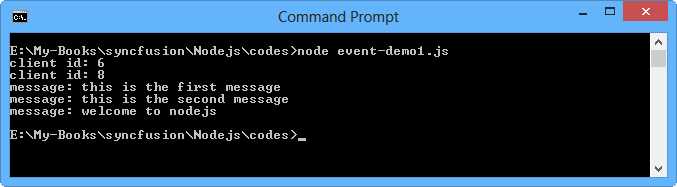
Figure 51: Executing an application with the events module
Once Event Listener
If you use the on() method, it means this event listener will listen for the event forever until the application closes. If you plan to listen for the event once, you can use the once() method.
Please write this sample code:
var EventEmitter = require('events').EventEmitter; var myEmitter = new EventEmitter; myEmitter.once('message', function(msg){ // do something console.log('message: ' + msg); }); myEmitter.emit('message', 'this is the first message'); myEmitter.emit('message', 'this is the second message'); myEmitter.emit('message', 'welcome to nodejs'); |
Try to run this code. The sample of program output can be seen in Figure 52.
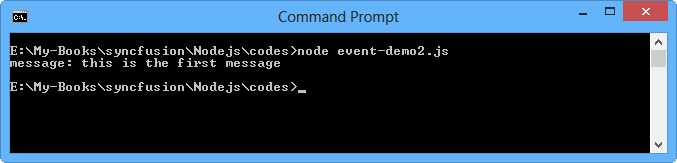
Figure 52: A simple application for once event usage
You can see that once the event function receives one event, it will stop to listen for another event.
Remove Events
If you want to remove the event listener, call removeListener(). This function needs an event name and a function variable for parameters.
Here is a sample code for how to remove the 'connection' event.
var EventEmitter = require('events').EventEmitter; var myEmitter = new EventEmitter; // functions var connection = function(id){ // do something console.log('client id: ' + id); }; var message = function(msg){ // do something console.log('message: ' + msg); }; // waiting event myEmitter.on('connection', connection); myEmitter.on('message', message); // send message myEmitter.emit('connection', 6); // remove event myEmitter.removeListener('connection',connection); // test to send message myEmitter.emit('connection', 10); myEmitter.emit('message', 'welcome to nodejs'); |
Run it. You can see the program output in Figure 53.
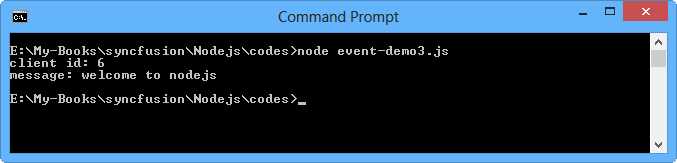
Figure 53: Removing event listener
Since the removeListener() function was called, the event didn't listen to the 'connection' event so the program only shows once.


- 1800+ high-performance UI components.
- Includes popular controls such as Grid, Chart, Scheduler, and more.
- 24x5 unlimited support by developers.