
NHibernate Succinctly®

CHAPTER 7
Restrictions and Filters
Restrictions
It is possible to specify additional restraining conditions to entities, which NHibernate always respects when performing SELECTs. These conditions come in two flavors: restrictions and filters. Let’s first focus on restrictions.
A restriction is a static WHERE clause that can be added at class and collection levels (sets, lists, bags, maps, id bags, arrays, and primitive arrays) in order to filter its elements. A typical example would be soft deletes where records are not actually deleted from the database but, instead, are marked with a column value that represents deletion. Here’s how we define this as XML, for classes and collections:
<class name="Blog" lazy="true" table="`POST`" where="deleted = 0"> <!-- ... --> <list cascade="all-delete-orphan" inverse="true" lazy="true" name="Posts" where="deleted = 0"> <!-- ... --> </list> </class> |
Here is the equivalent code in mapping by code:
mapper.Class<Blog>(ca => { ca.Where("deleted = 0"); //... ca.List(c => c.Posts, c => { c.Where("deleted = 0"); //... }); } |
And in attributes:
Whenever you query for the Blog entity, the “deleted = 0” restriction will be added automatically, even if you include other conditions:
IEnumerable<Blog> nonDeletedBlogs = session.Query<Blog>(); Blog b = session.Get<Blog>(1); |
See the resulting SQL for the two queries:
SELECT blog0_.blog_id AS blog1_11_, blog0_.picture AS picture11_, blog0_.user_id AS user3_11_, blog0_.name AS name11_, blog0_.creation AS creation11_, (SELECT COUNT(1) FROM post WHERE post.blog_id = blog0_.blog_id) AS formula2_ FROM blog blog0_ WHERE ( blog0_.deleted = 0 ) SELECT blog0_.blog_id AS blog1_11_0_, blog0_.picture AS picture11_0_, blog0_.user_id AS user3_11_0_, blog0_.name AS name11_0_, blog0_.creation AS creation11_0_, (SELECT COUNT(1) FROM post WHERE post.blog_id = blog0_.blog_id) AS formula2_0_ FROM blog blog0_ WHERE blog0_.blog_id = 1 AND ( blog0_.deleted = 0 ) |
Filters
A filter is similar to a restriction but it is dynamic. This means it can be enabled or disabled and can have parameters. One example might be a model in which you have translations of terms to multiple languages:
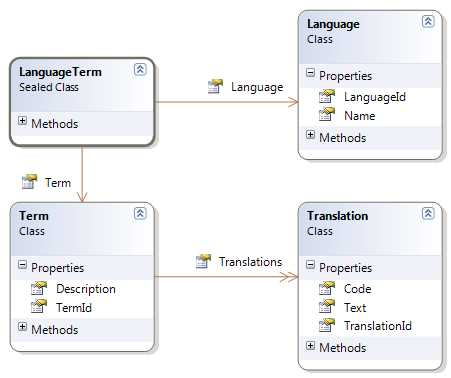
- Translations Class Model
What we have is:
- A Language
- A Term with a collection of Translations
- A Translation of a Term for a given Language
This introduces a new concept: a class that maps a composite key. In this case, it is the LanguageTerm that contains a reference to both a Term and a Language.
Typically, you would use a model like this if you only want to load the translations for the current language, not for all of them. Its mappings might look like this:
And, last but not least, a filter declaration, which must go on the Configuration instance before a session factory is built:
cfg.AddFilterDefinition(new FilterDefinition("CurrentLanguage", "language_id = :code", new Dictionary<String, IType>() { { "code", NHibernateUtil.String } }, false)); |
Tip: Import namespaces NHibernate.Type and NHibernate.Engine.
Notice this:
- The CurrentLanguage filter is basically a restriction on a language_id column and it uses a code parameter.
- The primary key of the Language class, LanguageId, is a String and uses the Assigned pattern. We will use it for storing meaningful culture names like “en-us” or “pt-pt” which must always be unique.
- The Translations collection of the Term class has the CurrentLanguage filter applied to it.
- The Translation class has a composite key (ComponentAsId) implemented by the LanguageTerm class which references both a Term and a Language.
- The Translation class also uses the CurrentLanguage filter.
We need to assign a value to the code parameter of the filter and enable it before actually querying:
The filter will be included in the SQL as a parameter:
SELECT TOP (1) term0_.term_id AS term1_8_, term0_.description AS descript2_8_ FROM term term0_
SELECT translatio0_.term_id AS term2_1_, translatio0_.language_id AS language1_1_, translatio0_.language_id AS language1_9_0_, translatio0_.term_id AS term2_9_0_, translatio0_.text AS text9_0_ FROM [translation] translatio0_ WHERE translatio0_.language_id = 'en-us' AND translatio0_.term_id = 1 |
When you no longer need the filter, you just disable it:
//disable the filter session.DisableFilter("CurrentLanguage"); |
Final notes:
- Each entity and collection may have several filters and more than one can be enabled at the same time.
- A filter may or may not have parameters and these can have default values.
- A filter may be enabled or disabled.
- A filter’s SQL can only reference columns directly accessible by the class where it is applied.


- 1800+ high-performance UI components.
- Includes popular controls such as Grid, Chart, Scheduler, and more.
- 24x5 unlimited support by developers.