
NHibernate Succinctly®

CHAPTER 5
Querying the Database
Granted, probably the most typical operation you do involving a database is to query it. NHibernate offers a rich set of APIs to do this, covering different use cases.
To start querying your model, you need a session. A session is obtained from a session factory which, in turn, is built from the configuration object you learned to create in the chapter on Configuration. You will use something like:
Tip: You will need to reference the NHibernate namespace in order to compile this example.
Do note that both the session factory and the sessions are wrapped in using blocks. This is to ensure that they both are disposed of when no longer needed—at the end of each block.
A session factory may spawn multiple-session objects. It is a heavy beast and, typically, you only have one of these in your program. You will only need more than one if you wish to target multiple databases at the same time. In that case, there will be multiple Configuration and ISessionFactory instances. It is safe to access a session factory from multiple threads. What’s a session factory used for? Well, it builds up all the metadata from the mappings in the configuration object and tries to match them against actual .NET classes and database tables. It is the session factory that triggers the data model creation/validation that was discussed at the start of the Mappings chapter. And it is its disposal that will trigger its dropping, if so configured. It is read-only.
Note: Do not make changes to the Configuration instance after creating a session factory.
Sessions, on the other hand, are lightweight and do not actually represent a connection to a database; one is created when necessary, automatically. A session is where the action actually occurs. It’s the session that is responsible for querying. They are lightweight, so you can create new instances whenever you need them, typically inside a method. Do not keep references to a session in places where it might not be released. Also, do not access sessions from different threads; unexpected behavior may occur.
Tip: Whenever an exception is thrown by any session operation, the session instance becomes unusable and must be disposed of.
That being said, there are several APIs that will take a query and return a collection of in-memory objects that map to the objects on your database. Let’s look at them one by one.
Before we start, this is the domain model that we will be using:
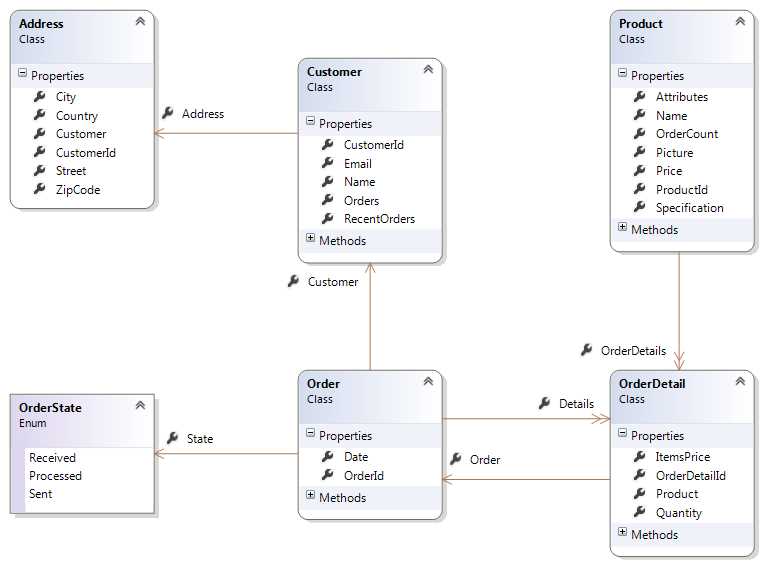
- Orders Class Model
By ID
If you know the identifier of the record you are trying to obtain, you can get it directly by this id:
//get strongly typed instance by id var someProduct = session.Get<Product>(1); //get object instance by id and type var someObject = session.Get(typeof(Product), 1); |
Get will return null if the record is not found. If it is, it will be loaded from the database and the appropriate class materialized.
LINQ
Since .NET 3.5 came along, LINQ has become the de facto standard for querying in the .NET world and it is understandable why. It is a unified way of performing strongly typed, object-oriented queries that are independent of the data source. NHibernate, of course, supports LINQ querying. To issue a LINQ query, you must make use of the Query extension method applied to a session:
//simplest LINQ query containing a filter var products = session.Query<Product>().Where(x => x.Price > 1000).ToList(); |
Tip: Import the NHibernate, NHibernate.Linq, and System.Linq namespaces.
Keep in mind that a LINQ query is only executed (sent to the database) when a terminal method is called such as ToList, ToArray, Single, SingleOrDefault, First, FirstOrDefault, Any or Count. If you don’t include such a method call, all you have is a query waiting to be executed, and you can add conditions and ordering to it:
|
var allProductsQuery = session.Query<Product>();
if (someCondition == true) { //a filter allProductsQuery = allProductsQuery.Where(x => x.Price > 1000); } else { //a filter allProductsQuery = allProductsQuery.Where(x => x.Price <= 1000); }
if (sortByName == true) { //ordering allProductsQuery = allProductsQuery.OrderBy(x => x.Name); } else { //ordering allProductsQuery = allProductsQuery.OrderByDescending(x => x.Price); }
//run the query var allProducts = allProductsQuery.ToList(); |
LINQ supports most operations available on SQL, for example:
|
var productsWithoutOrders = session.Query<Product>().Where(x => x.OrderDetails.Any() == false).ToList(); //filter on collection var ordersOfIphones = session.Query<OrderDetail>().Where(x => x.Product.Name == "iPhone") .Select(x => x.Order).ToList(); //two optional conditions var processedOrReceivedOrders = session.Query<Order>() .Where(x => x.State == OrderState.Processed || x.State == OrderState.Received).ToList(); //grouping and counting var countByProduct = (from od in session.Query<OrderDetail>() group od by od.Product.Name into p select new { Product = p.Key, Count = p.Count() }) .ToList(); //customers with two orders var customersWithTwoOrders = session.Query<Customer>().Where(x => x.Orders.Count() == 2) .ToList(); //nesting queries var customersWithOrders = session.Query<Customer>().Where(x => x.Orders.Any());
var ordersFromCustomers = session.Query<Order>().Where(x => customersWithOrders .Contains(x.Customer)) .ToList(); //paging var productsFrom20to30 = session.Query<Product>().Skip(19).Take(10).ToList(); //multiple conditions var productsWithPriceBetween10And20 = session.Query<Product>() .Where(x => x.Price >= 10 && x.Price < 20) .ToList(); //first record that matches a condition var customerWithMoreOrders = session.Query<Customer>().OrderBy(x => x.Orders.Count()) .FirstOrDefault(); //projection var productsAndOrderCount = session.Query<Product>() .Select(x => new { x.Name, Count = x.OrderDetails.Count() }).ToList(); //theta join with projection var productsAndCustomers = (from p in session.Query<Product>() join od in session.Query<OrderDetail>() on p equals od.Product select new { ProductName = p.Name, CustomerName = od.Order.Customer.Name }) .ToList().Distinct(); //property navigation and sorting var firstCustomer = session.Query<OrderDetail>().OrderBy(x => x.Order.Date) .Select(x => x.Order.Customer.Name).FirstOrDefault(); //set of values var orders = session.Query<Order>() .Where(x => new OrderState[] { OrderState.Processed, OrderState.Sent }.Contains(x.State)) .ToList(); //parameters var recentOrders = session.Query<Order>() .Where(x => x.Date <= DateTime.Today && x.Date > DateTime.Today.AddDays(-7)).ToList(); |
One notable exception that NHibernate LINQ cannot handle is OUTER JOINs (LEFT, RIGHT, FULL). In the current version of NHibernate, OUTER JOINs between unrelated entities are not supported.
Note: Do not be alarmed by the presence of constants; all constants will be translated to parameters so as to reuse the execution plan for the query. This also prevents SQL injection.
Most users of NHibernate will use LINQ as its primary query API, but there are alternatives as we will see next.
HQL
Hibernate Query Language (HQL) is a database-independent, object-oriented, SQL-like language that can be used for general-purpose querying over entities. Its syntax is very similar to SQL as you can see for yourself:
Tip: To try these examples, import the NHibernate namespace.
|
var productsWithoutOrders = session.CreateQuery( "from Product x where not exists elements(x.OrderDetails)").List<Product>(); //filter on collection var ordersOfIphones = session.CreateQuery( "select o from Order o join o.Details od where od.Product.Name = :name").SetParameter("name", "iPhone") .List<Order>(); //two optional conditions var processedOrReceivedOrders = session.CreateQuery( "from Order o where o.State = :processed or o.State = :received") .SetParameter("processed", OrderState.Processed).SetParameter("received", OrderState.Received) .List<Order>(); //grouping and counting var countByProduct = session.CreateQuery( "select od.Product.Name, count(od) from OrderDetail od group by od.Product.Name").List<Object[]>(); //customers with two orders var customersWithTwoOrders = session.CreateQuery("from Customer c where c.Orders.size = 2") .List<Customer>(); //nesting queries var ordersFromCustomers = session.CreateQuery( "from Order o where o.Customer in (select c from Customer c where exists elements(c.Orders))") .List<Order>(); //paging var productsFrom20to30 = session.CreateQuery("from Product skip 19 take 10").List<Product>(); //this is identical var productsFrom20to30 = session.CreateQuery("from Product").SetMaxResults(10) .SetFirstResult(20) .List<Product>(); //theta joins with projection var productCustomer = session.CreateQuery( "select distinct p.Name, od.Order.Customer.Name from Product p, OrderDetail od where od.Product = p") .List<Object[]>();
//property navigation and sorting var firstCustomerWith = session.CreateQuery( "select x.Order.Customer.Name from OrderDetail x order by x.Order.Date take 1") .UniqueResult<String>(); //set of values var orders = session.CreateQuery("from Order o where o.State in (:states)") .SetParameterList("states", new OrderState[] { OrderState.Processed,OrderState.Sent }).List<Order>(); //parameters var recentOrders = session .CreateQuery("from Order o where o.Date between :today and :a_week_ago") .SetParameter("today", DateTime.Today).SetParameter("a_week_ago", DateTime.Today.AddDays(-7)) .List<Order>(); |
But beware! While HQL itself is case-insensitive (“select” is equal to “SELECT” is equal to “Select”) the class’ names and properties are not.
Similar to LINQ, you can take the IQuery object and add paging (SetFirstResult, SetMaxResults) or parameters (SetParameter, SetParameterList, SetEntity) before actually executing the query, which will only happen when you call List, List<T>, UniqueResult or UniqueResult<T>. You will probably want to use the generic version of these methods when your query returns entities. In this case, because the HQL query is not strongly typed, you need to set the generic parameter type yourself.
A parameter in HQL is always specified with the ‘:’ character as a prefix to its name, regardless of the character that the database uses (‘@’ in Oracle, ‘:’ in SQL Server, etc). Its position does not matter, only its name. If the parameter is a single value, you should use SetParameter to set its value; if it is a collection (array, ArrayList or List<T>), use SetParameterList instead. If you are passing an entity, use SetEntity.
One advantage that HQL offers is that it has access to standard SQL functions, although probably with a nonstandard name. Here are some of them, available for all database engines:
Category | Function | Description |
Aggregations | count(…) count(distinct …) max(…) min(…) sum(…) avg(…) | Count of items Count of distinct items Maximum value Minimum value Sum of all values Average of all values |
Date and Time | day(…) month(…) year(…) hour(…) minute(…) second(…) extract(… from …) current_timestamp | Day part of a date Month part of a date Year part of a date Hours part of a date/time Minutes part of a date/time Seconds part of a date/time Extracts a part from a date/time Current database date and time |
General Purpose | cast(…) coalesce(…) nullif(…) id size class | Casts an expression into another .NET type Returns the first non-null value If two values are equal, returns null Entity identifier Collection size Returns the actual class of an abstract entity |
Mathematics | sqrt(…) log(…) tan(…) sin(…) cos(…) mod(…) rand() abs(…) | Square root Natural logarithm Tangent Sine Cosine Modulus, the remaining of an integer division Random value Absolute value |
String | concat(…) substring(…) locate(…) replace(…) trim(…) upper(…) lower(…) length(…) bit_length(…) str(…) | Concatenates several strings together Returns a substring Returns the index of a substring Replaces the first occurrence of a string Removes leading or trailing blank characters Uppercase Lowercase Length in characters Length in bits (length() * 8) Converts an expression to a string |
Some things are different from SQL:
- Outer joins (LEFT, RIGHT, FULL) between two arbitrary, non-related entities are not supported; HQL can only perform joins between entities having properties that link them.
- No “*” selection; the default is to select all of the mapped entities’ properties.
- No need to explicitly join two entities whose relation is mapped, just navigate from one to the other through its navigation property.
- All selects must come from some entity, although they might not reference it (for example, “SELECT GETDATE()” is not supported, but “select current_timestamp from Product” is.
- The “select” part is optional; if not present, it means “select all of the mapped entity’s properties”.
- HQL is polymorphic; it understands base classes, which means that the query “from System.Object” will return all records from the database, so beware!
- You don’t have to explicitly escape entities and properties with reserved names (such as Order); NHibernate will do it for you.
- If you explicitly join several associations or collections causing a Cartesian product, you may receive a response that is not what you expect: NHibernate will be confused and you will have to tell it to distinguish the distinct root entity that you want, by using a result transformer:
Tip: Import namespace NHibernate.Transform.
These other things also apply to HQL:
- You should limit the number of records to return, and even use projections, for performance’s sake.
- You should use parameters instead of constants, to allow for execution plan reusing.
- HQL is case-insensitive.
- You must use the syntax “is null” instead of “= null”.
Criteria
Another querying API is Criteria. It is interesting because it offers a more conceptual, explicit, step-by-step approach, which is good for multi-step dynamic generation of queries. For example:
Tip: Import the namespaces NHibernate and NHibernate.Criterion.
|
var productsByNameLike = session.CreateCriteria(typeof(Product)) .Add(Expression.Sql("Name LIKE ?", "%Phone", NHibernateUtil.String)).List<Product>(); //checking if a record exists var productsWithoutOrders = session.CreateCriteria("Product", "p") .Add(Restrictions.IsEmpty("p.OrderDetails")).List<Product>(); //filter on collection var ordersOfIphones = session.CreateCriteria(typeof(Order)) .CreateCriteria("Details").CreateCriteria("Product") .Add(Restrictions.Eq(Projections.Property("Name"), "iPhone")).List<Order>(); //two optional conditions var processedOrReceivedOrders = session.CreateCriteria(typeof(Order)) .Add(Restrictions.Or(Restrictions.Eq(Projections.Property("State"), OrderState.Processed), Restrictions.Eq(Projections.Property("State"), OrderState.Received))).List<Order>(); //grouping and counting var projection = Projections.ProjectionList() .Add(Projections.GroupProperty("p.Name")).Add(Projections.Count("Product"));
var countByProduct = session.CreateCriteria(typeof(OrderDetail), "od") .CreateAlias("od.Product", "p").SetProjection(projection).List(); //customers with two orders var innerQuery = DetachedCriteria.For(typeof(Customer)) .CreateAlias("Orders", "o").SetProjection(Projections.ProjectionList() .Add(Projections.RowCount()));
var customersWithTwoOrders = session.CreateCriteria(typeof(Customer), "c") .Add(Subqueries.Eq(2, innerQuery)).List<Customer>(); //nesting queries var innerQuery = DetachedCriteria.For(typeof(Customer), "ic") .Add(Restrictions.IsNotEmpty("Orders")).SetProjection(Projections.ProjectionList() .Add(Projections.Constant(1))); var ordersFromCustomers = session.CreateCriteria(typeof(Order), "o") .Add(Subqueries.Exists(innerQuery)) .List<Order>(); //paging var productsFrom20to30 = session.CreateCriteria(typeof(Product)).SetMaxResults(10) .SetFirstResult(20) .List<Product>(); //theta joins are not supported by Criteria //property navigation and sorting var firstCustomer = session.CreateCriteria(typeof(OrderDetail), "od") .CreateAlias("Order", "o") .CreateAlias("o.Customer", "c").SetProjection(Projections.Property("c.Name")) .AddOrder(Order.Asc("o.Date")).SetMaxResults(1).UniqueResult<String>(); //set of values var orders = session.CreateCriteria(typeof(Order)) .Add(Restrictions.In(Projections.Property("State"), new Object[] { OrderState.Processed, OrderState.Sent })).List<Order>(); //parameters var recentOrders = session.CreateCriteria(typeof(Order), "o") .Add(Restrictions.Between(Projections.Property("Date"), DateTime.Today.AddDays(7), DateTime.Today)) .List<Order>(); |
As you can see, querying with Criteria can be less intuitive than using HQL and LINQ. It requires careful consideration of what to do and may require doing things in several steps, perhaps resorting to additional DetachedCriteria objects. The resulting code is normally longer and harder to follow.
Paging works the exact same way by means of SetMaxResults and SetFirstResult.
You can work exclusively with DetachedCriterias, which you can pass around different layers of your application, or even serialize, because they are not tied to any session. In fact, they are a good implementation of the Query Object pattern. One example would be:
|
var productsWithoutOrdersWithDetached = DetachedCriteria.For(typeof(Product), "p") .Add(Restrictions.IsEmpty("p.OrderDetails")); var productsWithoutOrders = productsWithoutOrdersWithDetached.GetExecutableCriteria(session) .List<Product>(); |
If you issue several joins, causing a Cartesian product, you have the same problem that you have with HQL in that you have to tell NHibernate to distinguish the root entity. Here’s how to do it with Criteria:
|
var orderDetailsWithProductsAndOrders = session.CreateCriteria(typeof(OrderDetail), "od") .CreateAlias("od.Order", "o").CreateAlias("od.Product", "p").CreateAlias("o.Customer", "c") .SetResultTransformer(Transformers.DistinctRootEntity).List<OrderDetail>(); |
Criteria also offers an interesting query possibility, one that does not exist in any of the previous APIs: querying by example. Let’s see how this works:
|
var productsWithSamePrice = session.CreateCriteria(typeof(Product)) .Add(Example.Create(new Product() { Price = 1000 })).List<Product>(); |
Querying by example will take an object and check all of its properties that have non-default values (the id property and collections are not considered) to see what to query for. It will then try to find all objects that match the given values.
Query Over
Next in line is Query Over. It is something of a mix between LINQ and Criteria, meaning it has the same advantages (strong typing, easy to build dynamic queries) and disadvantages (verbosity, complex syntax, need to explicitly perform JOINs). Here are the same queries, now written with Query Over:
Tip: Import the NHibernate.Criterion namespace.
|
var productsWithoutOrders = session.QueryOver<Product>() .WithSubquery.WhereExists(QueryOver.Of<OrderDetail>().Select(x => x.Product)).List(); //filter on collection OrderDetail orderDetailAlias = null; Product productAlias = null;
var ordersOfIphones = session.QueryOver<Order>().JoinQueryOver(x => x.Details, () => orderDetailAlias) .JoinQueryOver(x => x.Product, () => productAlias).Where(x => x.Name == "iPhone").List(); //two optional conditions var processedOrReceivedOrders = session.QueryOver<Order>() .Where(x => x.State == OrderState.Processed || x.State == OrderState.Received).List(); //grouping and counting Product productAlias = null;
var projection = session.QueryOver<OrderDetail>().JoinAlias(x => x.Product, () => productAlias) .SelectList(list => list.SelectGroup(x => productAlias.Name).SelectCount(x => x.OrderDetailId)) .List<Object[]>(); //customers with two orders var innerQuery = QueryOver.Of<Customer>().JoinQueryOver(x => x.Orders).ToRowCountQuery();
var customersWithTwoOrders = session.QueryOver<Customer>().WithSubquery.WhereValue(2) .Eq(innerQuery) .List(); //nesting queries var innerQuery = QueryOver.Of<Customer>().WhereRestrictionOn(x => x.Orders).Not.IsEmpty .Select(x => 1);
var ordersFromCustomers = session.QueryOver<Order>().WithSubquery.WhereExists(innerQuery) .List(); //paging var productsFrom20to30 = session.QueryOver<Product>().Skip(20).Take(10).List(); //theta joins are not supported by Criteria //property navigation and sorting Order orderAlias = null; Customer customerAlias = null;
var firstCustomer = session.QueryOver<OrderDetail>().JoinAlias(x => x.Order, () => orderAlias) .JoinAlias(x => x.Order.Customer, () => customerAlias).OrderBy(x => orderAlias.Date).Desc .Select(x => customerAlias.Name).Take(1).SingleOrDefault<String>(); //set of values var orders = session.QueryOver<Order>().WhereRestrictionOn(x => x.State) .IsIn(new Object[] { OrderState.Processed, OrderState.Sent }).List(); //parameters var recentOrders = session.QueryOver<Order>() .Where(Restrictions.Between(Projections.Property<Order>(x => x.Date), DateTime.Today.AddDays(-7), DateTime.Today)).List(); |
As you can see, Query Over is similar to Criteria but with strongly typed, LINQ-style expressions. Some of these expressions are also entirely compatible with LINQ. Since most are strongly typed, so are aliases and hence the need for helper variables for representing these aliases.
Criteria does not support all of the query possibilities that HQL does, namely, theta joins, which are arbitrary joins between two unrelated tables.
If you ever need to mix Criteria with Query Over, it is possible by means of the RootCriteria property:
Querying by example is also supported:
|
var productsWithSamePrice = session.QueryOver<Product>() .Where(Example.Create(new Product() { Price = 1000 })).List(); |
Finally, the problem with Cartesian products is also pertinent. Here is the workaround:
|
OrderDetail orderDetailAlias = null; Order orderAlias = null; Product productAlias = null; Customer customerAlias = null;
var orderDetailsWithProductsAndOrders = session.QueryOver<OrderDetail>(() => orderDetailAlias) .JoinAlias(x => x.Order, () => orderAlias).JoinAlias(x => x.Product, () => productAlias) .JoinAlias(x => x.Order.Customer, () => customerAlias) .TransformUsing(Transformers.DistinctRootEntity) .List(); |
SQL
The previous querying APIs can be powerful but they are obviously no match for SQL. SQL is the native language of the relational database and is the one that unleashes its full power. Of course, NHibernate also supports SQL querying!
The previous examples should be fairly simple to implement with SQL. Let’s look at some examples:
You might have noticed that, on the second query, we are using the DATEADD and GETDATE functions, which are specific to SQL Server. NHibernate lets you do this; it just passes whatever query you give it to the database.
In general, when you use SQL, you might be bringing columns that do not correspond to the ones that your entities are using. So there is no immediate conversion: you are bringing columns, not entities. This is possible, however, by using a special syntax:
|
var products = session.CreateSQLQuery("SELECT {p.*} FROM Product p").AddEntity("p", typeof(Product)) .List<Product>(); |
You need to wrap the table or alias containing the entity columns that you wish to materialize inside {} and you need to declare the entity that its results should map to. As simple as that.
Paging works the exact same way, in database-independent fashion by means of SetMaxResults and SetFirstResult:
//paging var productsFrom10To20 = session.CreateSQLQuery("SELECT * FROM Product").SetFirstResult(10) .SetMaxResults(10).List(); |
Note: NHibernate will properly make changes to your query such as wrapping it inside another query that does the paging.
Parameters are also used the same way (be sure to use them); however, always use ‘:’ as the parameter prefix regardless of the database you are targeting:
//parameters var productsWithPriceLowerThan100 = session.CreateSQLQuery( "SELECT {p.*} FROM Product p WHERE p.price < :price").AddEntity("p", typeof(Product)) .SetParameter("price", 100).List<Product>(); |
Multi Queries and Futures
For some databases that support it, such as SQL Server and Oracle, NHibernate offers a way to send multiple queries at the same time, thus avoiding multiple roundtrips. It is called multi queries and a simplified version is called futures. Let’s see what they look like.
Multi queries can be used for the Criteria, Query Over, and HQL APIs. All of their usual options are supported including paging and parameters:
|
IMultiQuery mq = session.CreateMultiQuery(); mq = mq.Add("from Product p where p.Price < :price").SetParameter("price", 10000); mq = mq.Add("from Customer c"); mq = mq.Add("select distinct o.Date from Order o"); //queries are only sent to the database here IList results = mq.List();
IEnumerable<Product> products = (results[0] as IList).OfType<Product>(); IEnumerable<Customer> customers = (results[1] as IList).OfType<Customer>(); IEnumerable<DateTime> dates = (results[2] as IList).OfType<DateTime>(); //Criteria IMultiCriteria mc = session.CreateMultiCriteria(); mc = mc.Add(DetachedCriteria.For(typeof(Product)).Add(Restrictions.Lt( Projections.Property("Price"), 10000))); mc = mc.Add(session.QueryOver<Customer>()); mc = mc.Add(DetachedCriteria.For(typeof(Order)).SetProjection(Projections.Distinct( Projections.Property("Date"))));
IList results = mc.List(); IEnumerable<Product> products = (results[0] as IList).OfType<Product>(); IEnumerable<Customer> customers = (results[1] as IList).OfType<Customer>(); IEnumerable<DateTime> dates = (results[2] as IList).OfType<DateTime>(); |
Tip: Beware! If you try to create a multi query on a database server that does not support it, NHibernate will throw an exception.
Future queries and future values are similar to multi queries but operate on LINQ, Criteria, and Query Over queries:
|
var futureProductsFromLinq = session.Query<Product>().ToFuture(); var futureFirstOrderFromHql = session.CreateQuery("from Order o order by o.Date desc take 1") .Future<Order>(); var futureCustomersFromQueryOver = session.QueryOver<Customer>().Future();
//future single values var futureProductsPriceSumFromCriteria = session.CreateCriteria(typeof(Product)) .SetProjection(Projections.Sum(Projections.Property("Price"))).FutureValue<Decimal>(); var futurePostsCountFromQueryOver = session.QueryOver<Post>().ToRowCountQuery() .FutureValue<Int32>(); //query results – future queries are only sent to the database here var products = futureProductsFromLinq.ToList(); var firstOrder = futureFirstOrderFromHql.Single(); var customers = futureCustomersFromQueryOver.ToList(); //single value results – future values are only sent to the database here var postsCount = futurePostsCountFromQueryOver.Value; var productsPriceSum = futureProductsPriceSumFromCriteria.Value; |
Tip: If a given database engine does not support futures, it will silently ignore the future call and, instead, execute the query immediately. This is a big advantage of future queries.
Lazy Loading
Because entities have references and collections of other entities, if NHibernate followed all these references, it could potentially load the entire database into memory! Just think about this for a moment:
- You load a single Blog.
- The Blog references a User and has a collection of Posts.
- Each Post is associated with both a collection of Comments and Attachments.
As you can imagine, if NHibernate was to follow all of these associations, it would have to perform a lot of queries to retrieve all of the associated records from database and into memory. Depending on the use case, this may or may not be what you want. To help solve this problem, NHibernate offers lazy loading for both properties, references, and collections.
Lazy loading defers loading of records and columns until the properties that represent them are actually used by your code. For example:
- You have an Order with a lazy loaded Customer; this Customer won’t be loaded at the time you load the Order but only when (and if) its Customer property is accessed.
- Your Product has a lazy loaded Picture property that represents it, and you don’t always want the image loaded because it might potentially be very big.
- Your Customer has a lazy collection of Orders, and you seldom need to go through all of them.
Tip: For lazy loading to work, both its containing entity and its property definition must be declared as lazy—which, by the way, is the default—and must be implemented as auto (meaning, no backing field) virtual properties. The containing classes cannot be sealed.
Remember the mappings from the other section? You can see there that for the Blog class, the class itself, the Owner property, and the Posts collections are all marked as lazy. In the Post class, it is also marked as lazy as are its Attachments and Comments collections.
Not all laziness is the same:
- An entity itself can be lazy loaded, which means that none of its columns are retrieved from the database. Instead, NHibernate returns a proxy object for representing the record, which will load it when any of its properties is accessed.
- For properties, you can only say that they are lazy or not.
- For associations, if you use the default Proxy/proxy setting, NHibernate will generate a proxy that inherits from the class declared in the property type. There will be a problem if this property type is the root class of a hierarchy because .NET does not have multiple inheritance. This is also because the proxy already inherits directly from the property’s class; it won’t be able to also inherit from the actual class that the association relates to. To avoid this problem, always specify the NoProxy/no-proxy setting; it will work for both class hierarchies as well as single classes. In this case, NHibernate will only assign a value to the property once it knows what class to create, so inheritance will be respected.
- As for collections, there are options for indexed and non-indexed ones. For non-indexed collections, including collections of values, sets, and bags, the only option we have for them is to either be lazy (meaning, load all of the collection entities only when the collection is accessed) or not lazy (load all collection entities when its root entity is loaded). But, for indexed collections (lists, maps), we have a third option: ExtraLazy/extra. This tells NHibernate to only load each collection item as it is accessed, not all at the same time. Finally, array collections cannot be lazy loaded.
Note: A lazy property, association or collection will only be fetched from the database one time, when it is accessed. After that, it will be stored in memory. If an entity has several lazy properties—not associations or collections—all of them will be loaded at the same time. This is different from what happens for associations and collections.
So, to sum it all up:
Laziness Options
Member Type | Member Subtype | Laziness Options |
Properties (including components) | N/A | True, False |
References | N/A | Proxy, NoProxy, NoLazy |
Collections | Indexed (list, map) | Lazy, NoLazy, Extra |
Non-indexed (set, bag) | Lazy, NoLazy | |
Arrays (array, primitive array) | N/A |
When will you use lazy loading? Probably most of the time—at least for references and collections. You won’t need it when you are certain that after you load an entity you will go through some of its references and collections. When this happens, you might as well specify the Join/join fetch strategy; this will bring everything in a single SELECT instead of a SELECT for the root entity and one SELECT for each association or collection (the default strategy). Here’s how it is declared in XML:
<?xml version="1.0" encoding="utf-8"?> <hibernate-mapping namespace="Succinctly.Model" assembly="Succinctly.Model" xmlns="urn:nhibernate-mapping-2.2"> <class name="Post" lazy="true" table="`POST`"> <!-- ... --> <many-to-one name="Blog" column="`BLOG_ID`" not-null="true" lazy="false" fetch="join" /> </class> </hibernate-mapping> |
An in-mapping by code:
mapper.Class<Blog>(ca => { //... ca.ManyToOne(c => c.Owner, a => { //... a.Fetch(FetchKind.Join); a.Lazy(LazyRelation.NoLazy); }); ca.List(x => x.Posts, x => { //... x.Fetch(CollectionFetchMode.Join); x.Lazy(CollectionLazy.NoLazy); }, c => c.OneToMany()); }); |
Tip: Specifying the fetch strategy as Join only has meaning if lazy loading is not used. Also, disabling lazy loading and using Select for fetching is pointless, too.
Lazy loading by id is achieved by calling the Load method on a lazy-loadable entity:
//get strongly typed (possibly) proxy by id var someBlogProxy = session.Load<Blog>(1); //get object (possibly) proxy by id and type var someObjectProxy = session.Load(typeof(Blog), 1); |
What this does is:
- If the referenced entity was already loaded by the current session, no proxy will be returned but the entity itself.
- If the entity isn’t known by the current session, a proxy will be returned. The database won’t be touched until code accesses some property of this entity (except the id property).
- If no record exists for the given primary key, a proxy will still be returned. Remember, it doesn’t access the database. In this case, when a property is accessed, it will throw an exception because, at that point, it will try to fetch the record from the database but it doesn’t exist.
- If a record does exist for the given identifier, when some property is touched, the entity will be populated from the record’s columns.
Note: If an instance pointing to the same record is already present in the session’s cache, it will be returned instead of a proxy.
LINQ and HQL queries always treat associations and collections as lazy so, if you want them to come at the same time as their containers, you have to fetch them explicitly. This can even be done for multiple levels:
You can check if a property, reference or collection is already loaded without actually loading it:
//load an entity Blog o = session.Get<Blog>(1); Boolean isCustomerInitialized = NHibernateUtil.IsPropertyInitialized(o, "Owner"); |
Finally, a word of caution: Lazy loading requires the originating session to be available so that NHibernate can go to the database when necessary. If you have disposed of the session, you will get a runtime exception. This is particularly relevant if you have entity instances that span multiple NHibernate sessions. Think of entities stored in an ASP.NET session, for instance. In this case, make sure you explicitly load everything you need before the session goes away.
Note: If you won’t be using lazy loading, you don’t need to mark properties and methods as virtual, and you can have sealed classes.
Inheritance
We saw in the chapter on Entity Inheritance the ways by which we can store our inheritance model in the database. For querying, we can also both look explicitly for entities of a concrete type or for all entities of a base class, using any of the querying APIs regardless of the actual inheritance strategy. Some examples follow:
|
var personById = session.Get<Person>(1); var personById = session.Get(typeof(Person), 1); var allPeopleFromLinq = session.Query<Person>().ToList(); var allPeopleFromHql = session.CreateQuery("from Person").List<Person>(); var allPeopleFromCriteria = session.CreateCriteria(typeof(Person)).List<Person>(); var allPeopleFromQueryOver = session.QueryOver<Person>().List<Person>(); //query a derived class var nationalCitizensFromLinq = session.Query<NationalCitizen>().ToList(); var foreignCitizensFromLinq = session.Query<Person>().Where(x => x is ForeignCitizen) .Cast<ForeignCitizen>().ToList(); var nationalCitizenFromCriteria = session.CreateCriteria(typeof(Person), "p") .Add(Property.ForName("p.class").Eq(typeof(NationalCitizen))).List<NationalCitizen>(); var nationalCitizenFromQueryOver = session.QueryOver<Person>() .Where(x => x.GetType() == typeof(NationalCitizen)).List<NationalCitizen>(); var nationalCitizensFromHql = session .CreateQuery("from Person p where p.class = Succinctly.Model.NationalCitizen") .List<NationalCitizen>(); var foreignCitizensFromHql = session.CreateQuery("from ForeignCitizen") .List<ForeignCitizen>(); |
Tip: The class pseudo-property can only be used when we are querying a class hierarchy; otherwise, it is useless and will cause an error.
Refreshing
After an entity is loaded, it is stored in the first-level cache of the session. This means that whenever the same record is loaded by some query, NHibernate doesn’t need to create a new instance for it; instead it can return the existing entity. This raises a question: What if the record was changed after it was first loaded? To get the most recent values, we use the Refresh method of the ISession:
Blog b = session.Get<Blog>(1); //… session.Refresh(b); |
This will issue a SELECT statement and the entity instance will have its properties loaded once again.
Which One Shall I Choose?
The one you choose depends on what you want to do. A few tips:
- LINQ is great due to its SQL-like syntax and because it is now ubiquitous in .NET as a generic, data source-independent querying API.
- LINQ and Query Over are good because they are both strongly typed, and therefore refactor-friendly.
- Criteria and HQL are good for dynamic query construction and because they can be used to query even non-public properties.
- Criteria, Query Over, and HQL can be used to express functions and expressions (think of LIKE, for example) that cannot be expressed in LINQ.
- SQL offers all the power of the database.
Tip: As you should know by now, you need not be tied to any specific API and are free to use whatever you like, whenever it best suits your needs.


- 1800+ high-performance UI components.
- Includes popular controls such as Grid, Chart, Scheduler, and more.
- 24x5 unlimited support by developers.