
NHibernate Succinctly®

CHAPTER 2
Configuration
Before using NHibernate, you must configure it. Basic required configuration consists of the database driver, the dialect to use, and the driver-specific database connection string. As you will see, there are several ways to make this configuration in NHibernate.
For the drivers and dialects, these are the ones included with NHibernate:
NHibernate Drivers and Dialects
Driver | Dialects | Description |
CsharpSqliteDriver | GenericDialect | A NHibernate driver for the Community CsharpSqlite data provider |
DB2400Driver | DB2400Dialect | A NHibernate driver for using the IBM.Data.DB2.iSeries data provider |
DB2Driver | DB2Dialect | A NHibernate driver for using the IBM.Data.DB2 data provider |
FirebirdClientDriver | FirebirdDialect | A NHibernate driver for using the Firebird data provider located in FirebirdSql.Data.FirebirdClient assembly |
FirebirdDriver | FirebirdDialect | A NHibernate driver for using the FirebirdSql.Data.Firebird data provider |
IfxDriver | InformixDialect InformixDialect0940 InformixDialect1000 | A NHibernate driver for using the Informix data provider |
IngresDriver | IngresDialect | A NHibernate driver for using the Ingres data provider |
MySqlDataDriver | MySQLDialect MySQL5Dialect | Provides a database driver for MySQL |
NpgsqlDriver | PostgreSQLDialect PostgreSQL81Dialect PostgreSQL82Dialect | The PostgreSQL data provider provides a database driver for PostgreSQL |
OdbcDriver | GenericDialect | A NHibernate driver for using the ODBC Data Provider |
OleDbDriver | GenericDialect | A NHibernate driver for using the OleDb Data Provider |
OracleClientDriver | Oracle8iDialect Oracle9iDialect Oracle10gDialect | A NHibernate driver for using the Oracle Data Provider |
OracleDataClientDriver | Oracle8iDialect Oracle9iDialect Oracle10gDialect | A NHibernate driver for using the Oracle.DataAccess data provider |
OracleLiteDataClientDriver | OracleLiteDialect | A NHibernate driver for using the Oracle.DataAccess.Lite data provider |
Sql2008ClientDriver | MsSql2008Dialect MsSqlAzure2008Dialect | SQL Server 2008 and Azure driver |
SqlClientDriver | MsSql7Dialect MsSql2000Dialect MsSql2005Dialect | A NHibernate driver for using the SqlClient data provider |
SQLite20Driver | SQLiteDialect | NHibernate driver for the System.Data.SQLite data provider for .NET 2.0 |
SqlServerCeDriver | MsSqlCeDialect MsSqlCe40Dialect | A NHibernate driver for Microsoft SQL Server CE data provider |
SybaseAsaClientDriver | SybaseASA9Dialect | The SybaseAsaClientDriver driver provides a database driver for Adaptive Server Anywhere 9.0 |
SybaseAseClientDriver | SybaseASE15Dialect | This provides a driver for Sybase ASE 15 using the ADO.NET driver |
SybaseSQLAnywhereDotNet4Driver | SybaseSQLAnywhere10Dialect | SQL Dialect for SQL Anywhere 12 |
SybaseSQLAnywhereDriver | SybaseSQLAnywhere10Dialect SybaseSQLAnywhere11Dialect | The SybaseSQLAnywhereDriver Driver provides a database driver for Sybase SQL Anywhere 10 and above |
Some of these drivers and dialects are subclasses of others, which means they inherit something from their ancestors as well as add something new. You are free to create your own classes by inheriting from the most appropriate one.
A driver is the class responsible by actually creating the connection, by instancing a System.Data.Common.DbConnection-derived class suitable for a particular database engine. If you have ODBC or OLE DB drivers available, you can connect to virtually any database by using the corresponding NHibernate drivers (but you will have better performance if you use a specific driver).
The dialect describes characteristics and registers functions of a specific version of an engine so, generally speaking, you should choose the dialect that is closer to the actual version you are using (although you can always use the generic dialect).
A configuration is, essentially, an instance of the NHibernate.Cfg.Configuration class. It needs to get populated somehow and is required for using NHibernate since everything starts from it. You may have several configuration instances, which is typical if you need to support different databases at the same time (even hosted in different engines). In most cases, however, you will need only one configuration instance.
XML Configuration
In previous versions of NHibernate, the only possible configuration was through XML. The process now is: you register a custom section on the configuration file (App.config or Web.config) and you create this section, filling its required definitions. This section would look like this:
<?xml version="1.0" encoding="utf-8" ?> <configuration> <configSections> <section name="hibernate-configuration" type="NHibernate.Cfg.ConfigurationSectionHandler, NHibernate" /> </configSections> <hibernate-configuration xmlns="urn:nhibernate-configuration-2.2"> <session-factory> <property name="hbm2ddl.keywords">auto-quote</property> <property name="connection.driver_class">NHibernate.Driver.Sql2008ClientDriver </property> <property name="dialect">NHibernate.Dialect.MsSql2008Dialect</property> <property name="connection.connection_string_name">Succinctly</property> <property name="query.substitutions">true 1, false 0</property> <mapping assembly="Succinctly.Model" /> </session-factory> </hibernate-configuration> <connectionStrings> <add name="Succinctly" providerName="System.Data.SqlClient" connectionString="Data Source=. \sqlexpress; Integrated Security=SSPI; Initial Catalog=Succinctly"/> </connectionStrings> </configuration> |
This is a minimal NHibernate configuration. You can see that inside the hibernate-configuration section we are setting some properties and adding a mapping reference. Their meaning is:
- hbm2ddl.keywords: Tells NHibernate if it should automatically escape all column and table names so that, if reserved keywords are used, they are treated appropriately. For example, in SQL Server, replace any column named INT for [INT], ORDER for [ORDER], etc. Although not required, it is very handy to have this setting. I advise you to keep it.
- connection.driver_class: The full name of a .NET class that implements a NHibernate driver and thus allows you to connect to a database (see the above table). In this example, we are using the SQL Server 2008 driver; this is a required property.
- dialect: Also a required setting for the full name of a .NET class that is tied to the driver and supports a specific database version’s dialect. For this example, we will be using the SQL Server 2008.
- connection.connection_string_name: The name of a connection string specified in its own section (connectionStrings); this is required unless you set the actual connection string in a property connection.connection_string. It is recommended that you leave the connection strings on their own section and just reference the one you want by its unique name (in this case, Succinctly).
- query.substitutions: Some constant substitutions that will be performed whenever a query is about to be sent to the database. In this example, we are translating the string constants true and false for their SQL Server equivalents, 1 and 0, respectively. Although strictly not required, you should have this setting or you may run into trouble when executing HQL queries.
- mapping: The full name of an assembly containing entity classes and their mapping files, using XML configuration for this purpose (more on this on the Mappings chapter). It is not required as there are other ways to achieve this. But, nonetheless, it is useful and you can place as many mapping entries as you want.
To build the configuration instance and load settings from the configuration file, all you need is:
Configuration cfg = new Configuration().Configure(); |
Tip: Import the NHibernate.Cfg namespace.
If you would like to use XML-based configuration, one thing that may come in handy is Visual Studio IntelliSense. You can add such support by following the following steps:
- Download the XML Schema Definition (XSD) file for the configuration section from https://github.com/nhibernate/nhibernate-core/blob/master/src/NHibernate/nhibernate-configuration.xsd.
- Open the Web.config or App.config file where you have the NHibernate configuration in Visual Studio.
- Go to the Properties window and select the ellipsis (…) button next to Schemas.
- Click the Add… button and select the nhibernate-configuration.xsd file that you just downloaded.
- Select Use this Schema at the line with target namespace urn:nhibernate-configuration-2.2:
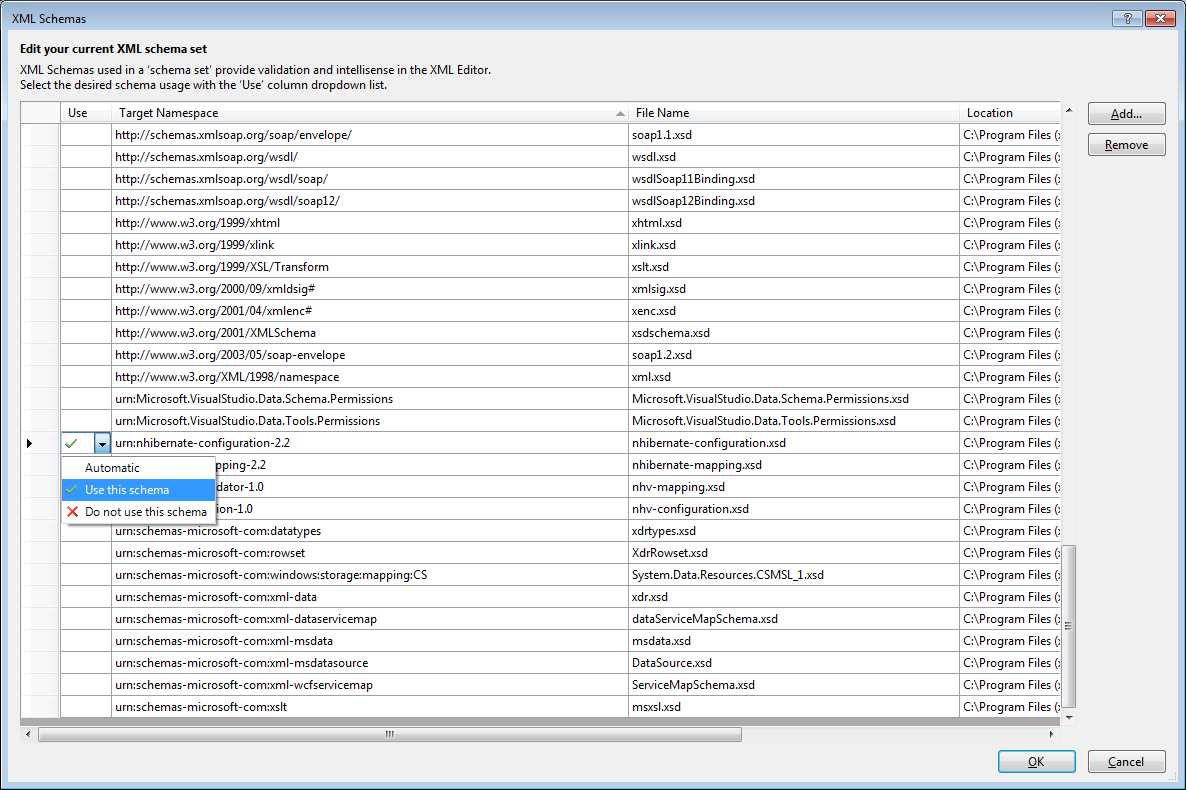
- XML Schemas for IntelliSense
- When you close the XML Schemas window, you will have IntelliSense:
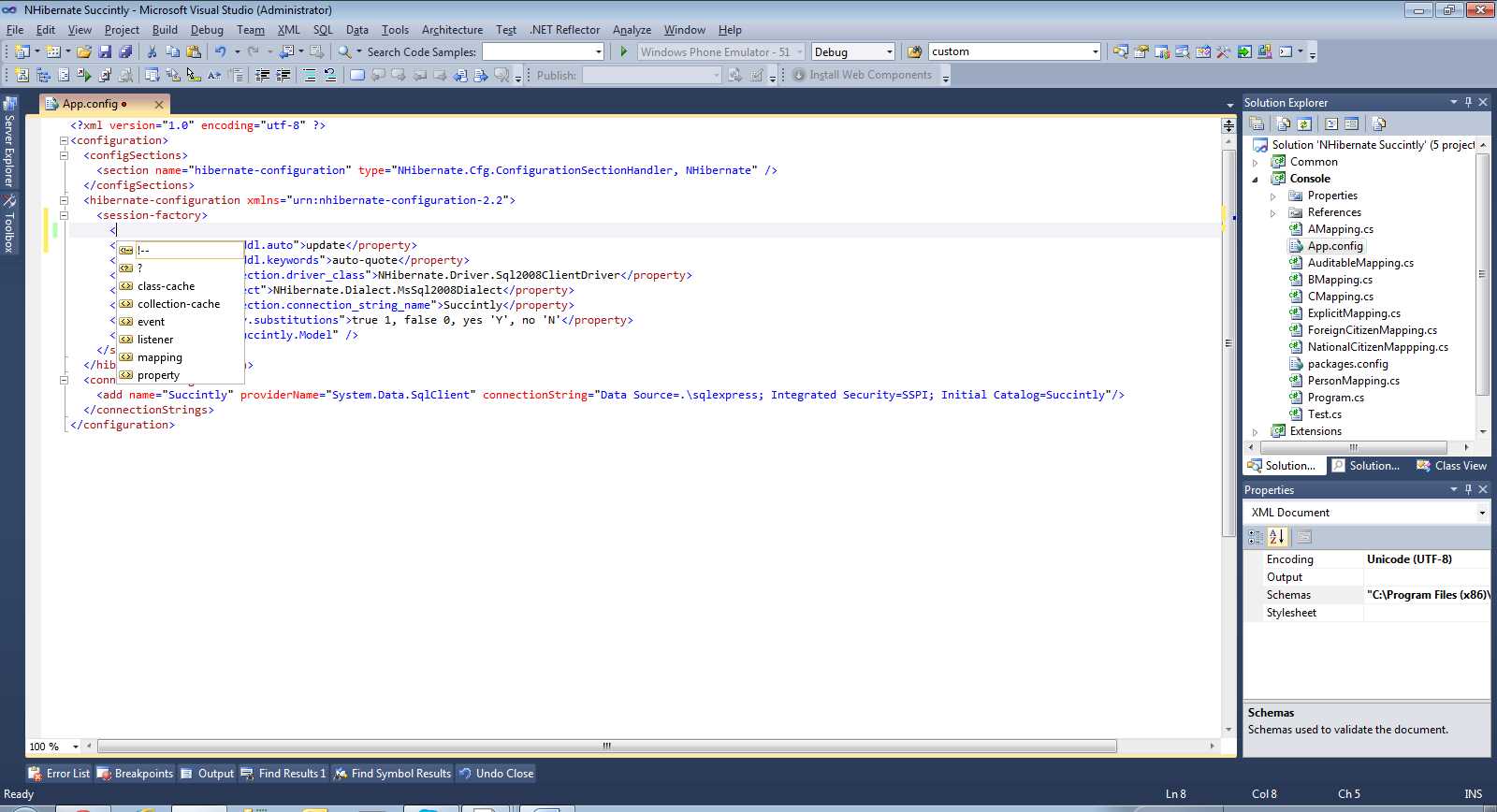
- IntelliSense for NHibernate XML
Loquacious Configuration
NHibernate 3.2 brought along what is called loquacious (or fluent) configuration. Basically, it renders the configuration section on the configuration file unnecessary and, instead, relies on code to initialize NHibernate. The configuration expressed in the previous section can be transformed into the following code:
Tip: You will need to import the NHibernate, NHibernate.Cfg, NHibernate.Dialect, and NHibernate.Driver namespaces.
Some things worth mentioning:
- The Dialect and Driver methods take generic parameters that must inherit from NHibernate.Dialect.Dialect and implement NHibernate.Driver.IDriver, respectively. As such, there is no easy way to pass in dynamically resolved types, for example, of type System.Type or in string format. For that, you can use the equivalent properties dialect and connection.driver_class:
- The AddAssembly method also has an overload that takes an Assembly instance.
- If you have both a configuration section and loquacious configuration, loquacious settings take precedence.
Which One Shall I Choose?
Again, which one you choose is up to you. They are fundamentally equivalent. XML-based configuration offers you the advantage of allowing changes without requiring recompilation of the code. However, it merely delays eventual configuration errors to a later stage when the application is run. Loquacious configuration, on the other hand, may detect syntactic errors sooner—even preventing the code from compiling altogether—at the cost of requiring recompilation just to make even the smallest change. But it allows conditional configuration, something you can’t achieve with static XML. You can have the best of both worlds and have both XML-based as well as by code configuration in the same project. It may make sense if, for example, you have to deal with legacy HBM.XML files.
These are the most basic settings required for NHibernate to work. Most of this book’s examples are agnostic regarding which database engine is used. Whenever this is not the case, it will be explicitly mentioned. Later on we will learn functionality that will require additional settings and so we will come back to this.
Note: It is also possible to have the configuration entries in an external file; that is, not as content inside the App.config or Web.config files or even as a resource embedded in some assembly. These are not typical scenarios and won’t be covered here, but you are free to explore them by looking at the various overloads of the Configuration.Configure method.


- 1800+ high-performance UI components.
- Includes popular controls such as Grid, Chart, Scheduler, and more.
- 24x5 unlimited support by developers.