
Neural Networks with JavaScript Succinctly®

CHAPTER 2
Input and Output
One of several ways to think about a neural network (NN) is that it’s a complex math function that accepts two or more numeric input values and emits one or more numeric output values. A solid understanding of the neural network input-output mechanism is essential in order to understand how a NN prediction system works.

Figure 2-1: Neural Network Input-Output Demo
The screenshot in Figure 2-1 shows a demonstration of the NN input-output process. The demo program creates a 3-4-2 network, which means there are three input values, four so-called hidden nodes where most of the computations are performed, and two output values.
Behind the scenes, the demo program configures the NN by setting the values of 12 input-to-hidden weights, four hidden biases, eight hidden-to-output weights, and two output biases (a total of 26 weights and biases). Initializing the values of a network's weights and biases will be explained shortly.
After setting the weights and biases, the demo program sets up three input values: (1.0, 2.0, 3.0). These values are fed to the network, and the two final output values are (0.4920, 0.5080). Note that the output values sum to 1.0, which is not a coincidence.
The demo program displays the computed values of the four internal hidden nodes and the preliminary values of the output nodes (0.6911, 0.7229) before the application of an important function called softmax activation.
Understanding the input-output mechanism
Before looking at the demo code, it's important to understand the neural network input-output mechanism. The diagram in Figure 2-2 corresponds to the demo program.

Figure 2-2: Neural Network Input-Output Calculations
The input node values are (1.0, 2.0, 3.0). Each blue line connecting input-to-hidden and hidden-to-output nodes represents a numeric constant called a weight. If nodes are zero-based indexed with node [0] at the top of the diagram, then the weight from input[0] to hidden[0] is 0.01, and the weight from hidden[3] to output[1] is 0.24. Weight values can be positive or negative.
Each hidden node and each output node (but not the input nodes) has an additional special weight called a bias. The bias value for hidden[3] is 0.16, and the bias for output[0] is 0.25.
Notice that if there are ni input nodes, nh hidden nodes, and no output nodes, then there are a total of (ni * nh) + (nh * no) + nh + no weights and biases. For the demo 3-4-2 neural net, there are (3 * 4) + (4 * 2) + 4 + 2 = 26 weights and bias values.
The first step in the input-output mechanism is to compute the values of the hidden nodes. Note that in most cases no processing occurs in the input nodes. For this reason, it's common to use different symbols for the input nodes (for example, squares inside circles) than for the hidden and output nodes (just circles). Additionally, the architecture of a neural network with a single hidden layer is usually called a two-layer neural network rather than a three-layer network.
To compute the value of a hidden node, you multiply each input value by its associated input-to-hidden weight, add the products up, then add the bias value, and then apply the hyperbolic tangent function (abbreviated tanh) to the sum. For hidden node [0] this is the following.
sum[0] = (1.0)(0.01) + (2.0)(0.05) + (3.0)(0.09) + 0.13
= 0.5100
hidden[0] = tanh(0.5100)
= 0.4699
The hyperbolic tangent function used in this way is called the hidden layer activation function. Two common alternatives are the logistic sigmoid function (often called just sigmoid) and rectified linear unit (ReLU). Using the tanh activation function forces all hidden node values to be between -1.0 and +1.0. Logistic sigmoid forces values between 0.0 and 1.0.
The output nodes are calculated similarly, but instead of using tanh, logistic sigmoid, or ReLU activation, a special function called softmax is used. The function is best explained by example. The preliminary sum of products plus bias values of output[0] and output[1] are the following.
sum[0] = (0.4699)(0.17) + (0.5227)(0.19) + (0.5717)(0.21) + (0.6169)(0.23) + 0.25
= 0.6911
sum[1] = (0.4699)(0.18) + (0.5227)(0.20) + (0.5717)(0.22) + (0.6169)(0.24) + 0.26
= 0.7229
A term called the divisor is computed by applying the exp() function to each sum term, and then summing those values.
divisor = exp(0.6911) + exp(0.7229)
= 1.9960 + 2.0604
= 4.0563
The exp(x) function is x raised to Euler's number, approximately 2.71828. The result of softmax is the exp() of each term divided by the divisor term.
output[0] = 1.9960 / 4.0563
= 0.4920
ouput[1] = 2.0604 / 4.0563
= 0.5080
The purpose of softmax activation is to scale output values so that they sum to 1.0 and can be loosely interpreted as probabilities. Suppose the demo corresponded to a problem where the goal is to predict if a person is male or female based on three predictor variables, such as annual income, years of education, and height. If male is encoded as (1, 0) and female is encoded as (0, 1) then the prediction is female because the second output value (0.5080) is larger than the first (0.4920).
It's relatively uncommon to use (1, 0) and (0, 1) encoding for a binary classification problem, but I used this encoding in the explanation to match the demo neural network architecture.
The Input-Output demo program
The complete source code for the demo program is presented in Code Listing 2-1. The overall structure of the program is:
// nn_io.js
// several helper functions defined here.
class NeuralNet
{
. . . // define NN
}
function main
{
let nn = new NeuralNet(3, 4, 2); // create NN.
// set the weights and biases values.
let X = [1.0, 2.0, 3.0]; // set input values.
let oupt = nn.eval(X);
console.log("Returned output values = ");
vecShow(oupt, 4);
}
main();
The core neural network functionality is defined in an ES6 class named NeuralNet. Some of the class methods call external helper functions, such as matMake(), to construct a matrix, and hyperTan() to apply hyperbolic tangent hidden layer activation. All of the control logic is contained in a main() function.
Code Listing 2-1: Neural Network Input-Output Demo Program Code
// nn_io.js // ES6 // ============================================================================= function vecMake(n, val) { let result = []; for (let i = 0; i < n; ++i) { result[i] = val; } return result; } function matMake(rows, cols, val) { let result = []; for (let i = 0; i < rows; ++i) { result[i] = []; for (let j = 0; j < cols; ++j) { result[i][j] = val; } } return result; } function vecShow(v, dec) { for (let i = 0; i < v.length; ++i) { if (v[i] >= 0.0) { process.stdout.write(" "); } process.stdout.write(v[i].toFixed(dec)); process.stdout.write(" "); } process.stdout.write("\n"); } function matShow(m, dec) { let rows = m.length; let cols = m[0].length; for (let i = 0; i < rows; ++i) { for (let j = 0; j < cols; ++j) { if (m[i][j] >= 0.0) { process.stdout.write(" "); } process.stdout.write(m[i][j].toFixed(dec)); process.stdout.write(" "); } process.stdout.write("\n"); } } function hyperTan(x) { if (x < -20.0) { return -1.0; } else if (x > 20.0) { return 1.0; } else { return Math.tanh(x); } } function vecMax(vec) { let mx = vec[0]; for (let i = 0; i < vec.length; ++i) { if (vec[i] > mx) { mx = vec[i]; } } return mx; } function softmax(vec) { let mx = vecMax(vec); // or Math.max(...vec) let result = []; let sum = 0.0; for (let i = 0; i < vec.length; ++i) { result[i] = Math.exp(vec[i] - mx); sum += result[i]; } for (let i = 0; i < result.length; ++i) { result[i] = result[i] / sum; } return result; } // ============================================================================= class NeuralNet { constructor(numInput, numHidden, numOutput) { this.ni = numInput; this.nh = numHidden; this.no = numOutput; this.iNodes = vecMake(this.ni, 0.0); this.hNodes = vecMake(this.nh, 0.0); this.oNodes = vecMake(this.no, 0.0); this.ihWeights = matMake(this.ni, this.nh, 0.0); this.hoWeights = matMake(this.nh, this.no, 0.0); this.hBiases = vecMake(this.nh, 0.0); this.oBiases = vecMake(this.no, 0.0); } eval(X) { let hSums = vecMake(this.nh, 0.0); let oSums = vecMake(this.no, 0.0); this.iNodes = X; for (let j = 0; j < this.nh; ++j) { for (let i = 0; i < this.ni; ++i) { hSums[j] += this.iNodes[i] * this.ihWeights[i][j]; } hSums[j] += this.hBiases[j]; this.hNodes[j] = hyperTan(hSums[j]); } console.log("\nInternal hidden node values = "); vecShow(this.hNodes, 4); for (let k = 0; k < this.no; ++k) { for (let j = 0; j < this.nh; ++j) { oSums[k] += this.hNodes[j] * this.hoWeights[j][k]; } oSums[k] += this.oBiases[k]; } console.log("\nInternal pre-softmax output nodes = "); vecShow(oSums, 4); this.oNodes = softmax(oSums); console.log("\nInternal softmax output nodes = "); vecShow(this.oNodes, 4); let result = []; for (let k = 0; k < this.no; ++k) { result[k] = this.oNodes[k]; } return result; } // eval() setWeights(wts) { // order: ihWts, hBiases, hoWts, oBiases let p = 0; for (let i = 0; i < this.ni; ++i) { for (let j = 0; j < this.nh; ++j) { this.ihWeights[i][j] = wts[p++]; } } for (let j = 0; j < this.nh; ++j) { this.hBiases[j] = wts[p++]; } for (let j = 0; j < this.nh; ++j) { for (let k = 0; k < this.no; ++k) { this.hoWeights[j][k] = wts[p++]; } } for (let k = 0; k < this.no; ++k) { this.oBiases[k] = wts[p++]; } } // setWeights() } // NeuralNet // ============================================================================= function main() { process.stdout.write("\033[0m"); // reset process.stdout.write("\x1b[1m" + "\x1b[37m"); // bright white console.log("\nBegin IO demo "); console.log("\nCreating 3-4-2 neural net "); let nn = new NeuralNet(3, 4, 2); let wts = [ 0.01, 0.02, 0.03, 0.04, 0.05, 0.06, // ihWeights 0.07, 0.08, 0.09, 0.10, 0.11, 0.12, 0.13, 0.14, 0.15, 0.16, // hBiases 0.17, 0.18, 0.19, 0.20, // hoWeights 0.21, 0.22, 0.23, 0.24, 0.25, 0.26]; // oBiases console.log("\nSetting weights and biases "); nn.setWeights(wts); let X = [1.0, 2.0, 3.0]; console.log("\nSetting input = "); vecShow(X, 1); let oupt = nn.eval(X); console.log("\nReturned output values = "); vecShow(oupt, 4); process.stdout.write("\033[0m"); // reset console.log("\nEnd demo"); } main(); |
The main() function begins by using the process.stdout.write() function to send escape characters to set the shell font to bright-white for better readability, but this does not affect the functionality of the neural network.
Neural networks are relatively complex structures. This means there are many different ways to organize and define a neural network object.
Matrix and vector helper functions
A neural network implementation is based on vectors (numeric arrays) and matrices (numeric array-of-arrays). The demo program defines helper functions to instantiate and display vectors and matrices.
Creating a vector is implemented by the vecMake() function.
function vecMake(n, val)
{
let result = [];
for (let i = 0; i < n; ++i) {
result[i] = val;
}
return result;
}
A statement like let v = vecMake(3, 0.0) creates a vector named v with three cells, each initialized to a 0.0 value. If you are new to JavaScript, note that there is only a single floating point-based numeric type (no integer type). Additionally, JavaScript arrays are more like lists in other programming languages.
When using the ++ increment operator in a standalone way, I prefer the prefix form (such as ++i) rather than the more common postfix form (i++).
Creating a matrix is implemented by the matMake() helper function.
function matMake(rows, cols, val)
{
let result = [];
for (let i = 0; i < rows; ++i) {
result[i] = [];
for (let j = 0; j < cols; ++j) {
result[i][j] = val;
}
}
return result;
}
A statement such as let m = matMake(2, 3, 0.0) creates a matrix named m with two rows and three columns, where each of the six cells is initialized to a 0.0 value. The returned matrix is really an array-of-arrays rather than a true matrix, but it's convenient to think of it having rows and columns. Once created, the matrix can be used in an intuitive way, for example, the following.
let m = matMake(4, 3, 0.0);
m[0][2] = 5.5;
let x = m[2][2];
let nRows = m.length; // 4 rows
let nCols = m[0].length; // 3 columns
let row1 = m[1]; // entire row
The demo program defines two helper functions to display vectors and matrices. To display a vector to the shell, see the following.
function vecShow(v, dec)
{
for (let i = 0; i < v.length; ++i) {
if (v[i] >= 0.0) {
process.stdout.write(" "); // + or -
}
process.stdout.write(v[i].toFixed(dec));
process.stdout.write(" ");
}
process.stdout.write("\n");
}
The function vecShow(v, dec) displays each cell in vector v using dec decimals. The function is quite crude, but gives you slightly nicer output than the console.log() function. You might want to add a third parameter to vecShow() to limit the number of values displayed on a line in situations with vectors with many cells. For example, the following code will print up to limit values on each line of the shell, and then print a new line.
function vecShow(v, dec, limit)
{
for (let i = 0; i < v.length; ++i) {
if (i > 0 && i % limit == 0) {
process.stdout.write("\n");
}
. . . (as before)
The function to display a matrix is as follows.
function matShow(m, dec)
{
let rows = m.length;
let cols = m[0].length;
for (let i = 0; i < rows; ++i) {
for (let j = 0; j < cols; ++j) {
if (m[i][j] >= 0.0) {
process.stdout.write(" ");
}
process.stdout.write(m[i][j].toFixed(dec));
process.stdout.write(" ");
}
process.stdout.write("\n");
}
}
One of the advantages of using your own lightweight code is that you can choose to add as much or as little error-checking code as you wish. The matShow() function has no error checking, which keeps the code small and easy to understand and modify. Adding error-checking code often increases the size of a code base significantly. For example, you could check parameter m to make sure it's not undefined or null, and you could check parameter dec to make sure it's positive and is integer-like.
function matShow(m, dec)
{
if (typeof m == 'undefined') {
console.log("OOPS");
}
if (m == null) {
console.log("UGH");
}
if (dec < 0) {
console.log("ARGH");
}
if (dec - dec.toFixed(0) != 0) {
console.log("DANG");
}
. . .
Even these basic parameter checks have nearly doubled the size of the function implementation. As a general rule of thumb, if you are the sole intended user of your code, you can get away with less error checking than if your code is intended for use by others.
Defining a neural network
The NeuralNet class constructor defines the key data structures for a single, hidden-layer neural network.
class NeuralNet
{
constructor(numInput, numHidden, numOutput)
{
this.ni = numInput;
this.nh = numHidden;
this.no = numOutput;
this.iNodes = vecMake(this.ni, 0.0);
this.hNodes = vecMake(this.nh, 0.0);
this.oNodes = vecMake(this.no, 0.0);
this.ihWeights = matMake(this.ni, this.nh, 0.0);
this.hoWeights = matMake(this.nh, this.no, 0.0);
this.hBiases = vecMake(this.nh, 0.0);
this.oBiases = vecMake(this.no, 0.0);
}
. . .
A neural network defined with this code would be instantiated with a statement like the following.
let nn = new NeuralNet(3, 4, 2);
The new keyword transfers control to the associated constructor() method. Syntactically, notice that methods defined in an ES6 class are functions, but you do not use the function keyword.
Variables (more accurately "class members") ni, nh, and no hold the number of input, hidden, and output nodes. In JavaScript, all class variables have public scope—there is no private scope mechanism as found in languages like Java and C#.
The class vectors iNodes, hNodes, and oNodes are the input, hidden, and output nodes, respectively. The class matrix ihWeights holds the input-to-hidden weights where the first index represents the "from" input node, and the second index represents the "to" hidden node. For example, ihWeights[0][3] holds the weight value connecting input node [0] to hidden node [3].
Similarly, class matrix hoWeights holds the hidden-to-output weights where the first index represents the hidden node and the second index represents the output node. For example, hoWeights[2][0] holds the weight value connecting hidden node [2] to output node [0].
The class vector hBiases holds the biases values for the hidden nodes, with one value for each node, and the class vector oBiases holds the bias values for the output nodes.
Notice that the NeuralNet class definition assumes that helper functions vecMake() and matMake() are in the same source code file as the class definition. A more manageable design would place all the helper functions in a separate library file.
For example, suppose you placed all the helper functions in a separate file named Utilities_lib.js, like the following.
// file utilities_lib.js
function vecMake(n, val)
{
let result = [];
for (let i = 0; i < n; ++i) {
result[i] = val;
}
return result;
}
function matMake(rows, cols, val)
{
. . .
// etc.
// ---------------------------------------------
module.exports = {
vecMake,
matMake,
. . .
// etc.
};
Then the helper functions could be accessed like in the following.
// file nn_io.js
let U = require("./utilities_lib.js");
class NeuralNet {
constructor(numInput, numHidden, numOutput)
{
this.ni = numInput;
this.nh = numHidden;
this.no = numOutput;
this.iNodes = U.vecMake(this.ni, 0.0);
this.hNodes = U.vecMake(this.nh, 0.0);
this.oNodes = U.vecMake(this.no, 0.0);
. . .
In summary, to create an external library file, write JavaScript code as usual, and add a module.exports statement at the end of the library file that lists the names of the defined functions. To access the external library file, use the require() function.
Setting values for weights and biases
The output values of a neural network depend on the input values and the values of the weights and biases. The demo program defines a class method setWeights() to assign values to the weights and biases.
setWeights(wts)
{
// order: ihWts, hBiases, hoWts, oBiases
let p = 0;
for (let i = 0; i < this.ni; ++i) {
for (let j = 0; j < this.nh; ++j) {
this.ihWeights[i][j] = wts[p++];
}
}
for (let j = 0; j < this.nh; ++j) {
this.hBiases[j] = wts[p++];
}
for (let j = 0; j < this.nh; ++j) {
for (let k = 0; k < this.no; ++k) {
this.hoWeights[j][k] = wts[p++];
}
}
for (let k = 0; k < this.no; ++k) {
this.oBiases[k] = wts[p++];
}
}
The method is called using these statements.
let wts = [
0.01, 0.02, 0.03, 0.04, 0.05, 0.06, // ihWeights
0.07, 0.08, 0.09, 0.10, 0.11, 0.12,
0.13, 0.14, 0.15, 0.16, // hBiases
0.17, 0.18, 0.19, 0.20, // hoWeights
0.21, 0.22, 0.23, 0.24,
0.25, 0.26 // oBiases
];
nn.setWeights(wts);
The ability to set the values of weights and biases is useful for experimentation purposes. In a nondemo environment, the values of the weights and biases are first initialized using one of several algorithms, and then the values are updated during training. Training is the process of determining values of weights and biases so that computed output values closely match target output values in a set of training data that has known input values and known correct output values.
The strategy used by the setWeights() method is to accept a single vector that contains all the weights and biases, and then sequentially places each value into the input-hidden weights, followed by the hidden node biases, followed by the hidden-output weight, followed by the output node biases. For the input-hidden and hidden-output weights, values are stored in row-major order, that is, all of row [0], followed by all of row [1], etc.
The order in which the weights and biases values are placed into the network is arbitrary, but it's important to document the order used and be consistent. For example, after training a neural network, you may want to write the values of the trained network's weights and biases to file so that you can reconstruct the network at a later time without having to retrain the network.
The demo program does not define a corresponding getWeights() function. Such a function could be called like the following.
let wts = nn.getWeights();
Here's a possible implementation of a getWeights() method.
getWeights()
{
// order: ihWts, hBiases, hoWts, oBiases
let numWts = (this.ni * this.nh) + this.nh + (this.nh * this.no) + this.no;
let result = vecMake(numWts, 0.0);
let p = 0;
for (let i = 0; i < this.ni; ++i) {
for (let j = 0; j < this.nh; ++j) {
result[p++] = this.ihWeights[i][j];
}
}
for (let j = 0; j < this.nh; ++j) {
result[p++] = this.hBiases[j];
}
for (let j = 0; j < this.nh; ++j) {
for (let k = 0; k < this.no; ++k) {
result[p++] = this.hoWeights[j][k];
}
}
for (let k = 0; k < this.no; ++k) {
result[p++] = this.oBiases[k];
}
return result;
}
The getWeights() function begins by creating a result vector with the appropriate number of cells. For a neural network with a single hidden layer with ni input nodes, nh hidden nodes, and no output nodes, there will be ni * nh input-hidden weights, nh * no hidden-output weights, nh hidden biases, and no output biases.
An alternative design choice for the setWeights() and getWeights() class methods is to pass four separate vectors as parameters, instead of serializing the input-hidden and hidden-output weights and the hidden and output biases. For example:
setWeights(ihWts, hBs, hoWts, oBs)
{
// copy ihWts param values into this.ihWeights matrix.
// copy hBs param values into this.hBiases vector.
// copy hoWts param values into this.hoWeights matrix.
// copy oBs param values into this.oBiases vector.
}
and
getWeights(ihWts, hBs, hoWts, oBs)
{
// copy this.ihWeights matrix values into ihWts out-param.
// copy this.hBiases vector values into hBs out-param.
// copy this.hoWeights matrix values into hoWts out-param.
// copy this.oBiases vector values into oBs out-param.
}
Using this design pattern gives you a bit more flexibility at the expense of a slightly less clean method interface.
Computing output values
The core class eval() method that computes output values (with console.log() statements removed) is defined as the following.
eval(X)
{
let hSums = vecMake(this.nh, 0.0);
let oSums = vecMake(this.no, 0.0);
this.iNodes = X;
for (let j = 0; j < this.nh; ++j) {
for (let i = 0; i < this.ni; ++i) {
hSums[j] += this.iNodes[i] * this.ihWeights[i][j];
}
hSums[j] += this.hBiases[j];
this.hNodes[j] = hyperTan(hSums[j]);
}
for (let k = 0; k < this.no; ++k) {
for (let j = 0; j < this.nh; ++j) {
oSums[k] += this.hNodes[j] * this.hoWeights[j][k];
}
oSums[k] += this.oBiases[k];
}
this.oNodes = softmax(oSums);
let result = [];
for (let k = 0; k < this.no; ++k) {
result[k] = this.oNodes[k];
}
return result;
}
The eval() method sets up local vectors hSums and oSums to hold the pre-activation sum of products for the hidden nodes and the output nodes, respectively. An alternative design is to compute the sums of products directly into class members this.hNodes and this.oNodes, but then you'd have to write code to reset their values all to 0.0 at the beginning of the eval() method because the sums of products are accumulated using the += operator.
The input values in parameter X are assigned to class vector this.iNodes by reference. An alternative design, which can be useful if the input values need to be processed in some way, is to assign by value, for example, the following.
for (let i = 0; i < this.ni; ++i) {
this.iNodes[i] = X[i];
}
A third design choice for dealing with the input values into a neural network is to eliminate the explicit network input nodes altogether and just use the X vector values directly, without copying those values into the network. Several deep neural network libraries use this implicit-input nodes approach.
The hidden node values are computed using the following statements.
. . .
for (let j = 0; j < this.nh; ++j) { // each hidden node.
for (let i = 0; i < this.ni; ++i) { // process each input node.
hSums[j] += this.iNodes[i] * this.ihWeights[i][j]; // accumulate.
}
hSums[j] += this.hBiases[j]; // add the bias.
this.hNodes[j] = hyperTan(hSums[j]); // apply activation.
}
. . .
As explained earlier, the product of each input node and its associated input-hidden weight is accumulated, then the hidden node bias value is added, and then an activation function (tanh) is applied to the sum.
A significantly different approach to the one used in the demo program is to use matrix operations. Accumulating the sum of products is essentially matrix multiplication. Therefore, if you had a helper function matProduct(A, B) that returned the result of matrix multiplication, then computing the values of the hidden nodes would resemble the following.
. . .
hSums = matProduct(this.ihWeights, X);
this.hNodes = vecHyperTan(hSums);
. . .
The matrix operations approach is used by all deep neural network code libraries so that they can take advantage of GPU processing. However, the matrix operations approach introduces quite a bit of additional complexity. For example, the input values X must be stored as an n´1 matrix rather than as a more natural vector with n cells.
After computing the values of the hidden nodes, the output node values are computed using the following statements.
. . .
for (let k = 0; k < this.no; ++k) {
for (let j = 0; j < this.nh; ++j) {
oSums[k] += this.hNodes[j] * this.hoWeights[j][k];
}
oSums[k] += this.oBiases[k];
}
this.oNodes = softmax(oSums);
. . .
The output nodes sums of products are accumulated using the values in the hidden nodes and the associated hidden-output weights, plus the output node bias values. Then, instead of applying an activation function to each accumulated sum, softmax activation is applied to the entire accumulated vector. The result of softmax activation applied to a vector is a vector with the same size as the input vector, where all values have been scaled so that they sum to 1.0, which allows those values to be loosely interpreted as probabilities.
The core eval() method concludes by copying the output node values into a vector, and returning that vector.
. . .
let result = [];
for (let k = 0; k < this.no; ++k) {
result[k] = this.oNodes[k];
}
return result;
} // eval()
In effect, the eval() method computes output values and returns the results in two ways: first, by storing into the internal this.oNodes vector, and second, by storing into an explicit return value. This approach is done for programming convenience, and allows eval() to be called like the following.
let oupt = nn.eval(X); // results stored into this.oNodes and also returned.
// do something with the oupt vector.
The explicit return value could have been omitted. If so, the call to eval() would resemble the following.
nn.eval(X); // results stored into this.oNodes.
let oupt = vecMake(numOutput);
for (let k = 0; k < numOutput; ++k) {
oupt[k] = nn.oNodes[k];
}
// do something with oupt.
The demo program hard codes the hidden layer activation function (tanh) and the output layer activation function (softmax) used in the eval() method. A more flexible design would pass this information in as two parameters to the class constructor. For example, the constructor would look like the following.
class NeuralNet
{
constructor(numInput, numHidden, numOutput, hiddenAct, outAct)
{
. . .
And then creating a neural network would look like the following.
let nn = new NeuralNet(3, 4, 2, "tanh", "softmax");
The point is that when creating a neural network from scratch, you have many design options. These design options usually involve a tradeoff between implementation simplicity and calling flexibility.
Softmax activation
The three most common forms of neural network systems are NN regression, NN multiclass classification, and NN binary classification. In NN regression, the goal is to predict a single numeric value, for example, predicting the annual income of a person based on age, sex, years and of education.
In NN multiclass classification, the goal is to predict a discrete value where there are three or more possible values. For example, you might want to predict the political leaning of a person (conservative, moderate, or liberal) based on things such as age and annual income.
In NN binary classification, the goal is to predict a discrete value where there are exactly two possible values. For example, you might want to predict the sex of a person (male or female) based on things such as political leaning, age, and height. As it turns out, the programming techniques used for neural binary classification are quite a bit different from the programming techniques used for multiclass classification.
Softmax activation is used for neural multiclass classification. The idea is best explained by example. Suppose you want to predict the political leanings of a person (conservative, moderate, or liberal) based on their age, height, annual income, and years of education. You could implement a 4-10-3 neural network, meaning there are four input nodes (one for each predictor value), 10 hidden processing nodes, and three output nodes. The number of hidden nodes is a free parameter, also called a hyperparameter, which means you must determine the value using trial and error, experience, and intuition.
Suppose the input values into the trained neural network are X = (3.2, 7.0, 6.5, 2.0), which could correspond to a 32-year old person who is 70 inches tall, makes $65,000 per year, and has two years of education past high school. And suppose the three raw output values before softmax activation are (3.0, 5.0, 2.0).
The result of applying softmax to (3.0, 5.0, 2.0) is (0.1142, 0.8438, 0.0420). The resulting values sum to 1.0 and loosely represent the probabilities that the person is conservative, moderate, or liberal. Because the second value (0.8434) is largest, the prediction is that the person is a political moderate.
The math equation for softmax is shown in Figure 2-3. There are alternatives for output layer activation for neural classifiers, such as Taylor softmax and sparsemax, but softmax is by far the most common.
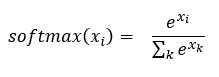
Figure 2-3: The Softmax Function
In words, the softmax of one of the values in a vector is the exp() of the value divided by the sum of the exp() function applied to each of the values in the vector. For (3.0, 5.0, 2.0), the exp() applied to each value and their sum is the following.
exp(3.0) = 20.0855
exp(5.0) = 148.4132
exp(2.0) = 7.3891
sum = 175.8878
Then the computed softmax values.
softmax(3.0) = 20.0855 / 175.8878 = 0.1142
softmax(5.0) = 148.4132 / 175.8878 = 0.8438
softmax(2.0) = 7.3891 / 175.8878 = 0.0420
A naive implementation of the softmax of a vector could be the following.
function softmax(vec)
{
let result = [];
let sum = 0.0;
for (let i = 0; i < vec.length; ++i) {
result[i] = Math.exp(vec[i]); // find exp() of each value.
sum += result[i]; // sum the exp()s
}
for (let i = 0; i < result.length; ++i) {
result[i] = result[i] / sum;
}
return result;
}
Unfortunately, a naive implementation could easily cause arithmetic problems because Math.exp(x) can be astronomically large for even moderate values of x. For example, Math.exp(200.0) = 7.23 ´ 1086, which is much larger than the JavaScript Number type can handle.
One technique for greatly reducing the likelihood of arithmetic overflow is to use the max trick. The trick relies on the algebra facts that exp(x + y) = exp(x) * exp(y) and exp(x - y) = exp(x) / exp(y).
The trick is to find the maximum value in the input vector, subtract the max value from each value in the input vector, and then compute softmax as usual on the differences.
For example, for an input of X = (3.0, 5.0, 2.0) the largest value is 5.0. Subtracting the max from each input value gives (-2.0, 0.0, -3.0). Then the following.
exp(-2.0) = 0.1353
exp(0.0) = 1.0000
exp(-3.0) = 0.0498
sum = 1.1851
Then the computed softmax values on the differences.
softmax(3.0) = exp(-2.0) / sum = 0.1353 / 1.1851 = 0.1142
softmax(5.0) = exp(0.0) / sum = 1.0000 / 1.1851 = 0.8438
softmax(2.0) = exp(-3.0) / sum = 0.0498 / 1.1851 = 0.0420
This is the same result as the direct calculation. Notice that by subtracting the max value, one modified value will be 0.0, and all other values will be negative. This prevents trying to compute Math.exp(x) for any value larger than x = 0.0.
The demo program implements the softmax function using the max trick.
function softmax(vec)
{
let mx = vecMax(vec); // or Math.max(...vec)
let result = [];
let sum = 0.0;
for (let i = 0; i < vec.length; ++i) {
result[i] = Math.exp(vec[i] - mx); // use max trick.
sum += result[i];
}
for (let i = 0; i < result.length; ++i) {
result[i] = result[i] / sum;
}
return result;
}
function vecMax(vec)
{
let mx = vec[0]; // assume first cell holds largest.
for (let i = 0; i < vec.length; ++i) { // check each cell.
if (vec[i] > mx) { // found a larger value.
mx = vec[i];
}
}
return mx;
}
Instead of defining a vecMax() function to return the largest value in a vector, you can use the quirky ES6 ... spread operator (three consecutive period characters) with the built-in Math.max() function.
Hidden layer activation functions
The demo program uses the hyperbolic tangent function for activation on the hidden layer nodes. The function is implemented.
function hyperTan(x)
{
if (x < -20.0) {
return -1.0;
}
else if (x > 20.0) {
return 1.0;
}
else {
return Math.tanh(x);
}
}
Notice that the program-defined hyperTan(x) function is just a wrapper around the built-in Math.tanh(x) function. To understand why the wrapper approach is used, take a look at the graph of the tanh function in Figure 2-4.
![Graph of tanh(x) on [-5.0, +5.0]](https://s3.amazonaws.com/ebooks.syncfusion.com/LiveReadOnlineFiles/neural-networks-with-javascript-succinctly/Images/graph-of-tanh-x-on-5-0-5-0.png)
Figure 2-4: Graph of tanh(x) on [-5.0, +5.0]
The tanh(x) function accepts any value x, from negative infinity to positive infinity, and returns a value between -1.0 and +1.0. Notice that for x values less than -5.0 and greater than +5.0, the tanh(x) result is nearly at its extreme value.
Because pre-activation hidden node values of less than about -5.0 or greater than +5.0 result in -1.0 or +1.0, respectively, an effective neural network often has pre-activation hidden node values close to 0.0. This means that you should avoid very large or very small input values. This is accomplished by normalizing input data, as described in Chapter 4.
The limits of -20.0 and +20.0 used in the demo program implementation of the hyperTan(x) function are somewhat arbitrary. Other common limit values for a program-defined tanh wrapper function are (-10.0, +10.0) and (-40.0, 40.0). In practice, different tanh limit values have little effect in the neural network in which they're used.
Another common hidden layer activation function is the logistic sigmoid function. The name of the function is often shortened to log-sig or sigmoid in a neural network context (there are many different kinds of sigmoid functions in addition to logistic sigmoid). The math definition of the sigmoid function is the following.
y = 1 / (1 + e-x) = 1 / (1 + exp(-x))
The graph of the sigmoid function is shown in Figure 2-5. Notice that the sigmoid function has a shape similar to the tanh function. The sigmoid function accepts any value from negative infinity to positive infinity and returns a value between 0.0 and 1.0.
![Graph of sigmoid(x) on [-5.0, +5.0]](https://s3.amazonaws.com/ebooks.syncfusion.com/LiveReadOnlineFiles/neural-networks-with-javascript-succinctly/Images/graph-of-sigmoid-x-on-5-0-5-0.png)
Figure 2-5: Graph of sigmoid(x) on [-5.0, +5.0]
One possible implementation of the logistic sigmoid function follows.
function logSig(x)
{
if (x < -20.0) {
return 0.0;
}
else if (x > 20.0) {
return 1.0;
}
else {
return 1.0 / (1.0 + Math.exp(-x));
}
}
During neural network training, most training algorithms use the calculus derivative of the hidden layer activation function. One of the reasons the tanh function is often used for hidden layer activation is that the function has a very convenient derivative. If y = tanh(x), the derivative is y' = (1 - y) * (1 + y).
The derivatives of most math functions are expressed in terms of the input value x. For example, if y = x2 + sin(x) + 3x, then y' = 2x + cos(x) + 3. By an algebra coincidence, the derivative of y = tanh(x) can be expressed in terms of the calculated value y instead of x. This characteristic is useful, as explained in Chapter 3. The derivative of the sigmoid function is y' = y * (1 - y), which is also computationally convenient.
In the early days of neural networks, the sigmoid function was used most often for hidden layer activation. However, experience has shown that for many, but not all, problem scenarios, the tanh function tends to give a slightly better predictive model.
A generic deep neural network has two or more hidden layers. For deep neural networks, the rectified linear unit (ReLU) function is often used for hidden layer activation. ReLU activation is a topic that is outside the scope of this book.
Questions
- How many weights and biases does a 4-10-3 neural network have?
- Suppose you have a 2-2-2 neural network with X = (1.0, 2.0), input-hidden weights = (0.2, 0.4, 0.6, 0.8), hidden biases = (0.10, 0.12), hidden-output weights = (0.14, 0.16, 0.18, 0.20), output biases = (0.22, 0.24), hidden layer activation = tanh, output layer activation = none. What are the output node values?
- Suppose you have a 5-8-3 neural network that uses softmax activation on the output nodes. If the pre-activation output nodes values are (1.5, 0.0, 2.5), what are the final output values?
- Suppose a neural network uses sigmoid activation on the hidden layer. If a hidden node has pre-activation value of 2.0, what is the approximate value of the node after activation?


- 80+ high-performance, responsive JavaScript UI controls.
- Popular controls like DataGrid, Charts, and Scheduler.
- Stunning built-in themes.
- Lightweight and user-friendly.