
.NET Core Succinctly®

CHAPTER 7
Building .NET Core applications on Linux
If you got this far in this book, then you have probably read dozens of times that .NET Core is cross-platform. In order to stress this concept, let’s see what it takes to go from 0 to a simple RSS Reader console app built with .NET Core on Linux.
Setting up the environment
Since I’m not a Linux guy, and don’t have a physical machine with Linux on it, I’ve fired up a basic Virtual Machine on Azure with Ubuntu 14.04 on it. At the time of writing, versions of Ubuntu above 14.04 are not supported. Creating a VM on Azure is fairly simple. I’ve used the new portal, and Figure 19 is a screenshot that basically tells you where to go (follow the path in the menu bar on top).
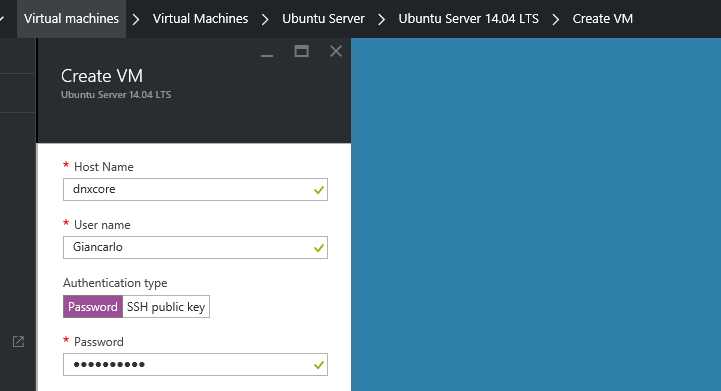
Figure 19: Ubuntu Virtual Machine creation on Azure
Once Azure finishes creating our Virtual Machine (this process usually takes about 30 minutes), we must configure our SSL endpoint, with which we are going to configure the RDP access to our Ubuntu VM. The quickest way to do it is by following these two tutorials: SSL and RDP.
Installing the .NET CLI on Ubuntu
After applying that workaround, we are ready to install the .NET CLI by typing in the shell:
sudo sh -c 'echo "deb [arch=amd64] https://apt-mo.trafficmanager.net/repos/dotnet/ trusty main" > /etc/apt/sources.list.d/dotnetdev.list' sudo apt-key adv --keyserver apt-mo.trafficmanager.net --recv-keys 417A0893 sudo apt-get update sudo apt-get install dotnet-dev-1.0.0-preview1-002702 |
The CLI is then installed:

Figure 20: The .NET CLI running on Ubuntu
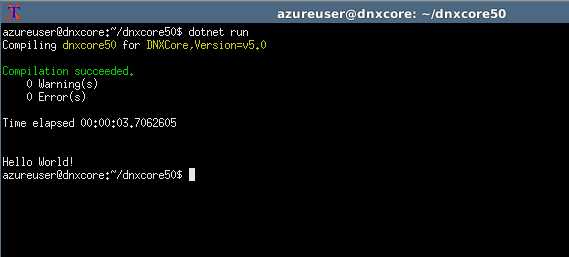
Figure 21: The basic Hello World app running on Ubuntu
Writing the app
We are now ready to start writing our RSS Reader. Go in any directory of your choice and run dotnet new, and then edit project.json and Program.cs like this:
Project.json
{ "version": "1.0.0-*", "buildOptions": { "emitEntryPoint": true }, "dependencies": { "Microsoft.NETCore.App": { "type": "platform", "version": "1.0.1" } }, "frameworks": { "netcoreapp1.0": { "imports": "dnxcore50", "dependencies": { "System.Net.Http": "4.1.0", "System.Xml.ReaderWriter": "4.0.11", "System.Xml.XDocument": "4.0.11", "System.Resources.ResourceManager": "4.0.1" } } } } |
Program.cs
using System; using System.Linq; using System.Net.Http; using System.Threading.Tasks; using System.Xml.Linq;
namespace Syncfusion.NETCore { public class Program { public static void Main(string[] args) { Task.Run(async () => { await MainAsync(args); }).Wait(); }
static async Task MainAsync(string[] args) { using (HttpClient client = new HttpClient()) { var blogUrl = "https://blogs.msdn.microsoft.com/italy/feed/"; var xml = await client.GetStringAsync(blogUrl); var reader = XDocument.Parse(xml);
foreach (var item in reader.Descendants("item").Take(5)) { var title = item.Descendants("title").FirstOrDefault().Value; Func<XElement, bool> p = x => x.Name.LocalName.Contains("creator"); var author = item.Descendants().FirstOrDefault(p).Value; Console.WriteLine($"{title}\n{author}\n"); } }
Console.ReadLine(); } } } |
Once we have those files ready, we only need to do a simple dotnet restore using the nightly feed, and then dotnet run to see an output like Figure 22. As you can understand from the code, this RSS Reader takes the first five blog posts from the Italian MSDN Blog.

Figure 22: RSS Reader written with .NET Core


- 80+ high-performance ASP.NET Core controls, including DataGrid, Charts, and Scheduler.
- Lightweight and responsive.
- Modular and touch-friendly.
- Built-in themes.