
Natural Language Processing Succinctly®

CHAPTER 10
Google Cloud NLP API
Google provides many API web services, including a set of API calls for processing text. In this chapter, we will discuss how to get set up to use the service, and the service calls available.
You can find the API Documentation here.
Getting an API key
To get an API key, you must first have a Google account. Visit this site and sign in with your user name and password.
Developers dashboard
The developer's dashboard (Figure 16) provides access to all of Google APIs, which you can explore by clicking on the library icon.
Figure 16 – Google developers dashboard

API Library
You will need to create credentials by first finding the Cloud Natural Language API and clicking on it. Figure 17 shows the API library that Google offers.
Figure 17 – Google API library
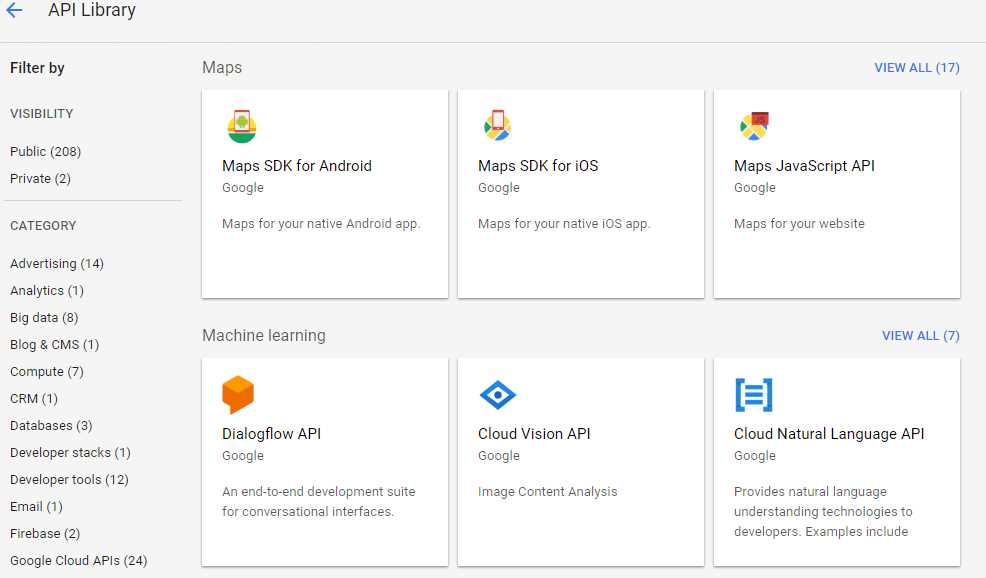
Select the API by clicking on the box, shown in Figure 18. Click Enable to enable the API.
Figure 18 – Enable your API

Creating credentials
Once you've picked the API, you'll need to create credentials for using the API. Once you do, you'll be given an API, which you'll need in your code. (I've hidden mine here.)
Figure 19 – Google credentials

That's it. Save that API key, and you are ready to start interfacing with Natural Language API.
Creating a Google NLP class
We are going to write a static class that will have private methods handling the interaction with the Google APIs and public methods to expose the APIs you want to use within your application.
Basic class
Listing 50 is the basic class to call the Google APIs. Be sure to set the GOOGLE_KEY variable to your API obtained previously.
Listing 50 – Base Google class
static public class GoogleNLP { static private string BASE_URL = "https://language.googleapis.com/v1/documents:"; static private string GOOGLE_KEY = " your API key "; static private dynamic BuildAPICall(string Target,string msg) { dynamic results = null; string result; HttpWebRequest NLPrequest = (HttpWebRequest)WebRequest. Create(BASE_URL + Target+"?key=" + GOOGLE_KEY); NLPrequest.Method = "POST"; NLPrequest.ContentType = "application/json"; using (var streamWriter = new StreamWriter(NLPrequest.GetRequestStream())) { string json = "{\"document\": {\"type\":\"PLAIN_TEXT\"," + "\"content\":\"" + msg + "\"} }"; streamWriter.Write(json); streamWriter.Flush(); streamWriter.Close(); } var NLPresponse = (HttpWebResponse)NLPrequest.GetResponse(); if (NLPresponse.StatusCode == HttpStatusCode.OK) { using (var streamReader = new StreamReader(NLPresponse.GetResponseStream())) { result = streamReader.ReadToEnd(); } results = JsonConvert.DeserializeObject<dynamic>(result); } return results; } |
Adding public methods
With this class built, the public methods to expose the methods are all simply wrapper calls. Listing 51 shows the public methods to call the Google API calls directly.
Listing 51. – Expose Google API calls
static public dynamic analyzeEntities(string msg) { dynamic ans_ = BuildAPICall("analyzeEntities", msg); if (ans_ == null) return null; return ans_; }
static public dynamic analyzeSentiment(string msg) { dynamic ans_ = BuildAPICall("analyzeSentiment", msg); if (ans_ == null) return null; return ans_; } static public dynamic analyzeSyntax(string msg) { dynamic ans_ = BuildAPICall("analyzeSyntax", msg); if (ans_ == null) return null; return ans_; }
static public dynamic classifyText(string msg) { dynamic ans_ = BuildAPICall("classifyText", msg); if (ans_ == null) return null; return ans_; }
static public dynamic analayzeEntitySentiment(string msg) { dynamic ans_ = BuildAPICall("analyzeEntitySentiment", msg); if (ans_ == null) return null; return ans_; } |
These calls return dynamic objects, which you can further parse to pull out information. The Google documentation provides details on the response data returned via the API.
Viewing the response data
The data coming back from the direct API calls will be a dynamic JSON object. You can explore the object in the debugger to see what properties are being returned. Figure 20 shows the debugger snapshot from the AnalyzeSyntax call.
Figure 20 – Response from API

You can access any of the properties of the object by name. For example, using the syntax resp.language.Value will return the string en. The syntax resp.sentences.Count will return the number of sentences in the response, and resp.sentences[x] will let you access the individual items in the sentences collection.
Wrapping the calls
In Chapter 2, we introduced a function to return a list of sentences from a paragraph. Listing 52 shows a wrapper function around the Google analyzeSyntax call that returns a list of strings.
Listing 52 – Extract sentences
static public List<string> GoogleExtractSentences(string Paragraph) { List<string> Sentences_ = new List<string>(); var ans_ = analyzeSyntax(Paragraph); if (ans_ !=null) { for(int x=0;x<ans_.sentences.Count;x++) { Sentences_.Add(ans_.sentences[x].text.content.Value); } } return Sentences_; } |
In Chapter 5, we introduced the concept of tagging words, using the Penn Treebank tag set. (See Appendix A.) Google uses a different set of tags, so we need to do some conversion work to map the Google tags to the Penn Treebank set.
Google tags
Google's API returns a token for each word in the parsed word list. These tags are based on the Universal tag list (see Appendix B). Each token has a part of speech component, which has 12 properties. We need to map these properties to the appropriate Penn Treebank tag. Listing 53 shows the code to get a list of tagged words from the Google API (by converting the Google partOfSpeech information to a Penn Tree Bank tag).
Listing 53 – Google tagged words
static public List<string> GoogleTaggedWords(string Sentence,bool includeLemma=false) { List<string> tags = new List<string>(); var ans_ = analyzeSyntax(Sentence); if (ans_ != null) { for (int x = 0; x < ans_.tokens.Count;x++) { string Tag = GoogleTokenToPennTreebank(ans_.tokens[x].partOfSpeech, ans_.tokens[x].text.content.Value.ToLower()); if (includeLemma) { Tag += ":" + ans_.tokens[x].lemma.Value; } tags.Add(Tag); } } return tags; } |
We've included an option to return the lemma. A lemma is the base form of a word, so that wins, won, winning, etc. would all have a lemma of win. Adding a lemma value simplifies the task of determine the concept the verb or noun represents. Google's API includes a lemma, so the method can append the lemma to the returned tag. Figure 21 shows a sample syntax analyze call from the API, including lemmas.
Figure 21 – Sample Google API syntax analysis

Listing 54 shows the code to convert the Universal Part of Speech tag to a Treebank code, relying on the Universal tag and some of the other fields available with the 12 properties returned for each word.
Listing 54 – Mapping part of speech tags
static private Dictionary<string, string> TagMapping = new Dictionary<string, string> { {"ADJ","JJ" }, {"ADP","IN" }, {"ADV","RB" }, {"CONJ","CC" }, {"DET","DT" }, {"NOUN","NN" }, {"NUM","CD" }, {"PRON","PRP" }, {"PUNCT","SYM" }, {"VERB","VB" }, {"X","FW" }, }; static private string GoogleTokenToPennTreebank(dynamic Token) { string ans = ""; string GoogleTag = Token.tag.Value.ToUpper(); if (TagMapping.ContainsKey(GoogleTag)) { ans = TagMapping[GoogleTag]; } // Tweak certain tags if (ans=="NN") { string number = Token.number.Value.ToUpper(); string proper = Token.proper.Value.ToUpper(); if (number == "PLURAL" && proper == "PROPER" ) { ans = "NNPS"; } // Plural proper noun if (number == "SINGULAR" && proper == "PROPER") { ans = "NNP"; } // Singular proper noun if (ans=="NN" && number=="PLURAL") { ans = "NNS"; } // Plural common noun }; if (ans=="VB") { string tense = Token.tense.Value.ToUpper(); string person = Token.person.Value.ToUpper(); if (tense == "PAST") { ans = "VBD"; } // Past tense verb if (tense == "PRESENT") { ans = "VBG"; } // Present tense verb }; return ans; } |
The code takes the Token object and maps it to the appropriate Treebank tag. However, there is additional information in the Google token, to let us map further, determining the type of noun and the case of verb.
Summary
The Google Cloud API provides a good set of NLP API calls, and can be helpful to build your tagged list of words. The API also offers categorization, named entity recognition, and sentiment analysis, all handy features when processing natural language text.


- 1800+ high-performance UI components.
- Includes popular controls such as Grid, Chart, Scheduler, and more.
- 24x5 unlimited support by developers.