
NancyFX Succinctly®

CHAPTER 9
Content Negotiation
In the world of web frameworks, everything is REST-based these days—from the routes that return rich, nicely formatted HTML views full of CSS and JavaScript, right through to those boring URLs that just return a bunch of JSON.
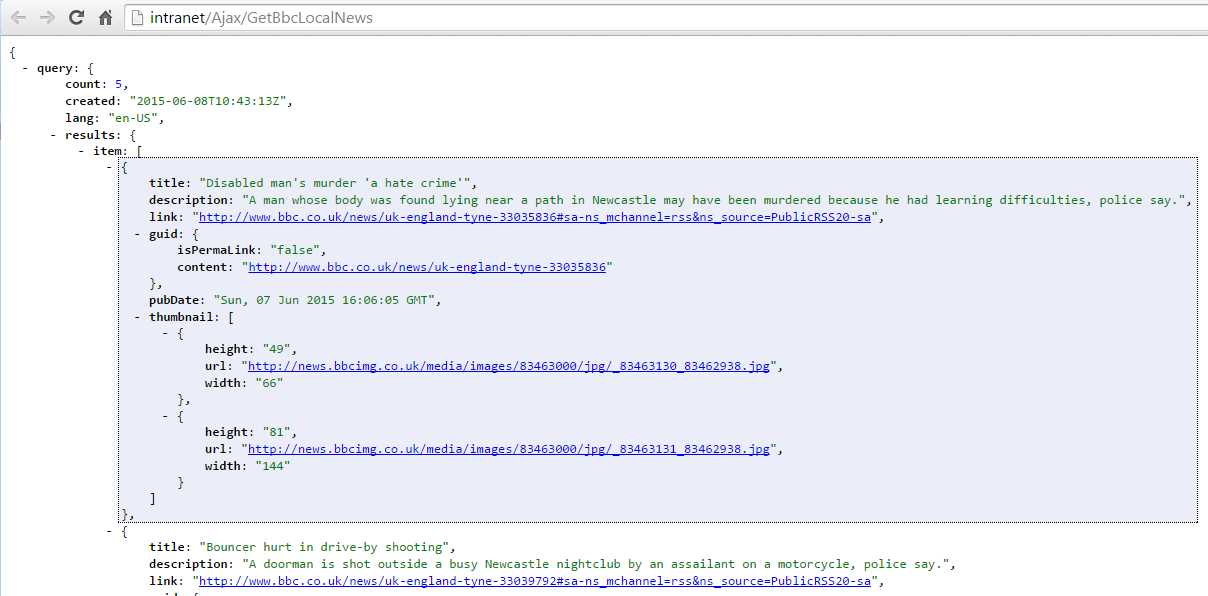
Figure 21: A rather plain JSON feed as viewed directly in the browser
Whichever way you look at it, both are required. We use one set of URLs to deliver our user interface, and then we use a second set of URLs to deliver the dynamic data to that user interface. Sometimes we might even have a third set of URLs that deliver data to our mobile applications.
All this duplication can seem like a lot of work to maintain, and it is. I've been there, and it's certainly not pretty. To provide a solution to this problem, many frameworks (Nancy included) have something called content negotiation added to them.
Content what?
When you make a request using a browser (or some code that knows how to speak to a web server), you provide various bits of information behind the scenes to describe the request.
These pieces of information are known as request headers:

Figure 22: Chrome debugger showing the request headers for the JSON in the previous image
You might not be able to see it in the screenshot, but one of these headers is called the Accept header, which tells the web server what kind of response the browser or calling program is willing to accept, in our example it's set to:
Accept: text/html,application/xhtml+xml,application/xml,image/webp,*/*
Which says that, in order of preference, I would like you to send me html, xml, or a webp image, and if you can't provide any of those in that order, then just send me what you have.
Nancy pays attention to this header when it receives a request. Based on what it finds, it can change the output of a given URL.
If our Accept header read:
Accept: application/json
Nancy will immediately look to see if it can send its response using JSON-based data, and if it can’t, it will throw an exception and fail. If we don't want it to fail, then we could add */* onto the end, just as in the previous version, and that would cause Nancy to just send the default response that it’s able to generate.
By default, Nancy can make a decision between HTML, XML, and JSON without you having to provide any extra configuration. If you build an API and then use that API to return a simple model, as we have already seen in previous chapters, Nancy will try to return the most appropriate response.
If you call your URL from a browser, then Nancy will look in your views folder for a view with a name that matches the object type.
Taking the Address object we were using in the previous chapter, Nancy would look for:
'~/Views/Address.Html'
That small HTML snippet could then use any of the available view engines to generate the output without you ever actually having to explicitly tell your module to return a view.
If the URL were called from some JavaScript inside your pages, and the Accept header in the call to the same URL-specified JSON, Nancy would just serialize your object into JSON syntax and return that.
To allow Nancy free reign in deciding which content type to return, you return nothing more than a simple object model from your Nancy routing modules. The methods we've seen so far for returning strings, pages, and view content are no use here; by using any of those, we stop Nancy from performing a correct analysis of the accept header. Instead, the quickest way is as follows:
Code Listing 38
Get[@"/{id}"] = parameters => { int recId = parameters.id; var record = Database.Find(recId); return record; }; |
By either returning a model using new or grabbing an object back from some backend store, you are letting Nancy act on the header information and decide exactly how to format the response.
You can also use the fluent Negotiate response API to perform the same task. The difference here is that you have much more control over the response, such as changing the view name that the HTML response will look for, or adding extra headers. You use the fluent response API in the following fashion:
Code Listing 39
Get[@"/{id}"] = parameters => { int recId = parameters.id; var record = Database.Find(recId); return Negotiate .WithModel(record) .WithHeader("X-CustomHeader", "Some custom value"); }; |
As before, this finds a record using our pretend Database, but instead of returning that model directly, it returns it while adding a custom heading to the response. There's a whole list of additions that can be made onto the response; Visual Studio's IntelliSense will show you them all, if you just pause after entering the first period:
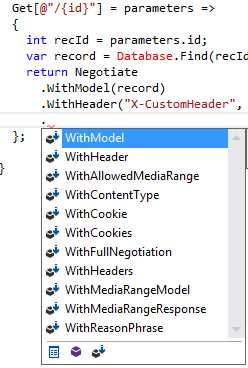
Figure 23: Visual Studio showing other methods in the fluent negotiation API
Finally, you can extend the serialization base classes and add in different or custom content types. If you take a look at some of the links on the NancyFX Wiki page, you'll find there are additions to return PD's and other special types of content, based solely on what the calling client asks for.
If you look in NuGet using Nancy.Serialization, you'll quickly find that there are content serializers available for Google Protocol Buffers, JSON .NET, ServiceStack, and a few others.
Unless you're using a custom serializer or doing things in a non-standard way, taking advantage of Nancy's ability to serve the correct content is automatic, as long as you make sure the correct headers are in your request.
Summary
In this chapter, you got a brief introduction to content negotiation in Nancy—it's such a simple concept that it requires next-to-no configuration to make it work correctly.
You saw that by employing content negotiation correctly, you can reduce the surface area of your API to a single URL that serves requests for everything using it, and in the process, reduce the complexity and maintenance time required to manage that API.
In the next chapter, we'll take a closer look at Nancy's response object, and see the different ways we return data and pages to a Nancy client.


- 1800+ high-performance UI components.
- Includes popular controls such as Grid, Chart, Scheduler, and more.
- 24x5 unlimited support by developers.