
MonoGame Succinctly®

CHAPTER 7
Completing the Game
Bullets flying everywhere
We stubbed out the functionality for having the character fire bullets, and now we’ll flesh it out. We’ll start with a standard manager class:
public class Bullet { private Direction _direction; private Vector2 _location; private bool _alive; public Vector2 Location { get { return _location; } } public Direction BulletDirection { get { return _direction; } } public bool IsAlive { get { return _alive; } } public Bullet(Direction dir,Vector2 location) { _direction = dir; _location = location; _alive = true; } public void Update() { if (_alive) { switch (_direction) { case Direction.East: _location.X += 4.0f; break; case Direction.North: _location.Y -= 4.0f; break; case Direction.NorthEast: _location.Y -= 3.0f; _location.X += 3.0f; break; case Direction.NorthWest: _location.Y -= 3.0f; _location.X -= 3.0f; break; case Direction.South: _location.Y += 4.0f; break; case Direction.SouthEast: _location.Y += 3.0f; _location.X += 3.0f; break; case Direction.SouthWest: _location.Y += 3.0f; _location.X -= 3.0f; break; case Direction.West: _location.X -= 4.0f; break; } } if (_location.X < 20 || _location.X > Game1.ScreenWidth - 20 || _location.Y < 88 || _location.Y > Game1.ScreenHeight - 20) _alive = false; } public void Kill() { _alive = false; _location = Vector2.Zero; } public void Spawn(Direction dir, Vector2 loc) { _direction = dir; _location = loc; _alive = true; } }
public class BulletManager : List<Bullet> { private static Vector2[] _bulletOffset; private Texture2D _bulletTexture; private Rectangle _bulletRect; private float _lastBulletSpawnTime; private int _shotsFired; private int _shotsHit; public int ShotsFired { get { return _shotsFired; } } public int ShotsHit { get { return _shotsHit; } } public BulletManager(Game game) : base(5) { _bulletOffset = new Vector2[8]; _bulletOffset[0] = new Vector2(0,-33); _bulletOffset[1] = new Vector2(24,-25); _bulletOffset[2] = new Vector2(33,0); _bulletOffset[3] = new Vector2(24,25); _bulletOffset[4] = new Vector2(0,33); _bulletOffset[5] = new Vector2(-24,25); _bulletOffset[6] = new Vector2(-33,0); _bulletOffset[7] = new Vector2(-24,-25); ContentManager content = new ContentManager(game.Services); _bulletTexture = content.Load<Texture2D>("Content/bullet"); _bulletRect = new Rectangle(0, 0, 2, 6); _lastBulletSpawnTime = 1.0f; _shotsFired = 0; _shotsHit = 0; }
public bool Spawn(Direction dir, Vector2 location) { bool bRet = false; if (this.Count < 5) { this.Add(new Bullet(dir, location + _bulletOffset[(int)dir])); bRet = true; } else { //check to see if any bullet is no longer alive foreach (Bullet bullet in this) if (bullet.IsAlive == false) { bullet.Spawn(dir, location + _bulletOffset[(int)dir]); bRet = true; break; } } if (bRet) _shotsFired++; return bRet; } public void Update() { foreach (Bullet bullet in this) bullet.Update(); } public void Draw(SpriteBatch sb) { Vector2 origin = new Vector2(_bulletTexture.Width / 2, _bulletTexture.Height / 2); float rot; foreach (Bullet bullet in this) { if (bullet.IsAlive) { rot = (int)bullet.BulletDirection * MathHelper.ToRadians(45.0f); sb.Draw(_bulletTexture, new Rectangle((int)bullet.Location.X, (int)bullet.Location.Y, 2, 6), _bulletRect, Color.White, rot, origin, SpriteEffects.None, 0.0f); } } } public bool CheckCollision(Entity entity) { bool ret = false; BoundingBox entityBox = new BoundingBox(new Vector3(entity.Location.X, entity.Location.Y, 0), new Vector3(entity.Location.X + entity.FrameWidth, entity.Location.Y + entity.FrameWidth, 0)); foreach (Bullet bullet in this) { BoundingBox bulletBox = new BoundingBox(new Vector3(bullet.Location.X, bullet.Location.Y, 0), new Vector3(bullet.Location.X + 2, bullet.Location.Y + 6, 0)); if (entityBox.Intersects(bulletBox)) { bullet.Kill(); _shotsHit++; ret = true; break; } } return ret; } } |
Code Listing 63 – BulletManager Class
The Bullet class handles updating its location based on the direction it was fired. It’s a hard-coded value, which isn’t ideal, but for a small game, it does the job. Ideally you’d ensure the value diagonally is the same over time as it is horizontally and vertically. It’s close with the values here, but not perfect. Players may not even notice, but if you want to clean it up a bit, feel free.
The BulletManager holds a collection of offsets so the bullet appears correctly based on the direction the character is facing when firing. It initializes the collection of bullets it manages to 5, which is all the player can have on screen at once to avoid overpowering the ghosts. If the player could just fire a bullet a second, he could probably just spin in place and never get touched. This way, he has to have a bit of skill and actually aim.
The CheckCollision method calls the Kill method of the Bullet class when it touches a ghost, which sets the _alive member to false. This member is also set to false if the bullet has gone offscreen. This is done in the Update method of the Bullet class.
When the player fires, the Spawn method is called, and we check to see if there are fewer than five bullets in the collection. If so, we add a new one. If not, we check the _alive member of each bullet to see if we can reuse that object.
The BulletManager is used in the Entity class:
private BulletManager _bulletManager; public int ShotsFired { get { return _bulletManager.ShotsFired; } } public int ShotsHit { get { return _bulletManager.ShotsHit; } }
public Entity(EntityType type, Vector2 location, Direction orientation, int numFrames, int textureWidth, Game game) { . . . _bulletManager = new BulletManager(game); } public void Update(GameTime gameTime, Vector2 playerLocation) { . . . _bulletManager.Update(); } public bool SpawnBullet() { return _bulletManager.Spawn(this.ShootDirection, this.Location); } public void DrawBullets(SpriteBatch sb) { _bulletManager.Draw(sb); } public bool CheckBulletCollision(Entity entity) { if (_bulletManager.CheckCollision(entity)) return true; return false; } public void Dispose() { _bulletManager.Clear(); } |
Code Listing 64 – Entity Class Bullet Code
We add a couple of helper methods that we’ll use in our achievements system. We add other methods to handle initializing, updating, and cleaning up the object, as well as adding, drawing, and checking for collision with a ghost. Pretty basic at this point.
Adding difficulty settings
As we’ve seen, we’ll have three difficulty settings for our game. The difficulty affects five different things: ghost health, ghost speed, the health drained from the character when touched by a ghost, the spawn time for ghosts, and the score for destroying a ghost. This data is kept in an XML file. Add a file called DifficultySettings.xml to the root of the project, and add the following to it:
<?xml version="1.0" encoding="utf-8" ?> <ArrayOfDifficultySetting xmlns:xsi="http://www.w3.org/2001/XMLSchema-instance" xmlns:xsd="http://www.w3.org/2001/XMLSchema">> <DifficultySetting> <Name>Easy</Name> <GhostHealth>1</GhostHealth> <GhostSpeed>3.0</GhostSpeed> <HealthDrain>2</HealthDrain> <GhostSpawnTime>3</GhostSpawnTime> <GhostScore>1</GhostScore> </DifficultySetting> <DifficultySetting> <Name>Normal</Name> <GhostHealth>2</GhostHealth> <GhostSpeed>3.5</GhostSpeed> <HealthDrain>4</HealthDrain> <GhostSpawnTime>2</GhostSpawnTime> <GhostScore>2</GhostScore> </DifficultySetting> <DifficultySetting> <Name>Hard</Name> <GhostHealth>3</GhostHealth> <GhostSpeed>4.0</GhostSpeed> <HealthDrain>8</HealthDrain> <GhostSpawnTime>1</GhostSpawnTime> <GhostScore>3</GhostScore> </DifficultySetting> </ArrayOfDifficultySetting> |
Code Listing 65 – DifficultySystem XML File
This data will be stored in a simple class. Create a DifficultySystem class and add the following class before it:
public class DifficultySetting { public string Name; public short HealthDrain; public float GhostSpeed; public short GhostHealth; public float GhostSpawnTime; public short GhostScore; } |
Code Listing 66 – DifficultySetting Class
This class will be used in our DifficultySystem class:
public class DifficultySystem { private int _difficulty; private float _levelSpeed; private List<DifficultySetting> _settings; public DifficultySystem() { GetDifficultySettings(); _levelSpeed = 0.0f; } private void GetDifficultySettings() { try { FileStream stream = File.Open("DifficultySettings.xml",FileMode.Open); XmlSerializer serializer = new XmlSerializer(typeof(List<DifficultySetting>)); _settings = (List<DifficultySetting>)serializer.Deserialize(stream); } catch (Exception e) { Console.WriteLine(e.Message); } } public int HealthDrain { get { return _settings[_difficulty].HealthDrain; } } public float GhostSpeed { get { return _settings[_difficulty].GhostSpeed + _levelSpeed; } } public int GhostHealth { get { return _settings[_difficulty].GhostHealth; } } public float GhostSpawnTime { get { return _settings[_difficulty].GhostSpawnTime; } } public short GhostScore { get { return _settings[_difficulty].GhostScore; } } public void SetDifficulty(int difficulty) { _difficulty = difficulty; }
public string[] GetDifficultyNames() { List<string>names = new List<string>(); foreach (DifficultySetting setting in _settings) names.Add(setting.Name); return names.ToArray(); } public void IncreaseGhostSpeed() { _levelSpeed += .2f; } } |
Code Listing 67 – DifficultySystem Class
With the DifficultySystem in place we can add an instance of it to our Game class and initialize it, as well as add the method to all the difficulty levels to be set:
public DifficultySystem Difficulty; protected override void Initialize() { . . . Difficulty = new DifficultySystem();
base.Initialize(); } public void SetDifficulty(int difficulty) { Difficulty.SetDifficulty(difficulty); } |
Code Listing 688 – Game Class Difficulty Code
After adding this, the lines in the DifficultyScreen Initialize method can be uncommented. We can now select a difficulty level when we start the game and set it in the GameplayScreen, adding the necessary members to the class:
int _remainingTime; float _timeCounter; int _difficulty; int _curLevel; public GameplayScreen(int difficulty) { TransitionOnTime = TimeSpan.FromSeconds(1.5); TransitionOffTime = TimeSpan.FromSeconds(0.5); _timeCounter = 0.0f; _remainingTime = 180; _difficulty = difficulty; _curLevel = 1; } public override void Initialize() { . . . ((Game1)ScreenManager.Game).SetDifficulty(_difficulty); } |
Code Listing 69 – Game Class Difficulty Code
Remaining Gameplay Logic
There’s a bit of code we haven’t added for handling increasing the level of the game over time, and handling what happens when the player dies. It’s not a lot of code, but the game would be broken without it, so let’s take care of that.
Everything goes in the GameplayScreen class:
string _displayMinutes; public override void Update(GameTime gameTime, bool otherScreenHasFocus, bool coveredByOtherScreen) { base.Update(gameTime, otherScreenHasFocus, coveredByOtherScreen); if (IsActive) { _entityManager.Update(gameTime); if (_entityManager.IsPlayerDead()) DoGameOver(); _timeCounter += gameTime.ElapsedGameTime.Milliseconds; if (_timeCounter >= 1000.0f) { _remainingTime--; _timeCounter -= 1000.0f; if (_remainingTime == 0) DoNextLevel(); } } } void DoGameOver() { MessageBoxScreen messageBox = new MessageBoxScreen("Game Over. Final score: " + _entityManager.Score.ToString()); messageBox.Accepted += GameOverMessageBoxAccepted; ScreenManager.AddScreen(messageBox); } void DoNextLevel() { _curLevel++; _remainingTime = 180; ((Game1)ScreenManager.Game).Difficulty.IncreaseGhostSpeed(); } void GameOverMessageBoxAccepted(object sender, EventArgs e) { LoadingScreen.Load(ScreenManager, LoadMainMenuScreen, false); } void LoadMainMenuScreen(object sender, EventArgs e) { ScreenManager.AddScreen(new MainMenuScreen()); } |
Code Listing 70 – GameplayScreen Class Gameplay Logic Code
We update the time to determine if the level of the game should be increased. If so, we speed up the ghosts a bit. When the player dies we display a message box to show the final score and allow the player to go back to the main menu. You could update this to allow the player to play again with the same difficulty. In this case, you’d have to clear out everything gameplay related.
High score list
There’s a bit of code left to add a new score to the high score list when the game is over. This goes in the DoGameOver method in the GameplayScreen class:
void DoGameOver() { . . . HighScoreList scores = new HighScoreList(); scores.AddScore(new HighScore(DateTime.Now.ToString("mm/dd/yyyy"), _curLevel, _entityManager.Score)); scores.Save(); } |
Code Listing 71 – GameplayScreen Class High Score Logic Code
We also need to finish fleshing out the HighScoreList class to actually load and save the scores:
|
public HighScoreList() { GetHighScores(); } private async void GetHighScores() { try { //StorageFile file = await storageFolder.GetFileAsync("scores.xml"); //Stream s = await file.OpenStreamForReadAsync(); //XmlSerializer serializer = new XmlSerializer(typeof(List<HighScore>)); //_scores = (List<HighScore>)serializer.Deserialize(s); } catch (Exception ex) { throw new Exception("Error getting achievements file"); } } public async void Save() { //StorageFile file = await storageFolder.GetFileAsync("scores.xml"); //Stream s = await file.OpenStreamForWriteAsync(); //XmlSerializer serializer = new XmlSerializer(typeof(List<HighScore>)); //serializer.Serialize(s, _scores); } public void Save(FileStream stream) { XmlSerializer serializer = new XmlSerializer(typeof(List<HighScore>)); serializer.Serialize(stream, _scores); } public void Load(FileStream stream) { XmlSerializer serializer = new XmlSerializer(typeof(List<HighScore>)); _scores = (List<HighScore>)serializer.Deserialize(stream); } public void AddScore(HighScore score) { if (_scores == null) _scores = new List<HighScore>(); bool scoreAdded = false; for (int i = 0; i < _scores.Count; i++) { if (_scores[i].Score < score.Score) { _scores.Insert(i, score); scoreAdded = true; if (_scores.Count > 10) _scores.RemoveAt(10); break; } } if (!scoreAdded && _scores.Count < 10) _scores.Add(score); } |
Code Listing 72 – HighScoreList Class Updated Code
I’ve left in the old XNA code that loaded the data so you can compare it with standard file I/O type loading. The list by default only keeps the 10 highest scores. Feel free to expand this if you implement global high scores.
Achievements
One thing that will keep players coming back to your game is a goal to achieve. Players love a challenge, and having unearned achievements in your game is a sure way to get players to keep playing your game.
We’ll add four achievements to the game:
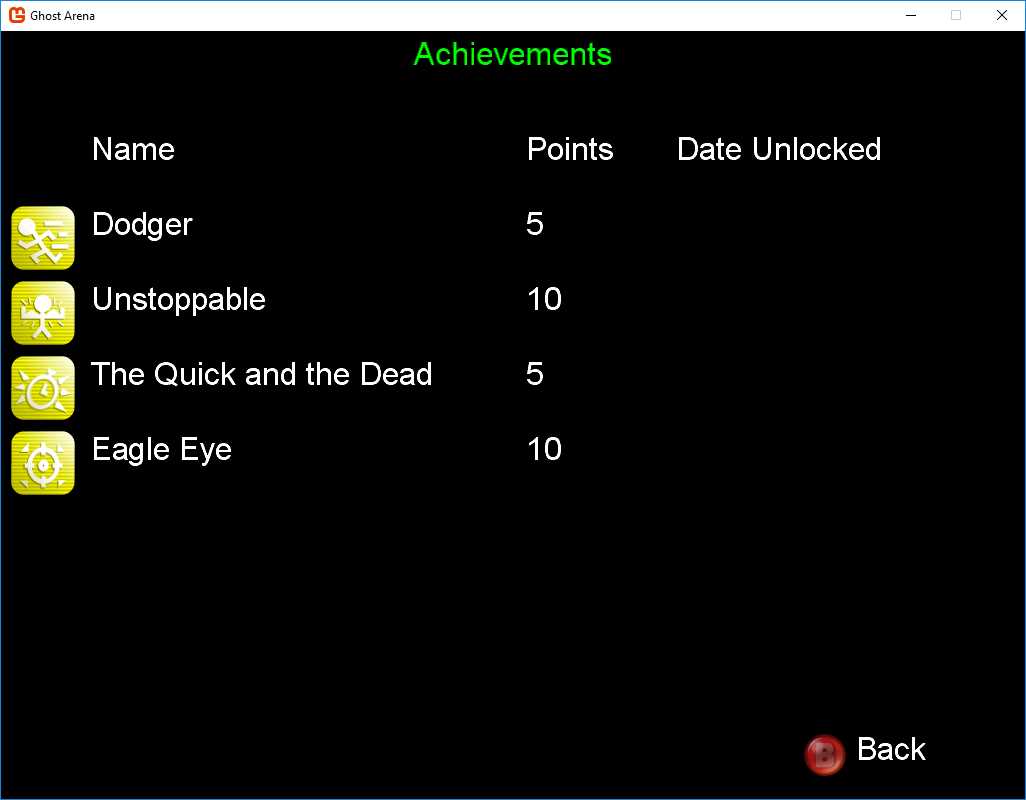
Figure 17 - Achievements Screen
As with the difficulty levels, the data for the achievements is kept in an XML file, where you can see a description of what needs to be done to earn the achievement. Add a file called achievements.xml to the root of the project, and add the following:
<?xml version="1.0"?> <ArrayOfAchievement xmlns:xsi="http://www.w3.org/2001/XMLSchema-instance" xmlns:xsd="http://www.w3.org/2001/XMLSchema"> <Achievement> <ID>1</ID> <Name>Dodger</Name> <Points>5</Points> <Description>Do not get touched by a ghost once during a level</Description> </Achievement> <Achievement> <ID>2</ID> <Name>Unstoppable</Name> <Points>10</Points> <Description>Do not die once in a level</Description> </Achievement> <Achievement> <ID>3</ID> <Name>The Quick and the Dead</Name> <Points>5</Points> <Description>Defeat a level under par time</Description> </Achievement> <Achievement> <ID>4</ID> <Name>Eagle Eye</Name> <Points>10</Points> <Description>Get 95% or greater hit/miss ratio in a level</Description> </Achievement> </ArrayOfAchievement> |
Code Listing 73 – Achievements Data
Again, as with the difficulties, we’ll keep the data in a class and have a manager for the data. Add a file to the project with the following:
//this enum must be synced with the order in the XML file public enum Achievements { Dodger, Unstoppable, QuickDead, EagleEye } public class Achievement { public int ID; public string Name; public int Points; public string Description; } public class PlayerAchievement { public int ID; public DateTime DateUnlocked; } //used in AchievementScreen public class AchievementDisplay { public Texture2D Icon; public string Name; public string Points; public string DateUnlocked; }
public class AchievementManager { private List<PlayerAchievement> _playerAchievements; private List<Achievement> _achievements; private Game _game; public AchievementManager(Game game) { _achievements = new List<Achievement>(); LoadAchievements(); LoadPlayerAchievements(); _game = game; } private void LoadAchievements() { try { FileStream stream = File.Open("achievements.xml", FileMode.Open); XmlSerializer serializer = new XmlSerializer(typeof(List<Achievement>)); _achievements = (List<Achievement>)serializer.Deserialize(stream); } catch (Exception ex) { throw new Exception("Error getting achievements file"); } } private void LoadPlayerAchievements() { try { FileStream stream = File.Open("achievements.xml", FileMode.Open); if (stream != null) { XmlSerializer serializer = new XmlSerializer(typeof(List<PlayerAchievement>)); _playerAchievements = (List<PlayerAchievement>)serializer.Deserialize(stream); } } catch (Exception ex) { _playerAchievements = new List<PlayerAchievement>(); } } public void Save() { try { FileStream stream = File.Open("achievements.xml", FileMode.OpenOrCreate); XmlSerializer serializer = new XmlSerializer(typeof(List<PlayerAchievement>)); serializer.Serialize(stream, _playerAchievements); } catch (Exception ex) { throw new Exception("Error getting player achievements file"); } } public bool PlayerHasAchievements() { if (_playerAchievements != null) return (_playerAchievements.Count > 0); else return false; } public int PlayerAchievementCount() { if (_playerAchievements != null) return _playerAchievements.Count; else return 0; } public List<AchievementDisplay> Achievements() { List<AchievementDisplay> achievements = new List<AchievementDisplay>(); AchievementDisplay display; foreach (Achievement achievement in _achievements) { display = new AchievementDisplay(); display.Icon = Game1.Instance.Content.Load<Texture2D>("achievement" + achievement.ID.ToString()); display.Name = achievement.Name; display.Points = achievement.Points.ToString(); display.DateUnlocked = GetDateUnlocked(achievement.ID); achievements.Add(display); } return achievements; } private string GetDateUnlocked(int id) { if (_playerAchievements != null) { foreach (PlayerAchievement achievement in _playerAchievements) if (achievement.ID == id) return achievement.DateUnlocked.ToString(); } return ""; } public void AddAchievement(Achievements type) { PlayerAchievement achievement = new PlayerAchievement(); achievement.DateUnlocked = DateTime.Now; achievement.ID = _achievements[(int)type].ID; if (_playerAchievements == null) _playerAchievements = new List<PlayerAchievement>(); _playerAchievements.Add(achievement); } public bool IsAchievementEarned(Achievements type) { if (_playerAchievements != null) { for (int i = 0; i < _playerAchievements.Count; i++) if (_playerAchievements[i].ID == _achievements[(int)type].ID) return true; } return false; } } |
Code Listing 74 – Achievements Code
Note that the enum for the achievement names is not in alphabetical order. If you want it to be, you’ll need to reorder the items in the XML file. If you’re really organized, this would mean you would want to update the ID property for each item to reflect the new order, which would also require changing the file names of the achievement icons.
The AchievementsScreen class is used to display the achievements. Add the file for this class to the Screens folder and update it with the following:
class AchievementsScreen : GameScreen { private List<AchievementDisplay> _achievements; private SpriteFont _titleFont; private Texture2D _buttonB; private SpriteFont _textFont; private Vector2 _iconLoc; private Vector2 _nameLoc; private Vector2 _pointsLoc; private Vector2 _dateLoc; private int _topIndex; private const int MaxAchievementsDisplayed = 6; public AchievementsScreen() { TransitionOnTime = TimeSpan.FromSeconds(1.5); TransitionOffTime = TimeSpan.FromSeconds(0.5); _iconLoc = new Vector2(10, 100); _nameLoc = new Vector2(90, 100); _pointsLoc = new Vector2(525, 100); _dateLoc = new Vector2(675, 100); _topIndex = 0; } public override void LoadContent() { _titleFont = Game1.Instance.Content.Load<SpriteFont>("menufont"); _textFont = Game1.Instance.Content.Load<SpriteFont>("menufont"); _buttonB = Game1.Instance.Content.Load<Texture2D>("BButton"); base.LoadContent(); } public override void Initialize() { _achievements = new AchievementManager(ScreenManager.Game).Achievements(); base.Initialize(); } public override void HandleInput(InputState input, GameTime gameTime) { if ((input.CurrentGamePadState.Buttons.B == Microsoft.Xna.Framework.Input.ButtonState.Pressed && input.LastGamePadState.Buttons.B == Microsoft.Xna.Framework.Input.ButtonState.Released) || (input.CurrentKeyboardState.IsKeyDown(Microsoft.Xna.Framework.Input.Keys.Escape) && input.LastKeyboardState.IsKeyUp(Microsoft.Xna.Framework.Input.Keys.Escape))) this.ExitScreen(); base.HandleInput(input, gameTime); } public override void Draw(GameTime gameTime) { Vector2 textPosition; ScreenManager.GraphicsDevice.Clear(ClearOptions.Target, Color.Black, 0, 0); Microsoft.Xna.Framework.Color color = new Microsoft.Xna.Framework.Color((byte)0, (byte)255, (byte)0, TransitionAlpha); ScreenManager.SpriteBatch.Begin(); Vector2 titleSize = _titleFont.MeasureString("Achievements"); textPosition = new Vector2(ScreenManager.GraphicsDevice.Viewport.Width / 2 - titleSize.X / 2, 5); ScreenManager.SpriteBatch.DrawString(_titleFont, "Achievements", textPosition, color); color = new Microsoft.Xna.Framework.Color((byte)255, (byte)255, (byte)255, TransitionAlpha); int numDisplayed = (int)MathHelper.Clamp(_achievements.Count, 0, MaxAchievementsDisplayed);
//draw headers ScreenManager.SpriteBatch.DrawString(_textFont, "Name", _nameLoc, Color.White); ScreenManager.SpriteBatch.DrawString(_textFont, "Points", _pointsLoc, Color.White); ScreenManager.SpriteBatch.DrawString(_textFont, "Date Unlocked", _dateLoc, Color.White);
//loop through list and draw each item for (int i = _topIndex; i < numDisplayed; i++) { ScreenManager.SpriteBatch.Draw(_achievements[i].Icon, _iconLoc + new Vector2(0, (i + 1) * 75), Color.White); ScreenManager.SpriteBatch.DrawString(_textFont, _achievements[i].Name, _nameLoc + new Vector2(0, (i + 1) * 75), Color.White); ScreenManager.SpriteBatch.DrawString(_textFont, _achievements[i].Points, _pointsLoc + new Vector2(0, (i + 1) * 75), Color.White); ScreenManager.SpriteBatch.DrawString(_textFont, _achievements[i].DateUnlocked, _dateLoc + new Vector2(0, (i + 1) * 75), Color.White); } ScreenManager.SpriteBatch.Draw(_buttonB, new Rectangle(800, 700, 48, 48), Color.White); ScreenManager.SpriteBatch.DrawString(ScreenManager.Font, "Back", new Vector2(855, 700), Color.White); ScreenManager.SpriteBatch.End(); if (TransitionPosition > 0) ScreenManager.FadeBackBufferToBlack(255 - TransitionAlpha); } } |
Code Listing 75 – AchievementsScreen Class
Some updates to the GameplayScreen will be necessary to track when an achievement is earned:
private AchievementManager _achievementManager; void DoGameOver() { CheckAchievements(); . . . if (_achievementManager != null) _achievementManager.Save(); } void CheckAchievements() { //check for level-based achievements if (_achievementManager == null) _achievementManager = new AchievementManager(ScreenManager.Game); //touched if (!_entityManager.PlayerTouched) { if (!_achievementManager.IsAchievementEarned(Achievements.Dodger)) _achievementManager.AddAchievement(Achievements.Dodger); } //died if (!_entityManager.PlayerDied) { if (!_achievementManager.IsAchievementEarned(Achievements.Unstoppable)) _achievementManager.AddAchievement(Achievements.Unstoppable); } //par time - right now just 2 1/2 minutes, could be changed to less time for higher levels if (_remainingTime >= 150) { if (!_achievementManager.IsAchievementEarned(Achievements.QuickDead)) _achievementManager.AddAchievement(Achievements.QuickDead); } //hit/miss ratio float ratio = _entityManager.GetPlayerHitMissRatio(); //just 95% right now, could be changed for higher levels if (ratio >= 0.95f) { if (!_achievementManager.IsAchievementEarned(Achievements.EagleEye)) _achievementManager.AddAchievement(Achievements.EagleEye); } } void DoNextLevel() { CheckAchievements(); . . . } |
Code Listing 76 – GameplayScreen Achievements Code
You’ll notice some new members and methods in the EntityManager class being queried. Now it’s time to update that class. In the Update method, replace the existing if (CheckEntityCollision(_entities[i])) block with the following.:
private bool _touched; private bool _died; public bool PlayerTouched { get { return _touched; } } public bool PlayerDied { get { return _died; } } public EntityManager() {
. . . _touched = false; _died = false; } |
public void Update(GameTime gameTime) { . . . if (CheckEntityCollision(_entities[i])) { _touched = true; _entities[0].DrainLife(Game1.Instance.Difficulty.HealthDrain); _entities.Remove(_entities[i]); if (_entities[0].Health <= 0) { Game1.Instance.GameSounds[Sounds.PlayerDie].Play(); _died = true; } if (_entities.Count == 1) break; } . . . } public bool IsPlayerDead() { if (_entities.Count > 0) { return _entities[0].State == EntityState.Dead; } else return true; } public float GetPlayerHitMissRatio() { if (_entities[0].ShotsFired > 0) return _entities[0].ShotsHit / _entities[0].ShotsFired; else return 0.0f; } |
Code Listing 77 – EntityManager Achievements Code
The EntityManager uses some new code in the Entity class:
public enum EntityState { Alive, Dying, Dead } |
public class Entity { private EntityState _state; public EntityState State { get { return _state; } } public void DrainLife(int amount) { . . . if (_health <= 0) _state = EntityState.Dead; } } |
Code Listing 78 – EntityManager Achievements Code
There’s really nothing new here that hasn’t been done before. Any new achievements you might add would just require updates to these three chunks of code and data added to the XML file, as well as an icon to display in the achievements screen. Note that if you add more than a couple more, the screen will not be able to display them all at once. You’ll have to add code to enable scrolling or paging of the achievements.
That wraps up everything that’s needed to make a playable game. Playable doesn’t always mean the best game that you can create, of course. There is always room for improvement in any game. The following are a couple of things that you can add to make the game more attractive and enjoyable—not just for this game, but any game you create.
Enhancements
Achievement notification
When an achievement is earned, there is currently no way for the player to know. Adding a notification that displays for several seconds on the screen would be a good enhancement to make your game more player friendly.
If you do this, I would recommend making a class that inherits from DrawableGameComponent that would become a member of the GameplayScreen class. A method called ShowNotification could be used to initialize the component, setting a switch that’s checked in the Draw method of the GameplayScreen to determine whether or not to draw the notification. You could pass the achievement information in this method.
Global leaderboards
The high scores in the game are currently local to the machine that the game is played on. To make the game more attractive to players, you might want to have the scores be seen by other players. This would mean you would have to either use a service that allows players to see scores from other players, or implement this functionality yourself. The latter would be a huge task.
There are a number of services that you could use for this. Here are a few:


- 1800+ high-performance UI components.
- Includes popular controls such as Grid, Chart, Scheduler, and more.
- 24x5 unlimited support by developers.