
MonoGame Role-Playing Game Development Succinctly®

CHAPTER 4
Conversations
Introduction
Your game is going to be very boring if there aren't entities for the player to interact with, both in an aggressive and a non-aggressive manner. This means we'll have to provide both types somehow, as well as handle how to interact with them. This chapter will show you how to do that.
We laid the foundation for having non-player characters in our game in the last chapter. We'll begin the process of adding them to our sample game in this one.
Conversation system
The first interaction a character usually has with a non-aggressive humanoid NPC is a conversation. Given that we don't yet have the ability to put in AI that will pass the Turing test, the player's conversations with NPCs will be somewhat limited, but how limited is up to you. A conversation can have many branches from the initial interaction, even looping and crossing each other. It could also be short and limited to just a couple of responses.
Our conversation system will give you the ability to have something in the middle. The conversations you create can be as long as you want, with as many choices as you want (at least, within what will fit on the screen). It will be up to you to make them interesting.
Code-wise, a conversation is a hierarchy of objects that have, at a minimum, text to display to the player and a number of objects that the player can choose as a response if one is needed. These responses can potentially have responses for the NPC and so on, letting the player interact with the NPC to whatever end you want. A conversation can give the player information that is needed to advance the game, allow the player to receive a question from an NPC, buy or sell items, and so on.
If you diagrammed a conversation, it could look something like this:
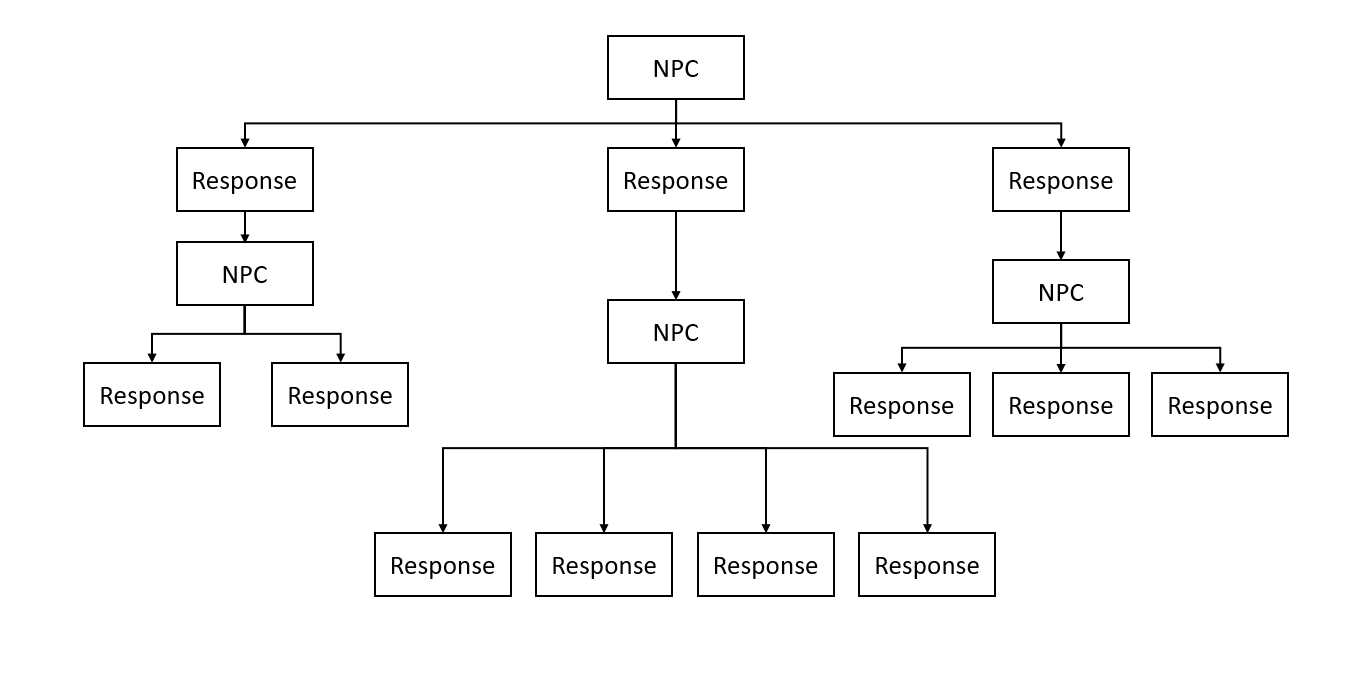
Figure 3: Conversation diagram
The number of responses, while usually consistent throughout a conversation, could vary. Realistically, you'll probably never need more than a half dozen, although the usual amount is three or four. Some responses might also be dynamic based on conditions in the game, actions taken by the player, statistics of the character, and so on. The new Cyberpunk 2077 game has responses based on the background the player selected for their character. An NPC might offer completely different responses if the character has just finished a rampage through the town, for example, or even refuse to speak with the character.
Pre-function
The ability to make an evaluation before a node in the conversation is shown will be added. This will be a simple true/false check but will still provide a good bit of flexibility. For example, if the player attempts to speak to an NPC who has a quest for them, we might want to check to see if the player already has that quest assigned to them to show a proper greeting. If the player doesn't have the quest, we would proceed as normal. If the player does have the quest, the NPC might want to ask if they have completed it.
If we were to diagram this, it would look like the following:
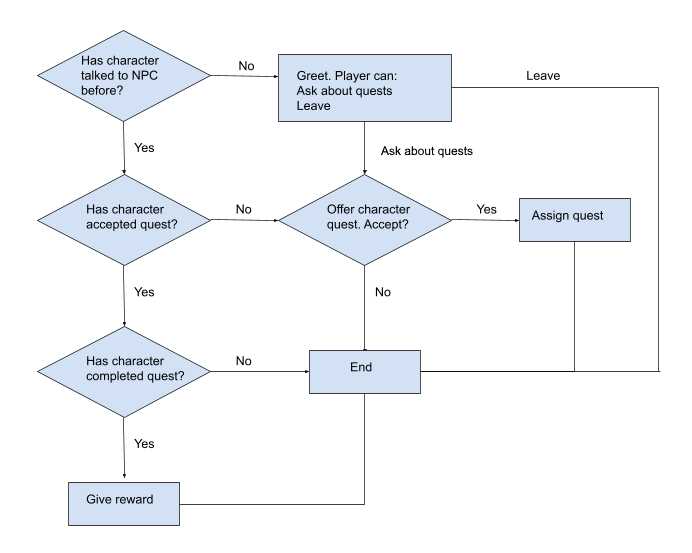
Figure 4: Conversation flow diagram
Post-function
Like the pre-function check, having the ability to do something after the player has selected a response is very useful. In our sample, if the player chooses to accept the quest the NPC offers, we need to add that quest to their character.
Let’s take a look at how our sample dialog integrates both of these features. The data we’ll use for this conversation will be contained in a JSON file:
Code Listing 31: Conversation JSON data
{ "id": 1, "nodes": [ { "id": 1, "text": "Hello.", "nodeFunctionType": 1, "functionName": "CheckKnownNPC", "functionParams": [ "1" ], "nodeCaseType": 0, "responses": [ { "id": 2, "text": "", "nodeFunctionType": 0, "functionName": null, "functionParams": null, "nodeCaseType": 1, "responses": [ { "id": 4, "text": "Hello", "nodeFunctionType": 1, "functionName": "QuestAssigned", "functionParams": [ "1" ], "nodeCaseType": 0, "responses": [ { "id": 7, "text": "", "nodeFunctionType": 0, "functionName": null, "functionParams": null, "nodeCaseType": 1, "responses": [ { "id": 11, "text": "I've finished the quest.", "nodeFunctionType": 2, "functionName": "IsQuestCompleted", "functionParams": [ "1" ], "nodeCaseType": 0, "responses": [ { "id": 2, "text": "", "nodeFunctionType": 0, "functionName": null, "functionParams": null, "nodeCaseType": 2, "responses": [ { "id": 9, "text": "You've not done what I asked. Come back when you're finished.", "nodeFunctionType": 0, "functionName": null, "functionParams": null, "nodeCaseType": 0, "responses": [ { "id": 15, "text": "Good bye.", "nodeFunctionType": 0, "functionName": null, "functionParams": null, "nodeCaseType": 0, "responses": null } ] } ] }, { "id": 12, "text": "", "nodeFunctionType": 0, "functionName": null, "functionParams": null, "nodeCaseType": 1, "responses": [ { "id": 11, "text": "Very good. Here is your reward.", "nodeFunctionType": 2, "functionName": "CompleteQuest", "functionParams": [ "1" ], "nodeCaseType": 1, "responses": [ { "id": 15, "text": "Good bye.", "nodeFunctionType": 0, "functionName": null, "functionParams": null, "nodeCaseType": 0, "responses": null } ] } ] } ] } ] }, { "id": 8, "text": "", "nodeFunctionType": 0, "functionName": null, "functionParams": null, "nodeCaseType": 2, "responses": [ { "id": 13, "text": "Good bye.", "nodeFunctionType": 0, "functionName": null, "functionParams": null, "nodeCaseType": 0, "responses": null } ] } ] } ] }, { "id": 3, "text": "", "nodeFunctionType": 0, "functionName": null, "functionParams": null, "nodeCaseType": 2, "responses": [ { "id": 5, "text": "Do you have a quest for me?", "nodeFunctionType": 2, "functionName": "HasQuest", "functionParams": null, "nodeCaseType": 0, "responses": [ { "id": 3, "text": "", "nodeFunctionType": 0, "functionName": null, "functionParams": null, "nodeCaseType": 1, "responses": [ { "id": 9, "text": "Yes. I need you to kill all the goblins outside of town.", "nodeFunctionType": 0, "functionName": null, "functionParams": null, "nodeCaseType": 1, "responses": [ { "id": 14, "text": "I don't have time for that.", "nodeFunctionType": 0, "functionName": null, "functionParams": null, "nodeCaseType": 0, "responses": null }, { "id": 15, "text": "Sure, I'd be glad to.", "nodeFunctionType": 2, "functionName": "AssignQuest", "functionParams": [ "1" ], "nodeCaseType": 0, "responses": null } ] } ] }, { "id": 3, "text": "", "nodeFunctionType": 0, "functionName": null, "functionParams": null, "nodeCaseType": 2, "responses": [ { "id": 10, "text": "No, I'm sorry.", "nodeFunctionType": 0, "functionName": null, "functionParams": null, "nodeCaseType": 2, "responses": [ { "id": 16, "text": "Good bye.", "nodeFunctionType": 0, "functionName": null, "functionParams": null, "nodeCaseType": 0, "responses": null } ] } ] } ] }, { "id": 16, "text": "Good bye.", "nodeFunctionType": 0, "functionName": null, "functionParams": null, "nodeCaseType": 0, "responses": null } ] } ] } ] } |
The first node contains a pre-function that has the conversation system check the player character to see if it has previously interacted with the entity it is having the conversation with. Since the conversation system knows about the entity that is having the conversation, as we’ll see shortly, there’s no need to have that information in the conversation file. The two responses for this node are true and false, which every node that contains a pre-function must have in order for the function to work.
If the player has interacted with the entity, another pre-function checks to see if the player already has the quest that the entity can offer. The functionParams property of the node holds the ID of the quest. This property allows for any number of pieces of data; they would be comma-delimited between the brackets.
If the quest is already assigned, a check is made to see if the player has completed it. We’ll see exactly how this is accomplished when we look at our quest system in the next chapter. If it hasn’t been completed, the player is told to come back when it has been; otherwise the quest reward is given.
If you look through the JSON, you’ll see another piece of the system that we’ll discuss: a placeholder for the quest description in node 9. Since a conversation could potentially allow multiple quests to be offered, this information needs to be determined when the conversation is occurring. There could be a number of pieces of information like this, such as the name of an entity or a location the player needs to find, or a number of items or entities the player needs to obtain or eliminate.
The code to load a conversation is just a few lines:
Code Listing 32: Method to load a conversation
public static Conversation LoadConversation(string id) { Conversation conversation = new Conversation(); string data = File.ReadAllText(@"Content\Data\Conversations\" + id.ToString() + ".json"); conversation = JsonConvert.DeserializeObject<Conversation>(data); return conversation; } |
The Newtonsoft library that we’re using handles all the heavy lifting in one line: the JsonConvert.DeserializeObject method.
Now that we’ve looked at the conversation, we’ll go over the code that allows it to work.
There are three main classes for this system: Conversation, ConversationManager, and ConversationRenderer.
The ConversationManager is extremely simple at this point. It has only five members:
Code Listing 33: ConversationManager class
public class ConversationManager { Conversation conversation; Entity player; Entity npc; ConversationNode curNode; public bool IsActive; } |
The constructor for the class is passed the first three members. IsActive lets other systems know if a conversation is currently taking place. curNode provides the information for the line to be displayed based on what the entity being talked to is saying. This is the data in a node of the JSON file.
Code Listing 34: ConversationNode class
public enum CaseType { CaseNone, CaseTrue, CaseFalse } public enum FunctionType { FunctionNone, PreFunction, PostFunction } public class ConversationNode { public int ID; public string Text; public FunctionType NodeFunctionType; public string FunctionName; public string[] FunctionParams; public CaseType NodeCaseType; private List<ConversationNode> responses; } |
Nothing here is that surprising. The class is simply a holder for data.
The Conversation class is just about as simple:
Code Listing 35: Conversation class
public class Conversation { private int id; public List<ConversationNode> nodes; private ConversationNode curNode; public ConversationStatus Status; } |
The only complex piece in the class is the code that deals with the pre-function:
Code Listing 36: Method to check a node before it displays
public void CheckPreFunction() { if (curNode.NodeFunctionType == FunctionType.PreFunction) { int index = 0; object obj = Globals.FunctionClasses[(ConversationFunctions)Enum.Parse(typeof(ConversationFunctions), curNode.FunctionName)]; if (obj.GetType().IsGenericType && obj is IList) { index = Convert.ToInt32(curNode.FunctionParams[0]); //First function param would be the id of the object in the list object ret = Globals.FunctionClasses[(ConversationFunctions)Enum.Parse(typeof(ConversationFunctions), curNode.FunctionName)].GetType().GetMethod(curNode.FunctionName) .Invoke(((IList)obj)[index], new[] { curNode.FunctionParams }); if ((bool)ret) { curNode.Responses = curNode.Responses.Find(c => c.Text == "true").Responses; } else { curNode.Responses = curNode.Responses.Find(c => c.Text == "false").Responses; } } else { object ret = Globals.FunctionClasses[(ConversationFunctions)Enum.Parse(typeof(ConversationFunctions), curNode.FunctionName)].GetType().GetMethod(curNode.FunctionName) .Invoke(obj, new[] { curNode.FunctionParams }); if ((bool)ret) { curNode.Responses = curNode.Responses.Find(c => c.NodeCaseType == CaseType.CaseTrue).Responses; } else { curNode.Responses = curNode.Responses.Find(c => c.NodeCaseType == CaseType.CaseFalse).Responses; } } } } |
Code Listing 37: Method to process a response selection
public void SelectResponse(int index) { //Check post function if (curNode.Responses[index].NodeFunctionType == FunctionType.PostFunction && curNode.Responses != null) { int param = 0; object obj = Globals.FunctionClasses[(ConversationFunctions)Enum.Parse(typeof(ConversationFunctions), curNode.Responses[index].FunctionName)]; object ret; if (obj.GetType().IsGenericType && obj is IList) { //First function param would be the id of the object in the list param = Convert.ToInt32(curNode.Responses[index].FunctionParams[0]); ret = Globals.FunctionClasses[(ConversationFunctions)Enum.Parse(typeof(ConversationFunctions), curNode.Responses[index].FunctionName)].GetType().GetMethod(curNode.Responses[index].FunctionName) .Invoke(((IList)obj)[param], new[] { curNode.Responses[index].FunctionParams }); } else { string[] functionParams = curNode.Responses[index].FunctionParams; ret = Globals.FunctionClasses[(ConversationFunctions)Enum.Parse(typeof(ConversationFunctions), curNode.Responses[index].FunctionName)].GetType().GetMethod(curNode.Responses[index].FunctionName) .Invoke(obj, functionParams); } if (curNode.Responses != null) { if ((bool)ret) { curNode = curNode.Responses[index].Responses.Find(c => c.NodeCaseType == CaseType.CaseTrue); } else { curNode = curNode.Responses[index].Responses.Find(c => c.NodeCaseType == CaseType.CaseFalse); } } else { curNode = null; } } else { if (curNode.Responses[index].Responses == null) { //End conversation curNode = null; } else { curNode = curNode.Responses[index]; } } if (curNode == null) { Status = ConversationStatus.Completed; } } |
As with the CheckPreFunction method, the only complex piece here is calling the post-function method if one exists, but it’s the exact same code as we’ve seen.
If the current node has no responses, we end the conversation.
ConversationRenderer
Drawing the conversation interface involves drawing a background window in which the conversation text is displayed, as well as the current node’s text and responses:
Code Listing 38: ConversationRenderer class
// In gameplay screen if (conversationManager != null && conversationManager.IsActive) conversationRenderer.Render(spriteBatch, conversationManager.GetCurrentNode()); public class ConversationRenderer { private Texture2D background; private Rectangle rect; private Vector2 conversationLine; private SpriteFont font; public ConversationRenderer() { ContentManager content = Game1.GetContentManager(); background = content.Load<Texture2D>("Sprites/UI/conversationbackground"); rect = new Rectangle(0, Game1.GetScreenManager().GraphicsDevice.Viewport.Height - 100, Game1.GetScreenManager().GraphicsDevice.Viewport.Width, 100); font = content.Load<SpriteFont>("conversationfont"); conversationLine = new Vector2(rect.X + 15, rect.Y + 5); } public void Render(SpriteBatch spriteBatch, ConversationNode curNode) { if (curNode != null) { spriteBatch.Draw(background, rect, Color.White); spriteBatch.DrawString(font, curNode.Text, conversationLine, Color.Black); int y = (int)conversationLine.Y + 15; int x = (int)conversationLine.X + 20; int i = 0; if (curNode.Responses != null) { foreach (ConversationNode node in curNode.Responses) { spriteBatch.DrawString(font, (i + 1).ToString() + ") " + node.Text, new Vector2(x, y + (20 * i)), Color.Black); i++; } } else { spriteBatch.DrawString(font, (i + 1).ToString() + ") Leave conversation.", new Vector2(x, y + (20 * i)), Color.Black); } } } } |
NPCs
Now that we have a conversation, we just need to have an NPC to talk to. A full game will have a lot of NPCs and other entities. Every area in the game world will have entities: good, bad, and neutral. When an area is loaded, it will have to load the entities that populate it. An easy way to do this is one that we already know: store the data for them in a JSON file. Here’s the one we’ll use for our small demo:
Code Listing 39: NPC JSON data
{ "$type": "System.Collections.Generic.List`1[[MonoGameRPG.EntityGameObject, Chapter 4]], mscorlib", "$values": [ { "$type": "MonoGameRPG.EntityGameObject, Chapter 5", "EntityType": 1, "Entity": { "$type": "RPGEngine.Entity, Chapter 5", "ID": 1, "Type": 0, "Name": "Blacksmith", "ClassID": "1", "Level": 1, "RaceID": "1", "BaseHP": 10, "Alignment": 0, "Sex": 0, "Age": 0, "PortraitFileName": null }, "Target": null, "GameSpriteFileName": "Sprites/Test/TestSheet2", "Type": 1, "StartLocation": "2, 2" }, { "$type": "MonoGameRPG.EntityGameObject, Chapter 4", "EntityType": 1, "Entity": { "$type": "RPGEngine.Entity, Chapter 4", "ID": 2, "Type": 0, "Name": "Shopkeeper", "ClassID": "1", "Level": 1, "RaceID": "1", "BaseHP": 10, "Alignment": 0, "Sex": 0, "Age": 0, "PortraitFileName": null }, "Target": null, "GameSpriteFileName": "Sprites/Test/TestSheet3", "Type": 1, "StartLocation": "6, 6" } ] } |
The code to load this is not much different than what we’ve already used. The only difference is that we need to add a setting that tells the DeserializeObject method how to handle the EntityGameObject:
Code Listing 40: JSON deserializtion settings
JsonSerializerSettings settings = new JsonSerializerSettings { TypeNameHandling = TypeNameHandling.All }; |
Pass this as the second parameter to the method, and everything just works.
Once we have the data loaded, we can create our NPCs. The loading code is in a method called LoadNPCs; we just return the list that’s created. We’ll also add a hook to allow us to start a conversation when the entity is clicked:
Code Listing 41: Entity initialization to handle conversations
List<EntityGameObject> npcs; npcs = new List<EntityGameObject>(); npcs.AddRange(GameObject.LoadNPCs()); foreach (EntityGameObject obj in npcs) { obj.Initialize(ScreenManager.Game, obj.GameSpriteFileName); obj.NPCClicked += NPCClicked; } ((Entity)npcs[0].Entity).AddConversation(ConversationManager.LoadConversation("1")); ((Entity)npcs[0].Entity).AddQuest(1); |
Although we’re going to look at quests later, we’ll add a placeholder to the first entity to allow the conversation system to work.
The gameplay code looks for input every frame and passes that input to every object to see if it was interacted with. This includes the entities, which allows us to start the conversation when one is clicked:
Code Listing 42: Method for handling NPC being clicked
private void NPCClicked(NPCClickedEventArgs e) { Entity entity = (Entity)npcs.Find(npc => ((Entity)npc.Entity).ID == e.ID).Entity; if (conversationManager == null) { conversationManager = new ConversationManager(((Entity)npcs.Find(npc => ((Entity)npc.Entity).ID == e.ID).Entity).GetConversation(e.ConversationID), ((Entity)character.Entity), entity); } conversationManager.Start(); conversationManager.IsActive = true; } |
The end result of all this is a simple interface that most RPG players will be familiar with:
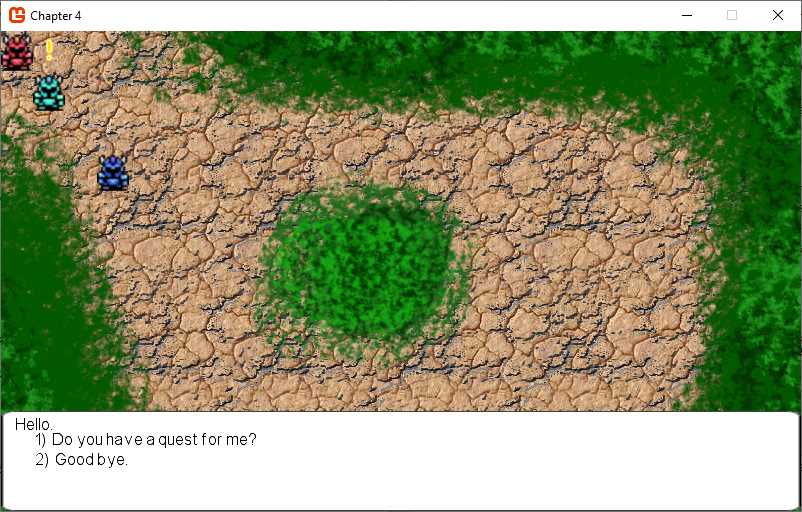
Figure 5: Conversation in action
As this is just a high-level view of how the conversation system works, we encourage you to run the sample for this chapter to see the conversation system in action and take a look at all the relevant code involved as there is a bit more to it.
We’ve looked at the most important pieces, and this should be enough to give you an idea of how to implement a conversation system. We’ll expand on this to tie into our quest system and give the player a goal to accomplish.
What’s next
Now that we have the ability to have the player accept a quest, we’ll work on actually designing the quest system. Head over the the next chapter where we’ll take a look at a simple but relatively robust quest system we’ll implement.


- 1800+ high-performance UI components.
- Includes popular controls such as Grid, Chart, Scheduler, and more.
- 24x5 unlimited support by developers.