
MongoDB 3 Succinctly®

CHAPTER 4
Manipulating Documents
Now that we are able to find out the available collections, let’s take a look at the following commands, which are used for manipulating the documents:
- Insert
- Update
- Remove
Simple data retrieval
Before we actually start with these operations, let’s look at how to query the database in the simplest terms, as this method will be used as an example in upcoming chapters.
The MongoDB shell offers the ability to query for data; this is mainly achieved by using the db.<collection>.find() method.
The db.collection.find() will retrieve all the documents in a given collection (actually, the top 20). For more information, please see the full chapter on how to find and project data in MongoDB.
Inserting a document
There are several ways to insert data into a MongoDB collection.
Table 3: Methods of document creation
db.<collection>.insert() | Inserts a document or collection of documents into a collection. Returns a BulkWriteResult object back to the caller. |
db.<collection>.insertOne() | New in v3.2. Inserts a single document into a collection. |
|
db.<collection>.insertMany() | New in version 3.2. Inserts multiple documents into a collection. Returns a document containing the object IDs and information if the insert is acknowledged. |
|
db.<collection>.save() | Updates an existing document or inserts a new document, depending on its document parameter. Returns a WriteResult object. |
The goal in the following example is to add a new user in the users collection.
As we have seen, it’s fairly easy to insert a simple document representing the user.
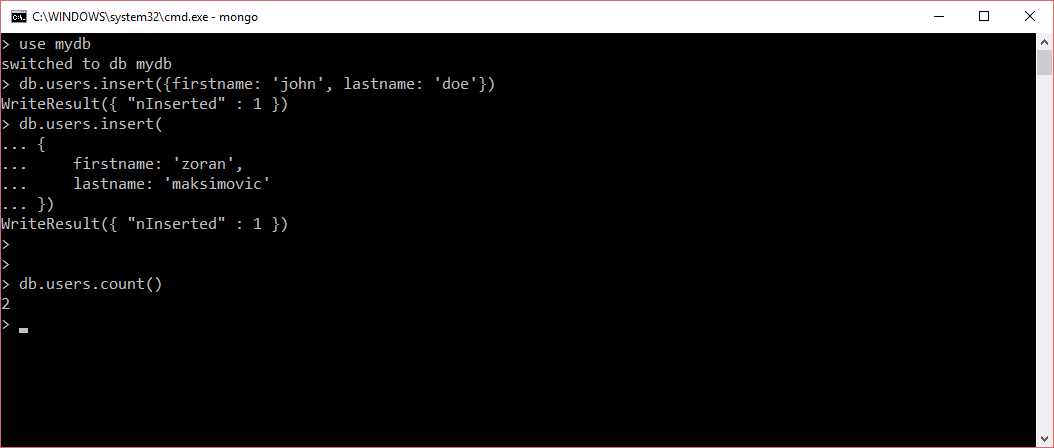
Figure 20: Inserting a user.
Using a single line vs multiline when specifying a JSON string doesn’t really make any difference. The important point is to close the function with the right parenthesis. As soon as the document is inserted, the MongoDB shell informs us with the number of affected rows in the form of WriteResult ({ “nInserted”: 1 }).
Just to prove that we have inserted two users, we can call db.users.count(), which will return the count of documents currently present in the users collection.
It is also possible to insert more than one document at a time, by using an array of JSON documents and passing this as a parameter to the insert function. In JSON, brackets [ ] are used to specify an array of objects.

Figure 21: Inserting multiple documents into a collection.
It’s also possible to use the db.users.save() to insert a new document into the collection. In reality, the save() command can be used both for inserting or updating documents.
If a document does not exist with the specified _id value, the save() method performs an insert with the specified fields in the document; otherwise, an update is performed, replacing all fields in the existing record with the fields from the document.
Let’s see an example of how to use the save() command to insert data into a collection. It’s pretty much straightforward, and it looks very similar to the previous examples.

Figure 22: Inserting data into a collection by using save().
Document primary key
When we retrieved the item from the users collection, you might have noticed that there is a field called _id, which we did not explicitly mention when we inserted the document.
As in any database, MongoDB provides a way of handling the primary keys for the documents. Documents stored in a collection require a unique _id field that acts as a primary key. We can explicitly set the value of the _id; alternatively, the database will assign one by default. MongoDB uses the ObjectId type as the default to store the value for the _id field; however, the _id field may contain values of any BSON data type, other than an array.
The ObjectId is a BSON type, and its value consists of 12 bytes, where the first four bytes are a timestamp that reflect the ObjectId’s creation, specifically:
- a 4-byte value representing the seconds since the Unix epoch
- a 3-byte machine identifier
- a 2-byte process ID
- a 3-byte counter, starting with a random value
So, it’s a very good candidate for a unique value. Let’s look at a small example on how to force our own primary key:
Code Listing 20: Inserting user data by forcing the primary key
db.users.insert({_id: 1, firstname: 'john', lastname: 'doe'}) |
Assigning an _id is as easy as handling any other attribute. As you can see in Figure 23, duplicate primary keys will be avoided.

Figure 23: Duplicate primary keys not allowed.
Updating a document
MongoDB allows you to change existing documents in the following ways:
- Update the value of an existing field.
- Change the document by adding or removing attributes (fields).
- Replace the document entirely.
To manipulate the documents, MongoDB mainly offers three different flavors of the update() methods to be performed at the collection level.
Table 4: MongoDB document update methods
db.<collection>.update() | Modifies document(s) in a collection. The method can modify specific fields of an existing document or documents or replace an existing document entirely. |
db.<collection>.updateOne() | New as of v3.2. Updates one document within a collection. |
db.<collection>.updateMany() | New as of version 3.2. Updates multiple documents within a collection. |
Updating a value of an existing attribute
The following seems to be the most obvious operation to perform, so let’s try to change the firstname of a user in the users collection. In order to do this, let’s just create a new user with a simpler _id, by running the following command:
Code Listing 21: Creating a user with a fixed primary key
db.users.insert({_id: 1, firstname: 'john', lastname: 'doe'}) |
Once the user is in the collection, we can quickly query the collection and check if the user has been properly inserted by running the find() method. The find() method will return the full list of items in the collection.
Code Listing 22: Searching for user data (basic usage)
db.users.find() |
You should be able to see the user with the primary key _id = 1.
In order to change the firstname of the user, we can use the following command:
Code Listing 23: Update user's firstname
db.users.update( { _id : 1}, //filter { $set: { firstname: "andrew" } } //update action ) |
The first parameter (in red) represents the filter that will be applied to items with the update, a bit like a WHERE clause when updating records in the RDBMS.
The second parameter (in blue) defines the operation to be performed. In our case, we use the operator $set in order to set the value of the firstname.
If the field we are passing is not in the document, it will be automatically created. If we would like to add the age of the user, then it becomes as simple as:
Code Listing 24: Updating user's age
db.users.update( { _id : 1}, { $set: { age: 40 } }) |
On the command line, you should see something similar to the following:

Figure 24: Applying the update methods.
To give an idea of which parameters the update() method supports, let’s take a look at the general method signature:
Code Listing 25: Collection update method signature
db.collection.update( <query>, <update>, { upsert: <boolean>, multi: <boolean>, writeConcern: <document> } ) |
Table 5: Update method's options
query | Defines the selection criteria for the update. This corresponds pretty much to the WHERE clause in the RDBMS. |
update | Specifies the action to be executed on the document that matches the query criteria. This is where we can update a field or create a new one. |
update-options | In the third parameter, there are few options that can be specified: upsert: If set to true, it creates a new document in case no documents have been found by the query criteria. By default, it is set to false. multi: If set to true, it updates multiple documents; otherwise, only one. writeConcern: Defines how the database will handle the write part. For instance, we can define the timeout for the query, or the acknowledgment that the data has been propagated to one or more nodes (in case of a multinode setup). |
Update operators
There are quite a few update operators that can be used to manipulate values. We have already seen the usage of the $set operator, which performs the change on the document by setting the value explicitly, but there are others:
Table 6: Update operators
$set | Sets the value of a field in a document. |
$unset | Removes the specified field from a document. |
$min | Updates the field if the value is less than the existing field value. |
$setOnInsert | Sets the value of a field if an update results in an insert of a document. Has no effect on update operations that modify existing documents. |
$max | Updates the field if the value is greater than the existing field value. |
$rename | Renames a field. |
$mul | Multiplies the value of the field by a specified amount. |
$inc | Increases (increments) the value by a specific amount. |
$currentDate | Sets the value of a field to the current date. |
If we are dealing with an array of items (a collection of items), then there are several more operators, including:
Table 7: Update operators for arrays
$pull | Removes all list elements that match a specified query. |
$push | Adds an item to an array. |
$addToSet | Adds an item to an array only if the item does not already exist. |
For the full list of available operators, please visit the official MongoDB documentation or check the available options directly in the MongoDB shell with the following command:
Code Listing 26: Use of help on a collection
db.users.help() |
Also, check the method signatures for the these update methods.
Deleting a document
In a very similar way as it happens for updates, MongoDB offers various ways for deleting documents. The methods follow pretty much the same principle.
Table 8: Data removal methods
db.<collection>.drop() | Completely empties the collection by deleting the collection itself. While this is not exactly deleting a document, it can be considered as a way of cleaning up the data. |
db.<collection>.remove() | Deletes a single document or multiple documents that match a specified filter. |
db.<collection>.deleteOne() | Deletes at most a single document that matches a specified filter, even though multiple documents may match the specified filter. It will delete the first document. |
db.<collection>.deleteMany() | Deletes all documents that match a specified filter. |
Let’s demonstrate a deletion of a single document by using the deleteOne method. The signature of the deleteOne method is as follows. It accepts the filter and the writeConcern as discussed previously. WriteConcern is not mandatory, and if not specified, will take the default values.
Code Listing 27: DeleteOne method signature
db.collection.deleteOne( <filter>, writeConcern: <document> ) |
Let’s assume we already have an entry in the users table, and we try to delete it. This might look like the following:
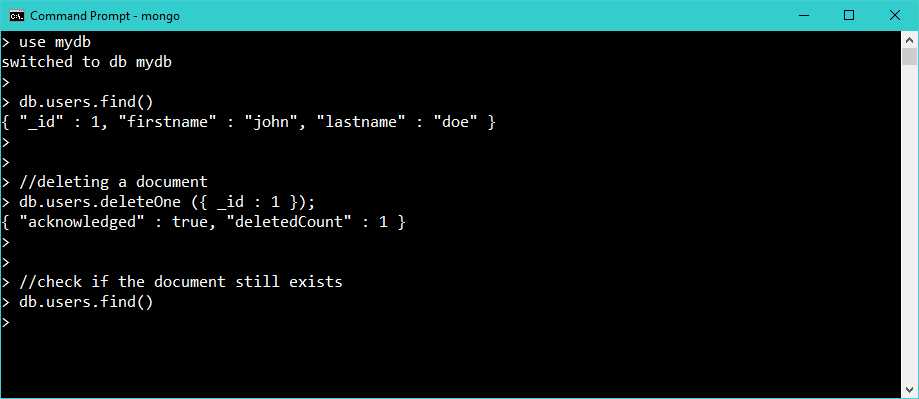
Figure 25: Deleting a document.
What is interesting here is the filter part, where we specify the document to be deleted. In our case, this is directly the primary key, _id = 1.


- 1800+ high-performance UI components.
- Includes popular controls such as Grid, Chart, Scheduler, and more.
- 24x5 unlimited support by developers.