
MongoDB 3 Succinctly®

CHAPTER 8
Inserting Data in C#
In this exercise, we will insert some data into the database called moviesDb. As we will be looking at two ways of inserting data, we will store the data into two collections (movies_bson for BsonDocument-based objects and movies_poco for data based on a POCO model). Technically, there should be no difference once the data is saved.
In order to do this, we need some sample data, as defined in the GetBsonMovies() method, which returns an array of BsonDocuments.
Code Listing 78: Return a BsonDocument array of movies
We can insert the data by using the InsertMany or InsertManyAsync methods available at the collection level. The GetDatabaseReference method has been mentioned previously, and this is just a helper method to automate the referencing of a database.
In a case of inserting one document, we would use the InsertOne or InsertOneAsync method as opposed to the above-mentioned one.
Code Listing 79: Inserting a movie into the database
public static async Task Insert<T>(T[] movies, string dbName, string tableName) { var db = DatabaseHelper.GetDatabaseReference("localhost", dbName);
var moviesCollection = db.GetCollection<T>(tableName); await moviesCollection.InsertManyAsync(movies); } |
The insert method is a generic method accepting a different kind of movie array, as we will be using the same method to send the list of movies based on POCO objects.
Tip: The general rule for using any method in MongoDB C# driver is to use the async method if available, rather than the synchronous ones. This book might not always follow this rule.
We call the Insert method as follows:
Code Listing 80: Calling the inserting method
|
BsonDocument[] movies = MovieManager.GetBsonMovies(); MovieManager.Insert<BsonDocument>(movies, "moviesDb", "movies_bson").Wait(); |
Don’t be confused by the MovieManager class, which is created as a helper class and contains the methods GetBsonMovies and Insert<T>(..).
After running this code, the result will be as follows when querying the movies_bson collection.
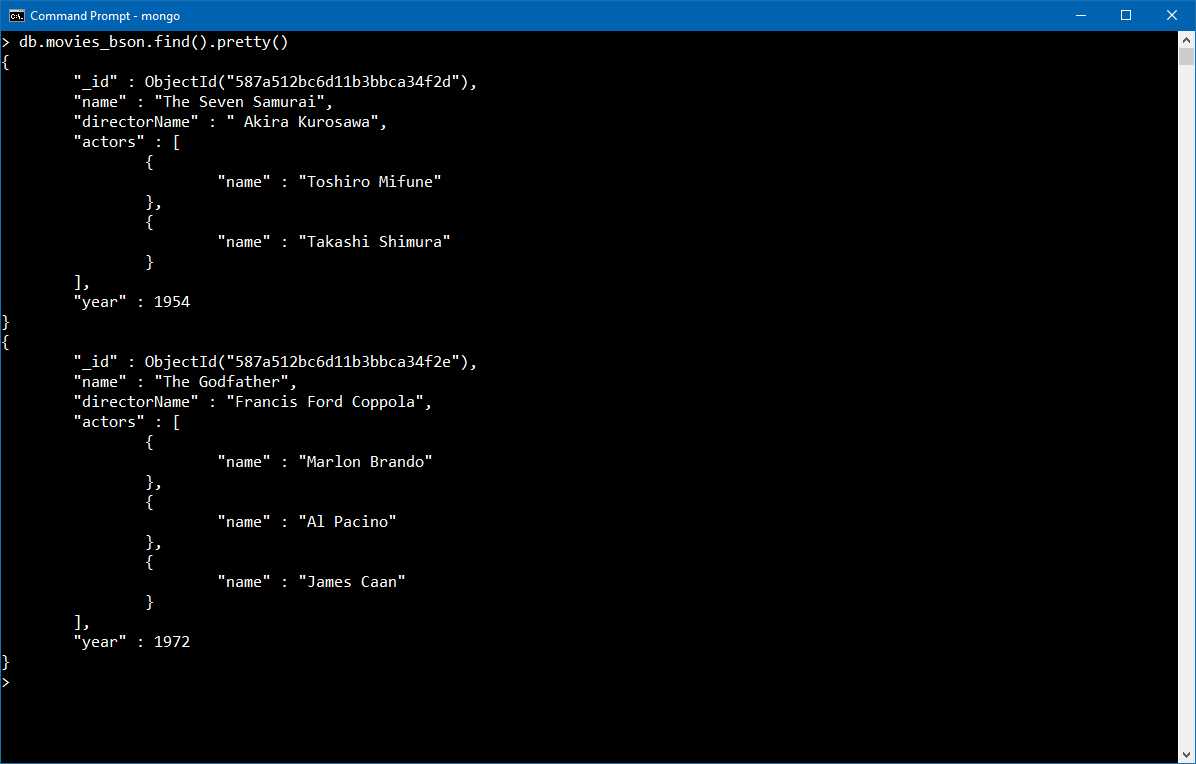
Figure 42 Movies from Bson format as stored in the database
As we have seen previously, the alternative method to the BsonDocument is to use POCO classes representing the objects, in which case we would first declare an array of Movie objects.
Code Listing 81 Get the list of Movies as array
public static Movie[] GetMovieList() { Movie sevenSamurai = new Movie() { Name = "Seven Samurai", Director = "Akira Kurosawa", Year = 1954, Actors = new Actor[] { new Actor {Name = "Toshiro Mifune"}, new Actor {Name = "Takashi Shimura"}, } };
Movie theGodFather = new Movie() { Name = "The Godfather", Director = "Francis Ford Coppola", Year = 1972, Actors = new Actor[] { new Actor {Name = "Marlon Brando"}, new Actor {Name = "Al Pacino"}, }, Metadata = new BsonDocument("href", "http://thegodfather.com") }; return new Movie[] { sevenSamurai, theGodFather }; } |
However, before calling the Insert<Movie>() method, as we have seen previously, we need to call the RegisterClassMap, which will make the driver aware of the mapping between the POCO object and the desired serialization. The full code of the mapper and calling of the insert method follows.
Code Listing 82: Full object-to-BSON mapping
public class BsonMapper { public static void Map() { if (!BsonClassMap.IsClassMapRegistered(typeof(Movie))) { BsonClassMap.RegisterClassMap<Movie>(movie => { movie.MapIdProperty(p => p.MovieId) .SetIdGenerator(new StringObjectIdGenerator()); movie.MapProperty(p => p.Name).SetElementName("name"); movie.MapProperty(p => p.Director).SetElementName("directorName"); movie.MapProperty(p => p.Year).SetElementName("year"); movie.MapProperty(p => p.Actors).SetElementName("actors"); movie.UnmapProperty(p => p.Age); movie.MapExtraElementsMember(p => p.Metadata); movie.SetIgnoreExtraElements(true); }); } if (!BsonClassMap.IsClassMapRegistered(typeof(Actor))) { BsonClassMap.RegisterClassMap<Actor>(actor => { actor.MapProperty(p => p.Name).SetElementName("name"); }); } } } |
How does the code look from the caller perspective?
Code Listing 83: Inserting movies by using POCO class mapping
private static void Main(string[] args) { Movie[] movies = MovieManager.GetMovieList(); BsonMapper.Map(); //map the class to the MongoDB representation. MovieManager.Insert<Movie>(movies, "moviesDb", "movies_poco").Wait(); } |
Just to make a difference, we are storing the data to the movies_poco collection. This is purely for showing the functionality. The two methods are identical, and in a production system, we would use the same collection.
Let’s also pay attention to the BsonMappe.Map() call. This should be executed only once, when the application starts.
The result of inserting the two movies is as follows. The conclusion is that the result obtained with the two methods is exactly the same.
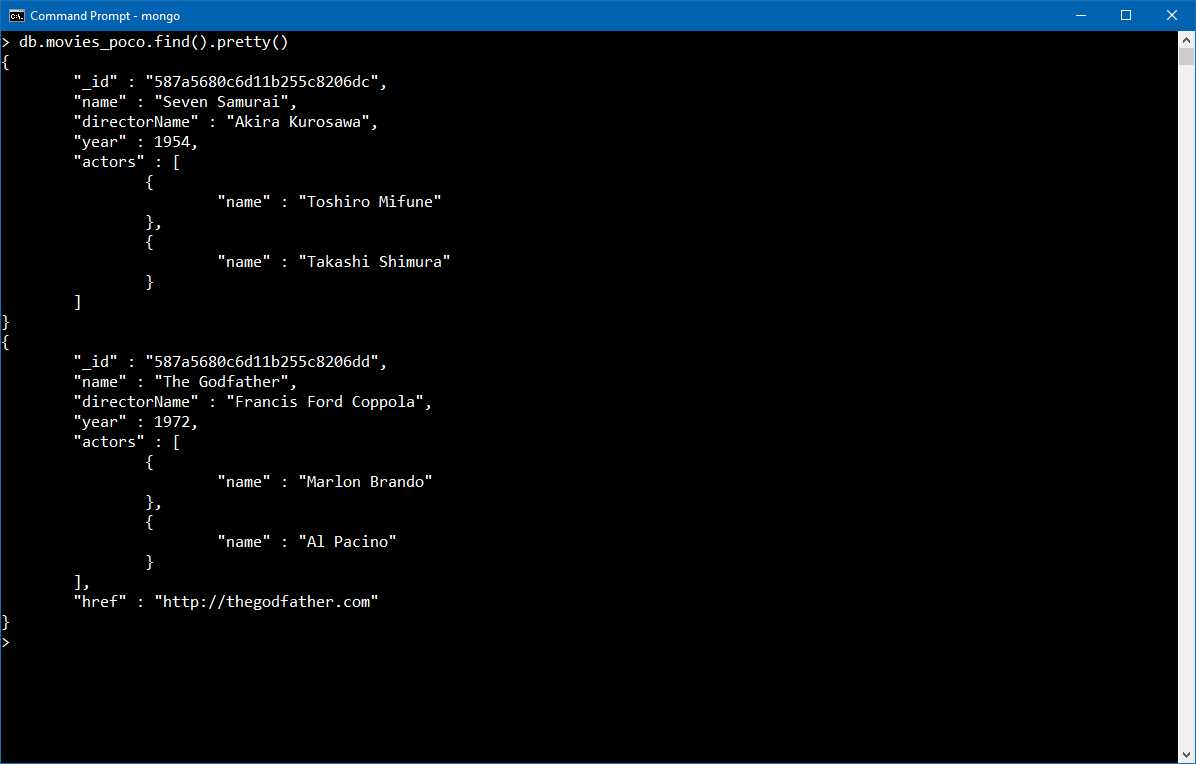
Figure 43: Movies as inserted in the database.


- 1800+ high-performance UI components.
- Includes popular controls such as Grid, Chart, Scheduler, and more.
- 24x5 unlimited support by developers.