
MongoDB 3 Succinctly®

CHAPTER 6
Basic MongoDB with C#
Over the years, as MongoDB has become more of a mainstream database, a large number of technologies have been embraced and extended so that there is a possibility of interaction. It’s perfectly normal to interact with MongoDB from Java, Microsoft.NET, Node.js, and many other platforms.
In this chapter, we will be discussing how Microsoft.NET and C# can be used to manipulate data in MongoDB. The idea is to show some basic operations (and bring some building blocks), and then later on to dive into a more complex solution.
To be able to use MongoDB from Microsoft.NET, we need a specific driver. In this book, we will be using the official driver supplied by MongoDB.
The driver can be downloaded from the MongoDB website. However, the preferred way to install the driver is by using the NuGet package, which is available with the following command:
Code Listing 52: Install MongoDB driver on NuGet
Install-Package MongoDB.Driver |
There are several other official (legacy) MongoDB drivers available on NuGet; however, the previously mentioned package is the latest supported, and it should be used for any new project. At the time of writing this book, the latest version of the driver is 2.4, which requires at least Microsoft.NET v4.5 to be used; however, it also supports the .NET Core.
Table 15: C# driver versions
C#/.NET Driver Version | MongoDB 2.4 | MongoDB 2.6 | MongoDB 3.0 | MongoDB 3.2 | MongoDB 3.4 |
|---|---|---|---|---|---|
Version 2.4 | ✓ | ✓ | |||
Version 2.3 | ✓ | ✓ | ✓ | ✓ | ✓ |
Version 2.2 | ✓ | ✓ | ✓ | ✓ |
Since version 2.0 of the driver, there has been support for async API. This feature allows us to use the resource more efficiently. Compared to the previous version, this version brings a new, more simplified API to work with. For instance, instead of having overloaded methods, there are now Option classes that allow having the different overloads configured in such a way.
The driver implements the three most important top-level interfaces:
Table 16: MongoDB driver's main interfaces
IMongoClient | Defines the root object that will interact with the MongoDB server. Responsible for connecting, monitoring, and performing operations against the server. |
IMongoDatabase | Represents a database in the MongoDB server instance. |
IMongoCollection | Represents a collection in the MongoDB database. |
In the upcoming chapters, we will take a look at how to use the classes implementing the above interfaces.
Connecting to the database
In this chapter, you will learn how to connect to a MongoDB database and perform basic operations such as referencing, creating, and deleting (dropping) the database.
Connecting to the database is very simple and it involves using an instance of the MongoClient.
Note: As we have seen in previous chapters, unless otherwise configured, MongoDB runs on port 27017 by default.
The first thing to do is to install MongoDB C# driver by running Install-Package MongoDB.Driver directly in Visual Studio, using the Package Manager Console.
The easiest way, without using any additional settings, is to create an instance of the MongoClient class and pass the connectionString as the argument. Note that the configuration string has the format of “mongodb://servername:port”.
Code Listing 53: Connecting to MongoDB without authentication
using System; using MongoDB.Driver; public static void ConnectWithoutAuthentication() { string connectionString = "mongodb://localhost:27017";
MongoClient client = new MongoClient(connectionString);
Console.WriteLine("Connected"); } |
The connection string can contain quite a few parameters, such as a list of hosts in case we use a MongoDB cluster, or to specify connection options. The full signature is as follows:
Code Listing 54: MongoDB connection string
mongodb://[username:password@]host1[:port1][,hostN[:portN]]] [/[database][?options]] |
Creating an instance of the MongoClient automatically creates a connection to the MongoDB. MongoClient in the background uses a connection pool.
The MongoDB recommendation is to create only one instance of the MongoClient per application so that the connection can be better reused. The MongoClient instance can be safely configured as a singleton lifetime if an inversion of control (IoC) framework is used.
Authentication
MongoDB itself supports several authentication mechanisms, such as SCRAM-SHA-1, MONGODB-CR, X.509 Certificate, LDAP Proxy, and Kerberos. By default, the SCRAM-SHA-1 is used. Sending the username and password is as easy as creating an instance of MongoCredential and supplying the database, username, and password, and wrapping it within an instance of the MongoClientSettings to be passed to the MongoClient. This is the second overload that can be used. It’s probably more complex to describe than to see in action, as follows:
Code Listing 55: Connecting to MongoDB with authentication
using MongoDB.Driver; public static void ConnectWithAuthentication() { string dbName = "ecommlight"; string userName = "some_user"; string password = "pwd";
var credentials = MongoCredential.CreateCredential(dbName, userName, password);
MongoClientSettings clientSettings = new MongoClientSettings() { Credentials = new[] { credentials }, Server = new MongoServerAddress("localhost", 27017) };
MongoClient client = new MongoClient(clientSettings);
Console.WriteLine("Connected as {0}", userName); } |
As quickly referenced, MongoDB has a rich model of authentication mechanism, which goes far beyond the scope of this book. For more detailed information about the various authentication methods, see this documentation.
Database operations
Through the MongoDB driver, it is possible to create, list, or drop a database, which we will demonstrate in this section.
Referencing a database
Creating a reference to a database is a basic operation that will be needed in almost all the data manipulation examples. The hierarchy defined in MongoDB is:
Server > Database > Collection > Document > Data
In order to get to the data, there should be a reference to the database, and then all the way down.
In order to keep the examples easy and simplify the code, we will create a simple method that will return an instance of MongoClient, which will then be used instead of manually creating the connection every time.
Code Listing 56: Generic method of instantiating MongoClient
public static MongoClient GetMongoClient(string hostName) { string connectionString = string.Format("mongodb://{0}:27017", hostName); return new MongoClient(connectionString); } |
We use the GetDatabase() method to get a reference to a database directly from the MongoClient instance, as follows:
Code Listing 57: Generic method of getting the database reference
public static IMongoDatabase GetDatabaseReference(string hostName, string dbName) { MongoClient client = GetMongoClient(hostName); IMongoDatabase database = client.GetDatabase(dbName); return database; } |
GetDatabase() returns an object that implements the IMongoDatabase interface, in this case MongoDatabaseImpl, which is the concrete implementation.
Database creation
MongoDB driver doesn’t have an explicit method to create a database, but this can be done by referencing a database, as we have seen in the GetDatabaseReference method.
If the database name does not exist, MongoDB driver will create it automatically the first time we add a document to it, or by simply creating a new collection.
Code Listing 58: Create a new database in C#
public static IMongoDatabase CreateDatabase(string databaseName, string collectionName) { MongoClient client = GetMongoClient(hostName); IMongoDatabase database = client.GetDatabase(databaseName); database.CreateCollection(collectionName); return database; } |
Which we can call:
Code Listing 59: Calling CreateDatabase method
public static void Main(string[] args) { CreateDatabase("newDatabaseName", "newCollectionName"); } |
Getting the list of databases
Getting the list of databases is straightforward. In the same style as getting the reference to the single database, we can call ListDatabases() or ListDatabasesAsync() on the MongoClient instance and obtain an instance of the BsonDocument, which will contain the basic information about the databases available on the server. Both of the methods would return an instance of an object that implements IAsyncCursor; however, the Async version would return the Task<IAsyncCursor>. Let’s see this in an example:
Code Listing 60: Show list of available databases
using System; using MongoDB.Driver; using System.Threading.Tasks; public static async Task GetListOfDatabasesAsync() { MongoClient client = GetMongoClient("localhost");
Console.WriteLine("Getting the list of databases asynchronously…"); using (var cursor = await client.ListDatabasesAsync()) { await cursor.ForEachAsync(d => Console.WriteLine(d.ToString())); } }
public static void GetListOfDatabasesSync() { MongoClient client = GetMongoClient("localhost");
Console.WriteLine("Getting the list of databases synchronously…"); var databases = client.ListDatabases().ToList(); databases.ForEach(d => Console.WriteLine(d.GetElement("name").Value)); |
The output in this case is as follows:
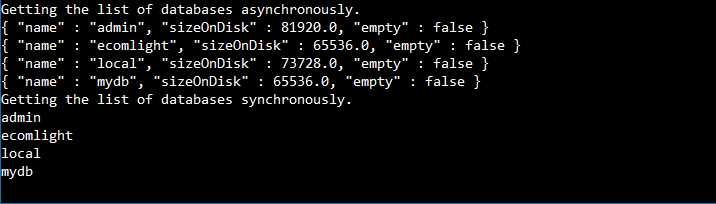
Figure 40: Returning the list of databases via C#.
I would like to emphasize the fact that in the first case (where we use the async method), a BsonDocument is returned and printed out to console. Being in JSON format, it’s very easily recognized.
In the second case, by using Console.WriteLine(d.GetElement("name").Value)), we only return the name portion of it.
Deleting a database
To delete a database from MongoDB server, we call the DropDatabase() or DropDatabaseAsync() method from MongoClient object.
Code Listing 61: Deleting the database (sync and async versions)
public static void DropDatabase(string databaseName) { MongoClient client = GetMongoClient("localhost"); client.DropDatabase(databaseName); }
public static async void DropDatabaseAsync(string databaseName) { MongoClient client = GetMongoClient("localhost"); await client.DropDatabaseAsync(databaseName); } |
Working with collections
As we have seen in the previous chapters, we can list and manipulate the collections by using the MongoDB shell. This is also possible by using the C# driver. In the following examples, we will show how to list, create, and drop a collection.
There are mainly three methods available on the IMongoDatabase:
- CreateCollection and CreateCollectionAsync: Creates a new collection if not already available.
- ListCollections and ListCollectionsAsync: Lists the already available collections on the database.
- DropCollection and DropCollectionAsync: Deletes (drops) a collection from the given database.
We can summarize all the operations within the CreateListAndDropCollections method as follows:
Code Listing 62: Show the list of available collections
public static void CreateListAndDropCollections(string databaseName) { var database = GetDatabaseReference(hostName, databaseName); var collectionName = "some_collection";
//create a new collection. database.CreateCollection(collectionName);
//showing the list of collections before deleting. ListCollections(hostName, databaseName);
//delete a collection. database.DropCollection(collectionName);
//showing the list of collections after deleting. ListCollections(hostName, databaseName); }
public static void ListCollections(string hostName, string databaseName) { var database = GetDatabaseReference(hostName, databaseName);
var collectionsList = database.ListCollections();
Console.WriteLine("List of collections in the {0} database:", database.DatabaseNamespace); foreach (var collection in collectionsList.ToList()) { Console.WriteLine(collection.ToString()); } } |
And by calling the previous code from:
Code Listing 63: Calling the method to show collections
public static void Main(string[] args) { var newDatabaseName = "newDbName"; CreateListAndDropCollections(newDatabaseName); } |
The output in this case is as follows:

Figure 41: List of available collections.
Keep in mind that creating a collection will cause an error if the collection already exists.


- 1800+ high-performance UI components.
- Includes popular controls such as Grid, Chart, Scheduler, and more.
- 24x5 unlimited support by developers.