
Localization for .NET Succinctly®

CHAPTER 5
Numbers
As first glance, numbers might seem to be the same for different cultures. But they do differ when it comes to separators and grouping.
One million comma fifty is in Swedish “1 000 000,50” while it’s “1,000,000.50” in the United States.
.NET
Among the others, in .NET we use the ToString() method to do the formatting. I recommend that you try to use the built-in formatters instead of manually defining the grouping etc.
Let’s print a million and a half:
The result follows:
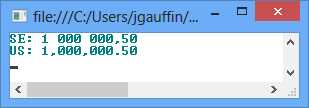
You could have done the same example by specifying the grouping manually:
var se = new CultureInfo("sv-se"); var us = new CultureInfo("en-us"); var number = 1000000.5; Console.WriteLine("SE: {0}", number.ToString(@"#,#.0", se)); Console.WriteLine("US: {0}", number.ToString(@"#,#.0", us)); |
This results in:
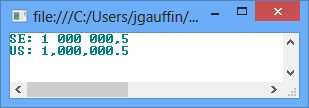
The comma tells .NET to use digit grouping, and the “.0” is used to tell how many decimals to use. You can read more about number formatting in MSDN.
JavaScript
At first, formatting numbers in JavaScript seems to be easy. There is a function called toLocaleString(culture), which should work just fine. Unfortunately, the support is not great in all browsers. And it also depends on which languages the user has activated in the web browser.
Let’s take a simple example. Add the following code into an empty HTML page.
<script type="text/javascript"> var number = 1000000.50; document.writeln(number.toLocaleString('sv-SE') + "<br>"); document.writeln(number.toLocaleString('en-US') + "<br>"); </script> |
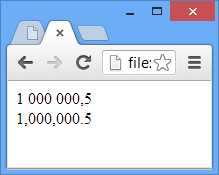
The output from that script looks quite nice in Google Chrome, as shown in Figure 34:
But the output in IE is a bit lacking (but IE get a bonus point for the decimal formatting), as shown in Figure 35:
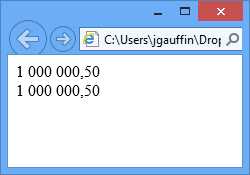
The Swedish formatting is used for the U.S. culture, too. The reason is that IE ignores the culture argument and uses the culture that is configured in Windows.
Globalize
Since we have Globalize, we can get a bit more straightforward conversion.
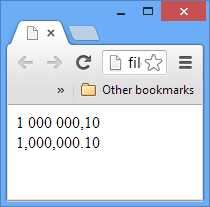
<!DOCTYPE html> <html xmlns="http://www.w3.org/1999/xhtml"> <head> <title></title> <script src="Scripts/jquery-1.9.1.min.js"></script> <script src="Scripts/jquery.globalize/globalize.js"></script> <script src="Scripts/jquery.globalize/cultures/globalize.culture.se-SE.js"></script> </head> <body> <script type="text/javascript"> Globalize.culture("se-SE"); document.writeln(Globalize.format(1000000.1, "n") + "<br>"); Globalize.culture("en-US"); document.write(Globalize.format(1000000.1, "n")); </script> </body> </html> |
The result follows:


- 1800+ high-performance UI components.
- Includes popular controls such as Grid, Chart, Scheduler, and more.
- 24x5 unlimited support by developers.