
Localization for .NET Succinctly®

CHAPTER 6
Currency/Money
There is no built-in support for currencies in .NET. The recommended approach is to use the decimal data type. That can however be a pain if you have to support multiple currencies.
static void Main(string[] args) { decimal shoppingCartTotal = 100; var us = new CultureInfo("en-US"); Console.WriteLine("Is it {0} ..", shoppingCartTotal.ToString("C0", us)); var sv = new CultureInfo("sv-SE"); Console.WriteLine(".. or {0}", shoppingCartTotal.ToString("C0", sv)); } |
The result is shown in Figure 37:
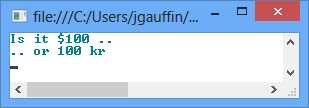
The ”0” in “C0” is for no decimals.
Handling multiple currencies
If you have to manage multiple currencies, always make sure that you include the currency identifier in all classes that contain amounts. Otherwise it’s easy to use the incorrect currency (which might be worth less).
A better approach would be to create a Money struct that can be used instead. The struct can be found in the Appendix.
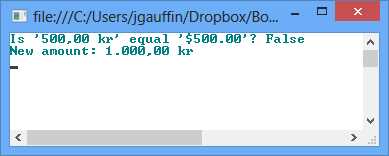
class Program { static void Main(string[] args) { var amountSek = new Money(500, "sv-se"); var amountUsd = new Money(500, "en-us"); Console.WriteLine("Is '{0}' equal '{1}'? {2}", amountSek, amountUsd, amountSek.Equals(amountUsd)); amountSek += 500; Console.WriteLine("New amount: " + amountSek); Console.ReadLine(); } } |
The result follows:
JavaScript
It might surprise you that JavaScript itself has quite good support for currency. Some initial attempts might look like this:
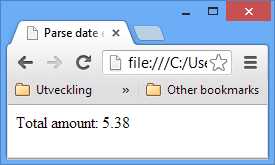
<script type="text/javascript"> var amount = 5.382; document.writeln("Total amount: " + amount.toFixed(2)); </script> |
We get the following result:
However, there is a much more elegant way:
<script type="text/javascript"> var amount = 5.382; document.writeln("Total amount: " + amount.toLocaleString('sv-se', { style: 'currency' })); </script> |
This will produce the following output:
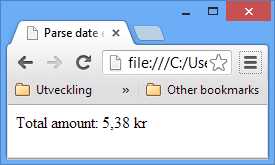
Notice that the decimal separator is correct for my language, and that the correct currency is attached.
Also notice that again, IE uses the OS (Windows) culture.


- 1800+ high-performance UI components.
- Includes popular controls such as Grid, Chart, Scheduler, and more.
- 24x5 unlimited support by developers.