
LINQ Succinctly®

CHAPTER 4
LINQ to XML
The building blocks that comprise LINQ to XML allow the creation, modification, querying, and saving of XML data.
At a high level, LINQ to XML consists of two key architectural elements that are designed to work well together:
· XML document object model.
· Additional LINQ to XML query operators.
The XML document object model in LINQ to XML (the X-DOM) is not the W3C DOM; it is a set of .NET types that represent in-memory XML data. While the types that make up the X-DOM can be used independently from any LINQ queries, they are designed to be LINQ-friendly and facilitate easy interaction when using LINQ.
X-DOM Overview
The types that make up the X-DOM are used to represent the structure of an XML document or fragment. They represent an in-memory model of the structure and content of XML data.
Key X-DOM types
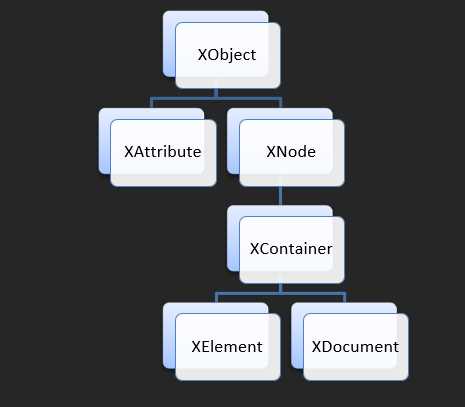
There are numerous types that make up the X-DOM object model. Some of the keys types are shown in the following class hierarchy diagram.
XContainer
An XContainer represents the idea of an item in the XML hierarchy that may have zero, one, or many children XNode objects. XContainer is an abstract class, so it cannot be instantiated directly; instead, either XElement or XDocument can be used.
XElement and XDocument
An XElement represents an element in an XML document such as an <ingredient> element. An XElement can contain a value such as “Butter,” and may contain zero, one, or many XAttributes. By virtue of it inheriting from XContainer, it may also have child XNode objects that belong to it.
An XDocument wraps a root XElement to provide the additional capability of XML declaration items such as XML version and encoding, as well as other “header” items, such a DTD for the XML document. Unless these kind of additional capabilities are required, using XElement is usually sufficient.
XAtrribute
An XAttribute represents an XML attribute on an XML element. For example, the calories attribute in the following XML would be represented as an XAttribute object: <ingredient calories="500">
XNode
While an XNode object has the concept of belonging to a parent (XElement) node that it can navigate to, unlike XContainer (and its subclasses XElement and XDocument), it has no concept of having any child nodes.
XName
XName is not part of the hierarchy, but it is used in many methods when wanting to specify node(s) to locate in the XML document hierarchy. It is used to represent the name of an XML element or attribute. In addition to representing elements as simple name strings, XName also contains logic for working with XML namespaced names.
Creating an X-DOM
There are a number of ways to arrive at an in-memory X-DOM, including loading XML files and instantiation through code.
Parsing Strings and Loading Files
To create an XElement from a string, the static Parse method can be used, as the following code shows.
string xmlString = @"<ingredients> <ingredient>Sugar</ingredient> <ingredient>Milk</ingredient> <ingredient>Butter</ingredient> </ingredients>"; XElement xdom = XElement.Parse(xmlString); Console.WriteLine(xdom); |
This produces the following output:
<ingredients>
<ingredient>Sugar</ingredient>
<ingredient>Milk</ingredient>
<ingredient>Butter</ingredient>
</ingredients>
To create an XElement from a physical XML file, the XElement.Load method can be used with a path specifying the file to be loaded.
Manual Procedural Creation
The types that make up the X-DOM can be instantiated, just as with regular .NET types. To create an X-DOM that represents the previous <ingredients> XML, the following code can be written.
XElement ingredients = new XElement("ingredients"); XElement sugar = new XElement("ingredient", "Sugar"); XElement milk = new XElement("ingredient", "Milk"); XElement butter = new XElement("ingredient", "Butter"); ingredients.Add(sugar); ingredients.Add(milk); ingredients.Add(butter); Console.WriteLine(ingredients); |
This produces the following output:
<ingredients>
<ingredient>Sugar</ingredient>
<ingredient>Milk</ingredient>
<ingredient>Butter</ingredient>
</ingredients>
Note in the preceding code that even though the XML structure is simple, this manual creation style does not make it particularly easy to understand what the XML structure that is being created is. An alternative approach is to use functional construction.
Functional Construction
Using the functional construction style can make the resulting XML structure easier to relate to when reading the code.
The following code shows the same <ingredients> XML created, this time using functional construction.
XElement ingredients = new XElement("ingredients", new XElement("ingredient", "Sugar"), new XElement("ingredient", "Milk"), new XElement("ingredient", "Butter") ); Console.WriteLine(ingredients); |
Notice in the preceding code, it is much easier for the reader to form a mental picture of what the XML structure is.
Notice the overload of XElement constructor in the preceding code is one which allows any number of content objects to be specified after the XElement name (“ingredients”). The signature of this version of the constructor is: public XElement(XName name, params object[] content).
Creation via Projection
One of the benefits of the functional construction style is that results from LINQ queries can be projected into an X-DOM.
The following code adapts the preceding code to populate the X-DOM with the result of a LINQ query.
Ingredient[] ingredients = { new Ingredient {Name = "Sugar", Calories = 500}, new Ingredient {Name = "Milk", Calories = 150}, new Ingredient {Name = "Butter", Calories = 200} }; XElement ingredientsXML = new XElement("ingredients", from i in ingredients select new XElement("ingredient", i.Name, ); Console.WriteLine(ingredientsXML); |
This produces the following output:
<ingredients>
<ingredient calories="500">Sugar</ingredient>
<ingredient calories="150">Milk</ingredient>
<ingredient calories="200">Butter</ingredient>
</ingredients>
Notice in the preceding code the addition of an XAttribute to each <ingredient> representing the calories. Again, this is possible because the constructor takes any number of content objects, even when those objects are of different types. In the preceding code, this allows the text content of the XElement to be set (for example, “Sugar”) at the same time an attribute is added.
Querying X-DOM with LINQ
Querying and navigating an X-DOM is implemented in two main ways. The first of these are the methods that belong to the X-DOM types themselves. The second is a set of additional query operators (i.e. extension methods) that are defined in the System.Xml.Linq.Extensions class. The methods of the X-DOM types often return IEnumerable sequences. The additional LINQ-to-XML query operators can then do further work with these sequences.
Note: The standard query operators can also be combined with the XML query operators.
As a simple example, the following code demonstrates both implementations.
XElement xmlData = XElement.Load("recipes.xml"); // Here Descendants() is an instance method of XContainer var allrecipes = xmlData.Descendants("recipe"); // Here Descendants() is a query operator extension method var allIngredients = allrecipes.Descendants("ingredient"); |
In the preceding code, the first execution of the Descendants method belongs to XElement. More specifically, the method belongs to XContainer, from which XElement inherits. This method returns an IEnumerable<XElement> into the variable allRecipes.
The second Descendants method call is a call to the LINQ-to-XML query operator extension method that has the signature: public static IEnumerable<XElement> Descendants<T>(this IEnumerable<T> source, XName name) where T : XContainer.
Finding Child Nodes
There are a number of properties and methods (in some cases both instance and query operator extension methods) that allow the locating of child nodes.
The following tables outline the methods and properties available for finding children.
Finding Child Nodes
Method(parameter) / Property | Returns | Operates On |
|---|---|---|
FirstNode | XNode | XContainer |
LastNode | XNode | XContainer |
Element( XName ) | XElement | XContainer |
Nodes() | IEnumerable<XNode> | XContainer, IEnumerable<XContainer> |
DescendantNodes() | IEnumerable<XNode> | XContainer, IEnumerable<XContainer> |
Elements() | ||
Descendants() | IEnumerable<XElement> | XContainer, IEnumerable<XContainer> |
Descendants( XName ) | IEnumerable<XElement> | XContainer, IEnumerable<XContainer> |
HasElements | Boolean | XElement |
DescendantNodesAndSelf() | IEnumerable<XNode> | XElement, IEnumerable<XElement> |
DescendantsAndSelf() | IEnumerable<XElement> | XElement, IEnumerable<XElement> |
DescendantsAndSelf( XName ) | IEnumerable<XElement> | XElement, IEnumerable<XElement> |
The following code demonstrates how to retrieve the first <ingredient> element that has any child elements. Here, Descendants is used to retrieve all ingredients, in conjunction with the standard query operator First. The predicate supplied to First is restricting the returned element to the first one that has any child elements by using the XElement’s HasElements property.
XElement xmlData = XElement.Load("recipes2.xml"); XElement firstIngredientWithSubElements = xmlData.Descendants("ingredient") .First(x => x.HasElements); |
Finding Parent Nodes
XDOM types that inherit from XNode contain a Parent property that returns the parent XElement.
Finding Parent Nodes
Method(parameter) / Property | Returns | Operates On |
|---|---|---|
Parent | XElement | XNode |
Ancestors() | IEnumerable<XElement> | XNode, IEnumerable<XNode> |
Ancestors( XName ) | IEnumerable<XElement> | XNode, IEnumerable<XNode> |
AncestorsAndSelf() | IEnumerable<XElement> | XElement, IEnumerable<XElement> |
AncestorsAndSelf( XName ) | IEnumerable<XElement> | XElement, IEnumerable<XElement> |
The following example shows the use of the Parent method to move up the XML hierarchy. This example finds the first ingredient that has child elements, then moves one level up to get the <ingredients> element. Then, another call to Parent moves another level up to get to the <recipe>.
XElement xmlData = XElement.Load("recipes2.xml"); XElement recipe = xmlData.Descendants("ingredient") .First(x => x.HasElements) .Parent // <ingredients> .Parent; // <recipe name="Cherry Pie"> |
Finding Peer Nodes
The following table shows the methods defined in the XNode class for working with nodes at the same level.
Finding Peer Nodes
Method(parameter) / Property | Returns |
|---|---|
IsBefore( XNode ) | Boolean |
IsAfter( XNode ) | Boolean |
PreviousNode | XNode |
NextNode | XNode |
NodesBeforeSelf() | IEnumerable<XNode> |
NodesAfterSelf() | IEnumerable<XNode> |
ElementsBeforeSelf() | IEnumerable<XElement> |
ElementsBeforeSelf( XName ) | IEnumerable<XElement> |
ElementsAfterSelf() | IEnumerable<XElement> |
ElementsAfterSelf( XName ) | IEnumerable<XElement> |
The following code shows the use of the NextNode and IsBefore methods. This code also demonstrates how the standard query operators (such as Skip) can be used in LINQ-to-XML queries.
XElement xmlData = XElement.Load("recipes2.xml"); var applePieIngredients = .First(x => x.Attribute("name").Value == "Apple Pie") .Descendants("ingredient"); var firstIngredient = applePieIngredients.First(); // Sugar var secondIngredient = firstIngredient.NextNode; // Apples var lastIngredient = applePieIngredients.Skip(2).First(); // Pastry
var isApplesBeforeSugar = secondIngredient.IsBefore(firstIngredient); // false |
Finding Attributes
An XElement may have a number of XAttributes. The following table shows the methods defined in XElement for working with attributes that belong to it.
Finding XElement Attributes
Method(parameter) / Property | Returns |
|---|---|
HasAttributes | Boolean |
Attribute( XName ) | XAttribute |
FirstAttribute | XAttribute |
LastAttribute | XAttribute |
Attributes() | IEnumerable<XAttribute> |
Attributes( XName ) | IEnumerable<XAttribute> |
The following code demonstrates the use of the Attribute(XName) method to locate a specific XAttribute and get its value by reading its Value property. This example also shows the use of the FirstAttribute method to get an element’s first declared attribute, and also how to combine standard query operators such as Skip to query the IEnumerable<XAttribute> provided by the Attributes method.
var xml = @" <ingredients> <ingredient name='milk' quantity='200' price='2.99' /> <ingredient name='sugar' quantity='100' price='4.99' /> <ingredient name='safron' quantity='1' price='46.77' /> </ingredients>"; XElement xmlData = XElement.Parse(xml); XElement milk = xmlData.Descendants("ingredient") .First(x => x.Attribute("name").Value == "milk"); XAttribute nameAttribute = milk.FirstAttribute; // name attribute XAttribute priceAttribute = milk.Attribute("price"); string priceOfMilk = priceAttribute.Value; // 2.99 XAttribute quantity = milk.Attributes() .Skip(1) .First(); // quantity attribute |


- 1800+ high-performance UI components.
- Includes popular controls such as Grid, Chart, Scheduler, and more.
- 24x5 unlimited support by developers.