
LINQ Succinctly®

CHAPTER 1
LINQ Fundamentals
Why LINQ?
At a high level, there are number of benefits that may be gained by using LINQ (Language Integrated Query), including:
· Reduce the amount of code that needs writing.
· A better understanding of the intent of what the code is doing.
· Once learned, can use a similar set of LINQ query knowledge against different data sources (in-memory objects, or remote sources such as SQL Server or even Twitter.)
· Queries can be composed together and built up in stages.
· Queries offer the safety of compile-time type checking.
Essentially, LINQ enables queries to be treated as first-class citizens in C# and Visual Basic.
The building blocks of LINQ
The two fundamental building blocks of LINQ are the concepts of elements and sequences.
A sequence can be thought of as a list of items, with each item in the list being an element. A sequence is an instance of a class that implements the IEnumerable<T> interface.
If an array of numbers were declared as: int[] fibonacci = {0, 1, 1, 2, 3, 5}; the variable fibonacci represents a sequence with each int in the array being an individual element.
A sequence could be a local sequence of in-memory objects or a remote sequence, like a SQL Server database. In the case of remote data sources (for example SQL Server), these remote sequences also implement the IQueryable<T> interface.
Queries, or more specifically query operators, work on an input sequence and produce some output value. This output value could be a transformed version of the input sequence, i.e. an output sequence or single scalar value such as a count of the number of elements in the input sequence.
Queries that run on local sequences are known as local queries or LINQ-to-objects queries.
There are a whole host of query operators that are implemented as extension methods in the static System.Linq.Enumerable class. This set of query operators are known as the standard query operators. These query operators will be covered in depth in the LINQ Query Operators chapter later in this book.
One important thing to note when using query operators is that they do not alter the input sequence; rather, the query operator will return a new sequence (or a scalar value).
Scalar return values and output sequences
A query operator returns an output sequence or a scalar value. In the following code, the input sequence fibonacci is operated on first by the Count query operator that produces a single scalar value representing the number of elements in the input sequence. Next, the same input sequence is operated on by the Distinct query operator that produces a new output sequence containing the elements from the input sequence, but with duplicate elements removed.
int[] fibonacci = { 0, 1, 1, 2, 3, 5 }; // Scalar return value int numberOfElements = fibonacci.Count(); Console.WriteLine("Count: {0}", numberOfElements); // Output sequence return value IEnumerable<int> distinctNumbers = fibonacci.Distinct(); Console.WriteLine("Elements in output sequence:"); foreach (var number in distinctNumbers) { Console.WriteLine(number); } |
The output from this code produces the following:
Count: 6
Elements in output sequence:
0
1
2
3
5
Deferred execution
The majority of query operators do not execute immediately; their execution is deferred to a later time in the program execution. This means that the query does not execute when it is created, but when it is used or enumerated.
Deferred execution means that the input sequence can be modified after the query is constructed, but before the query is executed. It is only when the query is executed that the input sequence is processed.
In the following code, the input sequence is modified after the query is constructed, but before it is executed.
int[] fibonacci = { 0, 1, 1, 2, 3, 5 }; // Construct the query IEnumerable<int> numbersGreaterThanTwoQuery = fibonacci.Where(x => x > 2); // At this point the query has been created but not executed // Change the first element of the input sequence fibonacci[0] = 99; // Cause the query to be executed (enumerated) foreach (var number in numbersGreaterThanTwoQuery) { Console.WriteLine(number); } |
The query is not actually executed until the foreach is executed. The results of running this code are as follows:
99
3
5
Notice that the value 99 has been included in the results, even though at the time the query was constructed the first element was still the original value of 0.
With the exception of those that return a scalar value (or a single element from the input sequence) such as Count, Min, and Last; the standard query operators work in this deferred execution way. So using operators such as Count will cause the query to be executed immediately, and not deferred.
There are a number of conversion operators that also cause immediate query execution, such as ToList, ToArray, ToLookup, and ToDictionary.
In the following code, the fibonacci array is being modified as in the preceding example code, but in this example, by the time the modification takes place (fibonacci[0] = 99), the query has already been executed because of the additional ToArray().
int[] fibonacci = { 0, 1, 1, 2, 3, 5 }; // Construct the query IEnumerable<int> numbersGreaterThanTwoQuery = fibonacci.Where(x => x > 2) .ToArray(); // At this point the query has been executed because of the .ToArray() // Change the first element of the input sequence fibonacci[0] = 99; // Enumerate the results foreach (var number in numbersGreaterThanTwoQuery) { Console.WriteLine(number); } |
The results of running this code are:
3
5
Notice here the value 99 is no longer present because the input sequence is being modified after the query has executed.
Lambda expressions in query operators
Some query operators allow custom logic to be supplied. This custom logic can be supplied to the query operator by way of a lambda expression.
The fibonacci.Where(x => x > 2) code in the preceding code sample is an example of a query operator being supplied some custom logic. Here the lambda expression x => x > 2 will only return elements (ints in this case) that are greater than 2.
When a query operator takes a lambda expression, it will apply the logic in the lambda expression to each individual element in the input sequence.
The type of lambda expression that is supplied to a query operator depends on what task the query operator is performing. In Figure 1, we can see the signature of the Where query operator; here the input element int is provided and a bool needs to be returned that determines of the element will be included in the output sequence.
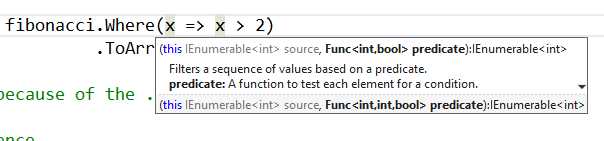
Figure 1: Visual Studio showing the signature of the Where operator
As an alternative to using a lambda expression, it is also possible to use a traditional delegate that points to a method.
Local and interpreted queries
LINQ provides for two distinct architectures: local and interpreted.
Local queries operate on IEnumerable<T> sequences and are compiled into the resulting assembly at compile time. Local queries, as the name suggests, can be thought of as operating on sequences local to the machine on which the query is executing (for example, querying an in-memory list of objects).
Interpreted queries are interpreted at runtime and work on sequences that can come from a remote source such as an SQL Server database. Interpreted queries operate on IQueryable<T> sequences.
Interpreted queries will be discussed later in Chapter 5, “Interpreted Queries.”
The following code demonstrates the use of the Attribute(XName) method to locate a specific XAttribute and get its value by reading its Value property. This example also shows the use of the FirstAttribute method to get an element’s first declared attribute, and also how to combine standard query operators such as Skip to query the IEnumerable<XAttribute> provided by the Attributes method.
var xml = @" <ingredients> <ingredient name='milk' quantity='200' price='2.99' /> <ingredient name='sugar' quantity='100' price='4.99' /> <ingredient name='safron' quantity='1' price='46.77' /> </ingredients>"; XElement xmlData = XElement.Parse(xml); XElement milk = xmlData.Descendants("ingredient") .First(x => x.Attribute("name").Value == "milk"); XAttribute nameAttribute = milk.FirstAttribute; // name attribute XAttribute priceAttribute = milk.Attribute("price"); string priceOfMilk = priceAttribute.Value; // 2.99 XAttribute quantity = milk.Attributes() .Skip(1) .First(); // quantity attribute |


- 1800+ high-performance UI components.
- Includes popular controls such as Grid, Chart, Scheduler, and more.
- 24x5 unlimited support by developers.