
Keystone.js Succinctly®

CHAPTER 9
Building REST APIs
REST APIs expose interfaces that allow various clients to read and write data in a consistent manner. REST APIs are resource-centric, which means that the methods are only concerned with the underlying resource and will not respond to arbitrary service methods. REST API methods work by mapping HTTP verbs into API calls. The most common HTTP verbs used with REST APIs are GET, POST, PUT, and DELETE. There may be many ways of implementing RESTful APIs, and each developer tends to follow their own conventions as to what RESTful means to them. However, the idea should be to keep the API aligned with the application architecture and design.
Expose endpoint for retrieving news
Let’s begin by outlining what our API is actually going to look like. To be able to work with the news items that are stored in our MongoDB database, we are going to support an HTTP GET to an API called news that will return a list of news items. In addition, the API will allow users to get data about a specific news item by ID. Let us define the following endpoints to allow for data retrieval in a REST-based fashion. The URL for a RESTful API is known as an endpoint.
GET /api/news: This gets the list of tickets.
GET /api/news/{id}: This gets the ticket with ID {id}.
To start, add the following routes that define the endpoints.
Code Listing 82: GET API routes
app.get('/api/news', keystone.middleware.api, routes.api.news.getNews); app.get('/api/news/:id', keystone.middleware.api, routes.api.news.getNewsById); |
The keystone.middleware.api parameter in the route adds the following shortcut methods for JSON API responses:
- res.apiResponse (data)
- res.apiError (key, err, msg, code)
- res.apiNotFound (err, msg)
- res.apiNotAllowed (err, msg)
The apiReponse method returns the response data in the JSON format. It can also automatically return data in JSONP if there is a callback specified in the request parameters.
The apiError method is a handy utility to return error messages to the client from our APIs. It returns an object with two keys—error and detail—which contain the exception that occurred. By default, it returns an HTTP status of 500 if the code parameter is not passed. The apiNotFound method provides a quick way to raise a 404 (not found) exception from our APIs. The apiNotAllowed method provides a quick way to raise a 403 (not allowed) HTTP response from our APIs.
Next, update the keystone.js file at the root of the application to include the api folder.
Code Listing 83: Include API routes
// Import Route Controllers var routes = { views: importRoutes('./views'), api: importRoutes('./api') }; |
Next, add a new JavaScript file to the routes/api folder and name it news.js with the following code.
Code Listing 84: API to get news
// API to get news var keystone = require('keystone'), News = keystone.list('News'); /** * Get List of News */ exports.getNews = function(req, res) { News.model.find(function(err, items) { if (err) return res.apiError('database error', err); res.apiResponse({ news: items }); }); } /** * Get News by ID */ exports.getNewsById = function(req, res) { News.model.findById(req.params.id).exec(function(err, item) { if (err) return res.apiError('database error', err); if (!item) return res.apiError('not found'); res.apiResponse({ news: item }); }); } |
To test the API, restart the node application and navigate to http://localhost:3000/api/news using Chrome or the Postman add-on tool for the Chrome browser. We should see a list of news returned to in JSON format.

Figure 31: API GetNews response JSON
To test the GetNewsById API call, navigate to http://localhost:3000/api/news/57464938cf65538c36b672e3 where you substitute one of your news item IDs in the URL. We should see a single JSON object returned as follows.

Figure 32: API GetNewsById response JSON
Expose endpoint for creating news
The API should also allow users to create a new news post. The most common HTTP verbs used to receive data on the server side are POST and PUT. POST is generally accepted as the verb to be used when we need to insert/save a new document.
Let’s take a look at endpoint code that accepts a POST request, inserts a news item into our collection, and returns the new document JSON. Update the routes file and include the following route.
Code Listing 85: API route for POST
app.post('/api/news', keystone.middleware.api, routes.api.news.createNews); |
Next, add the following code to the news.js file under the api folder.
Code Listing 86: API route for POST
/** * Create a News Item */ exports.createNews = function (req, res) { var item = new News.model(), data = req.body; item.getUpdateHandler(req).process(data, function (err) { if (err) return res.apiError('error', err); res.apiResponse({ news: item }); }); } |
To test the create functionality, use the Postman tool for Chrome and craft a POST request to http://localhost:3000/api/news.

Figure 33: API CreateNews response JSON
The getUpdateHandler method is the heart of this method. This method validates various criteria that have been specified during model definition. For example, we have specified that the title field is required. This will be properly validated automatically without the developer needing to check for such constraints programmatically at every instance.
To check the validation in action, perform an invalid POST to the /api/news endpoint. In the following example, we have specified an incorrect state for the news (pushed instead of published). The returned response clearly mentions the reason for failure along with an appropriate HTTP error code (500).

Figure 34: Testing the getUpdateHandler method
Now, issue a GET request to http://localhost:3000/api/news, and we should see the newly created news post returned.

Figure 35: Fetch updated news
Expose endpoint for deleting news
The delete operation is pretty straightforward. We should expose an endpoint that responds to a call with an HTTP DELETE verb along with the ID of the news that needs to be removed. Add the following route to the application.
Code Listing 87: API route for DELETE
app.delete('/api/news/:id', keystone.middleware.api, routes.api.news.deleteNewsById); |
Add the following code to the news.js API file.
Code Listing 88: View for DELETE
|
/** * Delete a News Item */ exports.deleteNewsById = function (req, res) { News.model.findById(req.params.id).exec(function (err, item) { if (err) return res.apiError('database error', err); if (!item) return res.apiError('not found'); item.remove(function (err) { if (err) return res.apiError('database error', err); return res.apiResponse({ success: true }); }); }); } |
The code uses the findById method to retrieve the document we intend to delete. If we do not find the document or encounter exceptions while removing the document, then we return an error to the client. If we do find the document, we remove it and return an object indicating the success status.
Use Postman to issue a delete request to http://localhost:3000/api/news/{id}. Replace the id parameter with an existing ID from our news collection. If the document is deleted, we should see a success message returned.
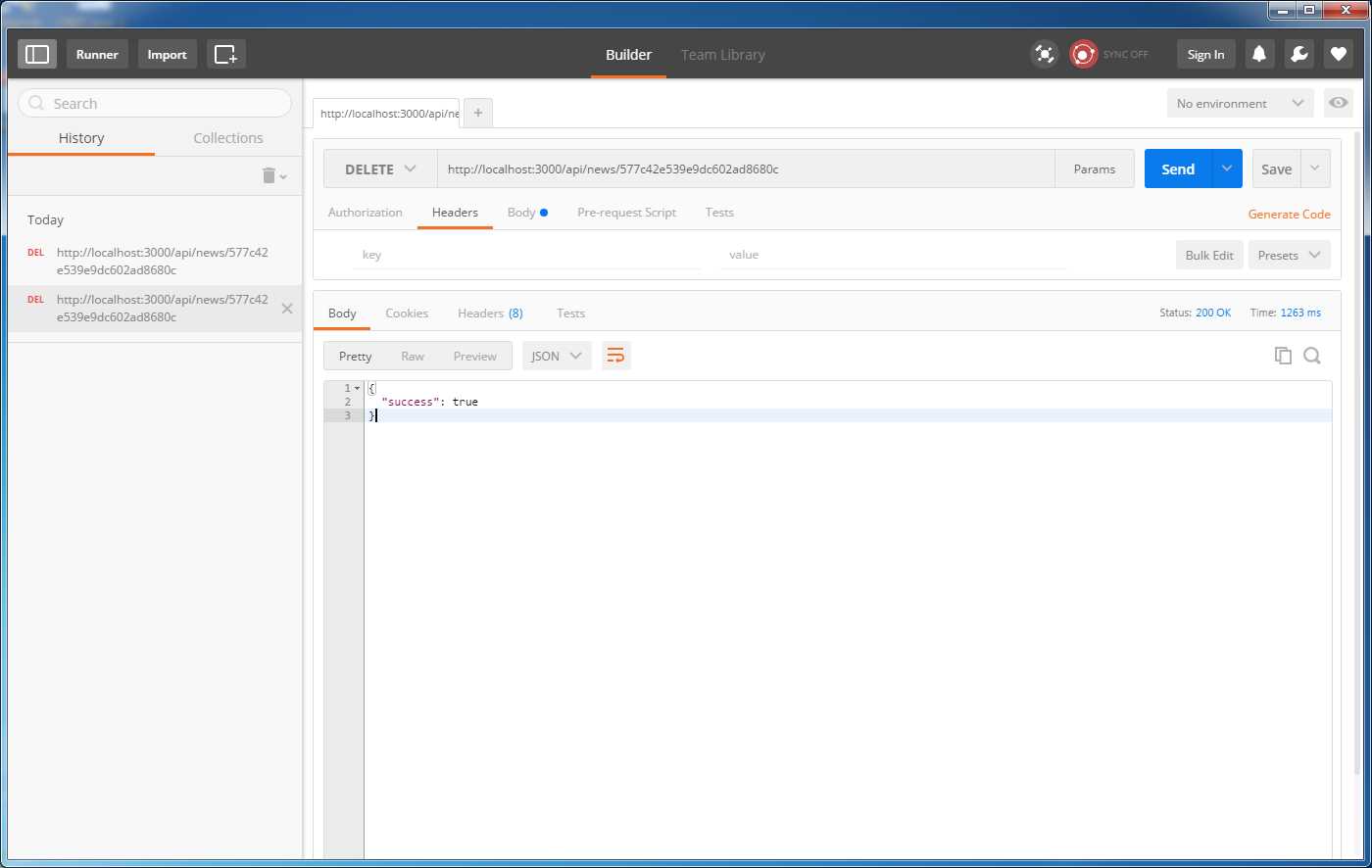
Figure 36: Delete news item
Summary
In this chapter we saw how extremely simple it is to expose REST endpoints in a Keystone.js application. The endpoints do not enforce strict role validation and authentication rules and may not be appropriate for production environments as is. However, those rules can be easily added to the Keystone.js middleware.


- 1800+ high-performance UI components.
- Includes popular controls such as Grid, Chart, Scheduler, and more.
- 24x5 unlimited support by developers.