
Java Succinctly® Part 1

CHAPTER 1
Introduction
This e-book provides an introduction to programming in Java. It covers the fundamental building blocks of the language and is designed for readers who have little or no programming background. A second e-book, Java Succinctly Part 2, will cover the language in more advanced terms, with topics such as GUI and multithreading. Code samples can be found here.
Java is a high-level, cross-platform, object-oriented programming language. The main objective of Java is to allow applications to be written once and run on a multitude of different devices. Java achieves its cross-platform nature by using a virtual machine architecture called the Java Virtual Machine (JVM). Java applications are ubiquitous, and the language is consistently ranked as one of the most popular and dominant in the world. It can be found everywhere from mobile phones to web applications to full desktop applications.
Java is a curly bracket, or curly brace, language. This means it uses { and } braces to designate blocks of code. The language inherits its roots from older languages such as C and C++. The curly bracket languages share many similarities, and once a programmer is familiar with one of them, it is not difficult to pick up another. Out of hundreds of computer programming languages used all over the world, Java is possibly the best introduction to programming because it offers a degree of safety to new programmers while maintaining the power and flexibility of its low-level ancestry.
Java is an object-oriented programming language. Object-oriented programming is a very important programming paradigm that allows the programmer to create virtual modules of code for reuse and to separate a program into components. There are many other object-oriented programming languages, and Java offers the perfect introduction to how the paradigm operates.
The main objective of this e-book is to describe the foundations of Java—from printing a line of text to the console all the way up to inheritance hierarchies in object-oriented programming. We will cover practical aspects of programming, such as debugging and using an IDE, as well as the core mechanics of the language.
If you are new to programming computers, or if you simply want to brush up on some core Java, I hope you have fun with the various challenges offered here.
Introduction to computer programming
Computers are machines that read and write data to various areas of memory. Computers can seem very complicated when we see a video game or complex statistics software. But in reality, computers are extremely simple. They are capable of only two things: reading and writing numbers. When we program a computer, we specify exactly what the computer should read and what the computer should write.
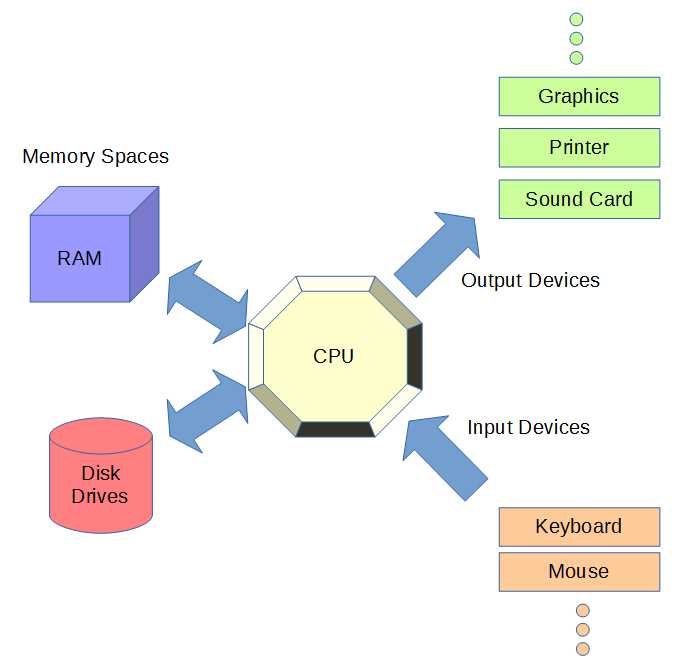
Figure 1: Outline of a Computer
Figure 1 illustrates the basic features of a computer. In the center, we have a very important piece of hardware, the Central Processing Unit (CPU), which is the brains of the machine. It reads input as a string of numbers from the keyboard, mouse, or other input device. It writes data to the graphics, printers, and sound devices. It also reads and writes data to memory spaces such as RAM and hard drives.
A CPU operates by executing a string of instructions. Everything in a computer is a number, even the instructions themselves. The instructions are generally very simple—they indicate that the CPU should perform a task such as adding two numbers or creating a copy of a number. The language of the CPU—Assembly language—is the lowest level of computer programming. Programming a CPU in its Assembly language is cumbersome because each instruction does almost nothing, and we need many thousands of instructions before our applications are useful. And every CPU has its own Assembly language. If we program an application to run on desktop PCs, the code will not be understood by an iPhone or a Samsung tablet.
Because it is difficult to program a CPU in its own language, people have invented high-level languages that are much closer to human languages (such as English and arithmetic). Java is one such high-level language. Instead of specifying a string of individual instructions, we can use mathematical expressions like a = a + b. This saves us a lot of time for two reasons:
- It is easier to program.
- It is easier to read and maintain.
Code Listing 1.0: High-Level vs. Low-Level Languages
; Assembly Language: Low Level Language mov rax, a ; Read the value of a add rax, b ; Add the value of b to a mov a, rax ; Write the result to a // Java: High Level Language a = a + b; |
Code Listing 1.0 shows a clear distinction between a high-level language (such as Java) and a low-level language (such as Assembly Language). In the low-level language, the addition of two values, a and b, and the storage of the result back into a takes three steps. The computer must be instructed to perform every specific detail of every operation, from moving the values into internal registers, such as RAX, to the addition itself. In Java, we can express this entire operation as a single, easy-to-read line of code that looks exactly like middle school algebra: a = a + b. The line means: Take the value in the variable a, add to it the value of b, and assign the result back to the variable a.
Code Listing 1.0 shows a simple expression in Java, and this expression would look the same in many other C-based languages. However, there is an additional advantage to programming an application in Java as opposed to C or C++. Java programs are designed to run on a virtual machine. Figure 2 shows an illustration of native applications versus a Java application. When we write native applications, we must compile our code for each type of system on which we need our application to run. This means we will need to create a version for ARM CPUs if we want our application to run on mobile devices and also create another version of the programming for x86 if we want our application to run on desktops and laptops.
Java does not work like C and C++ in this respect. In Java, we program a single version of our application. The different CPUs (ARM, x86, etc.) all run the Java Virtual Machine, which, in turn, runs our application. The Virtual Machine is simply a program written to emulate the hardware of the hypothetical Java computer. This means we can write our program once, and any device that has a Java Virtual Machine emulator (i.e. has Java installed on it) will be capable of running our applications. This is Java’s massive advantage—it means our applications will run on a very large number of devices without needing us to design specifically for them.

Figure 2: Java Virtual Machine


- 1800+ high-performance UI components.
- Includes popular controls such as Grid, Chart, Scheduler, and more.
- 24x5 unlimited support by developers.