
Istio Succinctly®

CHAPTER 6
Traffic Management: Part 2
In this chapter, we will start with an explanation of the virtual service and gateway networking APIs. Finally, we will discuss some key microservices traffic management patterns and apply them to our sample application.
Virtual service
A virtual service resource maps a fully qualified domain name (FQDN) to a set of destination services. It also provides other capabilities, such as defining the versions of the service (subsets) that are available, and routing properties, such as retries and timeouts. You have already seen a simple virtual service in action, which we used to deploy the first version of the fruits API. Let’s revisit that policy now.
Code Listing 49: Fruits API virtual service
apiVersion: networking.istio.io/v1alpha3 kind: VirtualService metadata: name: fruits-api-vservice namespace: micro-shake-factory spec: hosts: - fruits.istio-succinctly.io gateways: - fruits-api-gateway http: - route: - destination: host: fruits-api-service port: number: 80 |
The policy in the previous listing maps any request arriving through the fruits-api-gateway with hostname fruits.istio-succinctly.io to the destination service fruits-api-service.micro-shake-factory.svc.cluster.local. A key concept of virtual service that we would like to introduce here is the match filter, which can help you introduce constraints using HTTP request attributes such as URI, scheme, method, and headers. For example, we can add an additional match condition to the previous virtual service specification so that only the requests whose path starts with the string /api/fruits/ get routed to the fruits-api-service. This change won’t impact anything, as all the request paths of the fruits API do start with the same prefix. However, you can see that this feature grants you much finer control over routing a request to the destination service.
A key aspect of virtual service is that the mapping between a host and match filters can be scoped to a destination service or a subset (see destination rule in the previous chapter) within the destination service. For example, the following policy directs requests with the prefix /api/v2/fruits to the subset v2 of fruits-api-service. It rewrites the request URL before forwarding it to the destination service so that the destination service does not need to implement API versioning internally.
Code Listing 50: Match filters scoped to a subset
apiVersion: networking.istio.io/v1alpha3 kind: VirtualService metadata: name: fruits-api-vservice namespace: micro-shake-factory spec: hosts: - fruits.istio-succinctly.io gateways: - fruits-api-gateway http: - match: - uri: prefix: /api/v2/fruits/ rewrite: uri: /api/fruits/ route: - destination: host: fruits-api-service port: number: 80 subset: v2 |
We will discuss a few implementations of subset-based routing soon. Let’s now discuss some of the policies supported by the virtual service. Note that for discussing the syntax of any policy, we are only considering the keys within the spec field for brevity.
The following listing presents the keys in the schema of the virtual service policy.
Code Listing 51: Virtual service specification
apiVersion: networking.istio.io/v1alpha3 kind: VirtualService spec: hosts: gateways: http: tls: tcp: exportTo: |
The following are the supported values of the keys of the policy shown in the previous listing. We will revisit the keys with nested schema (complex types) later in this chapter.
- hosts*: string[]
This is the list of hostnames to which HTTP or TCP traffic is sent by the clients. The names specified can either be external FQDNs or service names available in the service registry (Kubernetes services or service entry objects). The hostnames can be prefixed with the wildcard character *, or the wildcard character can be used alone for flexible matching with the request. If a service entry is used to add an IP address to the service registry, then the IP address may be used as a value in this field.
- gateways: string[]
This is the list of names of gateway objects and sidecars to which the route rules will be applied. Since you can create a single virtual service resource for both the gateway and sidecar resources, while configuring HTTP/TCP routes, you can select the gateway or sidecar to which the rules should be applied—for example, by setting the name of the gateway in the http.match.gateways field. The keyword mesh is used to imply all sidecars in the mesh. If you want to expand the rules to apply to all sidecars and some gateways, use the word mesh as one of the entries in this list.
- http: HTTPRoute[]
This ordered list of route rules gets applied to HTTP1/2 and gRPC traffic. The first route rule that matches the request is used. As you can imagine, the routing rules require a port on whose traffic the rules will be applied. Istio uses a convention-based approach for shortlisting the ports. Any service port name prefixed with http-*, http2-*, or grpc-* is selected (this restriction is slated to be removed in future). If a gateway is used, then ports with protocol HTTP/HTTP2/gRPC/TLS-terminated-HTTPS are selected. In the case of service entry objects, ports with protocol HTTP/HTTP2/gRPC are selected.
- tls: TLSRoute[]
This ordered set of rules is applied to non-terminated TLS and HTTPS traffic (SSL termination at destination service instead of sidecar). Remember that since TLS traffic is encrypted, the routing rules rely on data present in the ClientHello message, which is an unencrypted handshake initiated by the client with information about TLS encryption supported by the client, such as supported version and cipher suite. The port selection follows a scheme similar to the HTTP setting, i.e. service ports named https-* and tls-* are selected, and gateway and service entry ports with HTTPS/TLS protocols are selected.
- tcp: TCPRoute[]
This ordered set of rules is applied to opaque TCP traffic. Istio shortlists the non-HTTP1/2/gRPC and -TLS ports as candidates on which the rules will be applied.
- exportTo: string[]
This is the list of namespaces to which the virtual service is visible. All the sidecars and gateways defined in the specified namespaces will be able to access the virtual service. If no namespaces are specified, the virtual service is exported to all the namespaces. Currently, this field only supports the . and * characters to denote the current namespace and all namespaces, respectively.
We will cover the HTTP, TCP, and TLS rules in detail later in this chapter.
As you can see from the schema in Code Listing 51, overall, there are three families of settings in a virtual service: HTTPRoute, TCPRoute, and TLSRoute. As evident from the name, HTTPRoute is responsible for the match conditions and actions for HTTP1/2/gRPC traffic, and TCPRoute is responsible for configuring match conditions and actions for routing TCP traffic. Finally, the TLSRoute is responsible for routing non-terminated TLS and HTTPS traffic.
HTTPRoute
The following diagram illustrates how the various components of HTTPRoute interact with each other to determine the action that handles the request.
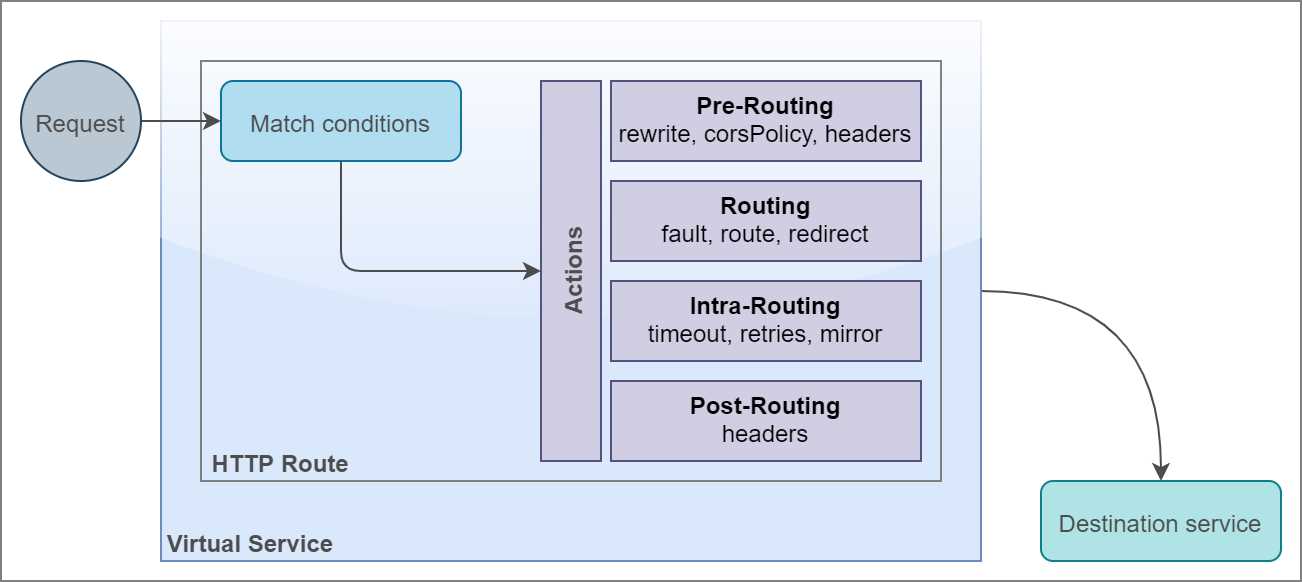
Figure 14: Anatomy of HTTPRoute
On receiving a request targeted to a configured HTTP port of service, the HTTPRoute policy executes a match condition on the request based on attributes such as URI, scheme, and headers. Once a match is found, one or more of the following actions take place with the request.
- Pre-routing actions: This family of actions prepares or handles the request before it reaches the destination. The following are the sub-policies with their type that make up these actions.
- rewrite: HTTPRewrite
This policy rewrites the actual URIs and authority headers before forwarding the request to the destination route.
- corsPolicy: CorsPolicy
Agents such as browsers send a preflight request before the actual request to ensure that scripts don’t illegally request resources outside their domain unless authorized by the remote service. This policy handles and responds to the preflight request without forwarding the request to the destination.
- headers/request: Headers
This policy manipulates headers (set, add, remove) before forwarding the request to the destination.
- Routing actions: This family of actions forwards the request to the destination. The following sub-policies make up this family:
- route: HTTPRouteDestination[]
The policy defined for this action directs the request to a service defined in the service registry of the platform. The destination service may be one of the subsets of the service defined using the destination rule object.
- redirect: HTTPRedirect
This policy sends a 301 response to the client with the new location of the resource. It can additionally specify the authority/host header value that the client should use for the subsequent request.
- Intra-routing actions: This family of actions remains in play during the process of routing, and it can affect the behavior of the routing actions. The following sub-policies make up this family of actions:
- fault: HTTPFaultInjection
This policy configures Envoy to respond to requests with a configured fault. By deliberately injecting faults, developers can test and monitor the behavior of the client applications when remote services are producing errors or delaying responses.
- timeout: protobuf.Duration
This policy defines the interval for the HTTP request timeout. It supports values in the protobuf.Duration format.
- retries: HTTPRetry
This policy defines the action to take when an HTTP request fails.
- mirror: Destination
This policy causes Envoy to send requests in parallel to a destination service in addition to the actual target service. Envoy doesn’t wait for the secondary destination service to respond before sending the response to the client. This feature helps developers test new versions of an application against actual traffic before replacing the deployed application with a new version of it.
- Post-routing actions: This family of actions manipulates the response from the destination before returning it to the client. The following sub-policies make up this family of actions:
- Headers/response: Headers
This policy manipulates headers (set, add, remove) before returning the response to the client.
The following listing represents the schema of the HTTPRoute policy.
Code Listing 52: HTTPRoute policy specification
spec: hosts: http: - match: rewrite: route: redirect: timeout: retries: fault: mirror: corsPolicy: headers: |
We have already discussed the effects of the various policies. Let’s now discuss the individual sub-policies and their schema.
HTTPMatchRequest
This policy defines the conditions that should be met for the associated rule to be applied. The following code listing presents the keys that make up this sub-policy.
Code Listing 53: HTTPMatchRequest specification
spec: hosts: http: - match: - headers: <header-name>: prefix: <header-value> exact: <header-value> regex: <header-value> uri: prefix: exact: regex: scheme: prefix: exact: regex: method: prefix: exact: regex: authority: prefix: exact: regex: port: sourceLabels: gateways: queryParams: <query-parameter>: prefix: <value> exact: <value> regex: <value> |
Let us now discuss the values that the keys in the previous listing support.
- uri: StringMatch
Specifies constraints that execute on the URI of the incoming request. The constraint matches are case sensitive. The match is performed using one of the following three selectors:
- exact: Performs exact match with the input string.
- prefix: Performs prefix match with the input string.
- regex: Performs regex match conforming to ECMAScript regex specification.
- scheme: StringMatch
Specifies constraints that execute the URI scheme of the request. The specification is similar to that of the URI match.
- method: StringMatch
Specifies constraints that execute the HTTP method of the request. The specification is similar to that of the URI match.
- authority: StringMatch
Specifies constraints that execute the HTTP authority/host of the request. The specification is similar to that of the URI match.
- headers: map<string, StringMatch>
Specifies constraints that execute the HTTP headers of the request. The specification is similar to that of the URI match. The header keys should be lowercase and use a hyphen separator.
- port: int32
Specifies the port number of the host on whose traffic the match rules are applied. Specifying a port is unnecessary if the host only exposes a single port.
- sourceLabels: map<string, string>
Collection of one or more labels and desired value constraints that scope the applicability of the rules to resources that satisfy the conditions. For example, if you want to inject failures in responses from certain pods, you can use the sourceLabel selector to do that.
- gateways: string[]
The values denote the names of gateways on which the rules will be applied. The request should flow via the specified gateway to be considered for matches and actions.
- queryParams: map<string, StringMatch>
Specifies constraints that execute the HTTP query string parameters. All string match specifications are the same as those of the URI match except the prefix match, which is currently not supported.
Let’s discuss the actions in the family of pre-routing actions now.
CORS policy
Cross-origin resource sharing (CORS) restricts the domains that can request resources from a destination service. The HTTP CORS standard requires the client to send a preflight request with the value of HTTP header key Origin (optionally along with other headers, such as Access-Control-Request-Method and Access-Control-Request-Headers) set to the domain of the client. The server then responds to the request with Access-Control-* headers such as Access-Control-Allow-Origin (for example, http://juiceshopapi.io), and Access-Control-Allow-Methods (for example, GET and PUT) to inform the client the types of requests it can make. The agent sending the request is responsible for enforcing CORS constraints. For web applications, web browsers are responsible for enforcing CORS restrictions for requests initiated by scripts. The following listing presents the keys that constitute this setting.
Code Listing 54: CORS policy specification
spec: hosts: http: - route: - destination: host: subset: corsPolicy: allowOrigin: allowMethods: allowCredentials: allowHeaders: maxAge: |
The specification presented in the previous listing enables CORS policy on the host and the subset defined in the route.destination.host key and route.destination.subset key, respectively. Envoy offloads the responsibility to handle preflight requests from the destination service. On receiving a preflight request from a client for the destination service, Envoy responds with CORS response headers with values as configured by you. Later, when the actual request arrives, Envoy will also use the same policy settings to accept or reject it. Let’s discuss the supported values of the keys of the CORS policy.
- allowOrigin: string[]
The values denote all the origins that can send requests to the destination service. The values specified for this key are set as values of the Access-Control-Allow-Origin HTTP header. Specifying wildcard character * will allow all origins to access the service.
- allowMethods: string[]
The values denote the HTTP verbs such as GET and PUT that are allowed for the client by the destination service. The input values are set as values of the Access-Control-Allow-Methods HTTP header. It supports the wildcard character * to allow all methods.
- allowHeaders: string[]
The values denote the headers that the clients can send in a request. The input values are set as values of the Access-Control-Allow-Headers HTTP header. It supports the wildcard character * to allow any header in the client request.
- exposeHeaders: string[]
The value denotes the names of the HTTP headers that will be exposed to the client by the server. The input values are set as values of the Access-Control-Expose-Headers HTTP header. It supports wildcard character * to expose all headers only in cases when requests don’t contain authorization information (as cookies or headers).
- maxAge: protobuf.Duration
The value denotes the duration for which the response of a preflight request can be cached. The input value is set as the value of the Access-Control-Max-Age HTTP header. The value 1 will disable caching.
- allowCredentials: bool
The value denotes whether a client can bypass pre-flight requests using credentials. The input value is set as the value of the Access-Control-Allow-Credentials HTTP header.
HTTPRewrite
This policy is used to rewrite parts of an HTTP request before forwarding it to the destination. The following listing presents where HTTPRewrite sits in the overall schema of virtual service. On a successful match, the policy will rewrite the request URI and/or authority and forward it to the destination.
Code Listing 55: HTTPRewrite specification
spec: hosts: http: - match: - uri: rewrite: uri: authority: route: - destination: |
HTTPRewrite supports the following values for the keys in its schema:
- uri: string
Replaces the path or prefix portion of the original URI with the input value.
- authority: string
Replaces the authority/host header with the input value.
Headers
This policy manipulates the HTTP headers of both the request sent to the destination and the response produced by the destination. The following schema presents the various keys of this policy and where it sits within the HTTPRoute schema.
Code Listing 56: HTTPRoute headers specification
http: - headers: response: remove: add: set: request: remove: add: set: route: - destination: |
Let’s discuss the values that the keys in the previous schema supports:
- request: HeaderOperations
These manipulations get applied before the request is forwarded to the destination. The HeaderOperations type consists of the following fields:
- set: map<string, string>
Overwrites the value of the request header specified by key with the input value.
- add: map<string, string>
Adds the given values to the headers specified by keys.
- remove: string[]
Removes the specified headers.
- response: HeaderOperations
These manipulations are configured similarly to the request manipulations, except that they are applied before returning a response to the client.
Let’s proceed on our journey by going through the routing actions next.
Destination
Before discussing the routing actions, it is necessary to understand the concept of destination. The type destination encapsulates the details of the target or destination service to which the request will be forwarded. A critical feature of virtual service is to direct requests targeted at a host to a destination service or subset based on the specified routing rule. We have already seen an example of this policy in action where we directed requests to the host fruits.istio-succinctly.io to destination fruits-api-service.micro-shake-factory.svc.cluster.local based on routing rules. The destination policy can be used to direct incoming traffic to any service in Istio’s service registry, which consists of services declared in Kubernetes as well as services declared through the service entry object.
Note: The destination service name defined as the value of the route.destination.host key can be a short name as well, such as serviceA. This name will be interpreted as serviceA.<namespace of virtual service>.svc.cluster.local. If the namespace of your virtual service is different from the namespace of serviceA, this may cause issues. It is recommended to use FQDN instead of short names to avoid confusion.
The following code sample shows where the destination fits into the structure of a virtual service.
Code Listing 57: Virtual service destination specification
spec: hosts: - services http: - match: - uri: prefix: "v2/path1" route: - destination: host: service2 subset: v2 - route: - destination: host: service1 subset: v1 |
The previous configuration executes a URI prefix check on every request that is sent to the HTTP endpoint of the services host. In the case of a match, the destination of the request is set to a host named service2. Otherwise, the request is directed to the destination service service1.
The destination is one of the properties in the route key of the virtual service schema, with a specification as follows.
Code Listing 58: Virtual service destination key specification
route: - destination: host: subset: port: |
Let’s discuss the values that the schema in the previous listing supports:
- host*: string
The name of the service available in the platform service registry, including hosts declared by the service entry. Traffic bound to unknown hosts is discarded.
- subset: string
The name of the subset as declared by the destination rule object.
- port: PortSelector
Specifies the port on the host to which the traffic will be sent. If the destination service has a single port exposed, this value is not required.
HTTPRouteDestination
Now that you understand what destination is, let’s discuss the HTTPRouteDestination type, which encapsulates one or more destinations and is responsible for deciding the proportion in which the traffic should be split between specific destinations. The following is the schema of this policy and where it fits in the overall schema of virtual service. We have deliberately expanded the schema so that it is easier to understand.
Code Listing 59: HTTPRouteDestination specification
spec: hosts: http: - route: - destination: host: subset: weight: headers: request: response: - destination: host: subset: weight: headers: request: response: |
The key weight in the schema is a numeric value that determines the proportion of traffic that should be allowed to the destination that it is associated with. You can also configure the request and response headers, which give you more refined control than http.headers does. The keys in the schema support the following values:
- destination*: Destination
Determines the destination to which the request should be sent.
- weight*: int32
Determines the proportion of traffic directed to the associated destination. The total of weights across all destinations must be 100. In the case of a single destination, the weight is assumed as 100 by default.
- headers: Headers
Allows you to manipulate the request and response headers for the associated destination.
HTTPRedirect
This policy is used to send a 301 response to the client. Optionally, the response can also direct the client to use an alternative host/authority. The following is the schema of this policy.
Code Listing 60: HTTPRedirect specification
spec: hosts: http: - match: redirect: uri: authority: |
Here are the values that the keys of the policy support:
- uri: string
This is the new path of the resource, which would replace only the path of the original request, for example, v2/newPath.
- authority: string
This is the new host or authority that the client should use to make the subsequent request.
HTTPFaultInjection
To simulate faults in the destination service, you can configure this policy to manipulate the behavior of the destination service in two ways: add a fixed delay in the response from the destination service and abort the request, and send a defined HTTP status code in response.
This policy is beneficial for developers and operators to test the behavior of a service when its dependent services respond erratically. The following is the schema of this policy that also shows where it sits in the overall schema of virtual service.
Code Listing 61: HTTPFaultInjection specification
spec: hosts: http: - route: - destination: host: fault: abort: percentage: value: httpStatus: delay: percentage: value: fixedDelay: |
As we previously discussed, there are two types of fault policies that we can associate with a destination. The delay policy makes Envoy wait for the configured duration before sending the request to the destination. The abort policy short-circuits the request and returns the configured HTTP status code to the client. Both policies are independent of each other.
The following are the values that are supported by the keys in the schema:
- percentage: Percent
Specifies the percent of requests that will be aborted or receive a response after a delay. The percentage/value key accepts a numeric value between 0.0 and 1.0.
- httpStatus*: int32
The numeric HTTP status code that will be returned to the client.
- fixedDelay*: protobuf.Duration
The duration for which the proxy will wait before responding to the client request.
Let’s discuss the elements of intra-routing actions that remain active during the process of routing requests.
Timeout
You can set up this policy to configure the duration for which Envoy will wait for the destination service to respond to the forwarded request. The following schema shows the position of this policy within the HTTPRoute policy.
Code Listing 62: Timeout specification
http: - timeout: route: - destination: host: |
The timeout field accepts a single value of type protobuf.Duration.
HTTPRetry
This policy sets up the retry policy to use when the HTTP request to the destination fails. The following schema shows the HTTPRetry policy with its placement in virtual service.
Code Listing 63: HTTPRetry specification
spec: hosts: http: - route: - destination: retries: attempts: perTryTimeout: retryOn: |
The following are the valid values for the keys in the policy:
- attempts*: int32
This denotes the number of retries Envoy will make for a request. The interval between retries is automatically determined.
- perTryTimeout: protobuf.Duration
Denotes the timeout duration (>=1ms) for each retry attempt.
- retryOn: string
This is the comma-delimited string (CSV) of names of policies for which the retry operation will take place. The following policies are supported:
- 5xx: The destination service returned 5xx as a response code or timed out.
- gateway-error: The destination service returned a 502, 503, or 504 response code.
- reset: The destination service failed to respond after the connection was established (disconnect, reset, or read timeout).
- connect-failure: The client failed to connect to the destination service, for example, a connection timeout.
- retriable-4xx: The destination service returned a retriable error status code in response, i.e. 4xx. Currently, it only retries for code 409.
- refused-stream: The destination service reset the stream and responded with the REFUSED_STREAM error code.
- retriable-status-code: The destination service responded with a retriable status code for an HTTP or gRPC request.
Mirror
This policy configures Envoy to route traffic to a secondary destination in addition to the primary destination. The following is the schema of this policy.
Code Listing 64: Mirror specification
spec: hosts: http: - route: - destination: host: subset: mirror: host: subset: |
The value of the mirror policy is of type destination. As you can see from the specification, mirror can route requests to a host and subset such that all the traffic targeted to a destination host and subset also reaches its mirrored counterpart.
Let’s briefly cover the second key member of the virtual service family: TCPRoute.
TCPRoute
Just like HTTPRoute, this policy covers the match conditions and actions for routing TCP traffic. The following is the schema of TCPRoute, and it presents all the keys required by this policy.
Code Listing 65: TCP route specification
spec: hosts: tcp: - match: - port: destinationSubnets: sourceLabels: gateways: route: - destination: host: subset: port: number: weight: |
The schema of TCPRoute resembles that of HTTPRoute except that the rules are applicable at Level 4 rather than Level 7 because the contents of individual TCP packets can’t be read. Let’s discuss the values that the keys support:
- match: L4MatchAttributes[]
Each value in the list specifies the set of conditions that must match for the rule to evaluate to true (conditions are ANDed). You can specify multiple match conditions as well, at least one of which must match for the rule to apply (matches are ORed). The following are the supported values of the key type L4MatchAttributes.
- port: int32
This specifies the port number of the host on whose traffic the match rules are applied. Specifying a port is unnecessary if the host only exposes a single port.
- destinationSubnets: string[]
The IPv4 or IPv6 address of the destination with optional subnet, such as 1.2.3.4/8 or 1.2.3.4.
- sourceLabels: map<string, string>
These label constraints restrict the rule to matching workloads.
- gateways: string[]
This is the name of the gateways where the rule should be applied.
- route: RouteDestination[]
These values denote all the destinations to which the request should be forwarded. The RouteDestination consists of two required elements: destination of type Destination and weight of type int32. We have discussed these types in detail previously.
The final member of this family of settings is TLSRoute, which we will discuss next.
TLSRoute
Just like other policies of its type, it describes match conditions and actions for routing passthrough TLS and HTTPS traffic. This is not as flexible as the HTTPRoute policy; because the content of request is encrypted, routing decisions can’t be made based on the content of the request. The following is the schema of this policy and its placement in virtual service.
Code Listing 66: TLSRoute specification
spec: hosts: tls: - match: - port: sniHosts: destinationSubnets: sourceLabels: gateways: route: - destination: host: subset: weight: |
Let’s discuss the keys and the values they support:
- match*: TLSMatchAttributes[]
These are match conditions that must be satisfied for the rule take effect. Different match blocks are ORed, and conditions in a single match block are ANDed. The following are the supported values of the keys of type TLSMatchAttribute.
- sniHosts*: string[]
This is the Server Name Indication (SNI) to match on. The values support wildcard character * as well. For example, *.microshake-factory.io will match fruits.microshake-factory.com.
- destinationSubnets: string[]
This is the IPv4 or IPv6 address of destinations with optional subnet.
- port: int32
This is the port on the host that will be monitored. It is not required if the service has a single port.
- sourceLabels: map<string, string>
These are the label constraints to select the applicable workload.
- gateways: string[]
These are the names of gateways on which the rule is applied.
- route: RouteDestination[]
These values denote the destination to which the request should be forwarded. RouteDestination has two nested keys whose value must be specified: destination of type Destination and weight of type int32. We have already discussed these types in detail.
Phew! Those were a lot of policies to cover. There is one final component that we need to discuss before we can get ready to put what we’ve learned into action.
Gateway
By default, services on the mesh are not exposed outside the cluster. Istio gateways are proxies that control the traffic that flows in and (optionally) out of the trusted network boundary of the mesh. To allow the traffic into the cluster, by default, Istio creates a Kubernetes load balancer resource named istio-ingressgateway. Execute the following command to view the public IP address of the service.
Code Listing 67: Get ingress gateway
$ kubectl get svc istio-ingressgateway -n istio-system NAME TYPE CLUSTER-IP EXTERNAL-IP PORT(S) istio-ingressgateway LoadBalancer 10.106.126.169 localhost 15020:30535/TCP,... |
On Docker Desktop for Mac/Windows, the ingress gateway service is exposed on localhost:80. The load balancer or ingress gateway can bring traffic into the cluster, but it lacks a route that will connect it to the mesh. You use the Istio gateway resource to configure the ingress gateway to allow incoming traffic destined for selected hosts or ports.
The other category of gateways, called the egress gateways, allow access to external HTTP/S services from services in the mesh. Essentially, both types of gateways are load balancers that apply L4–L6 (transport, session, and presentation) policies on requests to route them to appropriate destinations. In Chapter 3, we deployed a gateway resource to expose our services to external clients. Let’s go through the schema of a gateway resource.
Code Listing 68: Gateway resource specification
apiVersion: networking.istio.io/v1alpha3 kind: Gateway metadata: name: namespace: spec: selector: istio: ingressgateway | egressgateway servers: - port: number: name: protocol: hosts: tls: mode: SIMPLE | MUTUAL | PASSTHROUGH | AUTO_PASSTHROUGH serverCertificate: privateKey: caCertificates: credentialName: subjectAltNames: minProtocolVersion:TLS_AUTO|TLSV1_0|TLSV1_1|TLSV1_2|TLSV1_3 maxProtocolVersion:TLS_AUTO|TLSV1_0|TLSV1_1|TLSV1_2|TLSV1_3 cipherSuites: defaultEndpoint: |
You may have noticed that we used a label selector to apply the policies on all the gateway pods that have a label named istio with the value set to ingressgateway (for ingress gateway) and egressgateway (for egress gateway). These are the default labels applied by Istio to the pods of the istio-ingressgateway and istio-egressgateway services. However, you can customize the default definitions of the gateway, and the selectors would change accordingly.
Let’s discuss the values that the keys in the schema support:
- servers*: Server[]
These values denote the L4–L6 configurations that will be applied to the gateway. The following are the keys and their supported values for this type:
- port*: Port
These are the ports on the proxy that will accept traffic. The type Port itself is made up of three keys: number*, which takes a numeric value for the port number, protocol*, which is the name of the protocol of incoming traffic, and name, which is the label assigned to the port. The protocol can have one of these values: HTTP, HTTPS, GRPC, HTTP2, MONGO, TCP, or TLS. The value TLS means that TLS would not be terminated at the proxy.
- hosts*: string[]
These values specify the hostnames that are exposed by this gateway. The hostnames are specified in the format namespace/dnsName where namespace is an optional string, and dnsName should be a FQDN. The dnsName supports the * wildcard character as either *.example.com or *, which satisfies the host constraint of the associated virtual service. The namespace supports wildcard character * to represent services from any namespace and . to represent the namespace of the gateway resource. The default value is *.
- tls: TLSOptions
These settings control HTTP to HTTPS redirection and the TLS mode to use. We’ll cover the various keys of TLS options right after this section.
- defaultEndpoint: string
This is the localhost endpoint or Unix domain socket to which traffic should be sent by default. It can be one of 127.0.0.1:<port> or unix://<abstract namespace>.
- selector*: map<string, string>
As discussed, the values of this key denote one or more label-value pairs, all of which would be used to select the pods on which the configuration will be applied. The pods are looked up in the same namespace as the gateway; therefore, the namespace should be the same as that of the gateway.
Let’s discuss the various keys that make up the TLSOptions type.
- httpsRedirect: bool
When set to true, the value directs the load balancer to send 301 redirects for HTTP connections.
- mode: TLSMode
Determines the policy that the proxy enforces on the connection. It supports one of the following values:
- PASSTHROUGH: Use the SNI string of the request to match the criteria in the virtual service TLS route.
- SIMPLE: Secure connection with simple TLS (SSL).
- MUTUAL: Secure connection using mutual TLS (mTLS).
- AUTO_PASSTHROUGH: Similar to the PASSTHROUGH mode without the requirement of matching the SNI string to a service in the registry. It requires both the client and destination to use mTLS for security.
- ISTIO_MUTUAL: Similar to the MUTUAL mode, but uses certificates generated by Istio.
- serverCertificate*: string
This is required if the mode is SIMPLE/MUTUAL. The value denotes the path to a server-side TLS certificate.
- privateKey*: string
This is required if the mode is SIMPLE/MUTUAL. The value denotes the path to the server’s private key.
- caCertificates*: string
This is required if the mode is MUTUAL. The value denotes the path to CA certificates used to verify the client certificates.
- credentialName: string
Denotes a unique identifier that can be used to identify the serverCertificate and the privateKey. If specified, the serverCertificate and privateKey will be queried from credential stores such as Kubernetes certificates.
- subjectAltnames: string[]
This list of alternate names verifies the identity of the subject in the client certificate.
- verifyCertificateSpki: string[]
This is a list of base 64-encoded SHA-256 hashes of SPKIs of authorized client certificates.
- verifyCertificateHash: string[]
This is a list of hex-encoded SHA-256 hashes of the authorized client certificates.
- minProtocolVersion: TLSProtocol
This is the minimum TLS protocol version. Value can be one of TLS_AUTO, TLSV1_0, TLSV1_1, TLSV1_2, or TLSV1_3.
- maxProtocolVersion: TLSProtocol
This is the maximum TLS protocol version.
- cipherSuites: string[]
The cipher suite to support. Otherwise it defaults to Envoy’s default cipher suite.
By now, we have discussed all the networking APIs and their configurations. Individually, the APIs don’t have much to offer, but you can mix and match them together to add robust traffic management features to a service. Let’s now use the networking APIs to realize some common microservices patterns and improve our sample application iteratively. Download the source code from GitHub and navigate to Policies > Chapter 4 5 to follow along with us through the exercises.
Pattern 1: Request routing
Versioning is a critical aspect of microservices to maintain compatibility with existing clients. A microservice will need to change over time, and when that happens you will need to incrementally deploy the new version of your service to ensure that clients can gradually migrate to the updated service. We will use subsets to differentiate between the different versions of the same service.
Note: Since subset settings are external to Kubernetes, you can address scenarios where different versions of your service are deployed inside the Kubernetes cluster and outside the cluster. This is also a powerful technique for iteratively migrating your workloads to Kubernetes.
In this task, we will deploy two versions of the fruits API service and route traffic to appropriate endpoints using gateway rules. Execute the following command to delete the namespace to ensure a clean working environment.
Code Listing 69: Delete namespace
$ kubectl delete namespace micro-shake-factory namespace "micro-shake-factory" deleted |
Execute the following command to create two versions of the fruits API service as two different deployments.
Code Listing 70: Fruits API versioned deployment
$ kubectl apply -f fruits-api-versioned.yml namespace/micro-shake-factory created deployment.apps/fruits-api-deployment-v1 created deployment.apps/fruits-api-deployment-v2 created service/fruits-api-service created |
Let’s now create a virtual service and gateway resource to route requests to the services that we just created.
Code Listing 71: Fruits API subset deployment
$ kubectl apply -f fruits-api-dr-vs-gw.yml gateway.networking.istio.io/fruits-api-gateway created virtualservice.networking.istio.io/fruits-api-vservice created |
The configuration worth paying attention to here is the following.
Code Listing 72: Fruits API virtual service
apiVersion: networking.istio.io/v1alpha3 kind: VirtualService metadata: name: fruits-api-vservice namespace: micro-shake-factory spec: hosts: - fruits.istio-succinctly.io gateways: - fruits-api-gateway http: - match: - headers: version: exact: "2" route: - destination: host: fruits-api-service-v2 port: number: 80 - route: - destination: host: fruits-api-service-v1 port: number: 80 |
The previous policy routes requests with a header key named version with the value set to 2 to version 2 of the fruits API service, and others to version 1 of the service. Let’s test the policy by executing the following commands.
Code Listing 73: Invoke fruits API
$ curl http://localhost/api/fruits/special -H "Host: fruits.istio-succinctly.io" {"ver":"1","fruit":"Mango"} $ curl http://localhost/api/fruits/special -H "Host: fruits.istio-succinctly.io" -H "version: 2" {"ver":"2","fruit":"Orange"} |
You can also use one or more filters based on the various Level 4–7 attributes that we previously discussed to configure traffic routing.
Pattern 2: Fault injection
It is important to test individual microservices of the application for resiliency to ensure that the application degrades gracefully if one or more of its supporting services behave inconsistently. Istio allows you to configure faults for some percentage of HTTP traffic. You can inject arbitrary delays or return specific response codes (such as 500) and use the failures to write integration tests that ascertain the application behavior in the presence of failures of its dependencies.
Let’s introduce deliberate failures in the traffic routed to version 1 of the fruits API service. Apply the following configuration to update the fruits API virtual service.
Code Listing 74: Fruits API fault injection
$ kubectl apply -f fruits-api-dr-vs-gw-test-fault.yml gateway.networking.istio.io/fruits-api-gateway unchanged virtualservice.networking.istio.io/fruits-api-vservice configured |
The following configuration is responsible for injecting faults in the service.
Code Listing 75: Faults specification
- route: - destination: host: fruits-api-service-v1 port: number: 80 fault: delay: fixedDelay: 5s percentage: value: 40 abort: httpStatus: 500 percentage: value: 60 |
The configuration in the previous listing causes 40 percent of the requests to process with a delay of 5 seconds, and 60 percent of them to fail with HTTP status code 500. The following test script sends 10 requests to the service and outputs the response received. Use the PowerShell Core terminal to execute the following script.
Code Listing 76: Test fruits API faults
$ .\fruits-api-fault-test.ps1 Request 1: OK Request 2: OK Request 3: InternalServerError Request 4: OK Request 5: InternalServerError Request 6: InternalServerError Request 7: OK Request 8: InternalServerError Request 9: OK Request 10: InternalServerError |
You will notice that because of the applied configuration, the script takes some time before returning the 200/OK response, while it returns immediately for errors. Note that you won’t always get the desired split of errors and successes, since the faults are averaged over time.
Pattern 3: Traffic shifting
Traffic shifting, or canary deployment, is the practice of routing a small portion of the application traffic to a newly deployed workload to validate the quality of the increment. As the validations succeed, you can keep ramping up the percentage of traffic to the new workload until all traffic reaches the new workload.
The canary deployment model is a little different from the blue/green deployment model. Unlike routing all the traffic to one of the two replicas of the application (blue and green), which requires double the capacity of deployment, you require a constant amount of additional resources to propagate the changes.
You can direct the traffic to the canary service in several ways, such as splitting the traffic by percentage or by directing traffic from internal users to the canary service. For this demo, we will split the traffic in a 1:10 ratio between version 2 and version 1 of the fruits API service. Execute the following script to deploy the two subsets of service.
Code Listing 77: Fruits API canary deployment
$ kubectl apply -f fruits-api-dr-vs-gw-canary.yml gateway.networking.istio.io/fruits-api-gateway unchanged virtualservice.networking.istio.io/fruits-api-vservice configured |
Let’s now test this deployment by using another PowerShell script that will send 10 requests to the same endpoint. The results are averaged over time and, therefore, may look different from the ones shown here.
Code Listing 78: Test fruits API canary deployment
$ .\fruits-api-canary-test.ps1 Request 1: {"ver":"1","fruit":"Mango"} Request 2: {"ver":"2","fruit":"Orange"} Request 3: {"ver":"1","fruit":"Mango"} Request 4: {"ver":"1","fruit":"Mango"} Request 5: {"ver":"1","fruit":"Mango"} Request 6: {"ver":"1","fruit":"Mango"} Request 7: {"ver":"1","fruit":"Mango"} Request 8: {"ver":"1","fruit":"Mango"} Request 9: {"ver":"1","fruit":"Mango"} Request 10: {"ver":"1","fruit":"Mango"} |
The following virtual service configuration is responsible for the canary split.
Code Listing 79: Destination weight specification
http: - route: - destination: host: fruits-api-service-v2 port: number: 80 weight: 10 - destination: host: fruits-api-service-v1 port: number: 80 weight: 90 |
The task to split the canary traffic by HTTP attributes is left you as an exercise. Let’s discuss the next pattern now.
Pattern 4: Resilience
A resilient system degrades gracefully when failures occur in downstream systems. To build resilient systems, Istio provides several turnkey features such as client-side load balancing, outlier detection, automatic retry, and request timeouts. We have already discussed the various client-side load balancing strategies; now we will see how you can combine outlier detection (also called circuit breaker), request timeouts, and retries to ensure reliable communication between services. We will configure the following policies together:
- Circuit breaker/outlier detection to eject faulty instances from the load balancer pool.
- Timeout to avoid waiting on a faulty service.
- Retries to forward the request to another instance in the load balancer pool if the primary instance is not responding.
For this demo, we will use an endpoint in the juice-shop API service that has a probability of 0.8 to fail. In the real world, you rarely encounter such services that perform so poorly. Our goal is to implement multiple resiliency policies such that we receive much better quality of service (QoS) without making any changes to the API itself. To ensure that we don’t have any existing resources that can affect our demo, execute the following command to delete all resources within the namespace and the namespace itself.
Code Listing 80: Delete namespace
$ kubectl delete namespace micro-shake-factory namespace/micro-shake-factory deleted |
Let’s first deploy the juice-shop API service and its associated virtual service and gateway resources with the following command.
Code Listing 81: Apply fruits API resilience policy
$ kubectl apply -f juice-shop-api.yml -f juice-shop-api-vs-gw.yml namespace/micro-shake-factory created deployment.apps/juice-shop-api-deployment created service/juice-shop-api-service created gateway.networking.istio.io/juice-shop-api-gateway created virtualservice.networking.istio.io/juice-shop-api-vservice created |
You saw these specifications in action when we discussed service entry, and these policies do not implement any resiliency strategies yet. Let’s execute a test that makes 50 requests to the TestMyLuck (/api/juice-shop/testMyLuck) endpoint that has a high rate of producing errors. Execute the following script to launch the test.
Code Listing 82: Test fruits API resilience
$ .\juice-shop-api-resilience-test.ps1 Request 1: Better luck next time Request 2: Lucky Request 3: Better luck next time Request 4: Better luck next time Request 5: Better luck next time Request 6: Better luck next time |
In my test run, only two out of 50 requests succeeded (just 4 percent). Let’s now implement the resiliency strategies that we discussed previously. The following specification of virtual service adds a timeout period of 30 seconds to each request received from the client. Within this period, Envoy makes 10 attempts to fetch results from the juice-shop API service with a waiting period of 3 seconds between each attempt. We have also specified the failure conditions as the value of the retryOn key on which the retry policy kicks in.
Code Listing 83: Virtual service with retry specification
apiVersion: networking.istio.io/v1alpha3 kind: VirtualService metadata: name: juice-shop-api-vservice namespace: micro-shake-factory spec: hosts: - "juice-shop.istio-succinctly.io" gateways: - juice-shop-api-gateway http: - route: - destination: host: juice-shop-api-service port: number: 80 timeout: 30s retries: attempts: 10 perTryTimeout: 3s retryOn: "5xx,connect-failure,refused-stream" |
Next, we add a destination rule that detects and ejects the outliers from the load balancer pool. The following specification limits the number of parallel requests to the juice-shop API service, and on receiving a single error (should not be 1 in real-world scenarios) ejects the endpoint from the load balancer pool for a minimum of three minutes. Envoy decides on the endpoints to eject and the ones to bring back in the pool every second, and it can eject up to 100 percent of the endpoints from the pool.
Code Listing 84: Resilience specification
apiVersion: networking.istio.io/v1alpha3 kind: DestinationRule metadata: name: juice-shop-api-destination-rule namespace: micro-shake-factory spec: host: juice-shop-api-service trafficPolicy: connectionPool: http: http1MaxPendingRequests: 1 maxRequestsPerConnection: 1 outlierDetection: consecutiveErrors: 1 interval: 1s baseEjectionTime: 3m maxEjectionPercent: 100 |
This new specification for the juice-shop API service is present in the juice-shop-api-dr-vs-gw-resilience.yml file. Let’s apply this configuration to our cluster with the following command.
Code Listing 85: Apply fruits API with resilience policy
$ kubectl apply -f juice-shop-api-dr-vs-gw-resilience.yml gateway.networking.istio.io/juice-shop-api-gateway unchanged virtualservice.networking.istio.io/juice-shop-api-vservice configured destinationrule.networking.istio.io/juice-shop-api-destination-rule created |
Let’s execute the same test that we previously executed to verify the effectiveness of this policy.
Code Listing 86: Testing fruits API resilience
$ .\juice-shop-api-resilience-test.ps1 Request 1: Lucky Request 2: Lucky Request 3: Lucky Request 4: Lucky Request 5: Lucky Request 6: Lucky |
When you execute the test this time, you will notice that the tests execute much slower due to the request timeout policy and retries happening in the mesh. On this run, only 2 out of 50 requests resulted in errors for me. That is a significant improvement without any code alterations. Note that these policies are not universal and are scoped to each client of the juice API service, as the service may fault for a single client while still functioning for others.
Pattern 5: Mirroring
Traffic mirroring or dark launch is a model of deployment by which a new version of a service is deployed to production without affecting the traffic to the existing service. To enforce dark launch, Istio duplicates the requests to the primary service and sends them asynchronously to the service under test without waiting for the secondary service to respond. The asynchronous mirroring of traffic ensures that the critical path of live traffic remains unaffected. As an exercise, refer to the mirror setting specification in this chapter and try to route traffic in parallel to both versions of the fruits API service.
Summary
In this chapter, we demonstrated the full power of Istio’s networking APIs. Although there are several traffic management features in Istio, you should follow an incremental approach to applying them to your services. You should find the primary traffic management challenge in your microservices and fix it with an appropriate policy. Reiterate the process so that you incrementally gain confidence with stability of the mesh.


- 1800+ high-performance UI components.
- Includes popular controls such as Grid, Chart, Scheduler, and more.
- 24x5 unlimited support by developers.