
Istio Succinctly®

CHAPTER 8
Security
In the world of microservices, security can quickly become unwieldy with poor implementation and management. Traditionally, security policies have revolved around the network identity of a service, which is its IP address. However, IP addresses of workloads are ephemeral in Kubernetes and any other container orchestrator, so Istio solves this problem by decoupling the identity of a workload from the host.
Istio relies on the name rather than the network IP address of the resource as its identity. The Citadel component of Istio implements the SPIFFE framework to issue identities to services. SPIFFE requires that identities of resources should be URIs in the format: spiffe://domain/universally-unique-identifier (UUID), where the domain is the root of trust of the identity. Going by the specification, the identity created by Citadel for a service follows this format: spiffe://cluster.local/ns/<namespace-name>/sa/<service-account-name> (the service account name is default unless configured otherwise). This guarantees a unique identity of service in the mesh. Citadel’s definition of identity varies with the host platform. For example, in Kubernetes, the identity is a Kubernetes service account; in GCP, it is a GCP service account; and in AWS, it is an AWS IAM role/user.
Next, following the SPIFFE specifications, Citadel encodes the service identity in an X.509 certificate, also known as a SPIFFE Verifiable Identity Document (SVID), which can be verified to prove identity of service. Finally, the SPIFFE specifications demand an API for issuing and retrieving the SVIDs. Citadel implements this requirement by acting as a certificate authority (CA). The Citadel agents on mesh nodes send a certificate signing request (CSR) to the CA when they detect a new workload, and the CA returns a new SVID to it. The certificate has a lifetime of a couple of hours, after which the process is repeated, which ensures that any attack can’t continue for a long period of time.
Let’s briefly discuss how the service-to-service communication takes place. Istio uses mTLS, which requires the client and server to exchange certificates before initiating communication. In Istio, Envoy presents and receives the SVID of the service that it wants to communicate with. This ensures that the connection is authorized before actual communication.
The concept of access control ultimately boils down to two components: authentication and authorization. In Istio, a service can authenticate itself using an X.509 certificate issued by a trusted CA (Citadel). If the receiver can validate the certificate, the identity stored in the certificate is considered authenticated for further operations.
Authorization, on the other hand, determines whether an authenticated entity may perform an action on the resource. In Istio, the authorization of communication between services is configured with role-based access control (RBAC) policies.
Istio provides the following key security features to the services in the mesh:
- Automatic generation and rotation of SVID certificates.
- Service authentication with mTLS.
- Transport-level authorization using an RBAC system.
- Automatic traffic auditing and monitoring.
- Support for external authentication protocols like OpenID.
- TLS termination at the gateway.
We will explore these features in detail in this chapter. First, let’s discuss the architecture of Istio’s security management feature.
Security architecture
The following diagram shows the various components involved in Istio’s security architecture.
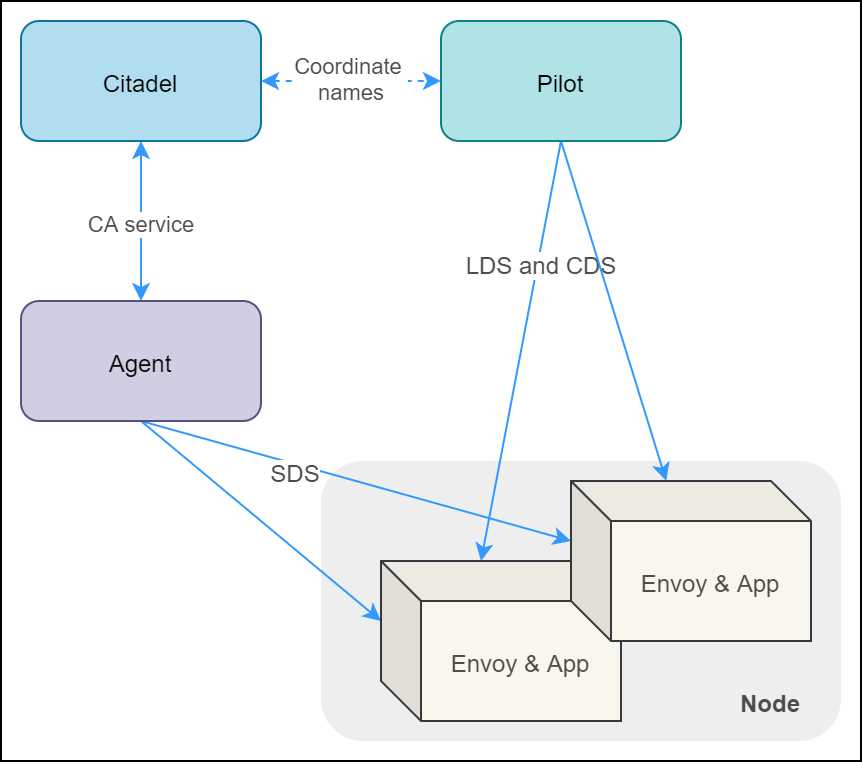
Figure 16: Istio security architecture
Let’s discuss the roles of the various components in the architecture:
- Citadel: Watches the Kubernetes apiserver, generates SVID for every service, and stores them as secrets. It fetches names of services from Pilot (remember, Istio is platform agnostic) to generate SVIDs.
- Node agent: The Citadel-trusted agent on the node that coordinates certificate issuance and rotation between Envoy and Citadel. Node agent uses SDS API to configure secrets for Envoy (Envoy only understands SDS) and helps validate the authority of the certificate received by Envoy during mTLS communication flow, which Envoy itself is incapable of.
- Envoy: Uses SVID certificates to communicate with other services.
- Pilot: Sends topology and listener information to Envoy using LDS and CDS API, including the name of certificates that Envoy should use to communicate with each service.
You can revisit Chapter 1 where we discussed the various components shown in the previous diagram in detail. Let’s proceed to discuss the authentication and authorization facets of Istio.
Istio authentication
Istio has two different sets of configurations for provisioning authentication and authorization policies. The authorization policies require prior provisioning of authentication policies. Let’s discuss the authentication policies of Istio.
Transport authentication: mTLS
Istio supports transport authentication using mutual TLS (mTLS), which requires both the client and the server to own identity in the form of TLS certificates (TLS is modern SSL) issued by a mutually trusted CA (Citadel). Authentication is provisioned at the service and namespace level using the authentication policy object in Istio. At the level of the cluster, you can provision a default authentication policy using the mesh policy object. The following diagram illustrates how Pilot delivers identity to services in the mesh.
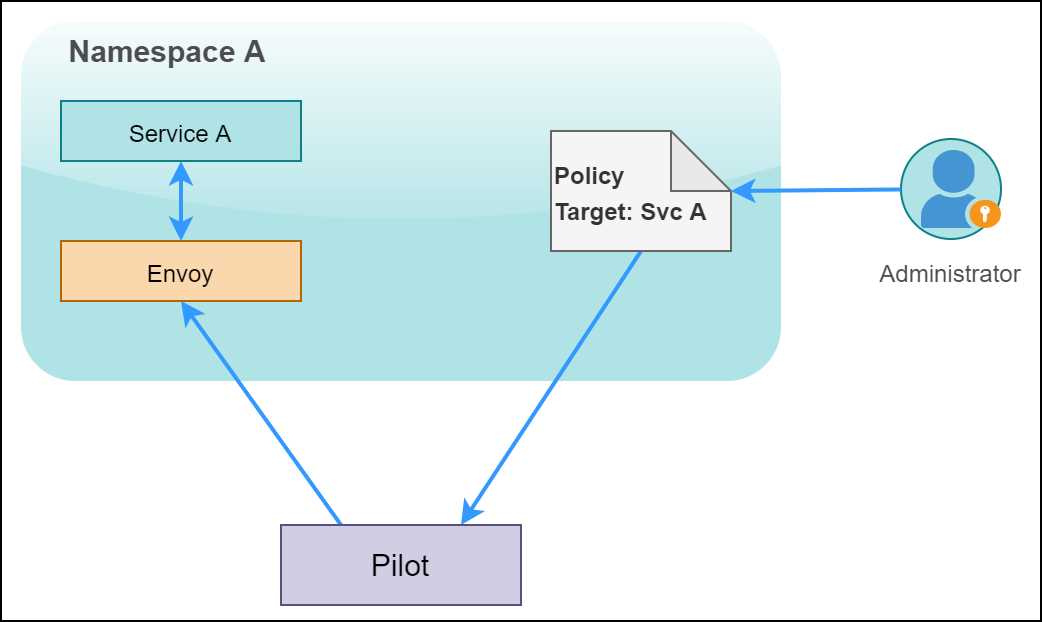
Figure 17: Pilot applying the policy to the service
The responsibility to watch and propagate authentication policies to Envoys lies with Pilot. Pilot translates changes in policies to appropriate LDS and CDS calls and ensures that the Envoy proxy sidecars are updated with the latest authentication mechanisms, such as JWT or path, to the certificate to use for mTLS.
For authentication purposes, the client proxies immediately start following the new authentication policy applied by Pilot. For example, for origin authentication, Envoy will attach a JWT token to each request, and for mTLS, Envoy will ensure that the request is using the appropriate destination rule to make the TLS connection with the server.
Tip: Istio supports a lenient permissive mode of mTLS, which helps smooth the migration of existing services to Istio mTLS. In this mode, Istio allows requests to succeed with and without mTLS.
We will now look into the schema of an authentication policy, which determines the authentication method and the principal that gets generated after the authentication process. The authentication policy can authenticate one or both of the following:
- peer: Credentials of the service sending the request.
- origin: Credentials of the user/service account/device from where the request originates.
After validation, you need to choose whether you want to choose the identity of the peer (default) or the origin as the identity principal. In the following schema, you can set the kind of policy as meshPolicy that will make the policy applicable to the entire mesh.
Code Listing 97: Authentication policy specification
apiVersion: authentication.istio.io/v1alpha1 kind: Policy metadata: name: namespace: spec: targets: - name: ports: - number: peers: - mtls: mode: PERMISSIVE | STRICT peerIsOptional: origins: - jwt: issuer: audiences: jwksUri: jwks: jwtHeaders: jwtParams: triggerRules: - excludedPaths: - includedPaths: originIsOptional: principalBinding: USE_ORIGIN | USE_PEER |
The keys described in this specification support the following values:
- targets: TargetSelector[]
An array of targets on which the policy is applied. If empty, the policy is applied to all workloads in the namespace. The array elements consist of the following keys:
- name*: Short name of the service from the service registry.
- ports: Port exposed by the service as PortSelector type. Empty value matches all the ports of the service.
- peers: PeerAuthenticationMethod[]
An ordered list of authentication methods used for peer authentication. An empty value means that peer authentication is not required. Currently, this array supports the key of type mtls to denote that mTLS should be used. The value of the mtls key is another key of type mode, which can be one of the following:
- STRICT: Client certificate must be presented over the TLS channel.
- PERMISSIVE: Client certificate can be omitted, and connection can be either plaintext or use TLS.
- peerIsOptional: bool
If set to true, it will override the decision of the peer authentication policy and accept the request from the peer authentication perspective.
- origins: OriginAuthenticationMethod[]
An ordered list of authentication methods used for origin authentication. If all rules are skipped because of unmatched requests, the policy is ignored. An empty value means that origin authentication is not required. The type OriginAuthenticationMethod currently only supports a key named jwt of type Jwt, which means that JSON Web Token (JWT) is required for authentication of the client. The Jwt type consists of the following fields:
- issuer: The value denotes the principal that issued the token.
- audiences: String array of JWT audiences that can access the token.
- jwkUri: URL of the provider’s public key set that can be used to validate the signature of JWT.
- jwks: JSON Web Key Set of public keys used to validate the signature of JWT.
- jwtHeaders: String array of headers where JWT tokens will be available if the JWT tokens are part of the request header.
- jwtParams: String array of query parameters where JWT tokens will be available if JWT tokens are part of the query string.
- triggerRule: An array of type TriggerRule that specifies whether the received JWT token should be validated. If the request matches any trigger rule, then validation is not carried out for the request, which helps exclude certain paths, such as health checks, from validation. The type TriggerRule contains two keys of type StringMatch[]:
- excludedPaths: List of request paths that should be excluded from checks.
- includedPaths: List of request paths that should be included for checks.
- originIsOptional: bool
If set to true, it will override the decision of origin authentication policy and accept the request from the origin authentication perspective.
- principalBinding: PrincipalBinding
This key can take one of two values: USE_PEER (default) or USE_ORIGIN to determine whether peer authentication or origin authentication will set the identity of the request.
Let’s start locking down the fruits API service by applying a few authentication policies. Before you proceed, delete the namespace micro-shake-factory to start with a clean canvas.
Applying transport authentication
Deploy the fruits API service and a gateway that makes this service accessible with the following command. Remember to replace the & operator with && on the Bash terminal.
Code Listing 98: Creating fruits API
$ kubectl apply -f fruits-api.yml & kubectl apply -f fruits-api-vs-gw.yml namespace/micro-shake-factory created deployment.apps/fruits-api-deployment-v1 created service/fruits-api-service created gateway.networking.istio.io/fruits-api-gateway created virtualservice.networking.istio.io/fruits-api-vservice created |
Currently, the fruits API service responds over HTTP. Let’s alter the behavior and apply a blanket mTLS-only policy over the entire mesh using the mesh policy.
Code Listing 99: Mesh policy specification
apiVersion: authentication.istio.io/v1alpha1 kind: MeshPolicy metadata: name: default spec: peers: - mtls: {} |
The policy in the previous listing will ensure that any communication in the mesh requires mTLS. After applying this policy, any new service created within the mesh will automatically have mTLS configured with Citadel-managed certificates. The name of the policy is default so that it overwrites the default policy that is automatically provisioned on the installation of Istio. Also, the policy mentions no targets for blanket application on all services. Apply the policy using the following command.
Code Listing 100: Creating default mesh policy
$ kubectl apply -f default-mesh-policy.yml meshpolicy.authentication.istio.io/default configured |
The mesh-wide policy configures services in the mesh to communicate with each other over the TLS-encrypted channel. However, now you won’t be able to use the curl command to send a request to the service, because that communication is still using clear text.
Tip: To view all authentication policies active in your cluster, use this command: kubectl get policies.authentication.istio.io -A. For mesh policies, use this command: kubectl get meshpolicies.authentication.istio.io.
To configure mTLS on the client, we will create a destination rule to enforce TLS on the client to the service channel.
Code Listing 101: Destination rule specification
apiVersion: networking.istio.io/v1alpha3 kind: DestinationRule metadata: name: default-destination-rule namespace: istio-system spec: host: "*.local" trafficPolicy: tls: mode: ISTIO_MUTUAL |
The wildcard match *.local makes the policy in previous listing applicable to all services in the mesh.
Note: Ideally, you should enforce mTLS mesh policy on the mesh. However, for scenarios where you need mTLS for specific services, use namespace or service-specific policies. For details, refer to this link.
Apply the destination rule that you just created with the following command.
Code Listing 102: Applying default destination rule
$ kubectl apply -f default-dr.yml destinationrule.networking.istio.io/default-destination-rule created |
Use curl to send a request to the fruits API service, which will succeed this time. There are a few other types of requests that require your attention based on your use case:
- Non-Istio service to Istio service: Since non-Istio services can’t access the authentication infrastructure of Istio, this communication will fail. You can whitelist services or endpoints from Istio authentication policies if such communication is a requirement, so that authentication policies do not apply to the communication.
- Istio service to Kubernetes apiserver: Since apiserver does not have an Envoy proxy to manage TLS, you will have to create a destination rule with the trafficPolicy.tls.mode key set to DISABLE for the host kubernetes.default.svc.cluster.local.
- Istio service to non-Istio service: The problem and solution is the same as the one for Kubernetes apiserver that we just discussed.
Depending on your use case, you can whitelist a namespace, a service, or even a port (specificity of a rule is specified as value of the spec.target key) from mTLS using authentication policies (have the same syntax as a mesh policy), which have higher priority than mesh policies.
Tip: Istio CLI has a useful command that can list the authentication policies applied to a service and its health: istioctl authn tls-check <name of pod> <FQDN of service on cluster>.
Let’s now discuss the process to grant access only authenticated users of the fruits API service.
Applying origin authentication
Istio supports origin (end-user or device) authentication with JSON Web Tokens (JWT). It allows you to validate nearly all the fields of a JWT token received and the identity provider. JWT is an industry-standard token format, and therefore, this feature helps Istio support integration with OpenID connect providers such as Auth0, Google Auth, and Keycloak.
Let’s enable JWT authentication on fruits API service to allow only authenticated requests to reach the service.
Code Listing 103: JWT authentication specification
apiVersion: authentication.istio.io/v1alpha1 kind: Policy metadata: name: fruits-api-authn-policy namespace: micro-shake-factory spec: targets: - name: fruits-api-service origins: - jwt: issuer: "istio-succinctly.io" jwksUri: "https://raw.githubusercontent.com/Istio-Succinctly/Policies/master/Static/jwks.json" principalBinding: USE_ORIGIN |
We have published a JSON Web Key Set (JWKS) endpoint at this link, which primarily serves the key ID (kid), algorithm (alg), and RSA public key (n) to the client. Istio uses the RSA public key to validate the issuer and key ID of the JWT token that it receives from the request. Apply this policy to the fruits API service by using the following command.
Code Listing 104: Applying authentication policy
$ kubectl apply -f fruits-api-authn-policy.yml policy.authentication.istio.io/fruits-api-authn-policy configured |
After this policy is applied to our service, any request that does not provide user credentials will return HTTP error 401-unauthorized.
Note: After applying the authentication policy, the mesh policy will be ignored entirely for the fruits API service. Note that the previous authentication policy did not specify a peer authentication configuration, but the mesh policy did. However, this policy will disable the mTLS requirement enforced by the mesh policy.
For ease of use, we have generated and stored a JWT token with a very long expiry duration (October 5, 2100), which is available here. If you decode the token using a script or online tools such as JWT.io, you will find that the token has the following header and payload.
Code Listing 105: Decoded JWT token
# Header { "alg": "RS256", "typ": "JWT", "kid": "Ow4Yuv9ACv5y6Hpt4XeICnC7UjGVUd21" } # Payload { "iss": "istio-succinctly.io", "name": "Istio", "role": "learner", "iat": 1516239022, "exp": 4126377167 } |
You can try to invoke an API endpoint of the fruits API service with and without (or wrong) JWT, as follows. Remember to replace the placeholder {TOKEN} with the actual token value.
Code Listing 106: Invoke API with auth header
$ curl http://localhost/api/fruits/special -H "Authorization: Bearer {TOKEN}" -H "Host: fruits.istio-succinctly.io" {"ver": "1","fruit": "Mango"} |
You can also restrict the audience of a service or an endpoint by requiring users to have a certain role claim in the JWT token. Let’s discuss the authorization policy of Istio in the next section.
Authorization policy
With an authorization policy, we can use identities to enforce access control on service-to-service communication channels. Istio describes the authorization policy using an RBAC system called ClusterRbacConfig. It is a custom resource definition (CRD) that is installed as part of Istio, and you can only have a single instance of the ClusterRbacConfig object in a mesh. You require two objects to configure RBAC in Istio:
- ServiceRole: Sets of actions that can be performed on a set of services by a principal with a role.
- ServiceRoleBinding: Assigns roles to a principal, which in Kubernetes is a ServiceAccount.
The ClusterRbacConfig object allows the incremental rollout of authorization policy, as just like authentication policies, its indiscriminate application may disrupt operations. The RBAC policy supports four modes:
- OFF: No RBAC required for communication. This is the default mode.
- ON: RBAC is required for service communication in the mesh.
- ON_WITH_INCLUSION: RBAC is required for communicating with services in the namespaces specified in the inclusion field.
- ON_WITH_EXCLUSION: RBAC is required for communicating with services outside the namespaces specified in the exclusion field.
For incremental rollout, enable RBAC with ON_WITH_INCLUSION mode, and after full rollout, switch it to ON mode.
Let’s briefly discuss the schema of the resources required for configuring authorization in Istio. The following schema illustrates the keys in the ClusterRbacConfig policy.
Code Listing 107: Cluster RBAC config specification
apiVersion: rbac.istio.io/v1alpha1 kind: ClusterRbacConfig metadata: name: default namespace: istio-system spec: mode: inclusion: namespaces: services: exclusion: namespaces: services: |
We will now go through the values supported by the keys in the spec field of the schema:
- mode: Mode
As we previously discussed, the value of can be one of ON, OFF, ON_WITH_INCLUSION, or ON_WITH_EXCLUSION.
- inclusion: Target
The value contains the names of services or namespaces on which RBAC policy is enforced. The key contains two nested keys named namespaces and services, both of which are of type string[], in which you supply a list of names of namespaces and services.
- exclusion: Target
The supported value is similar to that of the inclusion key. However, the specified namespaces and services are excluded from RBAC policies.
The following is the schema of the ServiceRole object.
Code Listing 108: Service role specification
apiVersion: rbac.istio.io/v1alpha1 kind: ServiceRole metadata: name: namespace: spec: rules: - services: - paths: - methods: constraints: - key: values: |
The following are the supported values of the individual keys in the spec field:
- rules*: AccessRule[]
The attributes determine the permissions that a role has. Each rule is composed of the following keys:
- services*: String array of names of the services on which the rule is applied. The names may be matched by prefix, suffix, or through wildcards. Therefore, you should use service FQDNs as names to avoid a collision.
- paths: A list of HTTP paths or gRPC methods to which the rule is applicable. It helps make the application of rules granular. For example, by setting the value to /pathA and specifying the service name as serviceX.default.cluster.local, you can restrict RBAC to just a path in the service. It supports the same matches as services.
- methods: List of HTTP request verbs such as GET, POST, and PUT on which the rule is applicable. This field is not applicable to TCP services and supports only POST for gRPC services. It supports the wildcard character * to match any verb.
- constraints: The value specifies additional constraints to restrict the applicability of rules, such as applying constraints only on a version of the service. It consists of two nested keys: key, to specify the key of the constraint; and values, which is a string array to specify the desired value of the key.
Finally, let’s investigate the schema of the object that binds the service role with request attributes: ServiceRoleBinding.
Code Listing 109: Service role binding specification
apiVersion: rbac.istio.io/v1alpha1 kind: ServiceRoleBinding metadata: name: namespace: spec: subjects: - user: - properties: source.namespace: roleRef: kind: ServiceRole name: |
Again, we will dive straight into the nested keys of the spec field:
- subjects*: Subject[]
The value determines the list of objects that are assigned to a ServiceRole object. The type Subject defines an identity that is either a user or a collection identified by a set of properties. It consists of the following keys:
- user: The name or ID of the user represented by the subject.
- properties: A map<string,string> object that identifies the properties of the subject.
- roleRef*: RoleRef
The value refers to a Kubernetes ServiceRole object. The type RoleRef consists of the following keys:
- kind*: The value references the kind of role to which the subject is mapped. Currently, it only supports the value ServiceRole.
- name*: The name of the underlying service role.
Let’s apply an authorization policy to the fruits API service so that only authorized requests can access the service. We will configure the policy such that the principal with role learner gets viewing (GET requests only) rights to the API. Revisit the JWT token payload that we used for authentication earlier. The body of the token contains a key named role with the value learner, which ultimately translates to the role claim of the principal.
First, we will enable RBAC with our service in the inclusion list of the policy using the following specification.
Code Listing 110: RBAC config policy
apiVersion: rbac.istio.io/v1alpha1 kind: RbacConfig metadata: name: default namespace: istio-system spec: mode: ON_WITH_INCLUSION inclusion: services: - fruits-api-service.micro-shake-factory.svc.cluster.local |
Next, we need to describe the roles that exist for our service, which currently is just one: fruits-api-viewer. So, we will declare a service role for it with the following specification.
Code Listing 111: Service role policy
apiVersion: rbac.istio.io/v1alpha1 kind: ServiceRole metadata: name: fruits-api-viewer namespace: micro-shake-factory spec: rules: - services: - fruits-api-service.micro-shake-factory.svc.cluster.local methods: - GET |
Finally, we will configure the binding that maps the role to the service account used by the fruits API service.
Code Listing 112: Service role binding policy
apiVersion: rbac.istio.io/v1alpha1 kind: ServiceRoleBinding metadata: name: fruits-api-viewer-binding namespace: micro-shake-factory spec: subjects: - properties: request.auth.claims[role]: "learner" roleRef: kind: ServiceRole name: fruits-api-viewer |
The previous policy will match any principal that has its claim named role set to the value learner. Let’s apply this policy to our cluster with the following command.
Code Listing 113: Apply fruits API authz specification
$ kubectl apply -f fruits-api-authz-policy.yml rbacconfig.rbac.istio.io/default created servicerole.rbac.istio.io/fruits-api-viewer created servicerolebinding.rbac.istio.io/fruits-api-viewer-binding created |
To test the policy, execute the same command that you previously used to test the authentication policy. Use the same token that you used earlier.
Code Listing 114: Testing RBAC in fruits API
$ curl http://localhost/api/fruits/special -H "Authorization: Bearer {TOKEN}" -H "Host: fruits.istio-succinctly.io" {"ver": "1","fruit": "Mango"} |
There is another token in the repository located here, which only differs from the previous token in the role attribute (verify it at JWT.io). The role property of this token is set to value juice-hater, which has no business accessing our API. When you execute the same command with this token set in the authorization header, you will receive the following response.
Code Listing 115: RBAC error
RBAC: access denied |
Having taken care of in-cluster security and application security, we will now discuss how you can secure the channel over which the clients access your services.
Istio Authorization Policy
Istio 1.4 added support for AuthorizationPolicy, which will supersede the RBAC policy that we just discussed. One of the major issues with the RBAC policy is that you can specify the Kubernetes deployment to which you want to apply an RBAC policy by specifying the service that it belongs to. However, a single deployment can be a part of multiple services, which can lead to confusion with the application of RBAC policies.
The AuthorizationPolicy CRD allows you to specify access policy for an individual deployment, and Isito 1.6 and later will only support AuthorizationPolicy objects instead of ClusterRbacConfig, ServiceRole, and ServiceRoleBinding objects. However, there are only semantic differences between the current RBAC policy specifications and the AuthorizationPolicy-based specifications. Istio 1.4 added an experimental migration tool (istioctl experimental authz convert) that can help migrate v1aplha1 policies to v1beta1 policies. You can read more about the policy migration path here.
Securing ingress
Clear text transmission of network traffic is not only a bad security practice, but it also impacts your site’s search rankings and gets flagged in modern browsers such as Google Chrome. SSL or its successor TLS ensures that network communication is secure. TLS protocol allows the connection between a client and server to be encrypted, which helps ensure that a third party can’t read or tamper the data in transit (a man-in-the-middle attack).
Istio gateway is the single resource that connects services within the cluster to the services outside the cluster. The gateway and virtual service split ensures that L4 (transport) and L5 (session) routing properties, which are managed by the gateway, remain decoupled from L7 (application) routing concerns, which are managed by the virtual service.
The Istio gateway allows you to terminate ingress TLS traffic, redirect non-TLS traffic to TLS ports, pass the TLS traffic to a backend service, and implement mutual TLS. Remember that after terminating TLS at the gateway, you can use the mTLS channel within the cluster to secure the communication between services in the mesh.
Simple TLS
The simple TLS implementation allows you to set up TLS on the gateway so that traffic is served only over HTTPS. To configure TLS for ingress traffic, we configure a private key and a public certificate that the gateway will use. Here is the highly simplified version of how TLS works. The encryption public key is published by the server in the form of a certificate that is trusted by the client since the certificate is issued by a trusted certificate authority (CA). The server uses the private key to initiate a handshake with the client, which is validated by the client using the public key. After the verification, a symmetric session key is created, and it is used by both the client and the server to encrypt the bi-directional network data.
There are two approaches to serving certificates through the gateway:
- Mount a Kubernetes volume containing certificates and keys to the proxy running the istio-ingressgateway service.
- Use Citadel to generate certificates for the gateway and manage certificate distribution through secret discovery service (SDS). The procedure for implementing this approach is documented here.
For the following series of examples, we will deploy the juice-shop API service to our mesh. Use the following command to deploy the services to the mesh.
Code Listing 116: Creating juice-shop API
$ kubectl apply -f juice-shop-api.yml -f juice-shop-api-vs-gw.yml namespace/micro-shake-factory unchanged deployment.apps/juice-shop-api-deployment created service/juice-shop-api-service created gateway.networking.istio.io/juice-shop-api-gateway created virtualservice.networking.istio.io/juice-shop-api-vservice created |
After applying the previous policy, you can access the service on HTTP. Let’s find out the default location from where the ingress gateway picks its certificates by executing the following command. Remember to replace the placeholder <pod-identifier> with the actual value.
Code Listing 117: Describe ingress gateway pod
$ kubectl describe po/istio-ingressgateway-<pod-identifier> -n istio-system Name: istio-ingressgateway-7c6f8fd795-whq94 Containers: istio-proxy: Mounts: /etc/certs from istio-certs (ro) /etc/istio/ingressgateway-ca-certs from ingressgateway-ca-certs (ro) /etc/istio/ingressgateway-certs from ingressgateway-certs (ro) /var/run/secrets/kubernetes.io/serviceaccount from istio-ingressgateway-service-account-token-bj7md (ro) Volumes: istio-certs: Type: Secret (a volume populated by a Secret) SecretName: istio.istio-ingressgateway-service-account Optional: true ingressgateway-certs: Type: Secret (a volume populated by a Secret) SecretName: istio-ingressgateway-certs Optional: true ingressgateway-ca-certs: Type: Secret (a volume populated by a Secret) SecretName: istio-ingressgateway-ca-certs Optional: true istio-ingressgateway-service-account-token-bj7md: Type: Secret (a volume populated by a Secret) SecretName: istio-ingressgateway-service-account-token-bj7md Optional: false |
The output from the previous listing is very informative. We now know that the gateway will load certificates from the volume ingressgateway-certs, which maps to a secret named istio-ingressgateway-certs. We will require certificates issued by a local CA to configure both the client (curl) and the gateway for which you can use the OpenSSL library. For convenience, we have added the certificate (juice-shop.istio-succinctly.crt) and key (juice-shop.istio-succinctly.key) in the code repository of this book that you can easily apply. A helper script in the certificates folder named cert-generator.sh can help you regenerate the certificates if needed.
Execute the following command to create the istio-ingressgateway-certs secret in your cluster.
Code Listing 118: Create secret
$ kubectl create -n istio-system secret tls istio-ingressgateway-certs --key certificates/juice-shop.istio-succinctly.key --cert certificates/juice-shop.istio-succinctly.crt secret/istio-ingressgateway-certs created |
The previous command will create a secret containing two data fields named tls.crt and tls.key containing certificate details that we can now use to configure the gateway as follows.
Code Listing 119: Ingress gateway rule simple TLS
apiVersion: networking.istio.io/v1alpha3 kind: Gateway metadata: name: juice-shop-api-gateway namespace: micro-shake-factory spec: selector: istio: ingressgateway servers: - port: number: 443 name: https-juice-shop-api-gateway protocol: HTTPS tls: mode: SIMPLE serverCertificate: /etc/istio/ingressgateway-certs/tls.crt privateKey: /etc/istio/ingressgateway-certs/tls.key hosts: - juice-shop.istio-succinctly.io |
With the policy described in the previous listing, we opened port 443 on our gateway and restricted the ingress protocol to HTTPS. We also defined the TLS specification and supplied the path to the key and certificate to the appropriate TLS settings. Now, apply this specification to the cluster using the following command.
Code Listing 120: Update ingress gateway
$ kubectl apply -f juice-shop-api-tls-vs-gw.yml gateway.networking.istio.io/juice-shop-api-gateway configured virtualservice.networking.istio.io/juice-shop-api-vservice unchanged |
To test the updated gateway, we need to map the hostname and port specified in the certificate to the IP address and port of the gateway through the --resolve flag of the curl command. Also, we need to pass the CA certificate that we generated to the curl command so that it can validate the certificate that it receives from the gateway.
Code Listing 121: Access juice-shop API
$ curl -H "Host:juice-shop.istio-succinctly.io" --resolve juice-shop.istio-succinctly.io:443:127.0.0.1 --cacert ca-chain.cert.pem https://juice-shop.istio-succinctly.io:443/api/juice-shop/hello Welcome to the Juice Shop! |
Let’s discuss how you can enforce HTTP to HTTPS redirection next.
HTTPS redirect
We can configure the gateway to direct all requests to the HTTP endpoint to be redirected to its HTTPS endpoint, thereby enforcing TLS on all network traffic. The following configuration enforces the redirection constraint. Notice the tls.httpsRedirect key in the following specification, whose value is set to true.
Code Listing 122: Ingress gateway HTTPS redirect
apiVersion: networking.istio.io/v1alpha3 kind: Gateway metadata: name: juice-shop-api-gateway namespace: micro-shake-factory spec: selector: istio: ingressgateway servers: - port: number: 80 name: http-juice-shop-api-gateway protocol: HTTP hosts: - juice-shop.istio-succinctly.io tls: httpsRedirect: true - port: number: 443 name: https-juice-shop-api-gateway protocol: HTTPS tls: mode: SIMPLE serverCertificate: /etc/istio/ingressgateway-certs/tls.crt privateKey: /etc/istio/ingressgateway-certs/tls.key hosts: - juice-shop.istio-succinctly.io |
Apply this configuration to the cluster using the following command.
Code Listing 123: Apply ingress rule
$ kubectl apply -f juice-shop-api-tls-only-vs-gw.yml gateway.networking.istio.io/juice-shop-api-gateway configured virtualservice.networking.istio.io/juice-shop-api-vservice unchanged |
Let’s try sending a request to the HTTP endpoint of the service now.
Code Listing 124: Access juice-shop API
$ curl http://localhost/api/juice-shop/hello -H "Host: juice-shop.istio-succinctly.io" -v * Trying::1... * TCP_NODELAY set * Connected to localhost (::1) port 80 (#0) > GET /api/juice-shop/hello HTTP/1.1 > Host: juice-shop.istio-succinctly.io > User-Agent: curl/7.55.1 > Accept: */* > < HTTP/1.1 301 Moved Permanently < location: https://juice-shop.istio-succinctly.io/api/juice-shop/hello < date: Mon, 07 Oct 2019 08:10:07 GMT < server: istio-envoy < content-length: 0 < * Connection #0 to host localhost left intact |
The output from the execution of the previous command shows that the gateway responded with HTTP 301 (redirect) response. With this policy in place, we can expect the ingress traffic through our gateway to always be encrypted.
Mutual TLS
In the simple TLS implementation, the client requests the server to present its public certificate that the client subsequently verifies with the trusted CA. With mutual TLS, both parties exchange their public certificates and verify them at their end before processing the actual request. For establishing mTLS, the client needs to provide a CA-issued certificate to the gateway for verification. The procedure to upload the certificate is the same as the one we followed for simple TLS. We will create another Kubernetes secret using the following command (revisit the output of Code Listing 119).
Code Listing 125: Create Kubernetes secret
$ kubectl create -n istio-system secret generic istio-ingressgateway-ca-certs --from-file=certificates/istio-succinctly.ca.crt secret/istio-ingressgateway-ca-certs created |
We will now update the gateway resource to use the CA certificate and change the protocol to mutual TLS.
Code Listing 126: Mutual TLS gateway
apiVersion: networking.istio.io/v1alpha3 kind: Gateway metadata: name: juice-shop-api-gateway namespace: micro-shake-factory spec: selector: istio: ingressgateway servers: - port: number: 443 name: https-juice-shop-api-gateway protocol: HTTPS tls: mode: MUTUAL serverCertificate: /etc/istio/ingressgateway-certs/tls.crt privateKey: /etc/istio/ingressgateway-certs/tls.key caCertificates: /ect/istio/ingressgateway-ca-certs/istio-succinctly.ca.crt hosts: - juice-shop.istio-succinctly.io |
Apply the previous specification using the following command.
Code Listing 127: Apply mTLS gateway rule
$ kubectl apply -f juice-shop-api-mTLS-vs-gw.yml gateway.networking.istio.io/juice-shop-api-gateway configured virtualservice.networking.istio.io/juice-shop-api-vservice unchanged |
To test this configuration, in addition to the CA certificate, the curl command needs the client’s certificate and its private key in the --cert and --key parameters, respectively.
Code Listing 128: Call juice-shop API with mTLS
$ curl -HHost:juice-shop.istio-succinctly.io --resolve juice-shop.istio-succinctly.io:443:127.0.0.1 --cacert istio-succinctly.ca.crt --cert client.juice-shop.istio-succinctly.crt --key client.juice-shop.istio-succinctly.key https://juice-shop.istio-succinctly.io:443/api/juice-shop/hello Welcome to the Juice Shop! |
Finally, you can also establish a client-to-destination service TLS channel, which is not affected by the gateway. We will discuss this workflow next.
TLS passthrough
With TLS passthrough the gateway doesn’t validate the TLS certificate presented by the client, nor does it participate in the HTTPS handshake. It simply directs the request to the destination service and allows the service to manage validation of the request and security of the channel. By default, the juice-shop API service supports secure communication over port 443 in addition to port 80. For this demo, we will establish connection between the client and the service on the secure channel available with the service.
The following gateway configuration will route the traffic without any modification to the destination service when the TLS mode is set to PASSTHROUGH.
Code Listing 129: TLS passthrough specification
apiVersion: networking.istio.io/v1alpha3 kind: Gateway metadata: name: juice-shop-api-gateway namespace: micro-shake-factory spec: selector: istio: ingressgateway servers: - port: number: 443 name: https-juice-shop-api-gateway protocol: HTTPS tls: mode: PASSTHROUGH hosts: - juice-shop.istio-succinctly.io |
In addition to the gateway, we will also make a small change to the virtual service, which will now only receive traffic at port 443, instead of 80 from the gateway.
Code Listing 130: Virtual service passthrough specification
apiVersion: networking.istio.io/v1alpha3 kind: VirtualService metadata: name: juice-shop-api-vservice namespace: micro-shake-factory spec: hosts: - juice-shop.istio-succinctly.io gateways: - juice-shop-api-gateway tls: - match: - port: 443 sniHosts: - juice-shop.istio-succinctly.io route: - destination: host: juice-shop-api-service port: number: 443 |
The change that we made to the virtual service from its previous version is the substitution of the HTTPRoute field with the TLSRoute field. Also, we specified the match condition with an SNI hostname and a route to which traffic is directed on a successful match. You can see that specification for a TLSRoute entity is similar to the specification for an HTTPRoute entity.
Note: The sniHosts key of the virtual service configuration supports wildcard character * as well.
TLS passthrough should only be used when TLS responsibilities can’t be offloaded to the gateway, or when an application is operating in an unsecure mesh. Since the network packets can’t be decrypted by the gateway, this policy limits the routing capabilities of the virtual service to only L4 attributes of a request.
Let’s apply the policy to our mesh with the following command.
Code Listing 131: Update gateway and virtual service for TLS passthrough
$ kubectl apply -f juice-shop-api-tls-pass-vs-gw.yml gateway.networking.istio.io/juice-shop-api-gateway configured virtualservice.networking.istio.io/juice-shop-api-vservice configured |
With the policies in place, we are now ready to test the service by executing the following command.
Code Listing 132: Access juice-shop API
$ curl https://juice-shop.istio-succinctly.io:443/api/juice-shop/hello --resolve juice-shop.istio-succinctly.io:443:127.0.0.1 -k Welcome to the Juice Shop! |
The output of the previous command shows that the service was able to successfully respond to our request. We have now covered all the critical aspects of security of services operating in the mesh.
Cleanup
To ensure that our mesh is ready for subsequent demos, we will remove the mesh policy and the default destination rule that we created previously. We will also delete the namespace micro-shake-factory to remove the services and Istio objects from the mesh. Execute the following command to restore the cluster to a clean state.
Code Listing 133: Cleanup cluster
$ kubectl delete namespace micro-shake-factory & kubectl delete -f default-mesh-policy.yml & kubectl delete -f kubectl apply -f default-dr.yml |
The previous command will delete the micro-shake-factory namespace and its resources, as well as remove the default mesh policy and the default destination rule.
Summary
Identity and access control form the boundary of service mesh, allowing only desired traffic to reach the services. Istio supports multiple authentication and authorization policies as well as channel security through mTLS. Istio allows you to incrementally adopt service-to-service mTLS and RBAC policies without affecting existing services. In the next chapter, we will discuss the monitoring and tracking features of Istio that bring transparency to operations of services on the mesh.


- 1800+ high-performance UI components.
- Includes popular controls such as Grid, Chart, Scheduler, and more.
- 24x5 unlimited support by developers.