
Istio Succinctly®

CHAPTER 4
Envoy Proxy
Now that our cluster is up and running, we are ready to dig deep into the nuances of Istio. The capabilities of Istio can be broadly classified into four key areas:
- Traffic management
- Security
- Observability/telemetry
- Policy enforcement for resiliency and testing
To showcase the value proposition of Istio, we will deploy a simple application named Micro Shake Factory, which simulates a shop that serves fresh fruit shakes on demand. The application consists of two microservices (hence the name) that can communicate with each other over HTTP. We will incrementally deploy the microservices of this application to our service mesh. Since we are going to work with the Micro Shake Factory application throughout the rest of the book, let us first familiarize ourselves with it.
Micro Shake Factory
The following is a high-level design diagram of the Micro Shake Factory application.
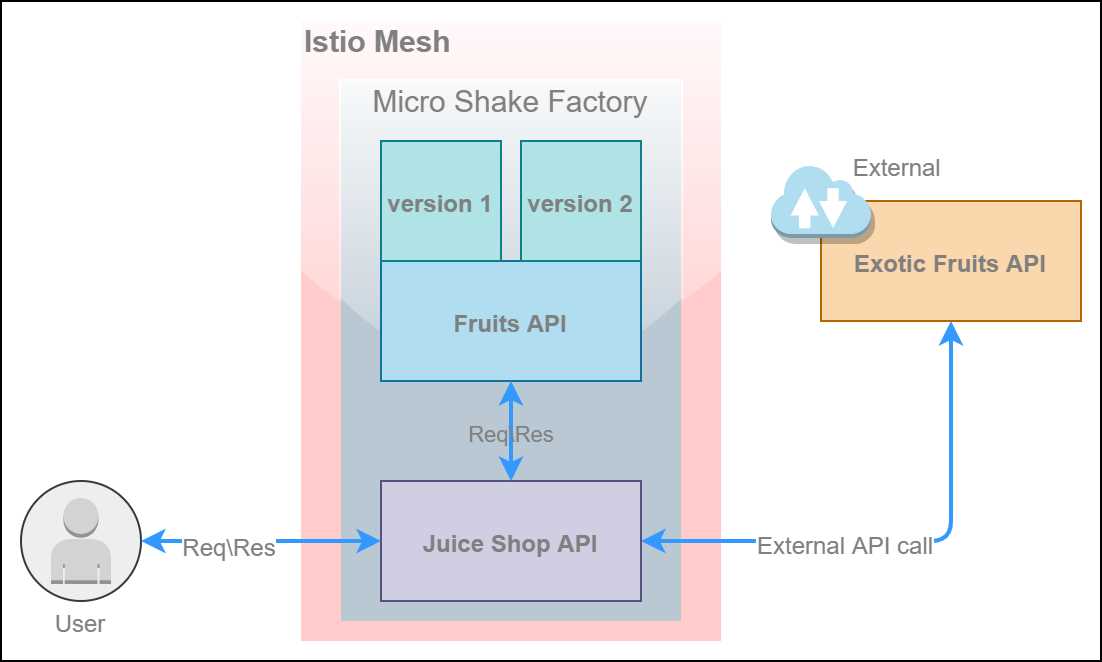
Figure 11: Micro Shake Factory architecture
The capabilities of Istio can be adequately demonstrated with a set of services that can communicate with each other. The Micro Shake Factory application consists of two REST-based microservices with the following capabilities.
- fruits API: This API manages the inventory of fruits and their prices by country. This API has the following endpoints.
Table 3: Fruits API endpoints
API Endpoint | Function |
|---|---|
GET: /api/fruits/:country | Returns a list of fruits based on the country code provided. The valid country codes are usa, au, and ind. |
GET: /api/fruits/special | Returns a specialty fruit that is specific to the version of the API that handles the request. Version 1 of the API returns Mango, and version 2 of the API returns Orange. |
GET: /api/fruits/:country/:name/price | Returns the price of a fruit (specified in the parameter name) in a country (specified in the parameter country). |
- juice-shop API: This API primarily communicates with the fruits API to fetch prices of fruits, and determines the price of the juice ordered by the customer. Additionally, this API communicates with an external API to present certain exotic fruits that are not available with the fruits API. This API has the following endpoints.
Table 4: Juice-shop API endpoints
API Endpoint | Function |
|---|---|
POST: /api/juice-shop/blender | Takes the names of two fruits as input and communicates with the fruits API over HTTP to retrieve the prices of the fruits. This endpoint returns the name and price of the juice prepared from the fruits whose names were sent in the request. |
GET: /api/juice-shop/exoticFruits | Fetches a list of fruits from an external API. Currently, this API is modeled as a static document available here. |
GET: /api/juice-shop/hello | Returns a greeting message. |
GET: /api/juice-shop/testMyLuck | Returns HTTP error status code 500 for around 80 percent of requests and a success response for the remainder of requests. |
The microservices are deployed as services on Kubernetes with Linux nodes. To reiterate, Istio is designed to be platform-agnostic and does not require a container orchestrator such as Kubernetes. However, Kubernetes is the best platform supported by Istio.
Deploying services
Let’s deploy our first service to the Istio mesh. We will start with deploying the first version of the fruits-api microservice to our Kubernetes cluster. As a reminder, you will find all the Kubernetes specification files (in YAML format) for deploying the services in a repository named Policies in the GitHub account of this ebook.
Note: YAML is a human-readable data serialization format that is typically used for storing configuration values. YAML is just a key-value store. In the following discussion, we will examine the keys and values it supports for the specification under consideration. If a field is required, it will be marked with an asterisk (*) followed by its data type.
Let’s discuss the contents of the specification in a little detail before applying it to the cluster.
Code Listing 6: Fruits API v1 specification
apiVersion: v1 kind: Namespace metadata: name: micro-shake-factory labels: istio-injection: enabled --- apiVersion: apps/v1 kind: Deployment metadata: name: fruits-api-deployment-v1 namespace: micro-shake-factory spec: selector: matchLabels: app: fruits-api replicas: 2 minReadySeconds: 1 progressDeadlineSeconds: 600 strategy: type: RollingUpdate rollingUpdate: maxSurge: 25% maxUnavailable: 25% template: metadata: labels: app: fruits-api version: "1" spec: containers: - name: fruits-api image: istiosuccinctly/fruits-api:1.0.0 imagePullPolicy: IfNotPresent resources: limits: cpu: 1000m memory: 1024Mi requests: cpu: 100m memory: 100Mi ports: - name: http-fruits-api containerPort: 3000 env: - name: app_version value: "1" --- apiVersion: v1 kind: Service metadata: name: fruits-api-service namespace: micro-shake-factory spec: selector: app: fruits-api ports: - name: http-fruits-api-service port: 80 targetPort: http-fruits-api |
The first Kubernetes object specified is the namespace. Kubernetes objects support having user-defined labels, which are essentially key-value pairs, attached to them. Istio relies on a specific label named istio-injection to decide the namespace on which the Envoy proxies are applied. This label supports two values. Setting the value to enabled means that Istio automatically deploys sidecars for the pods of your service. On the other hand, setting this value to disabled means that Istio will not inject sidecars automatically; however, it won’t affect the services within the namespace that have sidecars attached to them.
Note: Specifying the label istio-injection: enabled in the namespace will only install sidecars in newly created pods. If you want to inject a sidecar to existing pods, you need to either delete the pods in a controlled manner—which means deleting some pods and waiting for them to come up, then deleting the rest—or you can use the istioctl CLI to perform a rolling update. We will discuss the rolling update option later in this chapter.
Deployment is the second object listed in the specification. A Kubernetes deployment represents an application running on the cluster. The deployment object uses the values specified in the template attribute to define the specification of the pods that it needs to provision. In this case, Kubernetes provisions two pods named fruits-api that host our API. Kubernetes deployment uses a selector, which is a core grouping primitive in Kubernetes, to identify the pods that are governed by it.
Finally, the specification contains the definition of a Kubernetes service object. A Kubernetes service is a networking construct that assigns a cluster IP to the underlying pods, making them easy to communicate with, since the pods and their IP addresses are ephemeral.
Istio uses a sidecar injector service that listens to all pod creation events and relies on the istio-injection namespace label to decide whether to add a sidecar to a pod. Let’s verify the state of this service by executing the following command.
Code Listing 7: Verify sidecar injector deployment
$ kubectl -n istio-system get deployment -l istio=sidecar-injector NAME READY UP-TO-DATE AVAILABLE AGE istio-sidecar-injector 1/1 1 1 14d |
Since the sidecar injector service is ready, we can now deploy the fruits-api microservice to the mesh. Execute the following command to deploy the previous specification to the cluster.
Code Listing 8: Create fruits-api deployment
$ kubectl apply -f fruits-api.yml namespace/micro-shake-factory created deployment.apps/fruits-api-deployment created service/fruits-api-service created |
Now, we can verify that the sidecar was indeed injected by Istio to our pods by executing the following command.
Code Listing 9: Verify fruits-api deployment
$ kubectl get pods -n micro-shake-factory -o jsonpath={.items[*].spec.containers[*].name} fruits-api istio-proxy fruits-api istio-proxy |
Since we deployed two instances of our API, the output of this command lists two instances of containers named fruits-api and istio-proxy.
Ingress gateway
Now that our first service is deployed on the mesh, we will make the service accessible from outside the cluster. We will deploy an ingress gateway that will route traffic originating from outside our cluster to the fruits-api service via the Envoy proxy. The following is the specification for the gateway.
Code Listing 10: Ingress gateway rule specification
apiVersion: networking.istio.io/v1alpha3 kind: Gateway metadata: name: fruits-api-gateway namespace: micro-shake-factory spec: selector: istio: ingressgateway servers: - port: number: 80 name: http-fruits-api-gateway protocol: HTTP hosts: - fruits.istio-succinctly.io --- apiVersion: networking.istio.io/v1alpha3 kind: VirtualService metadata: name: fruits-api-vservice namespace: micro-shake-factory spec: hosts: - fruits.istio-succinctly.io gateways: - fruits-api-gateway http: - route: - destination: host: fruits-api-service port: number: 80 |
The specification in the previous listing creates a gateway object that enables the fruits-api service to accept traffic originating outside the cluster. We will read more about the gateway resource in the next chapter. To deploy the specification to the mesh, execute the following command.
Code Listing 11: Create ingress gateway rule
$ kubectl apply -f fruits-api-vs-gw.yml gateway.networking.istio.io/fruits-api-gateway created virtualservice.networking.istio.io/fruits-api-vservice created |
On your local cluster, the gateway that you just created will be available at hostname- localhost; otherwise, you can locate the external IP of the ingress service by executing the following command.
Code Listing 12: Get ingress gateway service
$ kubectl get service istio-ingressgateway -n istio-system NAME TYPE CLUSTER-IP EXTERNAL-IP istio-ingressgateway LoadBalancer 10.102.77.234 localhost |
Let’s send a simple HTTP GET request to our API to see whether it responds as expected.
Code Listing 13: Invoking fruits-api service
$ curl http://localhost/api/fruits/special -H "Host: fruits.istio-succinctly.io" {"ver":"1","fruit":"Mango"} |
Although being able to access services outside the cluster makes it easy to visualize the changes applied by Istio policies, the services are not required to be exposed outside the cluster for traffic manipulation. This means that you can affect traffic routing to a service by just using the virtual service object without adding a gateway for it.
Manual sidecar injection
The journey to virtualization in enterprises is an incremental process. This means that in some cases, you might find that organizations want to bring their existing workloads running on Kubernetes to the mesh. In such cases, you will have to manually inject Envoy sidecars into the existing services.
To simulate this scenario, let’s deploy another service to our namespace with automatic sidecar injection turned off.
Code Listing 14: Juice-shop API specification
apiVersion: v1 kind: Namespace metadata: name: micro-shake-factory --- apiVersion: apps/v1 kind: Deployment metadata: name: juice-shop-api-deployment namespace: micro-shake-factory spec: selector: matchLabels: app: juice-shop-api replicas: 2 minReadySeconds: 1 progressDeadlineSeconds: 600 strategy: type: RollingUpdate rollingUpdate: maxSurge: 25% maxUnavailable: 25% template: metadata: labels: app: juice-shop-api spec: containers: - name: juice-shop-api image: istiosuccinctly/juice-shop-api:1.0.0 imagePullPolicy: IfNotPresent resources: limits: cpu: 1000m memory: 1024Mi requests: cpu: 100m memory: 100Mi ports: - name: http-js-api containerPort: 3001 env: - name: FRUITS_API value: "" - name: EXOTIC_FRUITS_API value: "" --- apiVersion: v1 kind: Service metadata: name: juice-shop-api-service namespace: micro-shake-factory spec: selector: app: juice-shop-api ports: - name: http-js-api-service port: 80 targetPort: http-js-api |
You can see in the previous listing that we removed the label istio-injection from the namespace. This change will not alter the existing pods in our namespace. However, Istio will no longer inject sidecars to pods that we provision next.
We will now instruct Kubernetes to provision a new deployment for our service named juice-shop-api and provision a new service object for facilitating communication with the pods that get created. Execute the following command to deploy the specification to the cluster.
Code Listing 15: Create juice-shop API
$ kubectl apply -f juice-shop-api-no-sidecar.yml namespace/micro-shake-factory configured deployment.apps/juice-shop-api-deployment created service/juice-shop-api-service created |
You can validate whether a sidecar is injected into the new deployment, and whether it affected the existing pods, by enumerating the pods and their containers using the kubectl get pods command that we used previously.
We will now use the command-line utility of Istio named istioctl to inject a sidecar to our newly provisioned application, juice-shop-api, and thus onboard it to the mesh. The kube-inject command of istioctl can modify a deployment specification to provision sidecars for supported resources and leave the rest, such as secrets and policies, unaffected. Execute the following command, passing in the previous specification as an argument, to view the new specification generated by the istioctl CLI.
Code Listing 16: Inject Istio sidecar specification
$ istioctl kube-inject -f juice-shop-api-no-sidecar.yml apiVersion: apps/v1 kind: Deployment metadata: creationTimestamp: null name: juice-shop-api-deployment namespace: micro-shake-factory spec: minReadySeconds: 1 progressDeadlineSeconds: 600 replicas: 2 selector: matchLabels: app: juice-shop-api ... spec: containers: image: docker.io/istio/proxyv2:1.2.3 imagePullPolicy: IfNotPresent name: istio-proxy initContainers: image: docker.io/istio/proxy_init:1.2.3 name: istio-init status: {} |
In the previous listing, we can see that now Istio is relying on Kubernetes deployment to provision the sidecar proxy for the juice-shop API pods, which is what the sidecar injector service does in case of automatic sidecar injection. The generated specification instructs Kubernetes to provision two additional containers in each replica requested by us. The first container provisioned by Kubernetes in the deployment sequence is the istio-init container, which is a special container that must execute to a conclusion before any other containers can be provisioned. In Kubernetes specifications, such containers are specified as the value of the initContainers attribute. Next, the istio-proxy and juice-shop-api containers are provisioned as expected.
Note: The kube-inject command is not idempotent. It is essential that you preserve a copy of the original specification in your source control in case you wish to roll back at a later point in time, or wish to upgrade the sidecars to the latest version by applying the kube-inject command on the specification again.
To deploy the specification to your cluster, you can use the well-known bash pipes trick as follows.
Code Listing 17: Inject Istio sidecar
$ istioctl kube-inject -f juice-shop-api-no-sidecar.yml | kubectl apply -f - namespace/micro-shake-factory unchanged deployment.apps/juice-shop-api-deployment configured service/juice-shop-api-service unchanged |
Let’s execute the same command that we executed previously to view the containers in our pods.
Code Listing 18: Verify juice-shop API deployment
$ kubectl get pods -n micro-shake-factory -o jsonpath={.items[*].spec.containers[*].name} fruits-api istio-proxy fruits-api istio-proxy juice-shop-api istio-proxy juice-shop-api istio-proxy |
Using pipes, you can also update an existing deployment to add a sidecar to it and bring it to the mesh by executing the following command.
Code Listing 19: Inject sidecar specification and apply
$ kubectl get deployment -o yaml | istioctl kube-inject -f - | kubectl apply -f - |
If you are wondering where the command kube-inject is getting data such as the sidecar image name from, the answer is that this data is present in a ConfigMap resource named istio-sidecar-injector that lives in the Istio control plane in the istio-system namespace.
Note: istioctl now supports an experimental command that can bring either a service or a VM to the mesh using a single command: add-to-mesh. This experimental command can onboard the juice-shop API service to the mesh as well: istioctl experimental add-to-mesh service juice-shop API service -n micro-shake-factory.
By modifying this ConfigMap, you can alter the behavior of Istio to support features such as disabling automatic sidecar proxy injection for some or all namespaces or even pods. You can edit the istio-sidecar-injector ConfigMap file by executing the following command.
Code Listing 20: Edit sidecar injector ConfigMap
kubectl -n istio-system edit configmap istio-sidecar-injector |
If you don’t want to make overarching changes to Istio, you can create your own configuration file that conforms to the schema of the istio-sidecar-injector ConfigMap and supply it as a parameter to the kube-inject command using the --injectConfigFile parameter. You can also create a custom ConfigMap and supply it as the value of the parameter --injectConfigMapName of the kube-inject command.
You must be wondering how Istio can detect services getting deployed or updated in the cluster. Kubernetes natively supports an object named admission controller, which can intercept requests to apiserver before they are persisted to the etcd store. Apart from some built-in controllers, Kubernetes supports admission controllers developed as extensions that execute as webhooks (code that receives HTTP callbacks from Kubernetes). The admission webhooks receive admission requests from Kubernetes, on which they can perform an operation. The admission webhooks are of two types:
- Validating admission webhook: They validate the admission request and either accept or fail the request.
- Mutating admission webhook: They can modify the objects sent to the apiserver to enrich the behavior of the request. Mutating webhooks are invoked before the validating admission webhooks in sequence.
The Istio sidecar injector is added as a mutating admission webhook during the installation of Istio. You can verify its presence in your cluster by executing the following command.
Code Listing 21: Get mutating webhook configurations
$ kubectl get mutatingwebhookconfigurations NAME CREATED AT istio-sidecar-injector 2019-09-19T11:07:04Z |
You can find the istio-injection label constraint that triggers this webhook by expanding the configuration of this webhook using the following command. The output from the execution of the command is truncated for brevity.
Code Listing 22: Istio sidecar injector YAML
$ kubectl get mutatingwebhookconfigurations istio-sidecar-injector -o yaml apiVersion: admissionregistration.k8s.io/v1beta1 kind: MutatingWebhookConfiguration webhooks: - admissionReviewVersions: - v1beta1 clientConfig: caBundle: service: name: istio-sidecar-injector namespace: istio-system path: /inject failurePolicy: Fail name: sidecar-injector.istio.io namespaceSelector: matchLabels: istio-injection: enabled rules: - apiGroups: - "" apiVersions: - v1 operations: - CREATE resources: - pods scope: '*' sideEffects: Unknown timeoutSeconds: 30 |
Note the matchLabels constraint that must evaluate to true to activate the webhook. When trying to create pods that match the label constraint, the istio-sidecar-injector service augments your pod with a sidecar.
Let’s get back to the juice-shop API that we just deployed. The API is accessible inside the mesh, but it is inaccessible to us. To test the API, we will create an ingress gateway and link it to our virtual service to expose it.
Code Listing 23: Ingress gateway rule specification
apiVersion: networking.istio.io/v1alpha3 kind: Gateway metadata: name: juice-shop-api-gateway namespace: micro-shake-factory spec: selector: istio: ingressgateway servers: - port: number: 80 name: http-juice-shop-api-gateway protocol: HTTP hosts: - juice-shop.istio-succinctly.io --- apiVersion: networking.istio.io/v1alpha3 kind: VirtualService metadata: name: juice-shop-api-vservice namespace: micro-shake-factory spec: hosts: - juice-shop.istio-succinctly.io gateways: - juice-shop-api-gateway http: - route: - destination: host: juice-shop-api-service port: number: 80 |
Apply the configuration to the cluster using the kubectl apply command.
Code Listing 24: Create ingress gateway rule
$ kubectl apply -f juice-shop-api-vs-gw.yml gateway.networking.istio.io/juice-shop-api-gateway created virtualservice.networking.istio.io/juice-shop-api-vservice created |
We can now send a request to our newly deployed service to validate that it works.
Code Listing 25: Call juice-shop API
$ curl http://localhost/api/juice-shop/hello -H "Host: juice-shop.istio-succinctly.io" Welcome to the Juice Shop! |
The output of the previous command will present a welcome message from the juice-shop API service.
Summary
In this chapter, we deployed the services that make up our demo application Micro Shake Factory to the mesh on our Kubernetes cluster. We used both the automatic and manual approach to injecting sidecars to our services. Manual sidecar injection is useful in brownfield scenarios where you want to gradually migrate services to the mesh. In the next chapter, we will discuss the traffic management capabilities of Istio in detail.


- 1800+ high-performance UI components.
- Includes popular controls such as Grid, Chart, Scheduler, and more.
- 24x5 unlimited support by developers.