
HBase Succinctly®

CHAPTER 1
Introducing HBase
What is HBase?
HBase is a NoSQL database that can run on a single machine, or a cluster of servers for performance and fault-tolerance. It’s built for scale—HBase tables can store billions of rows and millions of columns—but unlike other big data technologies, which are batch-oriented, HBase provides data access in real-time.
There are a few key concepts which make HBase different from other databases, and in this book we’ll learn all about row key structure, column families, and regions. But HBase uses the same fundamental concepts as other database designs, so it’s straightforward to pick it up.
HBase is free, open-source software from the Apache Foundation. It’s a cross-platform technology so you can run it on Windows, Linux, or OS/X machines, and there are hosted HBase solutions in the cloud from both Amazon Web Services and Microsoft Azure. In this book we'll use the easiest option of all—running HBase in a Docker container.
You can connect to HBase using many client options, as shown in Figure 1. The Java API is the first-class citizen, but with the Thrift and REST APIs, you can connect with practically any language and platform. We will cover all three APIs in this book, together with the command-line interface that ships with HBase.

Figure 1: HBase APIs and Client Platforms
Why Choose HBase?
HBase is a very flexible and powerful database that integrates with a wide range of technologies and supports many different use cases. HBase leverages the Hadoop Distributed File System for high availability at the storage layer, but presents a real-time interface, so it’s useful for transactional systems as well as big data problems.
In a production system, HBase has more complex infrastructure requirements than many databases—there are three server roles (Zookeeper, Master and Region Servers), and for reliability and performance, you need multiple nodes in each role. With a well-designed database, you can scale HBase just by adding more servers, and you should never need to archive old data.
HBase is a Java system that can run in simplified modes for development and test environments, so your non-production landscape can be modest. You can containerize the database, which makes for easy end-to-end testing in your build process and a high level of quality assurance for your code.
HBase Data Structure
HBase was inspired by Google’s Big Table, which is the storage technology used for indexing the web. The architecture meets the need for real-time random access to specific items, in databases with terabytes – or even petabytes – of data. In HBase tables with hundreds of millions of rows, you can still expect sub-second access to individual rows.
Tables in HBase are partly structured; they don’t have a rigid schema like a SQL database where every column has a data type, but they do have a loose schema where the general structure of the data is defined. In HBase, you define a table in terms of column families, which can contain many columns.
In HBase, tables are collections of similar data, and tables contain rows. Every row has a unique identifier—the row key—and zero or more columns from the column families defined for the table. Column families are dynamic, so the actual columns that contain data can be different from row to row.
A Sample HBase Table
Table 2 shows the schema for an HBase table called social-usage, which records how much time people spend on social networks. The structure is very simple, containing just a table name and a list of column family names, which is all HBase needs:
Table 1: Table Structure in HBase
Table Name | social-usage |
Column Families | i |
fb | |
tw | |
t |
The table will record a row for each user, and the column families have cryptic names. Column names are part of the data that gets stored and transferred with each row, so typically they’re kept very short.
This is what the column families are used for:
- i = identifiers, the user’s ID for different social networks
- fb = Facebook, records the user’s Facebook activity
- tw = Twitter, records the user’s Twitter activity
- t = totals, sums of the user’s activity
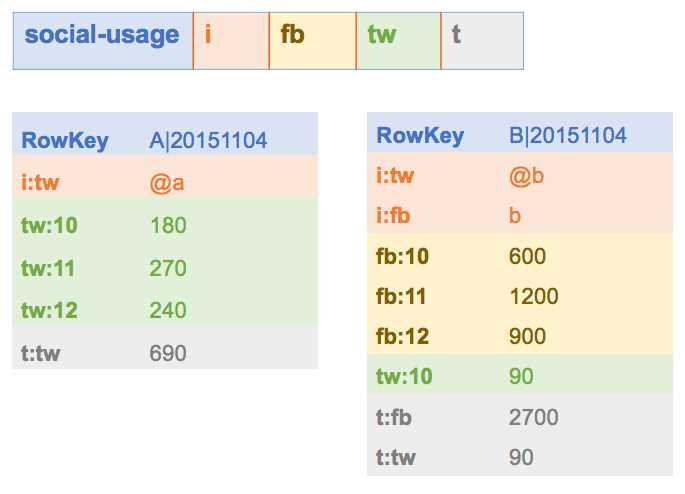
Figure 2 shows two sample rows for this table for users with very different usage profiles:

We can see the power of HBase from these two rows, which tell us a huge amount from a very simple table schema. User A, in the row on the left, has a Twitter account and uses it a lot, but isn’t on Facebook. User B, in the row on the right, has accounts for both networks, but spends much more time on Facebook.
Column Families and Qualifiers
A column family is like a hash table or a dictionary. For each row, the column family can contain many values (called cells), which are keyed by name (called the column qualifier). The column families available in a table are fixed, but you can add or remove cells to a column family in a row dynamically.
That means column qualifiers can be used as data stores, as well as cell values. In the fb column family in the sample, one row has a cell with the qualifier fb:2015110410, and the value 600. HBase doesn’t restrict how you name the qualifiers, so in this case I’m using a date period—in the format year, month, day, hour—and the cell value records the total usage in seconds during that hour.
For user B, the Facebook usage column family tells us they spent 10 minutes (600 seconds in the cell value) on Facebook between 10:00 and 11:00 on 4th November 2015, and 20 minutes between 11:00 and 12:00. There’s no cell with the qualifier fb:2015110409, which tells us the user wasn’t on Facebook between 09:00 and 10:00.
HBase Table Design
HBase is hugely flexible, but the primary way to access data is by the row key, so the design of your tables is critical to the performance of your solution. In the social-usage table, we store a single row for each user, and for each reporting period, we will add more cells to the column families.
This is called a wide table design—we have a (relatively) small number of rows, but rows can potentially have lots of columns. If we record usage for hourly periods, then for an active user we could be adding 98 cells every week (one cell for every hour of the week). Over a few years, we’ll have tens of thousands of cells for that user’s row—which is not a problem for HBase to store, but could be difficult for us to use efficiently.
If we wanted to sum the user’s activity for a particular month, we’d need to read the row and include just that month’s cells by filtering the results by the column qualifier name. Filtering based on columns is much more expensive for HBase than filtering based on rows, so an alternative design would be to use a tall table design instead.
Tall tables have larger numbers of rows, each with smaller numbers of columns. Instead of having one row for each user, we could have one row for each period for each user, which would give us the data in Figure 3:
Now the row contains a user name and a period, which is the date of the data. Column names are much shorter, as we are only capturing the hour in the column name, and all the data in the row is for the same date. For active users we will only have tens of columns in each row, and hundreds of rows can record a whole year's data.
This design uses a composite row key, in the format {userID}|{period}, so if we want to sum a user’s usage for a period, we can do it with a row scan, which is a much cheaper operation than a column filter, both of which we'll see later.
Note: You need to design HBase tables to support your expected data access patterns, but typically tall tables are preferable to wide ones.
Code Listing 1 shows the Data Definition Language (DDL) statement to create the social-usage table. It contains the minimum amount you need—the table name, followed by the column family names:
Code Listing 1: Create DDL statement
create 'social-usage', 'i', 'fb', 'tw', 't' |
The schema definition in HBase is deliberately vague. The format of the row key and column qualifiers are not specified and there are no data types.
The conventions for using the table are not explicit in the schema, and in fact we could use the exact same schema for a wide table (using just the user ID for the row key), or a tall table (using user ID and period for the row key).
Data Types
There are no data types in HBase; all data is stored as byte arrays—cell values, column qualifiers, and row keys. Some HBase clients carry that through in their interface; others abstract the detail and expose all data as strings (so the client library encodes and decodes the byte arrays from HBase).
Code Listing 2 shows how a row in the social-usage table looks when you access it through the HBase Shell, which decodes byte arrays to strings. Code Listing 3 shows the same row via the REST API, which exposes the raw byte arrays as Base64 encoded strings:
Code Listing 2: Reading Data with the HBase Shell
hbase(main):006:0> get 'social-usage', 'A|20151104' COLUMN CELL tw:10 timestamp=1447622316218, value=180 1 row(s) in 0.0380 seconds |
Code Listing 3: Reading Data with the REST API
$ curl -H Accept:application/json http://127.0.0.1:8080/social-usage/A%7C20151104 {"Row":[{"key":"QXwyMDE1MTEwNA==","Cell":[{"column":"dHc6MTA=","timestamp":1447622316218,"$":"MTgw"}]}]} |
Note that the row key has to be URL-encoded in the REST call, and all the data fields in the JSON response are Base64 strings.
If you work exclusively with one client, then you can store data in the platform’s native format. Code Listing 4 shows how to save a decimal value (1.1) in Java to a cell in HBase:
Code Listing 4: Storing Typed Data in HBase
Put newLog = new Put(rowKey); newLog.addColumn(family, qualifier, Bytes.toBytes(1.1)); access_logs.put(newLog); |
This can cause issues if you work with many clients, because native type encoding isn’t the same across platforms. If you read that cell using a .NET client, and try to decode the byte array to a .NET decimal value, it may not have the same value that you saved in Java.
Tip: If you’re working in a cross-platform solution, it’s a good idea to encode all values as UTF-8 strings so that any client can decode the byte arrays from HBase and get the same result.
Data Versions
The last feature of HBase we’ll cover in this introduction is that cell values can be versioned—each value is stored with a UNIX timestamp that records the time of the last update. You can have multiple versions of a cell with the same row key and column qualifier, with different timestamps recording when that version of the data was current.
HBase clients can fetch the latest cell version, or the last X versions, or the latest version for a specific date. When you update a cell value, you can specify a timestamp or let HBase use the current server time.
The number of cell versions HBase stores is specified at the column-family level, so different families in different tables can have different settings. In recent versions of HBase, the default number of versions is one, so if you need data versioning, you need to explicitly specify it in your DDL.
With a single-version column family, any updates to a cell overwrite the existing data. With more than one version, cell values are stored like a last-in, first-out stack. When you read the cell value you get the latest version, and if you update a cell that already has the maximum number of versions, the oldest gets removed.
Summary
In this chapter, we had an overview of what HBase is, how it logically stores data, and the features it provides. In the next chapter, we’ll see how to get up and running with a local instance of HBase and the HBase Shell.


- 1800+ high-performance UI components.
- Includes popular controls such as Grid, Chart, Scheduler, and more.
- 24x5 unlimited support by developers.