
Hadoop Succinctly®

CHAPTER 4
YARN—Yet Another Resource Negotiator
Introducing YARN
Until now, I've referred to the compute part of Hadoop as a job scheduler, but more correctly it should be referred to as a job scheduler, resource manager, and task monitor combined.
The compute platform was rewritten for Hadoop version 2 (released in 2013), and the resource management part was abstracted from MapReduce, which means Hadoop clusters can run different types of jobs, not only MapReduce programs. The new resource manager is YARN, named in the style of YAML (Yet Another Markup Language) and Yaws (Yet another web server).
We will look at how YARN schedules and manages jobs because understanding this will help us check on the status of long-running jobs and work on optimizing clusters. But from a programming perspective, YARN is a black box for Hadoop programs—you submit your MapReduce job with its configuration to the cluster and let YARN do the rest.
We've seen that in MapReduce we need to build a custom mapper, reducer, and driver, but we don't need to build anything else. And we don't need to tell Hadoop how to break up the job or where to run the tasks. That's all done by the MapReduce framework and YARN.
YARN is an abstracted job scheduler, and the Hadoop ecosystem has expanded to make full use of it. In a typical Hadoop cluster, YARN might schedule standard MapReduce jobs, run Hive queries using the Tez engine, and run Spark—all on the same set of compute resources.
Just as HDFS provides resilience and scalability at the storage layer, so YARN provides the same at the compute layer. Once a job has been submitted to YARN, it can be expected to complete at some point, even if there are repeated hardware failures during the life of the job.
The structure of a YARN job
YARN provides a logical separation of roles between the resource manager, which determines where tasks should run, and the job monitors, which report on task progress. That separation was a core driver for the new architecture in Hadoop 2 because it allows the job management tasks to be distributed around the cluster, which means the platform can run at higher scale.
The resource manager is the centralized master component, and it typically runs on the same node in the Hadoop cluster as the HDFS name node. The resource manager runs as a service, and when it starts a new job it creates an application master—a software component that has the responsibility of ensuring that the job (which could be a MapReduce program or an interactive Spark session) runs successfully.
Application masters work with the resource manager to request resources when they have work to do (such as a map task in MapReduce), and they also work with node managers—which are the compute services on each of the data nodes in the Hadoop cluster—in order to monitor tasks. Figure 9 shows how the components of a job can be distributed in the cluster.
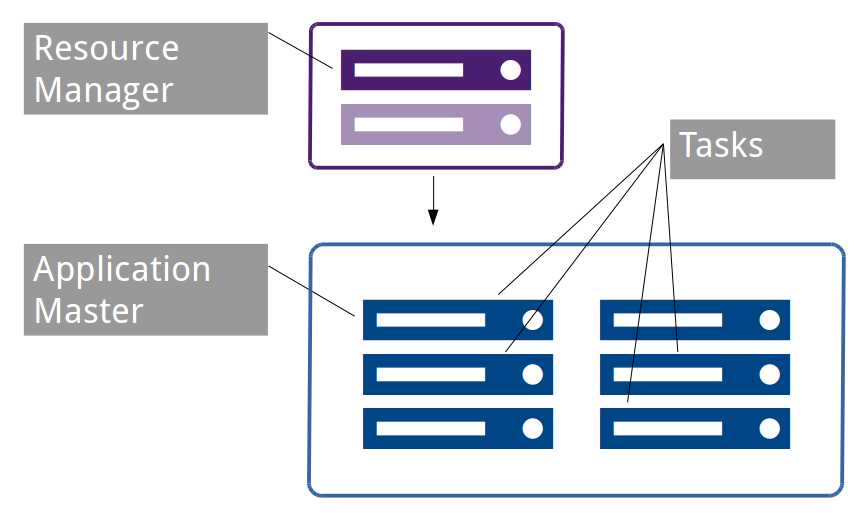
Figure 9: Distributed Job Components in YARN
Tasks are executed in containers on the data nodes. Containers are isolated units of compute with a fixed allocation of CPU and memory.
Note: YARN containers are logically similar to Docker containers, but as yet Docker is not integrated with YARN, which means tasks can't be scheduled to run as a Docker container instance.
While task containers are running, they communicate progress with the application master, and the application master communicates overall progress with the client that submitted the job. YARN permits containers to communicate using their own protocol, which allows YARN to run different types of jobs without knowing the internal workings of the framework. However, the application master must use the YARN protocol to communicate with the resource manager.
When all the task containers are complete, the application master will flag the entire job as complete to the client and to the resource manager, so that the resources used by the application master can be freed and used for other work.
A key feature of YARN is that the application master itself runs in a container that can be hosted on any node manager in the cluster so that the capacity of large clusters isn't restricted by the capacity of the resource manager (because the application masters are distributed around the cluster’s worker nodes).
How MapReduce works in YARN
We've already submitted some MapReduce jobs to YARN with the hadoop jar command line. With that command, all we do is specify the JAR file containing the application we want to run and the arguments expected by our own code. That submits the job to the resource manager running on the name node, which checks capacity in the cluster and—assuming there is spare capacity—allocates a container on one of the data nodes to run the application master for the job.
The application master can start on any data node, so a registration process runs back to the resource manager, then the resource manager can inform the client where the application master is running. From then on, the client communicates directly with the application master running on the data node.
The application master starts the job, which uses its own framework to determine the compute tasks to be performed. In the case of our word count, the MapReduce framework will generate multiple map tasks—one for each input file and a single reducer task. While tasks are run, the application master makes a request to the resource manager for a new container allocation. The request can be specific about its requirements, requesting the amount of memory and CPU needed and even the preferred node name or rack name.
If there is available capacity, the resource manager identifies which node manager the application should use, and the application master communicates directly with the node to create the container and start the task. While tasks are running, the application master monitors them, and while there are more tasks queued to be scheduled, the application master keeps running.
Should any tasks fail, the application master will decide how to handle the failure. That could mean rescheduling the task via another call to the resource manager, or, in the case of multiple failures, it could mean flagging the entire job as a failure and exiting the application. In the event of failed communication between the application master and the resource manager, as in the case of data node failure, the resource manager itself can terminate the application.
However the application master ends, it is the job of the resource manager to tidy up the container allocation for the application, so that compute resource can be used for other containers such as a new application master or a task container started by another application.
Scheduler implementations
The resource manager is the central component that allocates compute resources as required. Compute resources are finite, which means there might be a point when resource requests cannot be met, and YARN has a pluggable framework that allows for different approaches to meeting requests. This is the scheduler component, which is configured at the whole-cluster level, and currently there are three implementations bundled with Hadoop.
The simplest implementation is the FIFO (First In, First Out) Scheduler that purely allocates resources based on which application asked first. If you submit a large job to a Hadoop cluster using the FIFO Scheduler, that job will use all available resources until it completes or until it reaches a point when it no longer needs all the resources.
When the application stops requesting resources and existing resources are freed up, the next application in the queue will start. Figure 10 shows how two large jobs and one small job run with the FIFO Scheduler.
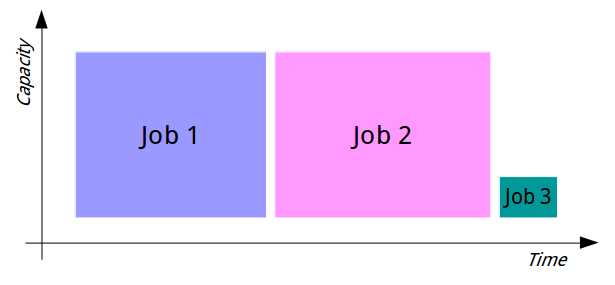
Figure 10: Job Processing with the FIFO Scheduler
With the FIFO Scheduler, large jobs all run sequentially, each one consuming the available resources until it completes. Then the next job starts and consumes all available resources. Jobs can only run concurrently if they require less than the total amount of compute available, which in practice only happens with very small jobs or with a very large cluster.
The FIFO Scheduler is crude, but it is suitable for cases in which jobs do not need to run concurrently—for example, small enterprises with batch process that must all run eventually, but in which individual jobs don't have their own Service Level Agreements (SLAs).
The other schedulers are more sophisticated, using both explicit queue configurations to allow multiple jobs to run concurrently and the cluster resources to be shared more predictably. With the Capacity Scheduler, we can define multiple queues and give each queue a fixed allocation of compute capacity. For example, we could have a cluster with three top-level queues for Marketing, Research, and Development, with a 50:30:20 split. The scheduler would ensure the entire capacity of the cluster is used as allocated, so that if one queue is empty, its share of the compute isn't reallocated and the cluster isn't fully utilized.
When the queues have outstanding work, the FIFO policy is used within the queues. That way each department (or however the top-level split is organized) has its allocated share, but within the department's queue large jobs can still clog the cluster and cause delays for smaller jobs. Figure 11 shows how the same two large jobs and one small job run using the Capacity Scheduler.
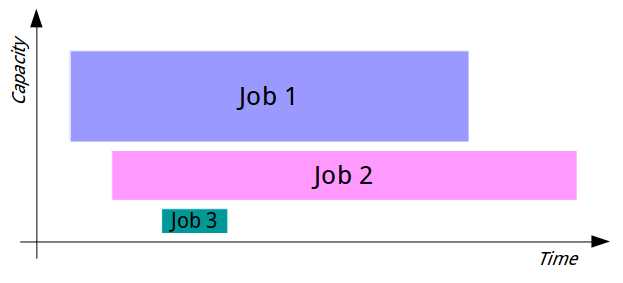
Figure 11: Job Processing with the Capacity Scheduler
In Apache Hadoop, the Capacity Scheduler is the default, but some distributions change this to use the final option—the Fair Scheduler. The Fair Scheduler attempts to fairly allocate cluster resources between all running jobs. When a single job runs with the Fair Scheduler, it gets 100% of the cluster capacity. As more jobs are submitted, each gets a share of resources as they are freed up from the original job, so that when a task from the first job completes, its resources can be given to the second job while the next task for the first job has to wait.
With the Fair Scheduler, we can address the problem of making sure small jobs don't get stuck waiting for large jobs while also making sure that large jobs don't take an excessive amount of time to run due to their resources being starved by small jobs. Figure 12 shows how the two large jobs and one small job would run under the Fair Scheduler.
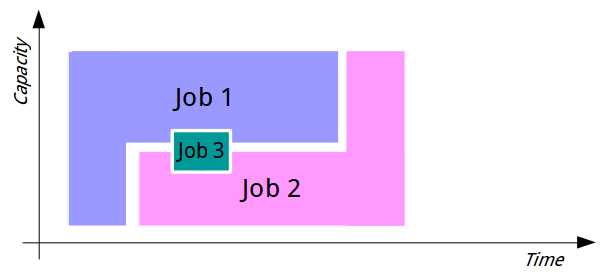
Figure 12: Job Processing with the Fair Scheduler
The Fair Scheduler can also be configured with hierarchical queues following its fair policy of running for jobs within the queues as well as between queues. In order to support complex sharing requirements, we can also define fixed allocations for queues, effectively giving them higher priority within the general fairness policy.
What is a resource?
Because YARN is a framework-independent technology, it doesn't enforce any notions of what a resource looks like or how it should be used. In MapReduce, containers are the resources requested for running specific tasks. A container can be allocated for running a mapper over a single file split. Typically, we’d aim for each mapper to complete its work and release the resources in a short timeframe—one minute is a good goal.
Compare that to Spark, in which a container can be used for a long-running client process (such as a user connection from a Jupyter notebook). In that case, Spark can request a resource with multiple cores and several gigabytes of RAM, and that single container may run for hours.
In the case of MapReduce, the container runs an instance of a Java VM, and by default the resources requested are a single CPU core and 1 GB of RAM. These are configurable, but be aware that when we write our mapper and reducer code, it will run in a constrained environment in which each individual task has a relatively small amount of resources allocated to it.
Monitoring jobs in YARN
Like HDFS, the various YARN services include embedded web servers that you can use to check the status of work on the cluster.
The UI runs on port 8088, so if you're using the hadoop-succinctly Docker image in Linux, you can browse to http://127.0.0.1:8088 (or, if you've added the Docker machine IP address to your hosts file, you can browse to http://hadoop:8088) and see the Resource Manager UI, shown in Figure 13.
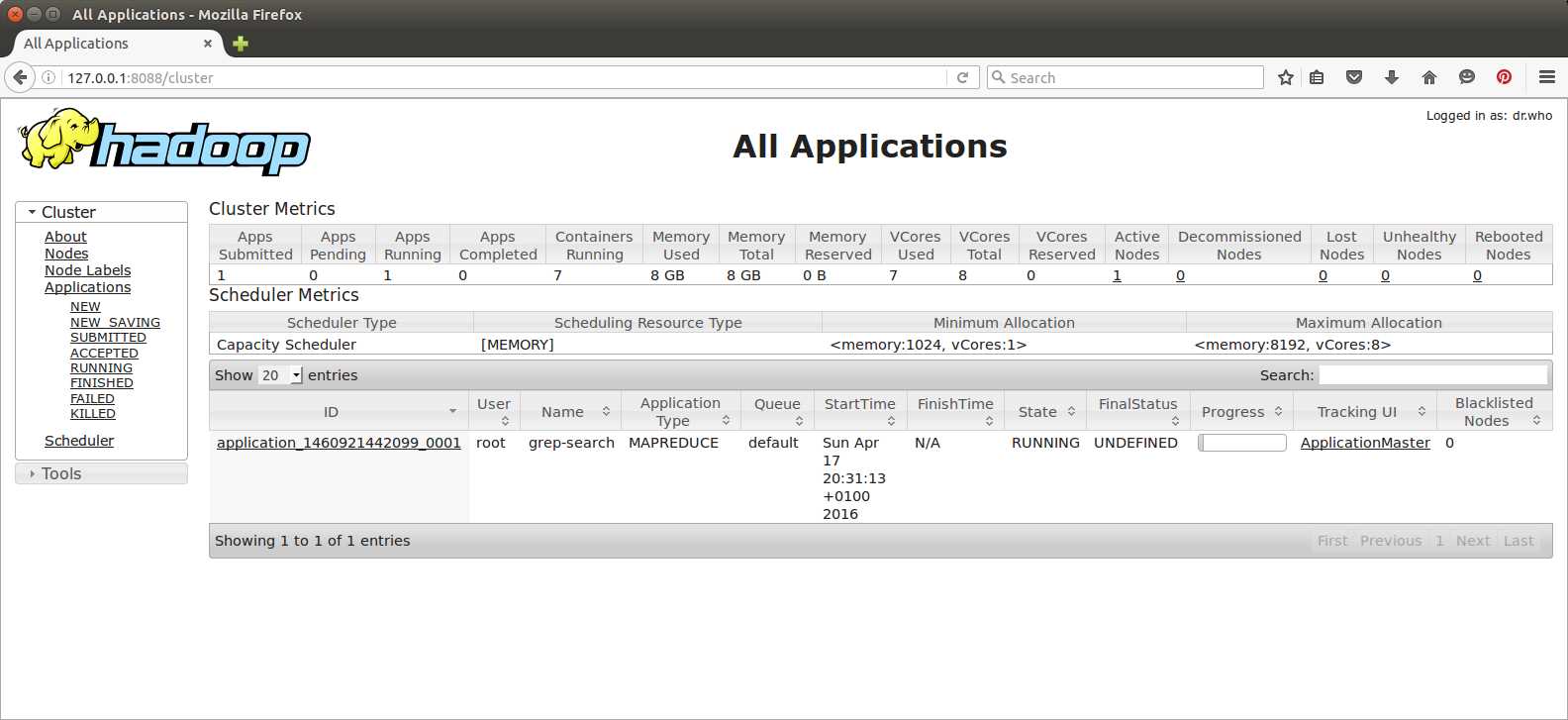
Figure 13: The YARN Resource Manager UI
The default view of the resource manager is to show all running jobs with a link to their respective Application Master UI. Remember that the application master for a job runs as a container on a worker node in the cluster, but the application master communicates progress back to the resource manager. When you open the application link, you'll see the UI in Figure 14.
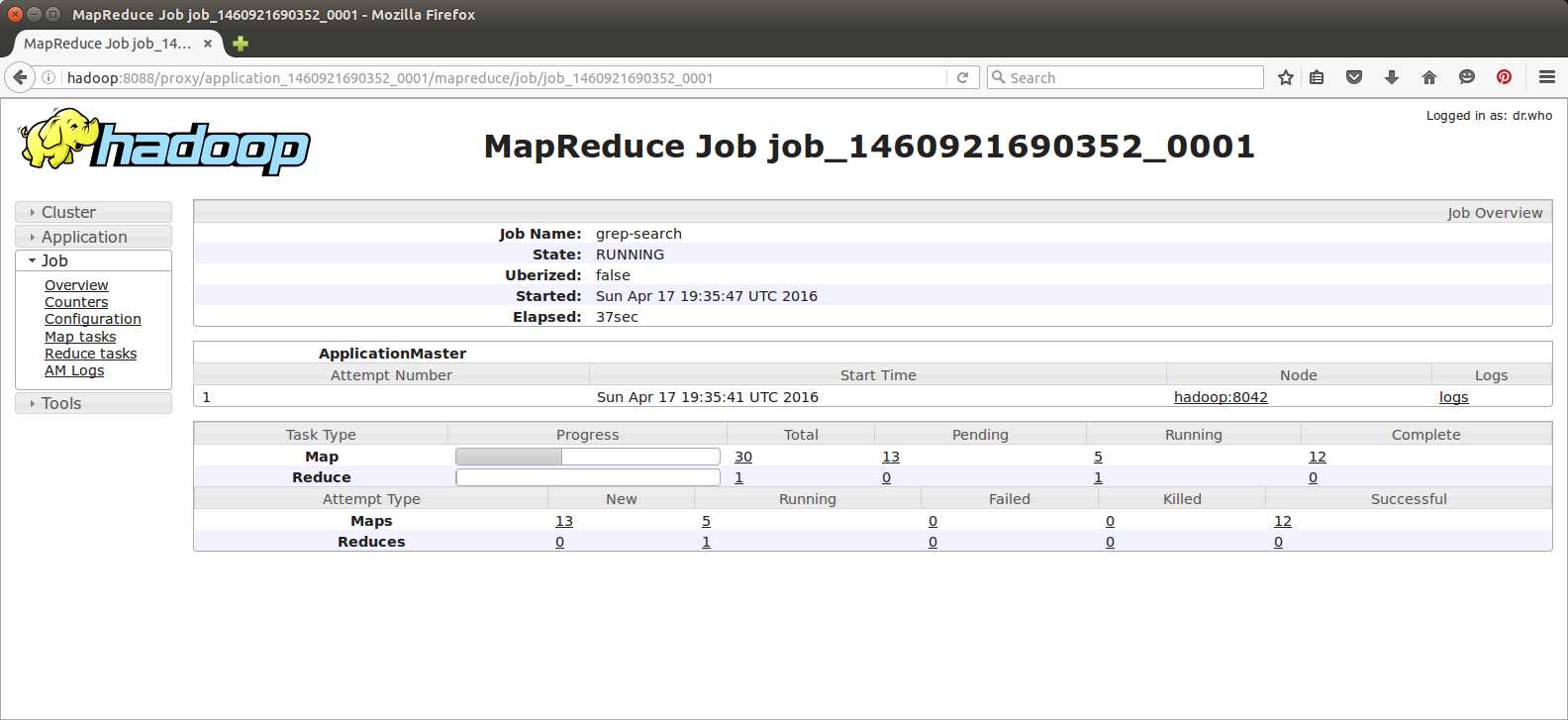
Figure 14: The Application Master UI
Figure 14 shows the breakdown of the work that the application runs through. In this case, it's the grep MapReduce job from Chapter 2, and the UI shows the number of map and reduce tasks by status. You can drill down for even more detail by following the links and getting a list of all tasks, then viewing the logs for a specific task, as in Figure 15.
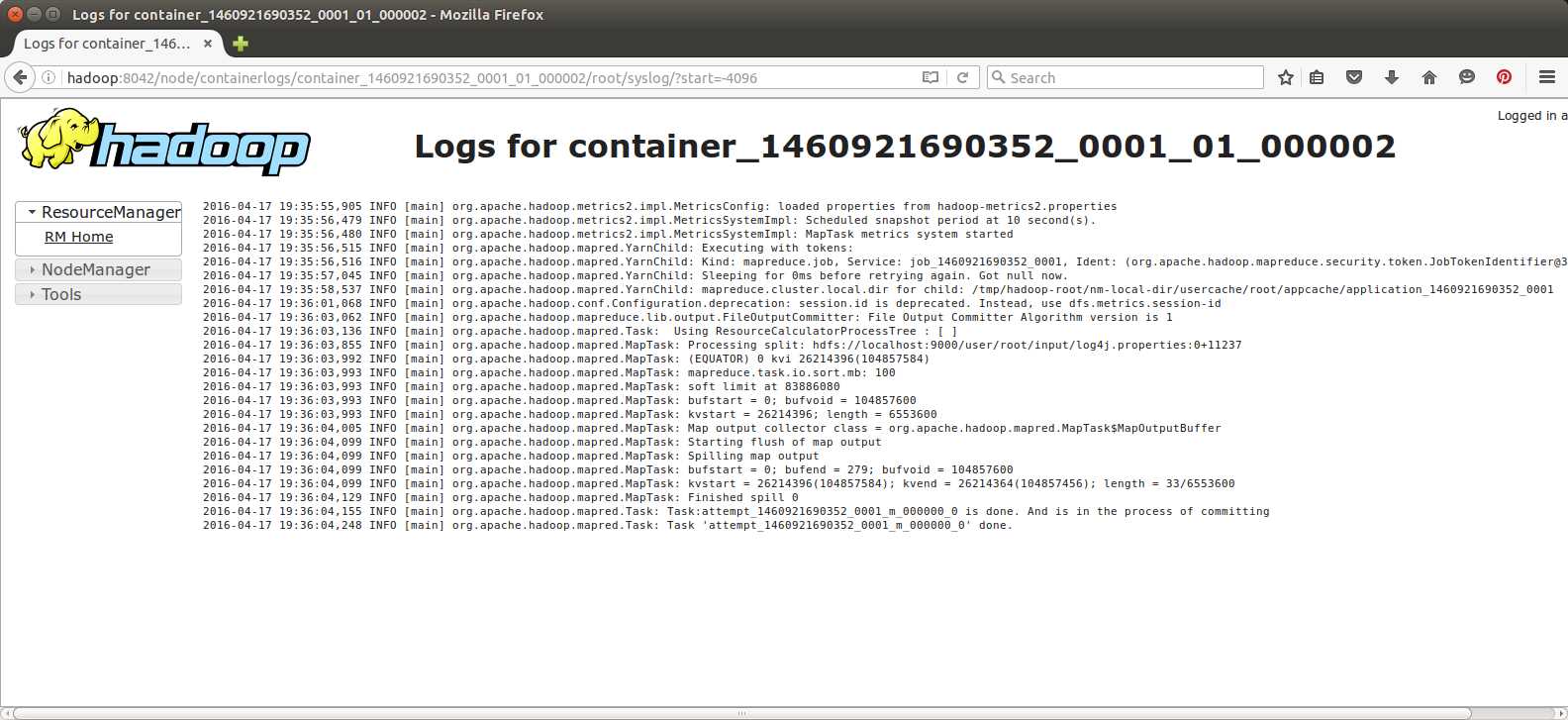
Figure 15: Viewing Task Logs in the YARN UI
The container logs are viewed from the node manager web server running on the node that hosted the container, which means in a cluster that will be a different machine from the resource manager. In our pseudo-distributed Docker runtime, the node manager is running on the same machine, but it uses the standard port 8042 instead of 8088 for the resource manager.
With the resource manager and node manager web servers, you will also get a lot of detail about the setup of the machine and of Hadoop. You can view the hardware allocation for nodes, check the Hadoop service logs, and view metrics and configuration all from the web UIs—they are worth getting to know well.
Summary
In this chapter, we looked at the compute part of Hadoop, learning how YARN works and about the key parts of resource negotiation in Hadoop. YARN is a generic job scheduler that supports different application frameworks—primarily MapReduce but also newer application types such as Spark and Tez. YARN allows applications to request resources that it will fulfill based on the capacity of the cluster, and it lets the applications determine which resources they need.
The flexibility and scalability of YARN come from the master/slave framework and the separation of concerns. On the master node, the resource manager’s role is to accept job requests from clients, start jobs by allocating an application master, and respond to resource requests from running applications.
Application masters run in resource containers (not Docker containers!) on data nodes, so that the management overhead in YARN is distributed throughout the cluster. YARN can be configured to use various scheduling policies when resources are requested, which means you can set up your cluster to use a basic FIFO policy, a fixed-capacity policy, or a fair policy that shares compute as fairly as possible between active jobs.
We also noted briefly that the YARN resource manager and node manager services have embedded web servers. The web UIs tell us a lot of information about the nodes in the cluster and the work they have done, which means they are useful for administration and troubleshooting.
Now that we have a better understanding of how Hadoop works, next we’ll look at alternative programming options for MapReduce.


- 1800+ high-performance UI components.
- Includes popular controls such as Grid, Chart, Scheduler, and more.
- 24x5 unlimited support by developers.